Keeping Up with the Blogosphere

I’m not the only one struggling.

I use a feed reader (endo) to follow about 30 feeds in a wide range of topics. At least I try to. The trouble is, if I skip a day reading the feeds, no one tells the authors to stop writing. They just keep churning out new material. The result: as I type this, there are 1188 unread blog entries waiting for me in endo.

Sheesh!

Why Don’t I Just Do It?

Why don’t I read them regularly? Well, one of the reasons I subscribe to all these feeds is because they give me food for thought. I’ll read an article and think about it and, in some cases, it’ll get the creative juices flowing so I can write a blog entry based on what I’ve read.

Perfect example is the article I wrote yesterday about notebooks and scratchpads. It wasn’t a good article — I’ll be the first to admit that — primarily because I threw it together without giving it enough thought. (My husband was rushing me. He wanted to go out to dinner. Can you imagine putting food before blogging?) But the seed that became the article came from a blog entry (which I now can’t find) recommending that bloggers keep a notebook beside their computers. I think that’s incredible advice — and it goes against what all the geeks out there recommend — and I realize that I follow it. I wanted to explain why it’s good advice by explaining how I follow it. My post didn’t communicate the story the way I wanted it to, but that’s where the idea came from.

Thinking takes time, which brings up…

…the Other Reason

I simply don’t have the time to read (and think) about them all.

Now you might tell me that I can make the time. And I’d tell you that I really do need to sleep at night and get some paying work done during the day.

I stumbled upon a blog post today, written by Lincoln Adams, who evidently really likes to punish himself with this stuff. From “Can I get back to blogging now??” on Habitation of Justice:

Honestly, I don’t know how some people do it. It took me literally all day just to check out places like Digg, Reddit, MyBlogLog, and so on. Just to read the latest feeds from my newsreader sucked up so much time that before I knew it, it was 3AM and my brain was fried from fatigue and an overload of information. How do people find time not only to sift through the all the crap out there, but also blog 20 posts a day AND work a full time job on top of that? My goodness.

My goodness, too!

Apparently, Lincoln and I have the same problem, only he’s taking it more seriously than I am by actually trying to keep up. I don’t think he writes 20 blog posts a day and I know I don’t. But even two or three can be tough when you’re doing so much other stuff.

Read Less Feeds?

Of course, you might tell me that I should subscribe to fewer feeds. And I’d tell you that I think you’ve got something there.

But which ones to remove? Lately, I’ve been adding more feeds than I’ve been removing.

But I’m starting to think that the ones without full-text feeds will be the ones to go first. Like Slate.com’s feeds. I don’t subscribe to the entire magazine — I did for a while and quickly put an end to that. I subscribe to about 10 different columns. And the problem I have is that all that appears in my feed reader is a tease to get me to the site. While it only takes a few moments to click a link and see if the article is worth reading in full, it would be quicker and easier if I just scanned it in endo. And it would certainly prevent me from being distracted by links to other articles on Slate’s site.

I’m Too Interesting…I Mean Interested

I think my main problem is interests. I have too many of them.

I’m interested in blogging and productivity. I’m interested in writing and traveling. I’m interested in photography and flying. I’m interested in politics and religion — as an observer (rather than a participant) in both. I’m just interested in too much stuff.

And the blogosphere is a great place to find information and viewpoints about all kinds of stuff. So how could I turn up the chance to suck in some fresh new content?

So I subscribe to a bunch of blogs and I wade through all that content when I have time.

I mean find time.

No, I mean make time.

I think I’d better make some time right now. If you’ll excuse me…
On Notebooks and Scratchpads

Some organization/productivity tips.

When I’m working in my office, I’m sitting in front of a computer all day. Although I have three different tools for taking notes on my computer while I’m working, I always turn to pen and paper when I need to make a note. And I recently realized that that isn’t a bad thing after all.

Sure, you can use software to jot down notes as you need to, but there’s really no substitute for a notebook or scratchpad. I have both, although I prefer the notebook.

It’s usually a spiral bound notebook, the kind with page perforations so you can cleanly rip off a sheet. I keep it open on my desk to the “current” page, which is the page I last used for jotting down a note. I try hard to start a new page each time I have a series of related notes to jot down, but I don’t always succeed. Sometimes, I simply forget.

Recently, I used up all the pages in my notebook and haven’t replaced it. So I’m using a scratchpad. I make the scratch pads out of the galley pages for my Quicken books. Really. Here’s how it works. I write my Quicken book and submit it electronically as Word files. I get back edited Word files, accept or reject changes, and send them back. Then the book goes to layout. The publisher prints the galley pages and sends them to me. I mark up the pages that have problems and send them back to the publisher. Since there’s no reason to send back pages without problems — after all, why pay to ship more than you have to? — I save them. I bring them to Kwikprint here in Wickenburg and they cut them into 1/4 or 1/2 size sheets and pad them up with about 200 pages per pad with the blank side facing up. Throughout the year, I use the scratch pads in my office and house to jot down notes.

What kinds of things do I jot down? Well, one look at the notebook will reveal all. Here’s my current scratchpad (1/4 page size) by page:

  1. The phone number for the local museum (highly recommended), along with the user ID, password, and domain address for a recently created MySQL file.
  2. A list of the template files I plan to create for my series of articles about creating a WordPress Theme from scratch. (The same list appears in the first article of the series.)
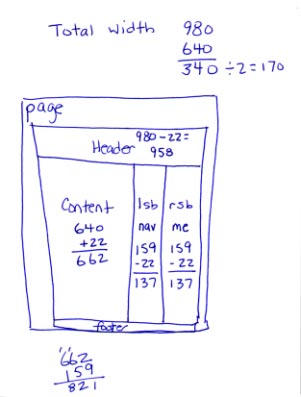
  3. My ScratchpadMeasurements of content, sidebar, and page sizes, in pixels, for the WordPress theme I’m designing from scratch and writing about in the article series (see image).
  4. Another page of the same thing but with a different layout and different measurements.
  5. A list of hexadecimal codes corresponding to the colors I plan to use in the WordPress theme I’m creating.
  6. Dates for the beta and Gold Master releases of a software program I’m not allowed to talk about.
  7. Domain names for a few adventure travel sites I checked out for possible advertising of Flying M Air excursions. (They all suck.) Also the phrases Whirly Girls, instrument rating, and Part 136 jotted down during a conversation with a fellow pilot this afternoon.

What’s not listed here are the pages I don’t need anymore, the ones I’ve torn out and discarded. (Don’t worry; I have a recycle box under my desk.) That’s the beauty of notebooks and scratchpads. You can write down the information you need when you get it and discard the pages when you’re done with them. Or file the pages if you think you’ll need them in the future.

Getting Things DoneI’ve been trying hard lately to get and stay organized. I have been reading Getting Things Done by David Allen and it’s been helping. Although I think he goes to far — no, I do not need a label maker to properly file or label things — he has a lot of good ideas. And although he recommends blank, unlined paper — like the kind in your copy machine — I prefer lined notebook paper for notes I want to keep. What I like best about the notebooks is that the pages stay bound together until I’m ready to discard or file them. No loose paper scattered all over my desk, waiting for me to do something with it.

So although I still rely on iCal to keep track of appointments and schedule items, I don’t use any computer-based tool for jotting down notes. All notes are in my notebook or scratchpad (or both), where I can note things wherever I am, without having to open a program or document and use a keyboard.

After all, it only takes one hand to write with a pen.

Alaska, Here We Come

Reservations finally made.

For the past three years, Mike has been whining (for lack of a better word) about wanting to go to Alaska. Not knowing what he has in mind and unable to connect with him to discuss it (which is amazing, since we live in the same house), no plans have been made.

This year was different. He decided in April that this was the year we’d go. My cherry drying gig fell through and my Leopard book was rescheduled, so I was not going to pick up a flying job elsewhere. So he went to a travel agent here in Wickenburg (if you can believe that) and told her what he wanted. With tight date restrictions — I need to be working on the Leopard book by mid June and my annual mystery project will be sucking time in July — the travel agent achieved the impossible: a 7-night cruise with a 2-night Denali visit that includes some time on the ground for visiting Mike’s cousin in Seattle and Mike’s friend in Anchorage.

Radiance of the SeasThe trip will start with the Anchorage visit, then the train ride with overnight stays at the Princess Denali lodge. From there, we get on Radiance of the Seas — ironically, the only other cruise ship we’ve ever been on (that’s why I have a photo of it), and that was in the Caribbean — for a 7 days/nights cruising down to the Vancouver, with stops at the usual tourist ports almost every day. From there, we go to Seattle for two nights. Then home. We’ll be gone about two weeks — the longest vacation we’ve ever taken together.

Our accommodations on the ship will be similar to what we had on the last cruise: a mini suite with balcony. I seriously doubt whether we’ll get the concierge key this time; that was too much of a dumb luck coincidence last time. But it’ll be nice to spend late nights watching the sun set from the balcony. I just hope I can stay up late enough to make the most of it. Almost wish there was a way I could do all my sleeping before the trip so I only need a few hours a night. Wouldn’t that be great?

I’ll blog the trip. Of course. And if I can get an Internet connection while I’m away, I’ll actually send entries before I get back. With pictures.

Before that, though, Mike and I are heading to Torrance, CA for a week. Mike needs to take the Robinson Factory Safety course before he can get on my insurance. I decided to take it again with him. (This will be my third time.) We’ll fly out to California, spend the weekdays at an area hotel, then spend a few days in Malibu, just to get away. This was set up before the Alaska trip — a kind of mini vacation.

We deserve — and need — the time away.

Four Tips for Great Antelope Canyon Photos

You don’t need to be a professional photographer to get great shots of this incredible place.

This past week, I made my fourth visit to Antelope Canyon near Page, AZ.

Antelope CanyonAntelope Canyon is an incredible slot canyon cut through Navajo sandstone. At certain times of the day at certain times of the year, the sunlight enters the top of the canyon, illuminating it with a golden light. The canyon has been featured in many magazines, sometimes with shafts of light capturing particles of dust set in motion by the cool breeze. Everyone who sees these photos dreams of taking photos just like them.

The sad reality of Antelope Canyon is that it’s a major tourist attraction that has hundreds of visitors a day. The prime midday time slots are especially crowded, with dozens of photographers vying for position to capture the perfect image. Add to that the normal tourist crowd with their flash cameras and you have a less-than-perfect photo opportunity.

That said, I’m proud to say that the photo you see here was taken at about noon last Tuesday. I had never before seen so many people in the canyon. The “serious” photographers were especially obnoxious, blocking the narrow canyon with their tripods, making it next to impossible for anyone to move forward. Yet there was only one person within sight when I took this photo, and I did it with a point-and-shoot digital camera.

Here are my secrets.

  • Don’t be in a hurry. The tour groups visiting Antelope Canyon come in truckloads of 6 to 18 people each. In most cases, group members are in a hurry to get through the canyon. The truth is, the first two or three chambers are the most beautiful and usually have the best light. By hanging back in the group, you can have these chambers all to yourself — before the next group comes through. (That’s how I found myself alone with just one other photographer for a full five minutes with this beautiful scene in front of me.)
  • Turn off your flash. Flash illumination will wash out the colors and cast deep shadows where shadows simply don’t belong. If your camera has an “automatic” or “program” mode, it should be “smart” enough to get the exposure right. This photo was taken with natural light. And no, I didn’t use Photoshop to enhance it.
  • Use a tripod. This is must. Don’t trust image stabilization features. I mount my camera vertically on the tripod and extend its legs while I’m still on the truck, so I’m ready to go right away. Then all I do is spread the tripod’s legs, embed its feet in the sandy floor of the canyon, and fine-tune to frame my subject. And, in case you’re wondering, my tripod for this duty is a $10 model that was thrown in as a giveaway with my video camera — in other words, a piece of junk.
  • Use a cable release…or your camera’s self-timer. Pushing the button on your camera will shake it — possibly enough to blur the image. That’s why you should use a cable release to snap the photo. Your camera doesn’t support that? No problem. Set the camera’s self timer to one or two seconds and press the button. Your button-pressing finger will be safely out of the way when the photo snaps.

Been to Antelope Canyon? I’d love to see your photos. Use the Comments to link to your best shots and share them with the rest of us.

And if you’d like to read more about my visits to this wonderful place, read “Antelope Canyon,” a post I wrote here last year.

Buy on RedBubbleThe full-frame version of this photo is available for sale as cards and prints at RedBubble.com.

Commercial Airline Travel Blues

At the mercy of misguided authority — and other minor inconveniences.

I flew to Austin, TX today. Well, that’s not exactly true. I wasn’t doing the flying. I was a passenger on a Southwest Airlines 737.

Dangerous Substances and Implements

I hadn’t been on a commercial airliner since last November and I’d forgotten what a pain in the neck it could be. Back then, Mike and I were flying to Florida for a week and we checked our luggage, so all the liquids/cremes/gels nonsense didn’t apply to us. Since those days, most airports have relaxed many of their restrictions on these things. But Phoenix has not. It still limits your liquids/cremes/gels carry-on to 3 ounce bottles that must fit in a clear plastic bag that they provide. They call it 3-1-1, but I have no clue what the 1 and 1 are supposed to stand for.

I had a tube of toothpaste, a tiny bottle of eye drops, 4 disposable contact lenses (in original packaging), and an almost spent tube of face cream. It was tucked into my backpack, along with a change of clothes, some PJs, my 12″ PowerBook, and a bunch of chargers and AC adapters.

I decided that I was going to take my chances with the X-Ray machine. Phoenix could save a plastic bag. If security found my liquids/cremes/gels a hazard to airline traffic, they could keep them.

And that’s what was going through my mind as I waited on line at security.

Until I got to the front of the line and started wondering whether I still had that mini Leatherman tool in my purse. I’d bought the tool back in my turbine helicopter days, when I needed a screwdriver to open the battery compartment on the Long Ranger I flew at the Grand Canyon. SInce then, the tool was always shuffling around from one place to another. I wasn’t sure if it was in my purse.

Security brought good news and bad news. The good news is, they either didn’t find my liquids/cremes/gels or didn’t care about them. The bad news is, they did find the Leatherman tool. But, of course, that’s good news, too. I would have been more worried if it were in there and they didn’t find it.

The Leatherman cost me $34 in 2004 and I wasn’t about to leave it for the security people to fight over. So I got an escort back into the insecure area and a special yellow card that would allow me to come back to the front of the line. I also got directions to the Information desk, where a Indian woman would help me mail my Leatherman home.

I waited behind a man buying stamps for postcards. When it was my turn, the Indian woman weighed my leatherman and gave me a padded envelope and 3 39¢ stamps. I gave her $2.79.

“The mailbox is on the second level,” she told me. Go down one level and go out door 23 on the north side. It’s to the left. You’ll have to walk a little.”

That was the understatement of the day. The mailbox was on the opposite end of the terminal. I think that if I’d walked in a different direction, I probably would have run into a post office sooner.

Back at the line, I was able to get to the front with my yellow card. Then I faced the X-Ray machine again. Would they confiscate my liquids/cremes/gels?

No.

I felt bad for the folks who had unpacked these dangerous substances and revealed them to the world.

East by Southwest

Southwest Airlines LinePart two of my commercial airline travel day came when I arrived at the Southwest Airlines gate for my flight. That’s when I remembered why I’d stopped flying Southwest years ago. No assigned seats.

At the gate were three signs on poles: A, B, and C. And at each sign was a line of passengers. I got on what I thought was the end of line A but was then directed back behind 20 more people who were fortunate enough to have seats on line.

Whatever.

The pre-board line was surprisingly long. On it were folks in wheel chairs, a family with a young child in a stroller, and some older people who looked perfectly fit to me. I guess that when you get to be over a certain age, you can get special treatment if you push hard enough for it.

The pre-board folks disappeared into the plane and they started on line A. I handed over my boarding pass — didn’t need it since it didn’t have a seat number on it — and followed the people in front of me. I was very surprised to get a seat at a window in row 3. Apparently most folks don’t want window seats. Most aisle seats in the front half of the plane were full.

The older folks who had been on the pre-board line were sitting right in front of me.

Planes on LineAlthough we taxied right to the runway for departure, when we turned the corner I saw at least a dozen airplanes in line behind us. I guess that’s why the captain was taxiing so quickly on the ramp.

It was a great flight. Short and smooth. I had two glasses of orange juice, a bag of honey roasted peanuts, and a bag of Ritz crackers. I listened to podcasts: Wait Wait Don’t Tell Me, Wired News, and Alt Text.

It was clear through Arizona and into New Mexico. I had a great view of the north side of El Paso. Then the tiny clouds started up, casting oddly shaped shadows on the desert terrain below them. We flew over the oil fields — mile after mile of sand colored squares, connected by dirt roads. The clouds thickened until I could no longer see the ground at all. Then we started our descent. I heard the landing gear lock into place long before I saw the ground again. It was wet.

As I was getting off the plane, I noted that the folks in front of me who needed extra time to board needed no extra time to get off the plane. They were out the door almost before the jetway had rolled to a complete stop. I bet they have a handicapped sign for their car’s rear view mirror so they can use handicapped parking, too.

Austin’s airport terminal looks like a great place to hang out. I’m sure I’ll get a good opportunity tomorrow, while I’m waiting for my return flight.

Unless I decide to spend that time standing on line.

Car Rental Scams and Beyond

The Hertz car rental guy tried hard to sell me the insurance coverage, using the usual scare tactics. I resisted. He then tried to sell me a whole tank of fuel for the car, warning me that I’d pay $6.69 a gallon if I didn’t return it full. I doubt if I’ll drive more than 20 miles, so I told him I’d return it full.

Right now I’m sitting in a nice little room at the Marriott Springhill Suites. I have an Internet connection, a fridge, a microwave, and a king sized bed with a pillowtop mattress. Outside my window is a tree — not a parking lot! It sure beats the place I stayed in last time I came to Austin.

Travel isn’t so bad. I’ll live.