
On Notebooks and Scratchpads

Some organization/productivity tips.

When I’m working in my office, I’m sitting in front of a computer all day. Although I have three different tools for taking notes on my computer while I’m working, I always turn to pen and paper when I need to make a note. And I recently realized that that isn’t a bad thing after all.

Sure, you can use software to jot down notes as you need to, but there’s really no substitute for a notebook or scratchpad. I have both, although I prefer the notebook.

It’s usually a spiral bound notebook, the kind with page perforations so you can cleanly rip off a sheet. I keep it open on my desk to the “current” page, which is the page I last used for jotting down a note. I try hard to start a new page each time I have a series of related notes to jot down, but I don’t always succeed. Sometimes, I simply forget.

Recently, I used up all the pages in my notebook and haven’t replaced it. So I’m using a scratchpad. I make the scratch pads out of the galley pages for my Quicken books. Really. Here’s how it works. I write my Quicken book and submit it electronically as Word files. I get back edited Word files, accept or reject changes, and send them back. Then the book goes to layout. The publisher prints the galley pages and sends them to me. I mark up the pages that have problems and send them back to the publisher. Since there’s no reason to send back pages without problems — after all, why pay to ship more than you have to? — I save them. I bring them to Kwikprint here in Wickenburg and they cut them into 1/4 or 1/2 size sheets and pad them up with about 200 pages per pad with the blank side facing up. Throughout the year, I use the scratch pads in my office and house to jot down notes.

What kinds of things do I jot down? Well, one look at the notebook will reveal all. Here’s my current scratchpad (1/4 page size) by page:

  1. The phone number for the local museum (highly recommended), along with the user ID, password, and domain address for a recently created MySQL file.
  2. A list of the template files I plan to create for my series of articles about creating a WordPress Theme from scratch. (The same list appears in the first article of the series.)
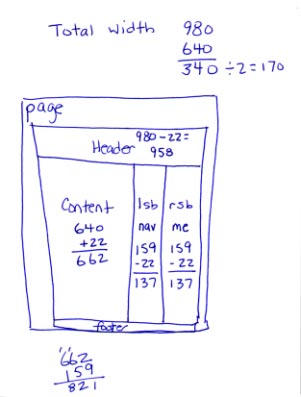
  3. My ScratchpadMeasurements of content, sidebar, and page sizes, in pixels, for the WordPress theme I’m designing from scratch and writing about in the article series (see image).
  4. Another page of the same thing but with a different layout and different measurements.
  5. A list of hexadecimal codes corresponding to the colors I plan to use in the WordPress theme I’m creating.
  6. Dates for the beta and Gold Master releases of a software program I’m not allowed to talk about.
  7. Domain names for a few adventure travel sites I checked out for possible advertising of Flying M Air excursions. (They all suck.) Also the phrases Whirly Girls, instrument rating, and Part 136 jotted down during a conversation with a fellow pilot this afternoon.
What’s not listed here are the pages I don’t need anymore, the ones I’ve torn out and discarded. (Don’t worry; I have a recycle box under my desk.) That’s the beauty of notebooks and scratchpads. You can write down the information you need when you get it and discard the pages when you’re done with them. Or file the pages if you think you’ll need them in the future.

Getting Things DoneI’ve been trying hard lately to get and stay organized. I have been reading Getting Things Done by David Allen and it’s been helping. Although I think he goes to far — no, I do not need a label maker to properly file or label things — he has a lot of good ideas. And although he recommends blank, unlined paper — like the kind in your copy machine — I prefer lined notebook paper for notes I want to keep. What I like best about the notebooks is that the pages stay bound together until I’m ready to discard or file them. No loose paper scattered all over my desk, waiting for me to do something with it.

So although I still rely on iCal to keep track of appointments and schedule items, I don’t use any computer-based tool for jotting down notes. All notes are in my notebook or scratchpad (or both), where I can note things wherever I am, without having to open a program or document and use a keyboard.

After all, it only takes one hand to write with a pen.

Digg and the HD DVD Key

A few thoughts about the recent goings on at Digg and elsewhere.

Last week, the hexadecimal key code that is used for copy protection on HD DVDs appeared in a blog. The key code is a 16-digit string of two-digit numbers and letters — if you spend more than an hour a day on the Web, you must have seen it by now. I won’t repeat it here because, frankly, I don’t have to. It’s easy enough to find online. Just Google HD DVD Key.

And that brings up the main point of this post: the so-called Steisand Effect. In 2002, Barbra Streisand sued a photographer who included a photo of her Malibu estate on the Web. He was doing an aerial photography research project about coastal erosion and the photo was one of hundreds of others that were published on the Web. In the publicity that followed, the photo was copied and reproduced thousands of times all over the Web. If Ms. Streisand had just kept quiet about the whole thing, it probably would have gone unnoticed. Instead, the information she wanted removed spread like a virus and received a huge amount of publicity, thus becoming far more known than she wanted.

And, of course, she had this effect named after her, which further brings up the subject (and photo links) every time someone else tries to suppress information on the Web.

That’s what happened with this HD DVD key. It appeared on a blog and someone dugg it. It soon got lots of diggs. The folks at Digg, acting on a cease and desist order (or rumor that they were about to get one) decided to be proactive and remove the references on Digg. Digg users saw this as censorship and immediately went nuts, posting more blog articles and references to the offensive key code — many of which used the code in the post title. When the Streisand Effect entry was updated on Wikipedia (yesterday, perhaps), the updater noted that there were currently more than 280,000 references to the code, a song, and multiple domain names with variations on the code.

Grant Robertson‘s post on DownloadSquad.com, “HD DVD Key Fiasco is an Example of 21st Century Digital Revolt” said it best:

As Joe Rogan’s character on Newsradio once quite accurately quipped, “Dude, you can’t take something off the Internet.. that’s like trying to take pee out of a swimming pool.” The content providers have attempted to do exactly that, remove pee from the proverbial swimming pool that is the Internet and, as we’ve witnessed so many times before, they’ve failed miserably.

If the AACS Licensing Authority would have kept out of this, the code probably would have come and gone like most material on the Web — within a few days. Instead, the 16-digit number has become “the most famous number on the Web” and is everywhere. What’s worse is that while a week ago, only a few hackers might have known what to do with it to unlock or remove protection from HD DVDs, now it’s likely that someone will go through the bother of writing a software program that does the work for everyone. If that software isn’t already out, I expect it to appear any day now. And I’m sure its location will be dugg so everyone knows about it.

What can we — and others — learn about this? With the Web, nothing is private. If information can be known, it will be known on the Web. But it can remain obscure if — and only if — the owner of the information does nothing to hide it.

What should the AACS Licensing Authority have done? Quietly recall the key code and start using a new one. Or, better yet, just ignore the whole thing. Millions of people would not have known about it at all if AACS had done nothing.

But what this also brings to light is the public’s feelings about DRM. Consumers don’t want it. And now consumers are starting to fight back.

Born Again into a Living Hope?

I find a Bible reference in a weird place and look it up.

This morning, while having breakfast with Mike, he pulled out an aviation catalog I’d never seen before. It’s evidently a company completing with Sporty’s and Aircraft Spruce to sell pilot supplies and aircraft parts. A slick catalog with color photos and a clean layout.

But on the cover, in small type, was a cryptic code: 1 Peter 1:3-5.

I’ll be the first to admit that I’ve never read the Bible, but I know a Bible reference when I see one. I whipped out my PowerBook and did a Google search for the reference, wondering what Bible verse would apply to aviation. I wound up on a page of BibleGateway.com, an excellent source of Bible text, with multiple versions all searchable by verse or text. Here’s what the Standard English version had to say about this reference.

Born Again to a Living Hope
3 Blessed be the God and Father of our Lord Jesus Christ! According to his great mercy, he has caused us to be born again to a living hope through the resurrection of Jesus Christ from the dead, 4 to an inheritance that is imperishable, undefiled, and unfading, kept in heaven for you, 5 who by God’s power are being guarded through faith for a salvation ready to be revealed in the last time.

I don’t know about you, but I find references to the end of days on the cover of an aviation catalog a bit over the top. Disturbing, in fact. So disturbing, I find I don’t want to order anything from the company who published the catalog.

On a related note, I was listening to Bill Maher’s HBO show yesterday. I subscribe to the podcast (we don’t get HBO) and I find it fascinating to hear so many viewpoints about what’s going on in politics and the world. In the most recent episode, someone said, “Didn’t Jesus say the truth will set you free?” He was talking about the current administration’s lies regarding Pat Tillman and Jessica Lynch. Evidently, some right-wing conservative told the Tillman family that they’d feel better about their son’s death if they were “more Christian.”

I decided I wanted that particular bible quote on my TumbleLog, where I collect quotes. So I looked it up on Google and wound up on the BibleGateway site. (I really do recommend the site if you ever need to check out something in the Bible.) I found the full quote and added the King James version to my TumbleLog:

John 8:32
32 And ye shall know the truth, and the truth shall make you free.

It interests me how people use the Bible. They pull out passages when they want to send a message, but they completely ignore the simple passages that everyone — even non-believers — find right and good. The truth will make you free — free of lies and the burden of maintaining them. I don’t need to read the Bible or even be a religious person to know and understand that.

Alaska, Here We Come

Reservations finally made.

For the past three years, Mike has been whining (for lack of a better word) about wanting to go to Alaska. Not knowing what he has in mind and unable to connect with him to discuss it (which is amazing, since we live in the same house), no plans have been made.

This year was different. He decided in April that this was the year we’d go. My cherry drying gig fell through and my Leopard book was rescheduled, so I was not going to pick up a flying job elsewhere. So he went to a travel agent here in Wickenburg (if you can believe that) and told her what he wanted. With tight date restrictions — I need to be working on the Leopard book by mid June and my annual mystery project will be sucking time in July — the travel agent achieved the impossible: a 7-night cruise with a 2-night Denali visit that includes some time on the ground for visiting Mike’s cousin in Seattle and Mike’s friend in Anchorage.

Radiance of the SeasThe trip will start with the Anchorage visit, then the train ride with overnight stays at the Princess Denali lodge. From there, we get on Radiance of the Seas — ironically, the only other cruise ship we’ve ever been on (that’s why I have a photo of it), and that was in the Caribbean — for a 7 days/nights cruising down to the Vancouver, with stops at the usual tourist ports almost every day. From there, we go to Seattle for two nights. Then home. We’ll be gone about two weeks — the longest vacation we’ve ever taken together.
Our accommodations on the ship will be similar to what we had on the last cruise: a mini suite with balcony. I seriously doubt whether we’ll get the concierge key this time; that was too much of a dumb luck coincidence last time. But it’ll be nice to spend late nights watching the sun set from the balcony. I just hope I can stay up late enough to make the most of it. Almost wish there was a way I could do all my sleeping before the trip so I only need a few hours a night. Wouldn’t that be great?

I’ll blog the trip. Of course. And if I can get an Internet connection while I’m away, I’ll actually send entries before I get back. With pictures.

Before that, though, Mike and I are heading to Torrance, CA for a week. Mike needs to take the Robinson Factory Safety course before he can get on my insurance. I decided to take it again with him. (This will be my third time.) We’ll fly out to California, spend the weekdays at an area hotel, then spend a few days in Malibu, just to get away. This was set up before the Alaska trip — a kind of mini vacation.

We deserve — and need — the time away.

How to Report Spam Search Results to Google

When search results include spam, we all suffer.

Ever conduct a Google search, only to find that one of the top (non-sponsored) search results has no real value as far as your search criteria is concerned? In other words, the owner or Webmaster on the site has manipulated site content so it appears as a top search result but really has nothing to do with what you’re looking for?

That search result is considered spam by the folks at Google, and they want to stop it as much as we do.

What Google Says

From Google’s Report a Spam Result page:

We work hard to return the most relevant results for every search we conduct. To that end, we encourage site managers to make their content straightforward and easily understood by users and search engines alike. Unfortunately, not all websites have users’ best interests at heart. Trying to deceive (spam) our web crawler by means of hidden text, deceptive cloaking or doorway pages compromises the quality of our results and degrades the search experience for everyone.

We think that’s a bad thing, and so we request that, if your Google search returns a result that you suspect is spam, you please let us know by using this form. We thoroughly investigate every report of deceptive practices and take appropriate action when we uncover genuine abuse. In especially egregious cases, we will remove spammers from our index immediately, so they don’t show up in search results at all. At a minimum we’ll use the data from each spam report to improve our site ranking and filtering algorithms, which, over time, should increase the quality of our results.

Here’s what you can do to help

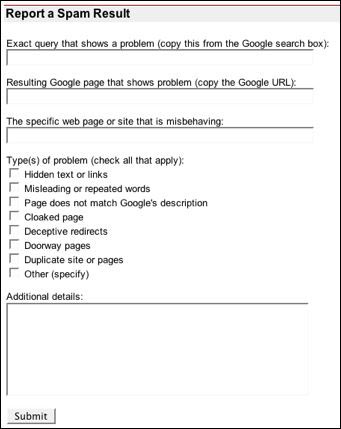
  1. Report a Spam ResultVisit www.google.com/ contact/ spamreport.html and scroll down to the Report a Spam Result form.
  2. In the Exact query box, paste in the contents of the Google Search box.
  3. In the Resulting Google page box, paste in the contents of the address box for the Google Search results page.
  4. In the Specific web page or site box, paste in the contents of the address box after clicking the link to the spam page.
  5. Turn on all the check boxes that apply.
  6. Use the Additional Details box to explain why you consider the result to be spam or what you were looking for and why the page/site doesn’t deliver what you expected.
  7. Click Submit.

It’ll only take a few minutes and, if enough people do this, we can really make a difference.