
Reach Out and Meet Someone

I remember what online community is all about.

I got my start in the online world back in 1984, when I bought my first computer. It was an Apple //c and I quickly began visiting bulletin board systems (BBSes) using my 300 baud modem. You could get away with 300 bps in those days — there were no graphics, no big downloads, no Flash or PDF or QuickTime files.

Back in those days I visited BBSes to participate in online discussions on what were called message boards: the precursor to today’s forums and blog comment features. Later, in 1989, when I bought my first Mac, I was quick to start my own BBS, The Electronic Pen. I kept it up and running for years, until the Web made BBSes archaic. Then I hopped on board Web 1.0 with a Web site — back in 1995 or so? — and have been a Web publisher ever since.

It Was about Meeting People

In exchanging comments and ideas on BBSes, I met a lot of people:

  • There was Tim, who ran a BBS out of the same office where he sold tombstones. (Really!) Tim was my age and a Mac user and he’s part of what made me so enthusiastic about Macs. He introduced me to Mark, a legally blind albino guy who worked as a graphic designer. (Really!) Mark couldn’t drive, so we’d take him out to dinner once in a while. He had all this high-tech computer equipment that he’d show off to us: things like CD-ROM writers, 20″ monitors, and high-end graphic software. (Remember, this was in the early 90s.) Although I lost touch with Mark, I still exchange e-mail with Tim, who married his high school sweetheart, fathered three boys, and got a job as an IT guy for some medical information company.
  • There was May, who ran a BBS for writers. She wanted to become a writer, but she couldn’t seem to get her foot in the door with any publisher. She even quit her day job to devote all her energy to writing. She wound up broke and depressed. She went back to work. Years later, she finally got some stories published. I don’t know what she’s doing now. She once called me an “overachiever,” which is something I’ll never forget. It made me feel as if I should be ashamed of my success.
  • There was Art, a computer programmer who knew everything — or thought he did. At thirty-something, he still lived at home with his parents. When I met him in person, I was very surprised to see that he was only about 4’10” tall. He bitched a lot about his employer and I wasn’t too surprised when he got canned. When he got 18 months pay in his severance package, I encouraged him to travel around a bit before getting back to work. He visited his brother in Seattle. “There’s snow on the Rockies,” he told me after his trip. “Art,” I replied, “there’s always snow on the Rockies.” Some people really need to get out more. We lost touch just a few years ago.
  • There was Bill, a copywriter. Here was a middle-aged man who wrote for a living. And he made a good living. He offered me advice (when I asked for it) and was amazed when I told him that I thought something I’d written “sounded good.” “That’s the point,” he said, obviously excited that I’d made the comment. “Good writing should sound good when it’s read out loud.” I learned a lot from him, but ironically, we lost touch soon after my first book was published.
  • There was Martin, a computer geek like me, but with an arty streak. He did design work and computer training for a local computer store. If my memory serves me right, he helped me get my foot in the door there and I worked for them for some time. I went to his wedding and, when I moved out to Arizona, he, his wife, and their new baby spent a day with us. When he set up his own consulting firm, he sent me a full complement of his high-class giveaways. I still use the logo-embroidered throw blanket when I sit on the sofa to watch television some evenings. I haven’t seen him in years, but he’s one of my LinkedIn contacts.

These are just some of the people who entered my world through the world of online communication. (And no, these aren’t their real names.) They were friends, despite our mutual shortcomings, and we socialized both online and off. In fact, I was better friends with these people than my college classmates.

What Changed

Somewhere along the line, things changed. I think it had something to do with switching from the two-way communication of BBSes to the one-sided Web sites of Web 1.0. Although I remained friends with this handful of people for some time, I didn’t meet anyone new.

And I didn’t miss meeting people.

After all, I was busy with work — writing books and articles, teaching computer courses for two different companies, writing course material. And then we moved to Arizona and I was busy with my new home, learning to fly, and exploring my surroundings. As my old BBS friendships faded away, new ones didn’t replace them. But I didn’t even notice the gap in my life.

Social Networking

Until yesterday, I never realized the value of social networking sites like LinkedIn, MyBlogLog, and Twitter. You see, I wasn’t in the market for new friends. I didn’t need any. I have friends around here, I have friends elsewhere.

The trouble is, our friends around here are either 20 to 30 years older than we are (remember, Wickenburg is a retirement community) or, if they’re younger, they’re transient, passing through Wickenburg on their way to someplace where they’re not always the youngest person in a restaurant or supermarket. (Okay, so that’s an exaggeration. There are usually a few people younger than me in the supermarket, and some of them are even customers.) We lost two friends our age just last month when he got a better job in Michigan and they just packed up and left. Other friends have been bailing out regularly: one couple to Colorado, one to San Diego, one to New Mexico.

Mike and I aren’t movers. We like to stay in one place a good, long time. But with the way things in Wickenburg are going, I’m ready to bail out. We’ve been here 10 years — that’s longer than most of our friends (in any age group).

So I’m starting to think about new friends who live someplace other than Wickenburg.

Yesterday, I read “How to Use MyBlogLog to Succesfully Build Massive Blog or Website Traffic.” I’d signed up for MyBlogLog back in January, but never did anything with my membership. I had some time, so I went through the instructions in the article. And I started finding blogs for people who write about the same kinds of things I write about. People with similar thoughts and ideas and concerns. And I began to realize that I could make friends online again. Perhaps even good friends.

Now if you’re reading this and actively participate in social networking sites, you’re probably thinking that I must be some kind of moron. Of course that’s what social networking sites are for.

Hoof PickWell, have you ever seen a hoof pick? There’s a picture of one right here. You use it to scrape horse poop and mud and rocks from the bottom of a horse’s foot. It’s standard equipment for everyone who rides a horse — a responsible rider wouldn’t even consider getting into the saddle unless the horse’s feet had been checked and scraped. But if I didn’t tell you this and you’d never needed one and someone handed one to you, would you know what it was for?

That was me with social networking Web sites. I couldn’t understand the purpose.

Now I do.

(Duh.)

Build Community Through Participation

Yesterday, I also realized that what’s holding back my blog from reaching the next level (whatever that is) is the sporadic participation of visitors.

Sometimes I’ll write a post, hundreds of people will read it, and a bunch of people will post comments with other viewpoints about what I’ve said. This adds substance to the blog and makes it more valuable not only to visitors, but to me. I learn by starting a conversation and reading what others add to it. (I love to learn.)

Most times, however, I’ll write a post and even though many people will read it, no one will post comments to it. Which makes me wonder whether I “got it right” or if anyone cared about what I said. Are these posts a waste of time? Are they useless bandwidth suckers? Why did Post A get a lot of response while Post B, with a similar topic, generate “dead air”?

I may never know.

But the one thing I do know is that I want more participation here. And since I want it here, I’m sure other bloggers want it on their sites. So I’m actively trying to add something to a comment string — sometimes even starting a comment string — when I have something to add. Even if what I have to say is just a quick note to thank the blogger or give him/her my support on that issue. (Whatever that’s worth.)

Twitter Really Is More than Just a Waste of Time

Yesterday was also the day that I realized that Twitter is a lot more interesting if you’re monitoring the tweets of people you know and/or care about. I realized this as I started adding “friends” to my Twitter account — the same people whose blogs I was beginning to monitor. When you follow the tweets of a select group of people, you learn more about them and the things they do. Like me, some of these people publish tweets about the major work-related things they do throughout the day. Or about ideas that have just gone through their heads. Or about life’s frustrations.

And I think that Twitter can be a great way to help decide whether I want to take another step toward a real friendship with someone. A person’s tweets reveal not only what he/she is doing or thinking, but his/her personality. I could never pursue a friendship with someone who composed tweets like AOL chat room IMs. Or a person who took him/herself too seriously. Or someone who used Twitter solely to market a product or service.

So I’m going to be more active in the blogging world, both in my blog and on other people’s it will be interesting to see what new friends I can make.
Keeping Up with the Blogosphere

I’m not the only one struggling.

I use a feed reader (endo) to follow about 30 feeds in a wide range of topics. At least I try to. The trouble is, if I skip a day reading the feeds, no one tells the authors to stop writing. They just keep churning out new material. The result: as I type this, there are 1188 unread blog entries waiting for me in endo.

Sheesh!

Why Don’t I Just Do It?

Why don’t I read them regularly? Well, one of the reasons I subscribe to all these feeds is because they give me food for thought. I’ll read an article and think about it and, in some cases, it’ll get the creative juices flowing so I can write a blog entry based on what I’ve read.

Perfect example is the article I wrote yesterday about notebooks and scratchpads. It wasn’t a good article — I’ll be the first to admit that — primarily because I threw it together without giving it enough thought. (My husband was rushing me. He wanted to go out to dinner. Can you imagine putting food before blogging?) But the seed that became the article came from a blog entry (which I now can’t find) recommending that bloggers keep a notebook beside their computers. I think that’s incredible advice — and it goes against what all the geeks out there recommend — and I realize that I follow it. I wanted to explain why it’s good advice by explaining how I follow it. My post didn’t communicate the story the way I wanted it to, but that’s where the idea came from.

Thinking takes time, which brings up…

…the Other Reason

I simply don’t have the time to read (and think) about them all.

Now you might tell me that I can make the time. And I’d tell you that I really do need to sleep at night and get some paying work done during the day.

I stumbled upon a blog post today, written by Lincoln Adams, who evidently really likes to punish himself with this stuff. From “Can I get back to blogging now??” on Habitation of Justice:

Honestly, I don’t know how some people do it. It took me literally all day just to check out places like Digg, Reddit, MyBlogLog, and so on. Just to read the latest feeds from my newsreader sucked up so much time that before I knew it, it was 3AM and my brain was fried from fatigue and an overload of information. How do people find time not only to sift through the all the crap out there, but also blog 20 posts a day AND work a full time job on top of that? My goodness.

My goodness, too!

Apparently, Lincoln and I have the same problem, only he’s taking it more seriously than I am by actually trying to keep up. I don’t think he writes 20 blog posts a day and I know I don’t. But even two or three can be tough when you’re doing so much other stuff.

Read Less Feeds?

Of course, you might tell me that I should subscribe to fewer feeds. And I’d tell you that I think you’ve got something there.

But which ones to remove? Lately, I’ve been adding more feeds than I’ve been removing.

But I’m starting to think that the ones without full-text feeds will be the ones to go first. Like Slate.com’s feeds. I don’t subscribe to the entire magazine — I did for a while and quickly put an end to that. I subscribe to about 10 different columns. And the problem I have is that all that appears in my feed reader is a tease to get me to the site. While it only takes a few moments to click a link and see if the article is worth reading in full, it would be quicker and easier if I just scanned it in endo. And it would certainly prevent me from being distracted by links to other articles on Slate’s site.

I’m Too Interesting…I Mean Interested

I think my main problem is interests. I have too many of them.

I’m interested in blogging and productivity. I’m interested in writing and traveling. I’m interested in photography and flying. I’m interested in politics and religion — as an observer (rather than a participant) in both. I’m just interested in too much stuff.

And the blogosphere is a great place to find information and viewpoints about all kinds of stuff. So how could I turn up the chance to suck in some fresh new content?

So I subscribe to a bunch of blogs and I wade through all that content when I have time.

I mean find time.

No, I mean make time.

I think I’d better make some time right now. If you’ll excuse me…

On Notebooks and Scratchpads

Some organization/productivity tips.

When I’m working in my office, I’m sitting in front of a computer all day. Although I have three different tools for taking notes on my computer while I’m working, I always turn to pen and paper when I need to make a note. And I recently realized that that isn’t a bad thing after all.

Sure, you can use software to jot down notes as you need to, but there’s really no substitute for a notebook or scratchpad. I have both, although I prefer the notebook.

It’s usually a spiral bound notebook, the kind with page perforations so you can cleanly rip off a sheet. I keep it open on my desk to the “current” page, which is the page I last used for jotting down a note. I try hard to start a new page each time I have a series of related notes to jot down, but I don’t always succeed. Sometimes, I simply forget.

Recently, I used up all the pages in my notebook and haven’t replaced it. So I’m using a scratchpad. I make the scratch pads out of the galley pages for my Quicken books. Really. Here’s how it works. I write my Quicken book and submit it electronically as Word files. I get back edited Word files, accept or reject changes, and send them back. Then the book goes to layout. The publisher prints the galley pages and sends them to me. I mark up the pages that have problems and send them back to the publisher. Since there’s no reason to send back pages without problems — after all, why pay to ship more than you have to? — I save them. I bring them to Kwikprint here in Wickenburg and they cut them into 1/4 or 1/2 size sheets and pad them up with about 200 pages per pad with the blank side facing up. Throughout the year, I use the scratch pads in my office and house to jot down notes.

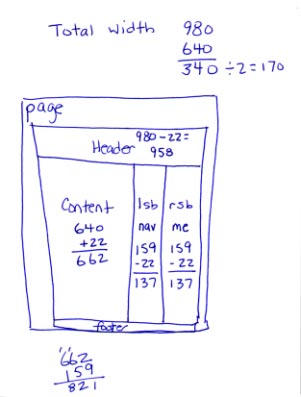
What kinds of things do I jot down? Well, one look at the notebook will reveal all. Here’s my current scratchpad (1/4 page size) by page:

  1. The phone number for the local museum (highly recommended), along with the user ID, password, and domain address for a recently created MySQL file.
  2. A list of the template files I plan to create for my series of articles about creating a WordPress Theme from scratch. (The same list appears in the first article of the series.)
  3. My ScratchpadMeasurements of content, sidebar, and page sizes, in pixels, for the WordPress theme I’m designing from scratch and writing about in the article series (see image).
  4. Another page of the same thing but with a different layout and different measurements.
  5. A list of hexadecimal codes corresponding to the colors I plan to use in the WordPress theme I’m creating.
  6. Dates for the beta and Gold Master releases of a software program I’m not allowed to talk about.
  7. Domain names for a few adventure travel sites I checked out for possible advertising of Flying M Air excursions. (They all suck.) Also the phrases Whirly Girls, instrument rating, and Part 136 jotted down during a conversation with a fellow pilot this afternoon.

What’s not listed here are the pages I don’t need anymore, the ones I’ve torn out and discarded. (Don’t worry; I have a recycle box under my desk.) That’s the beauty of notebooks and scratchpads. You can write down the information you need when you get it and discard the pages when you’re done with them. Or file the pages if you think you’ll need them in the future.

Getting Things DoneI’ve been trying hard lately to get and stay organized. I have been reading Getting Things Done by David Allen and it’s been helping. Although I think he goes to far — no, I do not need a label maker to properly file or label things — he has a lot of good ideas. And although he recommends blank, unlined paper — like the kind in your copy machine — I prefer lined notebook paper for notes I want to keep. What I like best about the notebooks is that the pages stay bound together until I’m ready to discard or file them. No loose paper scattered all over my desk, waiting for me to do something with it.

So although I still rely on iCal to keep track of appointments and schedule items, I don’t use any computer-based tool for jotting down notes. All notes are in my notebook or scratchpad (or both), where I can note things wherever I am, without having to open a program or document and use a keyboard.

After all, it only takes one hand to write with a pen.

Digg and the HD DVD Key

A few thoughts about the recent goings on at Digg and elsewhere.

Last week, the hexadecimal key code that is used for copy protection on HD DVDs appeared in a blog. The key code is a 16-digit string of two-digit numbers and letters — if you spend more than an hour a day on the Web, you must have seen it by now. I won’t repeat it here because, frankly, I don’t have to. It’s easy enough to find online. Just Google HD DVD Key.

And that brings up the main point of this post: the so-called Steisand Effect. In 2002, Barbra Streisand sued a photographer who included a photo of her Malibu estate on the Web. He was doing an aerial photography research project about coastal erosion and the photo was one of hundreds of others that were published on the Web. In the publicity that followed, the photo was copied and reproduced thousands of times all over the Web. If Ms. Streisand had just kept quiet about the whole thing, it probably would have gone unnoticed. Instead, the information she wanted removed spread like a virus and received a huge amount of publicity, thus becoming far more known than she wanted.

And, of course, she had this effect named after her, which further brings up the subject (and photo links) every time someone else tries to suppress information on the Web.

That’s what happened with this HD DVD key. It appeared on a blog and someone dugg it. It soon got lots of diggs. The folks at Digg, acting on a cease and desist order (or rumor that they were about to get one) decided to be proactive and remove the references on Digg. Digg users saw this as censorship and immediately went nuts, posting more blog articles and references to the offensive key code — many of which used the code in the post title. When the Streisand Effect entry was updated on Wikipedia (yesterday, perhaps), the updater noted that there were currently more than 280,000 references to the code, a song, and multiple domain names with variations on the code.

Grant Robertson‘s post on DownloadSquad.com, “HD DVD Key Fiasco is an Example of 21st Century Digital Revolt” said it best:

As Joe Rogan’s character on Newsradio once quite accurately quipped, “Dude, you can’t take something off the Internet.. that’s like trying to take pee out of a swimming pool.” The content providers have attempted to do exactly that, remove pee from the proverbial swimming pool that is the Internet and, as we’ve witnessed so many times before, they’ve failed miserably.

If the AACS Licensing Authority would have kept out of this, the code probably would have come and gone like most material on the Web — within a few days. Instead, the 16-digit number has become “the most famous number on the Web” and is everywhere. What’s worse is that while a week ago, only a few hackers might have known what to do with it to unlock or remove protection from HD DVDs, now it’s likely that someone will go through the bother of writing a software program that does the work for everyone. If that software isn’t already out, I expect it to appear any day now. And I’m sure its location will be dugg so everyone knows about it.

What can we — and others — learn about this? With the Web, nothing is private. If information can be known, it will be known on the Web. But it can remain obscure if — and only if — the owner of the information does nothing to hide it.

What should the AACS Licensing Authority have done? Quietly recall the key code and start using a new one. Or, better yet, just ignore the whole thing. Millions of people would not have known about it at all if AACS had done nothing.

But what this also brings to light is the public’s feelings about DRM. Consumers don’t want it. And now consumers are starting to fight back.

Leopard Postponed — What's a Writer to Do?

It’s all about timing.

Yesterday afternoon, not long after the stock markets closed in New York, Apple put a one-paragraph announcement on its Hot News page. The announcement told the world (or whoever happened to be watching that page) that because Leopard resources had been used to finish up the iPhone, Leopard would be delayed. Instead of seeing the finished OS in June, we’ll now see it in October.

Why it Matters to Me

I took the news with mixed emotions. I had begun working hard on my Leopard Visual QuickStart Guide for Peachpit Press. The book will be the eighth or tenth (I’ve lost count) edition of my Mac OS VQS, which is one of my biggest selling titles. The book is important to me; the last edition accounted for half of my annual income for two years in a row. When that book is ready to write I drop everything — even helicopter charters — to work on it.

The most important part of it is getting it done on time. When Tiger came out in 2005 only two authors had books in stores beside the brand new software on its release date: Robin Williams and me. Both long-time Peachpit authors with reputations for churning out books that satisfy readers. If Robin’s book sold only half as well as mine — and I’m not fooling myself; it probably sold twice as well — we kicked butt. It was a great reward for hard work and grueling deadlines. But I have to say honestly that my Tiger book was one of the ones I’m most proud of.

This Time was Different

This time around, things were definitely different. The software wasn’t ready yet — that was obvious in the way certain features just didn’t work right. Lots of bugs to iron out, but few developmental releases. It was almost as if Apple’s Mac OS team was overwhelmed. This announcement from Apple explains a lot. Apparently they were overwhelmed, but not by the task at hand. They were overwhelmed by being shorthanded to tackle the task at hand.

Add to that the fact that my screenshot software of choice, Snapz Pro, “broke” in Leopard. Don’t misunderstand me; it did work and it took fine screenshots. But the shortcut key to invoke it did not work — even when I fiddled with Mac OS settings and tried other shortcut keys. So, for example, there was no way to take a screenshot of a menu.

I don’t know if you’ve ever seen a Visual QuickStart Guide, but they rely on screenshots to communicate information. The book is full of step-by-step, illustrated instructions. I estimate that my Tiger VQS has at least 2,000 screenshots in it. Some screenshots show windows, others show menus. Almost every single one is less than a full screen of information. Now think of how much fun it might be to take 2,000 screenshots with something as awkward as Grab or, worse yet, Apple’s built-in screenshot shortcut keys. And then manually edit every single screenshot in a graphics program like Photoshop. Not having Snapz Pro (or something equivalent, if something equivalent exists) was going to seriously slow down my workflow.

What was even worse for me (and all other writers, I assume) was the “secret features” Steve Jobs alluded to when he first showed off Leopard. I had no idea what they were. And no one else did either. What if those features changed the way part of Mac OS X looked? All my screenshots would have to be redone. And what if the features were big enough to warrant their own chapters? Or replaced existing features? That could mean significant reorganization of the book, with changes to all the chapter and feature references. I could be working my butt off to finish a 700+ page book, only to have to redo major parts of it.

So I was under a lot of pressure. I had the ticking clock that said the software would be out “this spring.” That meant before June 20. I knew my publisher needed 2-3 weeks to get the final files printed and turned into books. That meant I needed to be done writing and editing by the end of May. But not knowing what the future would bring, was crippling me, making it difficult and frustrating to get things done.

I was not a happy camper. So when the announcement came yesterday, it was a bit of a relief for me.

The Problem with the Postponement

There is a problem, however: timing.

I had planned to work on my Leopard book for April and May. Then comes my annual secret project (which I can’t talk about until after publication) for the month of June and a bit into July. Then my annual one-month stay at Howard Mesa to get some work done on our property and knock off a few articles for Informit and possibly try to reconstruct that mystery novel I was working on (which was lost in the great hard disk crash and backup screw-up of February 2007). Then we’d planned to take a vacation to the northwest to continue our search for a new place to live. By that time, it would be September and the helicopter business would be heating up again; I already have two charters lined up for that month. Also, around that time, I’d be ready to start work on my Word for Macintosh revision.

There was a plan B for this summer, too. It consisted of me getting a job as a pilot for someone else, flying somewhere other than Arizona. I could work on my secret project while I was away and escape Arizona’s brutal heat and get to fly someplace different. I have a very good lead on a job in St. Louis (of all places) and a few possibilities in Oregon and Washington. But nothing finalized.

Now these plans for the next six months of my life are completely up in the air. Assuming an October 1 release of Leopard — this is just a date pulled out of the air; I swear I don’t know anything and if I did I wouldn’t repeat it — I have to be finished with the book by the first week in September. So I’ll work on it in July and August. While I still have my secret project to work on in June, I don’t have anything lined up for the rest of April and the month of May.

What’s even worse about all this is that I can’t work on a VQS at Howard Mesa or at a summer job elsewhere — I need a desktop computer with a big monitor to do the layout — and I can’t take a vacation when I need to work on this book. (See above for how important it is.) So my whole summer schedule is completely screwed up.

And It’s a Money Problem, Too

And since I get paid advances when I work and I don’t have anything lined up between now and the beginning of June, I’m not going to see a payday until the end of June or July. Ouch. So my finances will be screwed up, too.

It gets even worse. If the book had a release date in June 2007 (with the original release of Leopard), I’d start seeing royalties at September 2007 month-end. But because it won’t be released until October, which is after the start of the last quarter, I won’t see royalties until March 2008 month-end. That’s a 6-month payday delay for a 4-month publication delay. Double-ouch.

But that’s what the freelance writer’s life is like: a financial roller coaster.

What to Do?

Today I’ll be making some phone calls. The goal is to pin down exact dates for all of my known projects so I can decide, once and for all, if I can get a pilot job according to Plan B. And, while I’m at it, I’ll try to pick up a small book project to work on in May. (Not likely but remotely possible.)

Then I’ll get to work doing other things that I’ve been neglecting — cleaning out the condo I want to rent, washing the helicopter, organizing my office, reserving rooms for next year’s Southwest Circle Helicopter Adventure trips.

After all, life goes on.