Telephone Support for the Price of a Book?

Not likely.

I was driving down to the Phoenix area yesterday — my first time driving down there in months. It was a beautiful day, sunny with temperatures in the 70s. I was driving my little Honda with the top down and my iPod, connected to the stereo, blasting some classic rock. I had a 30-mile drive ahead of me on Route 60 (Grand Avenue) to get to the nearest PetSmart (or is it PetCo?), where I planned to buy some tropical fish for my aquarium. Route 60 isn’t the most pleasant road to drive on, but it’s nothing to complain about in the stretch I was driving.

I was having a good time.

My cell phone rang. The only reason I heard it is because it’s on vibrate mode and my ears were not necessary. I hit the mute button on the stereo and answered the phone.

The woman on the other end was difficult to hear at 65 mph in a convertible, so I pulled over. After all, she could be a customer for Flying M Air and I needed to hear what she wanted and to give her my full attention.

The words started coming through: QuickBooks. Book. Non-profit. How do I print checks?

It took all my patience not to explode. Apparently, this woman thought that since I’d written a book about Quicken for Windows and another book about QuickBooks for Macintosh, I could help her figure out how to print checks from the non-profit version of QuickBooks for Windows, which I had never even used, let alone written about. I don’t know where she got my phone number — it’s no longer on this site because of calls like hers — and I don’t know where she got the idea that the author of a book about a software product would be her free, technical support hotline.

I set her straight, hung up, and got back on the road. I was fuming for a short while, but the music and wind and great weather soon soothed me.

Here’s what people don’t seem to understand:

  • A book’s content is determined, in part, by the book’s project editor and page count. So an author cannot include coverage of every single nuance of a software program. The least used features are left out to make sure there’s room for the most used features.
  • An author cannot write a book about a topic unless the publisher feels that there’s enough of a market for the book to sell. That’s probably why this person could not find a book covering the not-for-profit version of QuickBooks for Windows. It’s also why I did not update my QuickBooks for Macintosh book to cover QuickBooks 2007 or my Quicken for Macintosh book for any version after 2003 (I think).
  • An author receives, on average, less than $1 per book sold. I don’t know where anyone can get one-on-one, completely personalized technical support by telephone for $1. (Even the folks in India use a script.) My point: buying one of my books does not entitle the reader to interrupt my day by telephone to ask questions about the book’s content or topics not covered in the book at all.
  • An author certainly cannot be expected to provide support for another author’s book. True story: I once got a question in my old FAQ system from someone who told me he’d bought a book by [insert author name here] and was having trouble understanding it. Could I help him? He wasn’t joking. Neither was I when I told him to contact the author of that book, not me.

This might seem like a hard line to take, but I don’t think so. I do a lot to support my work and provide content above and beyond what’s between a book’s covers. The Book Support categories you see listed near the top of the navigation bar are just an example — each one provides additional articles somehow related to a specific book. My Q & A system is also set up to receive questions that I can answer in a place where all readers can benefit from them.

That should be enough.
The Definitive Guide to Apache mod_rewrite

Hardcore .htaccess stuff for mere mortals like me.

Somewhere along the line recently, I got this idea in my head that I wanted all subscribers for my main feed here to get the FeedBurner version of the feed. Those of you who are familiar with RSS know that a feed icon appears in the address bar of most modern Web browsers, offering visitors a quick way to get the feed URL or create a live bookmark. Other folks might know that they can enter the URL for a WordPress-based site followed by the word feed to get a feed URL. There are a few other formulas that can be used to generate a workable feed URL for subscribing to a feed, too.

While that’s all well and good, with so many methods to subscribe to feed content, it’s nearly impossible to get a real count of subscribers. How many people are subscribed to my feed? Beats me. How many hits a day does it get? I don’t know.

And those of you who have been reading this blog for a while know how much I love stats.

So a did a little poking around on the Web and found a few articles that explained how to use .htaccess to redirect hits to WordPress-generated feeds to my FeedBurner feed. One was this thread on the FeedBurner site, which has special instructions for WordPress users (scroll down on that page). Another was this article on oneafrikan.com, which offered some additional tricks I found useful.

Unfortunately, these solutions had one thing in common: they redirected all feed links to a single FeedBurner feed link. While that’s fine for most people, I’ve just gone through a lot of trouble to set up and promoted category feeds on my site. The last thing in the world I wanted was for someone to subscribe to a category feed and then get the main feed in their feed reader.

Of course, all of this redirect magic is done with .htaccess, the “invisible” file that works with your Web server to provide some last-minute instructions for your site. I’d already played a bit with .htaccess settings to make sure that outdated URLs published in some of my older books still pointed to the right thing on my current site. And, of course, WordPress uses the .htaccess mod_rewrite module to change ugly PHP URLs into something more attractive and logical (although very lengthy, if you ask me). I knew only enough about .htaccess to be dangerous with it, but since I treat it like a vial of nitroglycerin, I haven’t gotten myself in trouble yet.

So I figured I’d take the oneafrikan.com settings and modify them to meet my needs. The trouble is, when I looked at the code, I couldn’t translate them into a language I understood (such as English), so I couldn’t modify them to meet my needs or anyone else’s.

I spent some more time on the Web and found lots of documentation. Unfortunately, all of it assumed I knew the basics of what I now know are called regular expressions: those punctuation marks that mean something completely different from the punctuation I’m used to as a writer. Not knowing what they were called made it impossible for me to look them up online. When I started looking at the same apache.org page over and over and it never changed (not that it should, mind you), I realized I needed more advanced (or perhaps basic) help.

What I needed was a book.

I don’t just write books. I read them, too. Although I very seldom read a computer book cover to cover, I have a bunch of them that I consult when I need to figure something out. Oddly enough, some of them are books I’ve written; I tend to forget things I’ve written about when I don’t use them regularly. (And they call me an expert! Ha!) I have a book by another author that covers Apache, but the information I needed was not in there. In fact, I’m trying to figure out why I bought that particular book in the first place.

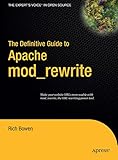
The Definitive Guide to Apache mod_rewriteSo I went on Amazon.com and I searched for .htaccess. I came up with a list of books that referenced it, but were not about it. Then I searched for mod_rewrite. And voila! I found The Definitive Guide to Apache mod_rewrite by Rich Bowen.

Not anxious to plunk down $30 for a book I might not find my answers in, I did some more research on the Web. I found a few book reviews and they were all positive. It appeared that this 160-page book covered the topic quite completely. It was definitely the book I wanted on my shelf.

Of course, I didn’t feel like waiting for Amazon.com to ship it to me. (I like immediate gratification almost as much as stats.) So when I realized that the publisher’s Web site offered the book as an eBook for only $20 (half the cover price), I bought it online and downloaded it. In five minutes, I had the answer to my question and enough information to tackle the problem. But rather than read the book on my 12″ PowerBook’s tiny (well, 12 inches, right?) screen (my G5 is still feeling sickly), I printed the whole thing out, punched holes in the pages, and put it in an old binder I had sitting around.

I realize that once again I’ve turned a short story — I found a great book about using mod_rewrite — into a long and drawn out one. (There are no short stories here.) My apologies to those of you in a hurry.

The point I wanted to make is that The Definitive Guide to Apache mod_rewrite is an extremely well organized, reader-friendly, well written, and informative book that explains exactly how to use mod_rewrite for anything you might want mod_rewrite to do: rewrite URLs, control access, set up virtual hosts, and so much more. Plenty of examples, each of which is analyzed and discussed. It’s all there.

I’m only about 30 pages into it so far, but I’m already very pleased.

Long Lost Cousin Found

A true story involving an odd last name, the Daytona 500, Google, and one of my Web sites.

The other day, I got an e-mail message from a guy named Steven P. Obviously, his name was not just P. It began with a P and was somewhat unusual. Pretend, for simplicity and to keep this guy’s identity private, that it was just plain P.

Here’s what he wrote.

My name is Steven P. I was getting tickets for the Daytona 500 and was surprised to find another P in the Ticket registery. All I got was Mike P from Pheonix. I googled his name and got a website with your writings. I also got a guest book for Benny Parson’s that Mike had left a message at. I was just wondering if you know Mike? I have lived in Tampa Florida all my life. I have family in Bradenton. All of them have passed, just cousins left. I was just trying to find out if we are family. If you know him and could tell him about this message I would be thankful. My EMail is scp@yahoo.com [not his real address].
Thanks, Steven

I don’t know who or what Benny Parson’s is, but I did track down a comment written by Mike P on my wickenburg-az.com Web site.

I don’t know Mike P. He’s not listed in the Wickenburg phone book. And I wrote back to Steven P to tell him that. But, at the same time, I told Steven P that I’d send Mike P a copy of his message. Since WordPress requires commenters to enter an e-mail address, I had one for Mike P. (Oddly enough, it was also a yahoo.com address.) So I forwarded Steven P’s message to Mike P with an apology for bothering him just in case they weren’t related.

A few days later, I got the following message from Steven P:

Thank you so much for forwarding my Email to Mike P. He Emailed me back and we are family. His Dad is my cousin who lives in Florida. We don’t see each other and I never knew he had kids. Thanks again. Steven

Now doesn’t that make you feel all warm and cuddly inside?

Backup at the Touch of a Button?

We’ll see.

The first thing I did when my hard disk failed on Friday (for the fourth time in less than 10 years) was to go online and find an external hard disk that had enough capacity to back up my computer’s entire hard disk. And while I was at it, I’d get one that was bigger than my current hard disk so I could use it for my next computer (which will probably be purchased sometime before the end of this year).

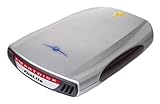
Seagate ST3300601CB-RK 300 GB External Hard Drive with FireWire and USB 2.0 InterfaceI started at the Apple store, figuring that the products sold there would work effortlessly with my Mac. I found a Seagate 300 GB model (the Seagate ST3300601CB-RK) that boasted “pushbutton backup.” Now that sounded like the right thing for me. I did a little Web searching and found the same hard disk on Amazon.com for $40 less. I ordered it. It should arrive sometime next week — hopefully right around the same time TechTool Pro finishes doing whatever it can to recover my data.

SmartDisk FWFL80 80GB Firelite 2.5In the meantime, I still have two 80GB Smart Disk FireLite portable Firewire hard disks to capture whatever can be scavenged from the disk.

I’d like to hear from readers about backup strategies and solutions, as well as any experiences with Seagate’s “award-winning Bounceback Express software.” (I’m extemely skeptical about this solution.) Use the Comments link. And if you want to share a hard disk crash story with us, please do. I can’t be the only one out there losing hard disks.

Computer Woes

Again.

If you were starting to wonder whether I’d fallen off the face of the earth, stop wondering. I’m still here. It’s my main computer’s hard disk that has decided to take an extended leave of absence from work.

It happened on Friday. It was doing four things at once as it usually does and it completely locked up. I had to power it down to unlock it. When I powered it back up, I had a blinking System folder icon. Never a good sign on a Mac.

Long story short: TechTools Pro has been working on the disk for about 37 hours now, trying to recover what was on the disk. It’s not even halfway finished, so I figure it’ll be done by Tuesday or Wednesday. Until it’s done, the computer is pretty much dead in the water. And maybe even after it’s done.

This has happened to me before, so most of my stuff is backed up. But a few things aren’t. Like 4 hours worth of work on Chapter 6 of my Excel 2007 Visual QuickStart Guide. What annoys me most about that is that it was the second time I went to work on that Chapter. The first time, I didn’t like the way it was coming out so I scrapped it.

If the data can’t be recovered by me or by experts elsewhere, I’ll have to rebuild the hard disk’s contents from scratch on a new hard disk. I’ll know if I need to do that sometime near the end of the week.

In the meantime, I have three laptops to work with: My trusty 12-inch PowerBook G4 (which I’m writing on right now), my new MacBook Pro (which is resting until it needs to do duty as a test mule for my upcoming Leopard book), and my Dell laptop (which is what I was running Excel 2007 on while revising my Excel book). So I can keep blogging, keep writing short articles, and write my outline for my Leopard book.

I’m just a bit depressed about the work that faces me and the possibly hundreds of photographs stored only on that computer’s hard disk. I couldn’t back up everything. But that’s going to change very soon.