Keeping Up with the Blogosphere

I’m not the only one struggling.

I use a feed reader (endo) to follow about 30 feeds in a wide range of topics. At least I try to. The trouble is, if I skip a day reading the feeds, no one tells the authors to stop writing. They just keep churning out new material. The result: as I type this, there are 1188 unread blog entries waiting for me in endo.

Sheesh!

Why Don’t I Just Do It?

Why don’t I read them regularly? Well, one of the reasons I subscribe to all these feeds is because they give me food for thought. I’ll read an article and think about it and, in some cases, it’ll get the creative juices flowing so I can write a blog entry based on what I’ve read.

Perfect example is the article I wrote yesterday about notebooks and scratchpads. It wasn’t a good article — I’ll be the first to admit that — primarily because I threw it together without giving it enough thought. (My husband was rushing me. He wanted to go out to dinner. Can you imagine putting food before blogging?) But the seed that became the article came from a blog entry (which I now can’t find) recommending that bloggers keep a notebook beside their computers. I think that’s incredible advice — and it goes against what all the geeks out there recommend — and I realize that I follow it. I wanted to explain why it’s good advice by explaining how I follow it. My post didn’t communicate the story the way I wanted it to, but that’s where the idea came from.

Thinking takes time, which brings up…

…the Other Reason

I simply don’t have the time to read (and think) about them all.

Now you might tell me that I can make the time. And I’d tell you that I really do need to sleep at night and get some paying work done during the day.

I stumbled upon a blog post today, written by Lincoln Adams, who evidently really likes to punish himself with this stuff. From “Can I get back to blogging now??” on Habitation of Justice:

Honestly, I don’t know how some people do it. It took me literally all day just to check out places like Digg, Reddit, MyBlogLog, and so on. Just to read the latest feeds from my newsreader sucked up so much time that before I knew it, it was 3AM and my brain was fried from fatigue and an overload of information. How do people find time not only to sift through the all the crap out there, but also blog 20 posts a day AND work a full time job on top of that? My goodness.

My goodness, too!

Apparently, Lincoln and I have the same problem, only he’s taking it more seriously than I am by actually trying to keep up. I don’t think he writes 20 blog posts a day and I know I don’t. But even two or three can be tough when you’re doing so much other stuff.

Read Less Feeds?

Of course, you might tell me that I should subscribe to fewer feeds. And I’d tell you that I think you’ve got something there.

But which ones to remove? Lately, I’ve been adding more feeds than I’ve been removing.

But I’m starting to think that the ones without full-text feeds will be the ones to go first. Like Slate.com’s feeds. I don’t subscribe to the entire magazine — I did for a while and quickly put an end to that. I subscribe to about 10 different columns. And the problem I have is that all that appears in my feed reader is a tease to get me to the site. While it only takes a few moments to click a link and see if the article is worth reading in full, it would be quicker and easier if I just scanned it in endo. And it would certainly prevent me from being distracted by links to other articles on Slate’s site.

I’m Too Interesting…I Mean Interested

I think my main problem is interests. I have too many of them.

I’m interested in blogging and productivity. I’m interested in writing and traveling. I’m interested in photography and flying. I’m interested in politics and religion — as an observer (rather than a participant) in both. I’m just interested in too much stuff.

And the blogosphere is a great place to find information and viewpoints about all kinds of stuff. So how could I turn up the chance to suck in some fresh new content?

So I subscribe to a bunch of blogs and I wade through all that content when I have time.

I mean find time.

No, I mean make time.

I think I’d better make some time right now. If you’ll excuse me…
KBSZ Interview

Maria Speaks Episode 36: KBSZ Interview.

I was interviewed again by local radio station KBSZ 1250-AM. Pete’s a great interviewer and always makes his guests feel comfortable. We talked for about 40 minutes, mostly about my wickenburg-az.com Web site, which celebrates its 8-year anniversary this month. We also talked about blogging in general, search engine optimization (which I’m no expert in), and my flying business. Keep in mind that the station’s audience isn’t exactly computer savvy, so I do a lot of explaining and simplifying when discussing some computer topics.

How to Report Spam Search Results to Google

When search results include spam, we all suffer.

Ever conduct a Google search, only to find that one of the top (non-sponsored) search results has no real value as far as your search criteria is concerned? In other words, the owner or Webmaster on the site has manipulated site content so it appears as a top search result but really has nothing to do with what you’re looking for?

That search result is considered spam by the folks at Google, and they want to stop it as much as we do.

What Google Says

From Google’s Report a Spam Result page:

We work hard to return the most relevant results for every search we conduct. To that end, we encourage site managers to make their content straightforward and easily understood by users and search engines alike. Unfortunately, not all websites have users’ best interests at heart. Trying to deceive (spam) our web crawler by means of hidden text, deceptive cloaking or doorway pages compromises the quality of our results and degrades the search experience for everyone.

We think that’s a bad thing, and so we request that, if your Google search returns a result that you suspect is spam, you please let us know by using this form. We thoroughly investigate every report of deceptive practices and take appropriate action when we uncover genuine abuse. In especially egregious cases, we will remove spammers from our index immediately, so they don’t show up in search results at all. At a minimum we’ll use the data from each spam report to improve our site ranking and filtering algorithms, which, over time, should increase the quality of our results.

Here’s what you can do to help

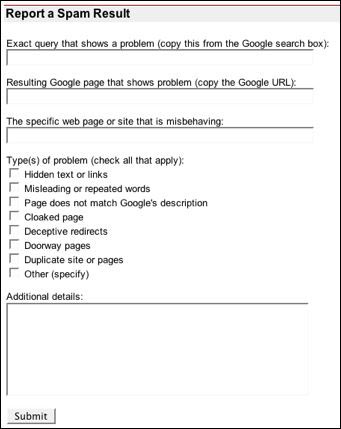
  1. Report a Spam ResultVisit www.google.com/ contact/ spamreport.html and scroll down to the Report a Spam Result form.
  2. In the Exact query box, paste in the contents of the Google Search box.
  3. In the Resulting Google page box, paste in the contents of the address box for the Google Search results page.
  4. In the Specific web page or site box, paste in the contents of the address box after clicking the link to the spam page.
  5. Turn on all the check boxes that apply.
  6. Use the Additional Details box to explain why you consider the result to be spam or what you were looking for and why the page/site doesn’t deliver what you expected.
  7. Click Submit.

It’ll only take a few minutes and, if enough people do this, we can really make a difference.


More on Twitter

Frivolous and a waste of time, but kind of cool, too.

According to Wikipedia, Twitter is

a social networking and micro-blogging service that allows users to send “updates” (text-based posts, up to 140 characters long) via SMS, instant messaging, the Twitter website, or an application such as Twitterrific.

Some More Details

Here’s how it works.

You join Twitter by signing up for a free membership.

You can then use the Twitter Web site, an application such as Twitterific (Mac OS only; there must be something out there for Windows users), a Dashboard Widget such as Twitterlex or Twidget (Mac OS only), SMS, or instant messaging to compose a 140-character-or-less mini blog post — referred to as a tweet — and post it to the Twitter service.

Your tweet goes into the Twitter public timeline (shown below), a constantly updated listing of recent tweets that changes so frequently, you probably won’t see your tweet appear because by the time you refresh the page, 20 or 30 other Twitter users have posted their tweets, thus pushing yours off the page. Much of what does appear is pretty boring. Some of it is clearly promotional or self-promotional. Some of it is in languages other than English.) And, of course, there’s the usual low-level chat mentality of posting nonsense apparently in an effort to fill bandwidth with inane chatter.

The Twitter Public Timeline

So, in short, Twitter enables you to broadcast, to the world, what you’re doing at that very moment or, if you’re not doing anything worth talking about, whatever message you want to broadcast. But very few people are likely to see it, so it’s a lot like shouting out of a helicopter window while flying over the Pacific Ocean — pretty much a waste of communication effort.

Follow the Tweets of your Friends

TwitterificFortunately, there is a way to weed out the stuff you don’t want to see and to concentrate on the stuff you do want to see. Just create a network of “friends” and people you “follow.” As you find other Twitter members you’re interested in, you add them as friends. Then, when you view your Twitter home page or use an application like Twitterific (shown here) to keep up to date, you only see the tweets from the people you care about.

My only problem is, either the people I care about don’t use Twitter or, if they do, I don’t know their Twitter User IDs so I can’t add them as friends. This is probably because I’m not hip — a situation I’m quite used to, since I’ve been dealing with it my entire life.

Put Your Tweets on Your Blog or Site

Twitter BadgeA cool feature of Twitter is the ability to add a Twitter badge to your Web site or blog. You can see my Twitter badge (if it’s still online when you read this) in the navigation bar on the Home page of my Web site. Here’s a screen shot of it, just in case I removed it. (I’m so fickle about features on my site.)

You can modify the color of the badge, but not much else. I think the badge is too big for the 140 characters allowed, given the microscopic font size. I was unable to tweak it for the appearance I wanted. What’s nice is that it includes a link to my Twitter page for people who care about me to follow me. I don’t think anyone has yet. That doesn’t surprise me, given that I’m not hip.

By the way, adding the badge to your site is pretty easy. Follow the link to Badges, set options as desired, then copy the resulting code and paste it into your site or blog where you want it to appear. It automatically shows your most recent tweet when the page is loaded.

Similar Services

I first heard about Twitter on the TWiT (no relation) podcast. (TWiT is short for This Week in Tech and it’s hosted by Leo Laporte. Since raving about it on a show, Leo has since switched to rival service Jaiku. I don’t know anything about Jaiku (yet) and am too busy today to explore it. But you can expect an article about it in the future.

Who knows? It might be a better solution for folks with hipness deficiencies.

Looking for other Twitters

If you’re a regular reader of this blog and maintain a Twit account, I welcome you to promote it in the comments for this site. I’ll check out your tweets and may add you to my list of “friends.” (Whoo-hoo!)

Would also be interested in reading your impressions of the Twitter service or competing services. Use the Comments link.

Blogging Courtesy

Why I think people should use some common courtesy on the Web.

Maybe I’m old fashioned or naive, but when I visit someone’s blog and read what they have to say, I would never consider posting a nasty comment that belittles or insults the author or another commenter.

But apparently, I’m among the minority. People will say anything they like in the comments, no matter how rude or crude it is. They use foul language, they insult the author of a post in no uncertain terms, they do their best to make it clear to other readers just how stupid they think the post’s author or another commenter is. I believe they do this for kicks and to make themselves seem more important. But what they really do is show how little self control and maturity they have.

Your Blog is Your Living Room

Here’s how I see it: A person’s blog is like their living room. By putting it on the Web, they’re opening the door for visitors. They share their opinions in their blog posts. They open comments to get feedback from visitors, to start discussions about the topic. Visitors can come and go as they please, they can participate in discussions by posting comments, they can share their insight to add value and help others learn or see another point of view.

I would no sooner post an insulting comment or perpetuate a heated argument in a blog than insult my host in his home.

If I read something in a blog that I don’t agree with and I want to comment to present my point of view, I’ll word my comment carefully as not to be insulting. This is how mature, educated people start discussions, the way ideas are shared in a friendly, non-offensive environment. This is how we learn from each other.

(A perfect example on this blog is the incredible string of informative comments for the post “Podcast Playlists No Longer Play Continuously.” I posted my solution to a problem and dozens of other people came forward with their comments and solutions. We all learned from this.)

If I find something in a blog so offensive that it makes me angry, I will simply stop reading that blog. Let’s face it: there are millions of blogs out there. Why should I waste my time reading the ones I don’t learn from or enjoy?

Bloggers Have a Responsibility

Bloggers, of course, have a responsibility. Allowing rude, insulting, and offensive comments to remain on their blog only invites more of the same. It’s like allowing the riffraff of the Web to take over your living room.

There’s been a lot of talk lately about at least one female blogger being threatened on her blog, in other blogs, and by e-mail. The threats are nasty and explicit, and to an intelligent person, would seem to be the work of deranged minds. They’re certainly not funny and, if taken seriously by the authorities, would probably lead to arrests.

My question is: how could a blogger consider himself responsible to the blogging community by allowing such comments to appear and remain on his blog?

The comment feature allows moderation. It makes it possible to clear offensive comments from a blog — like wiping dog crap off the carpet in your living room.

You might call this censorship. I don’t. I call it keeping things under control, respecting your fellow bloggers and visitors, taking responsibility for what goes on in your living room.

I Keep My Living Room Clean

I’ve had offensive comments appear on this blog. Some have been directed at me, others have been directed at other commenters. The comments were removed as soon as I saw them — normally within a few minutes of being posted.

But it bothers me that they appeared in the first place. That people can’t embrace the value of the blogging community and participate in discussions as mature and responsible adults. That they spend more energy typing in verbal abuse than actually thinking about what they’ve read and how it might apply to their lives — or not. That they’re willing to waste more time typing in a nasty comment than just moving on to a Web site that’s more in line with their own personal taste.

One thing’s for sure; their efforts will always be wasted here.