
A side dish that turned into a main course.
We were going to have steak for dinner. Mike had bought two “beautiful” (I haven’t seen them) rib eyes at Albertson’s on his way home on Wednesday. I needed to make something to go with them and I didn’t feel like a trip to the store.
One thing we always have a lot of these days is eggs. With 8 hens, we normally get 5 to 7 eggs a day. Alex eats an egg every morning and sometimes Mike will have 2 or 3 (they’re generally smaller than average). And I’ll have 1 or 2 once in a while. Otherwise, we wind up giving quite a few away. Basically, if you hand us an empty egg carton, you’ll get it back a short time later with a dozen eggs in it.
I thought about that Bisquick quiche I used to make and tracked down the recipe in my stack of clippings. The recipe called for only 3 eggs; I wanted to use more. And the recipe said nothing about vegetables; I had a bunch in the freezer that I wanted to use up. So I improvised. The following is my approximate recipe; it actually turned out quite good. And when Mike got home with a headache, we had the quiche for dinner so he didn’t have to go out in the heat to grill the steaks.
Ingredients
- 5 eggs. Remember, mine are small; if you buy large or jumbo eggs, 4 would probably be enough.
- 1/2 cup Bisquick
- 1/4 cup melted butter. The recipe called for 1/2 cup, but I think that’s too way much. It makes the final product greasy.
- 1/2 cup milk. The recipe called for 1-1/2 cups, but I wanted to get rid of eggs, not milk.
- 2-3 cups frozen (or fresh) chopped vegetables. I used asparagus, chopped spinach, and a potato/onion/pepper blend. I let them defrost for about a half hour on the countertop before I mixed them in.
- 1/2 cup shredded cheese. The recipe calls for a full cup, but I thought that was too much. Also the recipe calls for cheddar, but I didn’t have cheddar so I used Havarti with dill.
The recipe also called for bacon, but since we were going to eat it with steak, I left that out.
Directions
- In a large bowl, beat eggs.
- Mix in the Bisquick, melted butter, and milk. Stir until blended.
- Add the vegetables and stir well.
- Pour the mixture into a lightly greased pie pan. (I used olive oil spray to spray the bottom of the pan before I poured the mixture in.)
- Sprinkle the cheese over the top of the mixture.
- Bake for 30 to 45 minutes at 350°F. Quiche is done when it begins to brown and crack along the top.
- Eat while hot.
The magic of this recipe is that the Bisquick automatically creates its own crust. And, between the olive oil spray and the butter in the mix, it did not stick to my glass pie pan. It made a nice meal.
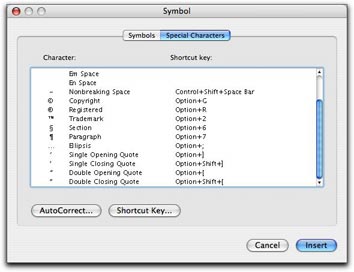 In Word, you can also use the Special Characters pane of the Symbols dialog. Choose Insert > Symbol to display the dialog and click the Special Characters tab or button. Scroll down to find the character you want (they’re listed at the bottom of the list) and double-click the one you want to insert it. This is a rather cumbersome way to get the job done, but it does work.
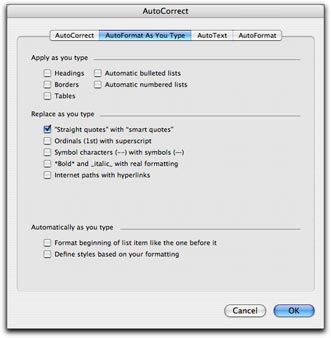 Fortunately, Word offers a better, automated way. You can set an option in the AutoFormat as you Type pane of the AutoCorrect dialog that will automatically convert every straight quote you type to the corresponding smart quote. Choose Tools > AutoCorrect and click the AutoFormat as You Type tab or button in the dialog that appears. Then turn on the “Straight quotes” with “Smart quotes” check box. (As you can see, that’s the only feature I have enabled in this pane on my copy of Word; I don’t like Word messing with the formatting of what I type, as I discuss in “
 First double check to make sure that the “Straight quotes” to “Smart quotes” feature is enabled as discussed above. Then choose Edit > Replace to display the Find and Replace window. Type the same plain old double quote character in the Find What and Replace With boxes. Then click Replace All. Word will replace the dumb double quotes with the correct smart quotes and tell you how many it replaced. Click OK to dismiss the confirmation dialog. Then type the same plain old single quote character in the Find What and Replace with boxes and click Replace All. Word replaces all the dumb single quotes with smart single quotes. Click OK to dismiss the confirmation dialog and close the Find and Replace window.
 This dock stretches into a body of water not far from the coast. It was a haunting image, made magical by the reflections of the dock and grasses off the perfectly smooth water surface.