
But what I really need is some advice.
As my sick dual G5’s hard disk churns away for the seventh straight day of data recovery efforts using TechTool Pro and I start work on my Leopard book, I have come to realize that I’m going to need a new desktop Mac before year-end. Probably within the next month or so.
I’m not happy about this. I bought two new computers last year (a Dell PC and a MacBook Pro, both of which will be used as “test mules”) and had to spend a small fortune on each of them. I also had a number of costly computer repairs, including a new hard disk for my old server and a new motherboard for my dual G5. Now I’m facing a new desktop computer purchase and there aren’t (m)any affordable options.
What I Need
I need a computer with the following minimum requirements:
- A Macintosh. Don’t try to sell me on Windows; it won’t work. I’ve been a Mac user since 1989 and have never even faintly felt the desire to switch to the “dark side” of computing. (My apologies to Windows devotees.)
- An estimated useful life of at least 3 years. I want my computer to be able to run all the latest and greatest software for the next 3 years, without having to upgrade a single hardware component. If I can get 4 years out of it, great. Five years would be asking too much.
- A relatively fast Intel processor. Obviously. I need to be able to boot Windows and run Windows software (so maybe I can get rid of my Dell laptop before it’s worthless on eBay). I also need to take advantage of updated programs that make use of the Intel processor’s technology.
- At least 2 GB of RAM. I have 1.5 GB now and although it’s enough for now, I don’t think it’ll be enough three years down the road.
- At least a 250 GB hard disk. Probably not much more. My file storage needs are minimal. I archive old stuff I don’t access regularly. The rest has to be backed up regularly. The way I see it, the less I have stored, the less I have to back up.
- A SuperDrive. I need to be able to read and write CDs and DVDs.
- Airport Extreme. I have a wireless network at home and like it that way.
- Bluetooth. I have a handful of Bluetooth devices and hope someday to have a Bluetooth phone. (I don’t buy a new cell phone until the old one dies a horrible death, sometimes involving water.)
- Enough graphics capability to display in high resolution in millions of colors on my existing Sony 20″ monitor. (Or, alternately, come with its own monitor that’s 20″ or larger.) I need a big monitor to get my layout work done, especially now that I’ve got “middle aged eyes.” (Don’t worry, boys and girls. You’ll know what I’m talking about before you know it.) When my Sony monitor dies, it’ll be replaced with a 30″ Apple Studio Display, but I’m not in a big hurry to drop a wad of cash on that.
Do I need two Intel Core 2 Duo processors? No. Do I need expansion capabilities? Not really.
 That tends to push me toward a 24″ iMac. But there’s this weird mental block in my head about iMacs. Traditionally, they’ve always been Apple’s low-end model of computer. While they were perfectly acceptable as test mules for my work, I never seriously considered them for my actual day-to-day production tasks. But in looking at the current iMac specs on the Apple Web site, it’s pretty clear that today’s iMac isn’t your Aunt Tillie’s iMac. It’s a pretty serious machine, which ample processing power for all but the most serious graphics/video/gaming tasks. And frankly, it would probably be able to tackle some of those tasks pretty well, too. Considering the price of the most loaded iMac, that’s to be expected. They ain’t exactly cheap these days. When I loaded one up on the Apple Store’s Web site, the price tag exceeded $2K. For an iMac. No wonder I have a mental block.
An update to a 24″ iMac would also update my monitor. It wouldn’t get me the 30″ display I’ve been yearning for since its release years ago, but 24″ is bigger than 20″, so it’s an upgrade. And that flat screen will take up a lot less space on my desk than the Sony CRT. Of course that leaves me with a perfectly functional 20″ monitor that I couldn’t sell on eBay. (The darn thing has to weigh in at at least 60 pounds.) But then again, according to the iMac specs, the computer can support a second monitor. But do I really want two monitors on my desk?
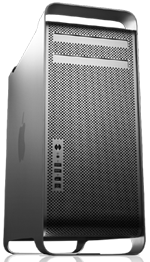 My greedy little mind is naturally leaning toward a Mac Pro. Now that’s a computer. I imagine two internal hard disks, two SuperDrives, 2 GB of RAM, and enough graphics power to drive the 30″ display I’ll probably never get. But when I loaded one of these up on the Apple Store’s Web site, the price tag was staggering: over $3K. I don’t have that kind of money sitting around to buy a computer. And if I did, would I want to blow it on a computer rather than, say, a two-week vacation in Hawaii?
But with a computer like that, I could do anything a Mac could do.
But do I need to do everything?
When I bought my last G3 — it was the last beige model — I made sure it had video in/out ports. The old-fashioned, color-coded kind. I don’t know what they’re called. (I’m really not as technical as people think.) I was certain that I’d be processing video on that machine and I wanted to be prepared. I think I used it exactly twice. Once when I got the computer because I had the feature and figured I should try it. And once to actually create a video that I never finished and eventually deleted as a half-finished project. Ditto for other features I’ve loaded into past computers, thinking I would use them. The SCSI card in my recently sold G4. The 250 MB Zip drive in the same machine. (Come to think of it, that machine really was loaded. The new owner got quite a deal at only $335 plus shipping. No wonder she was so happy.)
I was hoping to put off the purchase for at least six months. Actually, what I was really hoping was that Apple would introduce a new desktop Mac in the Mac Pro line at Macworld Expo in January and drop the price of the existing model. That’s usually how I choose my computer — buy the second or third model down from the top.
Maybe that model is an iMac these days. Seems that way to me.
If only I could break my mental block against those machines. Stop thinking about the ridiculous “ET” model I had on an editorial loan for about six months. I hated that computer. It seemed to mock computing with its silly design. I was not in the least bit sorry when I was asked to return it after using it for less than 50 hours of runtime.
So I’m looking for advice from folks who have purchased a desktop Mac within the past 6 to 12 months. Which model did you buy and why? What do you use it for? Are you happy with it? Use the comments link to share your thoughts with me and other readers.
 My production Mac, which is currently a 2-year-old Dual G5 tower, is the computer I sit at when I’m writing. It has a 21″ Sony monitor (the old, heavy CRT type) which is really great when I’m doing layout on Visual QuickStart Guides and Visual QuickProject Guides. It also has all the built-in and attached equipment I need to get my job done, including three printers, a scanner, and numerous mobile devices like cameras, digital video cameras, iSight cameras, external hard disks, and more.
 My Macintosh test mule, which is currently a 3- or 4-year-old G4 eMac, is the computer I run software on when I’m writing Mac books and articles. I like the all-in-one design of the eMac and the price when I bought it was within reason. When I bought it, it had the bare minimum I needed to get the job done: a G4 processor (at the time, G5 had just come out), a SuperDrive (because I often need to write about creating CDs and DVDs), built-in modem, networking capabilities, and adjustable screen resolution. When I went wireless last year, I installed an AirPort card. This computer was the machine I used to run beta Mac OS software for my Panther, Tiger, Word 2004, Excel 2004, WordPress 2, and QuickBooks 2006 books. Maybe even my Jaguar book, although I admit I can’t remember that far back.
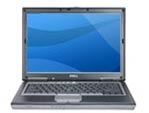 My PC test mule, which is currently a Dell Latitude D820 laptop, is the computer I run Windows software on when I’m writing Windows books. (The computer recently replaced a 4-year-old Dell Dimension tower, which was really showing its age.) This computer is loaded and it isn’t by choice. As mentioned earlier in this entry, I needed souped up graphics and a fast, modern processor (or two?) to run Vista with the Aero Glass effects. It has a CD writer but not a DVD writer, although it will read both. (This became a rather ironic thing when I downloaded the Vista beta from Microsoft’s Web site and had to use my Mac to create the DVD I needed to install Vista on my PC. It worked. Of course.) I’m hoping this computer, which cost me a small fortune, will last at least four years.
 My business/personal laptop, which is currently a 12″ PowerBook G4, is the machine I keep at home and take on the road with me. It’s used for e-mail and blogging these days, although I sometimes use it for podcasting. And, every once in a while when I need to do a presentation, I plug it into a projection monitor and do demos. I love the size and configuration of the computer, although I admit that the 40GB (really 37 GB, but who’s counting?) hard disk is a bit small. I recently had to offload a bunch of music and podcasts just to make room for some other stuff. And with only 640 MB of RAM and 867 MHz of processing power, it sometimes slows to a crawl when taking on heavy-duty tasks like sound conversion and iMovie visual effects. I also noticed that its fan starts more frequently than usual these days, like its always hot and bothered.
 In keeping with my downsizing plan, I decided that I wanted to get a Mac laptop. After struggling and finally succeeding in understanding the differences between a MacBook and a MacBook Pro, I decided on a MacBook Pro. 15″ monitor, 1 GB RAM, SuperDrive (need to write about iDVD a bit), 100 GB hard disk. This is going to be one hot computer.