5 Ways to Make Your Blog Posts More Readable

Learn five easy tricks to help pull readers into your blog posts.

Okay, so you’ve written an article for your blog and you’re all ready to publish it online. You’re confident that the article’s content is well-written. And you’re sure it will appeal to your blog’s regular readers.

But wait! Before you put it out to be read by the world, have you done what you can to make it more readable?

By readable, I mean formatted in such a way that visitors will be drawn into its content and want to read every word. Or have you simply composed 20 paragraphs of good, solid information, formatted as big solid blocks of text?

No matter what blogging tool you use to publish your blog, you should have access to the standard array of formatting features available in HTML. In this article, I’ll explain how and why you should use them.

Break Up Long Paragraphs

What’s less attractive on a Web page than solid blocks of text? Long paragraphs of unbroken text can intimidate readers. They look unapproachable, like a college textbook. (For me, they bring to mind the textbook in my college tax accounting course, which further reminds me of two semesters of boring hell on Mondays, Wednesdays, and Fridays.)

Break up long paragraphs at logical points. This will require some writing skill, since you can’t arbitrarily chop paragraphs up — each one must still communicate a complete thought. But shorter paragraphs are a lot less intimidating than long ones — a point that applies to sentences, too (although I can’t seem to get that one into my thick skull).

And one more thing about this: be sure to use a space between paragraphs (usually with the

tag rather than the
tag, if hand coding is required). On the Web, that’s the standard way to end one paragraph and begin another. Just starting a new line isn’t going to break the paragraph at all — at least not in the eyes of the reader.

Use Headings

Headings cue the reader about the content of paragraphs that follow them. For example, my Use Headings heading here tells you that I’m going to talk about headings in this paragraph and, likely the few that follow up until the next heading. Readers can scan your article’s headings to get a better idea of what the article covers.

Of course, there are two kinds of headings. There’s the kind that actually reflects what’s in the paragraphs they head — that’s what I’m using in this article. And then there’s the kind that doesn’t quite explain what the following paragraphs are about, but are humorous or witty. Both types can work, but for serious content, I recommend the first type.

Headings can also help with search engine optimization (SEO), but not being an SEO expert, I can’t elaborate much about this. I seem to recall reading that h1 and h2 level headings are more effective for SEO than other lower levels. I use h3 because that’s how formatting is set up on my blog and I’m not terribly concerned with SEO. If SEO is very important to you, you might want to look into this claim. Of course, for headings to be effective at all in SEO, they must be coded as headings using

and tags (or other level tags as appropriate) around them. The appearance of text coded as headings will vary depending on settings in your style.css file or other style information for your blog. (And now we’re getting a little more technical than I wanted to get in this article.)

Format Lists as Lists

If any paragraph in your article includes a list of four or more items that are longer than four or more words each, for heaven’s sake, format them as a list!

There’s nothing so boring or potentially confusing as long lists within a paragraph, especially when those lists include explanations, commas, and semicolons. Why worry about proper in-paragraph list formatting when you can simply create a bulleted or numbered list that’s clear and easy to read?

Lists, like headings, are also extremely scannable, making it easy for readers to get an idea of the content they include. They draw the reader in by giving them information in bite-sized chunks. Bold formatting used at the beginning of a list item (see below) can act as a heading, letting the reader know that an explanation or more information about the item follows.

In summary, lists can do the following for you:

  • Break up long blocks of text. Long lists in a paragraph make big, fat, intimidating blocks of text. Isn’t this much nicer?
  • Make one point easy to distinguish from the next. Since you (and your readers) don’t have to worry about how list items are separated (comma or semi-colon?) you don’t have to worry about someone misunderstanding list items.
  • Take advantage of built-in formatting options. I’m not just talking about standard bullets and hanging indents here. As you can see in this list, a blog’s style.css file can include instructions for graphic bullets or other fancy formatting.
  • Give your readers important points quickly. By presenting information in an easily scannable format, your readers can see what a list is about without wasting time. If it’s what they want to learn more about, they’ll dive in and read it.

Apply Other Formatting…but Sparingly!

There are other, more basic formatting features you can apply to text. Want some basic information to stand out? Use bold formatting (as I did in the bulleted list above). Introducing a new word or phrase? Italicize it. Got a quote to share? Here’s what I say:

If it’s longer than a dozen or so words, consider putting quotations between

and

tags. This clearly identifies the text as a quote from another author. (Well, in this case, it’s still words of wisdom from me, but you can quote me if you like.)

Don’t use ALL CAPS. It’s childish and unprofessional and considered by many to be “shouting.” And don’t use underlines. On the Web, underlines indicate hyperlinks and you can confuse your readers.

And don’t use too much formatting. There comes a point when the repeated application of bold and/or italic formatting loses meaning and simply fails to do the intended job.

Insert Illustrations

I’m a firm believer in the old adage: “One picture is worth a thousand words.” Maybe that’s why I’ve been writing Visual QuickStart Guides for Peachpit Press since 1995. Those books are full of screenshots — mine average 3-4 per page — and are excellent tools for teaching readers how to perform tasks with various software.

In regular writing — such as the writing you might do for your blog — images can also help communicate information. Did you write a software how-to piece? Screenshots of the steps would be extremely helpful. Did you write about a recent vacation? Include a few photos to show the scenes you’ve written about. Does your article explain the organization of a company or one of its departments? Include an organizational chart to put things in perspective.

On the Web, images do more than just communicate information. They also add visual appeal. Think about it as you visit sites on the Web. Which pages or blog posts caught your attention more? The ones without images? Or the ones with photos or drawings?

If you don’t have illustrations for your article and you want to include some other kind of graphic element, try text in a box. This effect, which is often used in print publications, can add visual appeal almost as much as an image can.

Let’s face it: people like to look at pictures. By giving them pictures that relate to your article, you can capture their attention and reel them in to read more about what the picture shows.

A word of warning here: Don’t use photos that don’t belong to you — doing so is likely a violation of copyright law. You can probably use company logos — if your use is consistent with the company’s rules governing logo use (normally available on its Web site) and you’re writing about the company. But taking photos off another Web site or scanning them out of a print publication for use on your site could get you in a lot of trouble. It’s stealing, plain and simple, and you could get sued. Use photos, screenshots, and drawings that you’ve taken or that you’ve received permission to use. The rule of thumb here is, if you don’t know whether you have permission to use it, you probably don’t.

Conclusion

As you can see, each of these techniques is relatively easy to implement on your blog. While it isn’t necessary to use all of them in one article (as I’ve attempted to do here), you can mix and match them as you see fit to liven up the layout and appearance of your prose.

The main thing to remember is this: the more interesting you make your text appear at first glance, the more likely you are to get readers to stick around and read what you’ve written.

Oh, and by the way, just about everything in this article also applies to your non-Web writing efforts: reports, articles, white papers, and books. You just won’t need HTML code to get the job done.

How to Contact Amazon.com Customer Support by Telephone

It’s easier than you think.

One of the annoyances of dealing with online companies is getting customer support by phone. Yes, there’s all kinds of information available on their Web site. But there are a lot of instances where the information that’s available online for your account simply doesn’t answer the question you have.

Like me, today, with Amazon.com. On December 26, I ordered a Caphalon One saucepan to complement the set my sister, brother, and sister-in-law so generously bought us for our Christmas/belated wedding gift. The pan cost a small fortune, so it qualified for free “super saver” shipping. My past experience with this free shipping is that if the item is in stock, it usually arrives 5 to 10 days after I place the order. I was in no real hurry, so that was fine.

But by today, nearly 3 weeks later, I still didn’t have the saucepan. I followed up on Amazon.com’s Web site and learned that the item had not yet shipped and was not scheduled to be shipped until January month-end — a full month after I placed the order. That was simply not tolerable. It was time to talk to Amazon.com.

Poking around the Help pages will eventually get you to a clickable button that you can use to contact Amazon.com by phone. Here’s the generic link: http://www.amazon.com/gp/help/contact-us/call-me.html/

imageHere’s how it works. You click the button (or above link) to get to a Contact Us by Phone page. You then click the Call Me button. A window like the one here pops up. Enter the phone number for the phone you’re nearest to and make sure Right Now is selected. Click Submit. Your phone rings immediately. Answer the phone. You’ll then be on hold for a short while until someone (most likely in India) picks up and begins reading to you off a script. If you’re lucky, that person will understand enough English to answer your question. If you’re really lucky, that person will be in West Virginia, like the person I got the first time I did this.
I went through this exercise today for my saucepan problem. The Indian woman on the other end of the line “upgraded” my shipping to standard at no charge. I’ll have the saucepan in 5 to 10 days. While this doesn’t answer the question of why shipping was delayed in the first place — that question was beyond her capabilities to answer — it does prevent any further delays.

Update: Want to comment or e-mail me with an Amazon.com customer service or technical support question? Read this first.

Earning Money with Your Blog

Without trashing it up.

Before I dive into this topic, I want to make it clear that I really hate the way some Web sites and blogs are so covered with advertising that it appears that the only reason the site/blog exists is to get visitors to click advertising links and earn money for the site/blog owner. You know what sites I’m talking about. It’s pretty obvious when advertisements take up more space in your browser window than the actual content you came to read.

(I’m actually involved with one of these sites. It’s a long story that’s still evolving. I’ll tell you more about it in a future article here. But my failure to provide the URL in this note should give you the idea that I’m not very proud of it.)

All that said, if you publish a Web site or blog and you’re not doing anything to monetize it, you’re leaving money on the table. And that point really hit home when I read that one of the bloggers I follow makes over $15,000 a month from Adsense revenue alone. Sheesh.

It seems that I need to walk a fine line between keeping my site free of advertisements (100% content per page, no revenue) and trashing it up with all the affiliate program and other advertisements I can get my hands on (25-50% content per page, some revenue).

After all, this site’s goal is not to make money. Sure, one goal is to promote my books and other work and support readers so they buy more books. And to attract new readers who buy books. There’s money there. But my other goals are to sound out about the things on my mind and take notes I can consult in the future about the things I do and see.

But can you imagine how much time I could spend doing, seeing, and blogging if my site brought in $15K/month?

(To be fair, you must consider the costs associated with maintaining such a site. If only 1% of a site’s visitors react to an advertisement by clicking on it — and that’s probably a high estimate — imagine how many visitors you need to crank up $15K of Adsense earnings. We’re talking thousands of page hits an hour. Those visitors eat up bandwidth at an alarming rate. Bandwidth costs money. So a bunch of that revenue is probably eaten up by hosting costs.)

One of the things that drives me is my own feeling towards advertising-heavy sites. I find them distasteful and I avoid them. That makes me think that if I filled my site with ads, people might use that as an excuse to stay away. Less visitors should mean less revenue, right?


Well, last week I started integrating Adsense ads into my sites. I’m trying to do it tastefully, with ads in various positions, depending on the site and the type of page. You may have noticed them. For the most part, they’re near the bottom of pages — which is not the recommended location to get clicks. wickenburg-az.com has a link unit across the top of the page, right beneath the header image. It’s color coordinated, so it fits in. There are text links at the bottom of single pages (that’s a page with a single article and all of its comments) on this site, and other text links in the sidebar for the Home and Category pages. wickenburg-az.com has a few image ads, which really concern me — some of them can be really tacky, with flashing graphics and obnoxious images. (I’m personally offended by some of the graphics in dating ads, like the ones you might see on Slate.com. They’re using women to sell sex.)

I also set up Adsense channels, which is another topic I need to write about here. They help me see where the revenue is coming from when I look at Adsense reports. Sure enough, my revenue stream took a big jump when I added the ads.

LinkShare  Referral  PrgToday, I set up LinkShare, an affiliate program that enables me to display all kinds of ads. Unlike Adsense, however, people have to buy something after clicking the link to earn me money. The percentages are higher, but what are the chances of someone actually clicking and buying?

With LinkShare, you choose the companies you want to represent and apply. I chose a bunch that I thought would interest my blog’s visitors. A bunch automatically accepted me. One declined me, but when I questioned them, they said it was an error and they approved me. Another declined me because I have no dedicated shopping areas on my site. In other words, they want sites with lots of ads. I’m waiting for a bunch of others.

Then I set up the WordPress Ad Rotator plugin to display a single 125×125 pixel “button” near the bottom of the Sidebar on all pages of this site. I had to manually copy and paste the code for every single ad I wanted to use. It took a long time and the task was boring and tedious. But it does display the clickable ads.

I could get fancy and set up the rotations based on categories, but I’m keeping it simple right now. I just want to see if this actually does earn revenue.

So that’s where I stand right now: ads from Adsense and LinkShare.

I’ll report on my progress when I start getting some reports from LinkShare. I’ll also put together that Adsense Channels article one of these days. I think it’s a great tool for seeing which pages and types of ads work best.

Rewarding Reader Participation

Because reading blogs should not be a spectator sport.

Sometimes I feel as if I’m blogging to myself. I know I’m not — the stats show more than 3,000 page views a week here, which isn’t too shabby. But the people who stop by seem to read (or browse) and hurry on their way without offering any feedback on what they’ve read.

Now everyone has an opinion and I like to think that everyone has additional insight they can share on many topics. That’s what the Comments links are for. So, in an effort to encourage comments from readers, I’ve decided to experiment with a little giveaway.

At January month-end, I’ll give away one of my books to a randomly selected commenter who posted a comment on one of my January 2007 posts. The book is reader’s choice from currently available titles. If this little reward program is successful at getting site visitors to participate with useful, insightful comments, I’ll continue the program for each month with similar rewards.

Keep in mind that this applies to comments posted using the Comments link for a particular post on this site. (Feedback submitted via contact form is not eligible.) The comment must pass muster with our spam prevention software, so if you comment and your comment doesn’t appear within 48 hours, it’s likely that its content was considered spam.

What do you think about this? Don’t keep it to yourself. Use the Comments link.

Flying to Sedona (again)

A helicopter flight that has become routine.

As I write this, 36% of the site visitors who have taken the time to vote in my Most Interesting Topics Poll (that’s 11 people so far; I’m hoping for continued growth in that vote count) have said that Flying is the most interesting topic on this site. So I decided to devote this morning’s blog session to a flying article.

(For those of you just tuning in for the first time, among the hats I wear is a commercial helicopter pilot hat. I operate a Single Pilot Part 135 helicopter tour and charter company out of Wickenburg, AZ — Flying M Air.)

I flew yesterday. I flew three passengers from Wickenburg to Sedona and back. The passengers were originally from Russia and now live in the U.K. They’re staying at the Flying E Ranch, one of Wickenburg’s remaining three guest ranches.

I can’t get excited about this flight. It was so routine. After all, by now I must have flown from Wickenburg to Sedona and back at least 50 times.

The only thing unusual about the flight yesterday was visibility. In Arizona, it’s clear and sunny almost every day. Not only can I usually see the Weaver Mountains about 15 miles to the north, but I can usually see them clearly — that means I can distinguish rocks and canyons and other features from 15 miles away. But yesterday was different. It was hazy, as if a thin gauze had been stretched across my eyes. As I drove to the airport at about 10:00, it was apparent why: there was moisture in the air. There was condensation on my Jeep and even a little frost down where the horses were munching their morning meal. Imagine that. Moisture.

My passengers arrived early, all bundled up for the 50°F temperatures we expected in Sedona. After giving them their preflight briefing and loading them on board, I started the helicopter and waited for it to warm up. A few minutes later, we were on our way, climbing to the northeast into hazy skies.

The air was smooth, the sights were the same as usual (except for the haze) and I pointed them out faithfully to my passengers. They didn’t talk much, which is always a danger with me. I wind up talking to fill the silence, telling them more about the area than I usually do. I had three passengers on board, so I had to make sure I pointed out things on both sides of the helicopter — normally, with just two on board, I put them on the same side of the helicopter so I only have to point out things on one side.

We crossed the Weaver Mountains not far from the hidden cabins I’d discovered years before. Then we followed the Hassayampa River up toward Prescott, crossing the Bradshaws. My passengers were thrilled by the sight of snow on the north side of the moutains. I was thrilled by the fact that the haze had cleared out and it was a nice, clear day up there.

As we got close to town, I reported in to the tower at Prescott Airport. I planned to follow Route 69 a bit and then head toward the pass atop Mingus Mountain. This would have me cutting as much as one mile into Prescott’s airspace. (I normally go around it so I don’t have to talk to the tower, but our heavy weight had our airspeed a bit slower than usual and I wanted to save a few minutes of time.) We were over Prescott Valley when the tower pointed out a Baron about 400 feet above us, crossing in front of us. I descended about 500 feet — I was high because of all the mountains I’d have to cross — to stay out of his way. Then the tower cut me loose and I climbed up and over Mingus Mountain, reaching my highest elevation of the flight: about 8,000 feet.

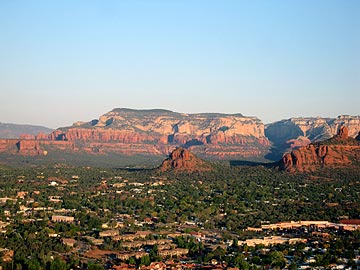
West SedonaFrom there, I started a 1,000 fpm descent to the northwest, descending past the former ghost town of Jerome. I told my passengers about the first time I’d been there nearly 20 years ago when only a handful of people lived there. Now it was a booming tourist town, with art galleries and restaurants in the old buildings perched along its hillside. I showed them the open pit mine, then continued northwest to the red rocks. We did a red rocks tour on the way into Sedona, avoiding the flight path of the helicopter tour operators there, and landed at the airport.

Uneventful.

Of course, I’d been so concerned with getting my credit card terminal to work at the airport that I’d forgotten to bring a book or my laptop so I’d have something to do while my passengers went on their Jeep tour. Duh. After the Jeep picked them up, I walked over to Sedona’s restaurant for lunch. (I don’t think I can recommend the Chicken Alfredo with Broccoli; too thick and starchy, although the chicken was cooked nicely.) Then back to the terminal to wait.

I wound up renting a car from the car rental guy there. $20 for up to 3 hours (I think). I didn’t even have it two hours. I drove down off Airport Mesa and hit the New Frontiers grocery store at the bottom of the hill. It has a magnificent selection of cheese and a very knowledgeable cheese guy behind the counter. I tasted some cheeses and wound up buying them all. I also bough brussels sprouts on the stalk — something that’s simply not available in Wickenburg.Then into “uptown” Sedona to visit a bookstore (the Worm) which seemed to have fewer books than I remember. And coffee at the coffee shop across the street. Then back to the airport so I’d be there when my passengers returned.

I talked to everyone who worked at the airport. The car rental guy, the AZ Adventures helicopter tour guys, the FBO guys, and the Maverick helicopter tour guy. That kept me busy even after my passengers returned from the Jeep tour and went to have lunch at the airport restaurant. By 3:30 PM, they were back and it was time to go.

The return trip was almost as routine. The haze had moved in a bit and we were flying right into the sun. My hat was under my seat, so I had to shade my eyes with my hand once in a while. Instead of heading straight for the southern end of Mingus Mountain, we headed southeast to Oak Creek Village. My front seat passenger had his camera out and the red rocks were being illuminated by that gently filtered afternoon sun. The views out that side of the helicopter were great. I flew just past Oak Creek VIllage before turning to the southwest, back into the sun. The mountains rose as dark shapes silhouetted against the hazy light.

I didn’t have as much to say on the way back. Part of that was my intercom system, which was creating static again. (I have to fix that! It’s driving me nuts!) So I had the squelch set so it was less likely to make noise. My passengers weren’t talking anyway. They were just looking; the daughter, who was probably close to 18 years old, had her iPod on under her headset and probably wouldn’t have heard what we were saying anyway.

The farther south we flew, the worse the haze got. It was definitely brownish in color toward the Phoenix area — smog trapped in an inversion. At one point, we could clearly see a dark line in the sky that marked the inversion layer. Very unusual.

I flew them over Crown King, a tiny town in the Bradshaw Mountains. The main reason I go that way on the way back is that you can normally see Wickenburg Airport from the Crown King area — a distance of about 23 nautical miles. But not yesterday. The haze was so complete that if I didn’t have my GPS set to Wickenburg (or at least a heading in mind) I would have strayed off course. I simply couldn’t see that far away. Even Lake Pleasant was difficult to see from the air, although I did point it out for my passengers as we flew about 10 miles north of its northern edge.

We were over the Monte Cristo mine on Constellation Road when I was still trying to figure out exactly where we were. When I saw the mine shaft and buildings, I thought I’d stumbled upon a mine I’d never seen before. Then I recognized it and was surprised that we were so close to town. Less than 10 miles to the airport, according to my GPS. I could just about make out reflections downtown and the scars of the earth around the airport.

I flew over town and then headed out to Flying E to show them the ranch where they were staying from the air. (That’s something I do for people staying in our local hotels and guest ranches.) Then we landed by the fuel pumps at the airport. I cooled down and shut down.

Routine.

After a while, flying the same route over and over does become routine or — dare I say it? — boring. Sedona is a place of incredible beauty and the best way to appreciate its beauty is to see it from the air. Yet when you’ve seen it as many times as I have, the impact of all that beauty fades. That’s one of the things I talked to the FBO guys in Sedona about. They both agreed that when they’d first come to Sedona, they were amazed at its beauty. Now, living with it all around them every day, it simply isn’t a big deal.

I felt like that when I flew at the Grand Canyon, too. Don’t get me wrong — it never got so boring that I’d prefer to fly elsewhere. I just wished I had the freedom to alter my flight path for a slightly different view or a new way of seeing things.

And here in Wickenburg. The upstairs front windows of my home look out over the Weaver Mountains in the distance. When I first moved into the house, I thought it was a view I’d never grow tired of. But I did. Kind of. I’m not sure why.

I’d be interested in hearing from other pilots who fly in beautiful places and have somehow lost sight of that beauty because of routine. Use the Comments link.