Morning Helicopter Flight to Quincy

Another video from the Flying M Air YouTube channel.

I was unexpectedly called out to do a cherry drying flight on Saturday morning. Here’s footage from the nose cam with narration added in production.

More Info:

Note: This is the 1080 FHD version of this video. There is an ad-free 4K version of this video for top-tier channel members That’s my thanks for their financial support to this channel. Become a channel member at the Access Premium Content level to watch 4K versions of channel videos.

Playing the Weather Game

Why I check the weather multiple times a day every day all summer long.

My main business — my bread and butter and steak and potatoes — is using my helicopter to dry cherries. I’ve written about this numerous places and even have YouTube videos about it, so I’m not going to go into detail here. You can find some of my blog posts about it by clicking the cherry drying tag.

Being a serious cherry drying pilot means watching the weather incessantly so you can be close to the helicopter when called out to fly. I watch the weather three ways:

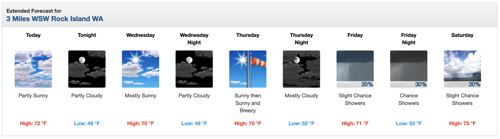
  • National Weather Service Forecast. I don’t care what anyone says about their favorite source of weather information. In the U.S., all weather data comes from NOAA and is made available on the NWS website. That’s Weather.GOV, not Weather.COM. I have point forecasts set up for the three areas that interest me most: Malaga, Quincy, and Mattawa. I have bookmarks set up for all three on my laptop computer, desktop computer, iPhone, and iPad. Throughout the day, I consult them numerous times. When there’s rain forecasted for the near future, I also look at the hourly forecast to see what time of day the rain might come.

    Weather for this Week
    The forecast icons make it easy to see the weather at a glance.

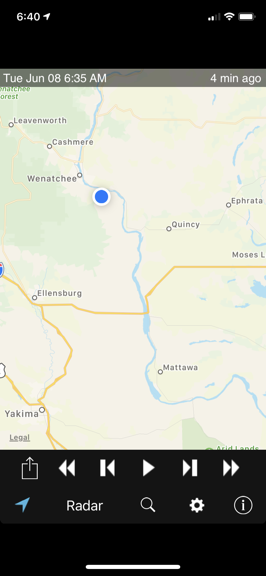
  • Radar Image
    Of course, there’s nothing on radar now, but if there was, this image would be full of gray, green, yellow, orange, or even red shading to show storm severity.

    Weather Radar. Again, I use a NOAA product to check the radar for the area. In this case, it’s the RadarUS app on my iPhone or iPad. When there’s rain in the area, I want to know where it is, how heavy it is, and which way it’s moving. This app can give me all of that information. I can even zoom in with a satellite image overlay to see how close it’s coming to the orchards I’m under contract to cover.

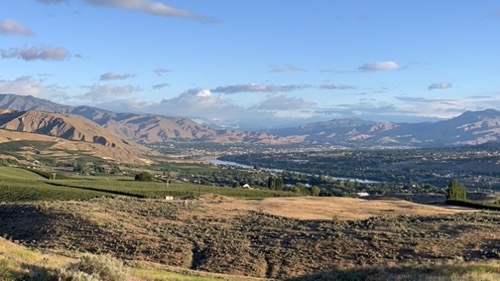
  • Sky watching. Wherever I am — although I’m usually at home this time of year — I watch the sky. Are there clouds? Do they look threatening? Is rain falling from them? What does that look like on radar? Which way are they moving? While I can’t see the Quincy or Mattawa areas from here — and they do both have different weather than we do locally — I can get a good idea of what’s going on in my immediate area where I have the most acreage to cover. I can also often see large storm cells over the Waterville Plateau that might be headed for Quincy.

    Sky Watching from Home
    This is the view from my house. I have a mostly unobstructed view from the southwest to the northeast so I can literally see the weather coming — unless it’s coming from the south. The view in this shot is looking mostly northwest.

The crazy thing is that the short term forecast changes every day. For example, last night, when I went to bed, the forecast showed a 20% chance of rain after 11 AM today (Tuesday). But this morning, as you can see in the above forecast image, that rain prediction is completely gone.

But it can just as easily come back.

Or rain without rain being in the forecast.

That’s what I call the Weather Game. You do everything you can to stay on top of the weather and the forecast is neither consistent nor reliable. I sometimes wonder why I bother.

In any case, this is part of my life until August when I’m done with cherry drying season. And even then, it’s hard to turn off the habit of checking the weather so often — I’m usually checking it regularly well into September.

Winter Helicopter Flight to McMinnville Part 2

Another video from the Flying M Air YouTube channel.

Here’s the second part of my March 2021 flight to McMinnville, starting west of Ellensburg, WA and running to the Yakima Reservation. This flight has both nosecam and instrument cam views, as well as cockpit narration and radio chatter. I’ll release additional parts of this flight throughout the summer.

Note: This is the 1080 HD version of this video. A ad-free 4K UHD version without the animated subscribe button is available to MEMBERS at the Access Premium Content level. That’s my thanks for their financial support to this channel.

Great Loop 2021: Plotting the Course

I put the planned overnight stops into a navigation app to get a general idea of the route.

When Capt Paul was interviewing crew members for his trip from Maine to Chicago by way of the Hudson River, Erie Canal, and Great Lakes, he sent each of us a PDF of a spreadsheet that he had created that listed the days of the journey, the expected stopping point each night, the distance between points, and expected dates of arrival and departure. I had taken a look at the list and had even tried once or twice to plot the route, but it wasn’t until today that I sat down and entered each planned stop as a waypoint in a navigation app.

What changed? Well, I tried a different, more user-friendly marine navigation app, Aqua Map.

A Tale of Two Marine Navigation Apps

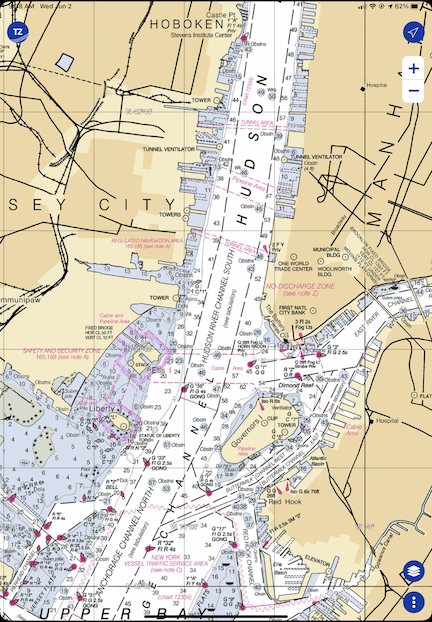
TZ iBoat
Here’s New York Harbor as it appears in TZ iBoat. This is a raster (“r” = “real” is my way to remember it) chart. TZ iBoat will automatically switch to the view magnification that’s appropriate for the scale I’ve zoomed to.

Years ago, when I did the Learn to Navigate the Inside Passage cruise with Northwest Navigation, I looked for (and found) an app that would run on my iPad and display our position on real nautical charts. That app was TZ iBoat. I chose it because it (1) enabled me to download charts so I didn’t need an active Internet connection and (2) it supported raster charts, which are basically scanned and location encoded versions of traditional printed NOAA (or, in the case of that trip, Canadian) charts. I wanted raster charts because I wanted something that looked like the paper I’d need to consult when actually cruising. Call me old fashioned, but I’m the same way with aeronatuical navigation apps like Foreflight — I always consult the sectional chart version because that’s what I’m used to.

TZ iBoat wasn’t terribly expensive. The app was free but I’d need an annual subscription to get the charts. That’s showing as $19.99 today on the App store but I’m pretty sure I paid more. I’m thinking $35. Still a lot cheaper and easier than buying printed charts.

When this Great Loop trip came up, I renewed my subscription for USA coverage. I already knew the software pretty well, so it would be easy enough to use it on this trip.

Aqua Map
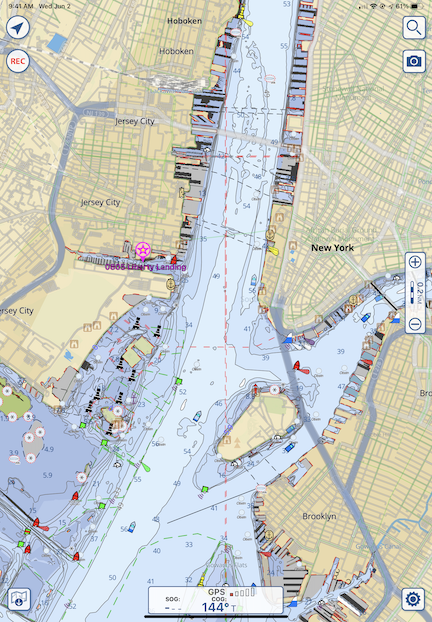
Aqua Map’s view of New York Harbor at roughly the same magnification. Because this is a vector chart, the more I zoom in, the more details are displayed.

But then Capt Paul told me about Aqua Map. I downloaded it to give it a try. I immediately realized that it had some major benefits over TZ Boat: it could display data overlays from other sources, including Waterway Guide. So in addition to charts, it would give me data about marinas, anchorages, locks, and other facilities that either aren’t included on charts or have limited information on charts. The app was free; a subscription for the US and Canada, including charted lakes, rivers, and canals, was $14.99. I subscribed and linked it with my Waterway Guide subscription. (This, I’m pretty sure, makes it unnecessary for me to subscribe to the digital version of Waterway Guide in that app.)

The only drawback to Aqua Map: it uses vector charts instead of the raster charts I prefer.

But is that really a drawback? Maybe I just need to face it: vector charts, with their customizable display layers, are probably the future of navigation, whether it’s marine or aviation. Maybe it’s time for me to move into the 21st century after all.

Of course, I’ll have both with me on the trip. My new iPad has plenty of room for both of them and the downloaded charts I’ll need along the way.

Plotting the Route

There were two ways I could plot out the planned route:

  • Create waypoints for each stop along the way.
  • Create a route with connected waypoints for each stop along the way.

I decided to just create the waypoints. I wasn’t going to steer the boat and, even if I did need a route laid out between obstacles, I could always create it on the day of the trip. All this data could easily be stored in the app. For now, all I really wanted to know was the general planned route and I figured that would show up well enough once the waypoints had been entered.

I did that this morning while I had my coffee and breakfast. It took quite a while. There were 51 overnight stops on the plan — some planned for more than one night — and they had to be located and created individually. I quickly learned to use Aqua Map’s search feature to find one point after another and create the waypoint. I named them with the 4-digit planned date (which I already knew was no longer accurate because we planned a later departure from New York) and the stop name. So the first waypoint I created was 0805 Liberty Landing for August 5 Liberty Landing Marina.

I only had one problem and that was when putting in the waypoints for Liverpool and Onodaga (in New York on the Canal). It seemed to me that they were the same place; I’m still waiting for Capt Paul to get back to me on my query.

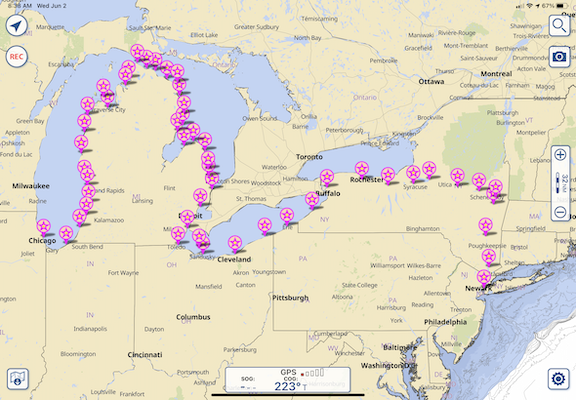
Once I zoomed out, the route became clear. While it looks like we’re boating across dry land as we cross New York, it also clearly shows which side of each of the Great Lakes we’ll be cruising along and the fact that points seem closer together on the Lakes than in the Canal.

IMG 0081
Here’s the big picture look at our original planned route.

Of course, Capt Paul and his crew will be doing more than this. He’s starting in Portland, ME and finishing up in Stuart, FL. What I did here represents a fraction of his cruise. But since I’m not going to be on board for anything beyond this, I didn’t bother plotting it.

Keep in mind that this is the general plan — a starting point for knowing where we’re going and how long it will take. I seriously doubt we’ll follow this to the letter. Capt Paul is already making changes to overnight stops along the way so we can enjoy a dinner at the Culinary Institute of America in Hyde Park after leaving New York City. I’ll be making an updated version of the route as we travel.

I’m also starting to consider turning the breadcrumbs subscription back on for my ancient Spot Messenger — if I can find it — so friends and family members can track me in real time. It might be worth it if I can get a pay-as-you-go monthly subscription and buy those lithium batteries it sucks down in bulk.

My Thoughts on the American Great Loop Cruisers’ Association

Some thoughts after about a month of membership.

I’m writing this blog post mostly because I said I would elsewhere. I’ll try to keep it brief.

Great Loop Logo
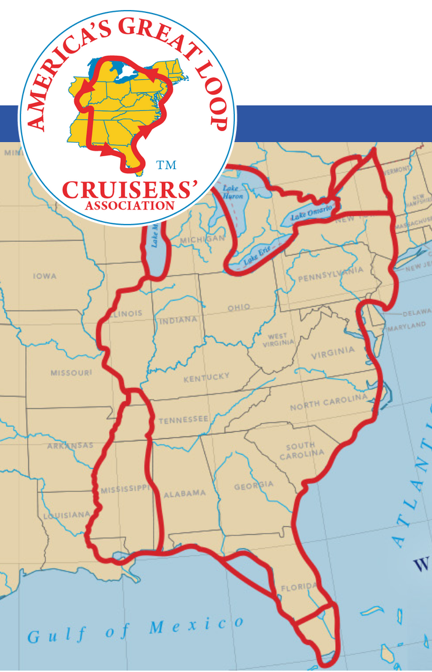
The AGLCA logo and a map of the route(s) on the home page of the organization’s website.

If you’ve been following my blog, you know I’m interested in completing the Great Loop. In an effort to learn all I can about it in preparation for the year-long journey, I began looking for resources online. The American Great Loop Cruisers’ Association was one of the resources I found.

At first, there were just two organizational resources that interested me: videos about the Loop and the Rendezvous.

The Videos

There are a lot of videos and most were tagged $25 each, which really put me off. I honestly couldn’t imagine them charging members a fee to watch existing content, many of which appeared to be narrated PowerPoint slide shows. I assumed that the videos were free to members and it was one of the reasons I joined up.

I was wrong. The $25 per video fee was on top of annual membership. Yes, there are a handful of videos that I could watch for free and my registration to the Rendezvous (see below) included credits I could apply to two (I think) more. So simply joining the organization wasn’t going to get me much closer to seeing educational video content unless I was willing to dish out more money.

Video for a Fee
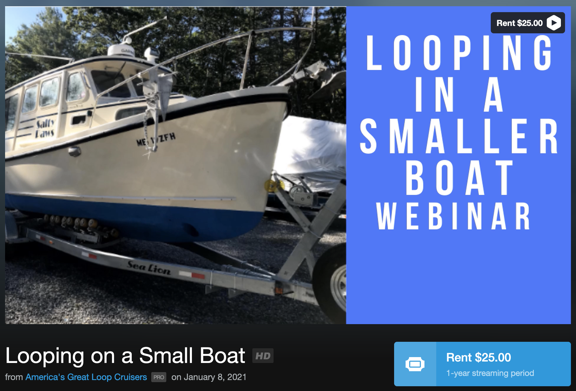
Is it worth paying another $25 to watch this webinar? I don’t know.

Understand this: I don’t mind paying for content I can learn from. But the price has to be related to the actual quality of the content. $25 to watch a 45-minute narrated PowerPoint slide show seems excessive to me. I understand that videos cost money to produce and host, but I also believe that they’d get a lot more views and likely take in a lot more money if they made the price more reasonable — maybe $5 or $10 each. At this point, I’m not terribly interested in spending $25 on a video that might or might not provide information I can benefit from.

The Rendezvous

The Rendezvous is an event held twice (or maybe three times?) a year. Normally, it’s held live at a location along the loop. For example, they’re planning an autumn rendezvous in Alabama and a new (I think) winter rendezvous in Florida. It’s designed for folks getting ready to start the journey, but it also seems like a good way to just pack in a lot of information.

Because of COVID, this spring’s rendezvous was held as webinars. That was actually good for me because it meant that I could attend without having to travel.

The Rendezvous includes social and educational activities: “docktail” parties, seminars, a vendor expo, etc. It seems like a good opportunity to network with other cruisers, learn about new products, get route briefings, and build a base of information about the trip.

I signed up for the spring rendezvous. It was conducted over a three week period with sessions on Tuesdays and Thursdays. There was a midday (EDT) “Lunch and Learn” which was basically a vendor talking about his/her products. I learned about Waterway Guide, which I wound up subscribing to. In the evening (afternoon for me), there were route briefings, each segment focusing on a different part of the loop. The presenters were actual loopers who narrated their slide decks either in a recording or live. Some were excellent — the couple who talked about the Chesapeake Bay and the guy who covered the Erie Canal were very good. Others were good but could have been better. (These were not professional speakers.) At the end of each presentation, they answered questions we’d ask either live or via text.

There were also two “small group” sessions, which were handled like Zoom meetings. Those were nice because you got a chance to chat with a small handful of other loopers. In person social events would (of course) be better, but this was a good substitute.

There was an online Expo and Q&A sessions concentrating on specific topics. Unfortunately, they were held at the same time. I chose the Q&A session for the Erie Canal so I missed other sessions I might of benefited from, as well as the Expo.

I did learn a lot and the good presentations really fed my desire to do the trip. Unfortunately, I missed or arrived late for some presentations. I didn’t get the links I needed a few times and had to scramble to contact the office to get them. Other times, I simply couldn’t take time off to attend — after all, this was in the morning or afternoon for me because of the time difference. What’s good is that I can apparently watch (or rewatch) any of the presentations as videos without having to pay for them again.

Overall, I think it was worth the cost to attend: $165 (on top of the $89 AGLCA membership fee; you must be a member to attend).

Other Benefits

Of course, the annual membership fee includes other benefits that are listed on the website. The funny thing about membership benefits is that they’re really not worth much if you don’t need/want/use them.

But one of the benefits is discounts at certain sponsor locations. Waterway Guide is one of those sponsors and I used my AGLCA discount to buy my Waterway Guide membership, thus getting two very detailed guides about parts of the loop. I also used the discount to buy another book about the loop. If I use enough discounts, it should (theoretically) cover the cost of membership.

Another benefit is access to a member forum where members ask and answer questions. This is a typical forum like you’d find for any group, but these folks are mature adults who don’t troll and act like assholes. So if you have a question — no matter how basic — you can be assured that someone will give you a good answer for it without humiliating you. They also share information about problems along the route — for example, lock closures or fuel unavailability. They even share opinions about marina service and anchorages. There’s lots there and it can be found on the website or delivered to you via daily emails.

Full access to classified ads is also a benefit, and it’s one I took advantage of to get on the crew of a boat doing part of the loop starting later this summer.

There are Looper Lifestyle seminars held a few times a year at various locations along the loop. I suspect that these have been put on hold during COVID, but they do appear on the calendar for the future, so they might actually happen. Keeping in mind that a lot of folks live full-time on their boats, this is probably pretty informative for them.

Worth It?

I’m pretty leery of “associations.” I’ve been conned into joining more than a few that weren’t what I expected them to be.

Helicopter Association International (HAI) is a perfect example. This organization seems to cater to big helicopter operators while pretty much ignoring the needs of the little guy. I honestly believe that it was started by a bunch of guys who saw a way to make a living traveling around the country to host events while occasionally acting as spokespeople for the helicopter community. I got sucked into joining twice and let my membership lapse with a very bad taste in my mouth both times.

I’ve also had an unsatisfactory experience with Whirly Girls, an organization of female helicopter pilots. I blogged about my experience here, so I won’t cover it again.

So while I like being part of groups of people who share similar backgrounds or interests, I’m not the kind of person who will just pay up to be a member. I need the organization to satisfy my needs.

In this case, my need is for information. The AGLCA does satisfy my need, but there’s a lot of pay-as-you-go along the way. I’m starting out, my knowledge base was nearly blank. They’re helping me fill it in and I believe the forums will be very useful for getting questions answered.

The fee is $89/year with discounts for longer terms or a lifetime membership. Is it worth it? I think it might be, at least right now. If those videos were free to members, it would definitely be worth it.

Footnote:

Last night, I watched one of the webinars that normally costs $25 but was free for AGLCA members. To watch it, I had to follow a link to get a promo code, then log into Vimeo, click to Rent the video, and enter the promo code. It took about 10 minutes for the video to appear in the Vimeo app on my television, but when it did, was able to watch it on the big screen.

It was an Aqua Map app demonstration by the developers. Although the video quality started out pretty bad (on a 4K TV), either I got used to it or it improved because it didn’t seem so bothersome after the initial shock. The developers had recorded and edited a tutorial style video that showed finger tapping on a smaller screen and results on a bigger screen. That was pretty effective, despite the strong Italian accents of the presenters. They gave a good tour of the app, but spent (in my opinion) too much time on the “Master” features that I don’t think will appeal to average users. I still don’t know how they got river mileage to display; they showed the feature but not how to enable it. When the tutorial video was over, they answered questions that had been posted live during the webinar. This didn’t go as smoothly as it could have, but they were definitely trying hard.

On a scale of 1 to 5, I’d give the webinar a 3. That score reflects the length of time they spent on Master features and the difficulty they had answering questions quickly and effectively. It wasn’t a waste of my time, but I sure wish it hadn’t been 90 minutes long.

Was it worth $25? I say no. I hope the other ones I get a chance to view are better.