Computer Wait Speed

Maria Speaks Episode 34: Computer Wait Speed

My current computer woes remind me of something I heard long ago.

A long time ago — ten or more years, which is the middle ages in terms of the computing industry — computers were being marketed primarily on the basis of processor speed. Every time Intel or Motorola would come out with a new processor chip, members of the geeky set hurried to the stories to buy a new computer or upgrade that would bring their machines up to speed. It was then that I heard this rather curious statement:

All computers wait at the same speed.

The statement, of course, was meant to poke fun at computer users. At least that’s how I read it. Your computer could be the fastest in the world, but if you weren’t up to speed, all that extra fast processing power would be wasted. After all, each time a computer completes an instruction — whether it’s opening a dialog box, applying a font style change to some text, or matching e-mail addresses in your address book when you type into a field in a new e-mail message form — the computer faithfully waits…for you. As long as it has to. And while computer processors are getting ever faster, computer users are simply not keeping up.

Let Me Tell You About My Mom

All this reminds me of a sort of funny story. My mother, who has been using computers for nearly as long as I have, is not what you’d call a “power user.” She pretty much knows what her computer can do for her and she can usually make it do it. But she’s not the kind of person who pushes against the boundaries of what she knows very often. And when she’s working with her computer, she spends a lot of time making the computer wait while she thinks about what’s onscreen and how she needs to proceed. That isn’t a big deal — I’d say that 95% of computer users are like her. People react to what the computer does rather than anticipate what’ll come up next and have the next task prepared in their minds when the computer is ready to accept it. And all these computers are waiting at the same speed.

Anyway, for years, my Mom used dial-up Internet services. Most of us did. But as better alternatives came around and Web sites got ever more graphic-intensive, most of us updated our Internet connection technology to take advantage of cable or DSL or some other higher bandwidth connection. (I was literally the first (and only) kid on the block to get ISDN at my home. This was back in the days before cable and DSL Internet service. It cost me a fortune — heck, they had to dig a trench to lay new telephone lines to my house — but I simply could not tolerate busy signals, dropped carriers, and slow download speeds for my work. It operated at a whopping 128 Kbps and cost me $150/month. Ouchie!) My Mom, on the other hand, didn’t upgrade. She continued to surf the Internet through AOL on a dial-up connection, right into late 2006. Worse yet, she refused to get a second phone line, so she limited her Internet access or was impossible to get on the phone.

Let me take a little side trip here to discuss why her attitude wasn’t a bad thing at all. Personally, I believe we have too much dependence on the Internet. I recently read “I Survived My Internet Vacation” by Lore Sjöberg on wired.com, which takes a comic but all-too-real look at Internet withdrawal. If you’re the kind of person who uses the Internet to check the weather, look up vocabulary words, and find obscure information throughout each day without really needing that information, you owe it to yourself to read the piece. It really hit home for me. So in the case of my Mom, the fact that her Internet use was minimal wasn’t such a bad thing. Not at least as far as I was concerned.

But it had gotten to the point with my Mom that she was spending more time waiting for her computer than her computer was waiting for her. And it had nothing to do with processor speed. It was her dial-up Internet connection that made it slow.

At first, I don’t think she understood this. I think that when she replaced her aging Macintosh with a PC about 2 years ago, she really expected everything to get faster. But the Internet got slower and slower for her, primarily because Web designers don’t design sites for dial-up connections. (Shame on them!) The Internet had become a tedious, frustrating place for her and she couldn’t understand why so many people were spending so much time using it.

In November 2006, I came for a visit. I had to look up something on the Internet and within 15 minutes, I was about to go mad. I asked her why she didn’t upgrade to a different service. Then she showed me a flyer that had come with her cable bill. We sat down with her phone bill and AOL bill and realized that she could upgrade to cable Internet service and actually save money. A little more research with her local phone company saved even more money.

So she was paying a premium to connect at 56Kbps or less.

I made a few phone calls and talked to people in the United States and India for her. I’ll be honest with you — the price difference between cable Internet and her local phone company’s Internet was minimal, but we went with the phone company because the person who answered the phone spoke English as her first language. (Subsequently, my Mom needed some tech support after I was gone and that person was in India. Sheesh.) The installation would happen the day after I left to go back to Arizona, but I was pretty confident that they would make everything work. And although it didn’t go as smoothly as we’d hoped, my Mom was soon cruising the ‘Net at normal DSL speeds.

In other words, wicked fast.

My Mom was floored by the difference. I’d told her it was much faster, but I didn’t tell her it was 100 times faster. And it’s always on — all she has to do is turn on the computer and she’s online! And she can even get phone calls while she’s on the Internet! Imagine all that!

The happy ending of this story is that my mother now spends a lot more time on the Internet. (I’m not sure how happy that is.) And of course, she’s now back to the situation where the computer is waiting for her.

Who’s Waiting for What in My Office

I reported a hard disk crash here about 9 days ago. I know it was 9 days because that’s how long I’ve been waiting for the data recovery software to churn through whatever is left of my hard disk. And although it’s still progressing, it’s slowed to a crawl. I think it’s teasing me. But I’ll get the last laugh — I’m pulling the plug today.

There comes a time when you simply can’t wait anymore. I think 9 days shows a great deal of patience on my part. I know I couldn’t have waited so long if I didn’t have other computers to work with. I did get some work done this past week. I wrote up the outline for my Mac OS X book revision for Leopard. I did a lot of e-mail, fixed up a bunch of Web sites, wrote and submitted a bid for Flying M Air to dry cherries this summer in Washington State.

But what I did not do outweighed what I did do. I didn’t work on my Excel 2007 Visual QuickStart Guide. (I need the big monitor to do layout.) I did not pay my bills. (The latest version of my Quicken data files are on the sick drive.) I didn’t update Flying M AIr’s brochure. (Original files on the sick disk, need big monitor for layout.) The list does go on and on.

Now it’s time to get back to work. So I’ll pull the plug on the current data recovery attempt, put the hard disk in the freezer for a few hours, then reinstall it and try again by accessing the sick disk via Firewire from another computer. I can try multiple software solutions to fix the problem. And if that doesn’t work, I take the long drive down to the nearest Genius and let them give the computer a check up to make sure there’s no motherboard damage (again). If the mother board is still fine, I’ll leave them the disk to play with, get a new disk to replace it, and get the hell back to work.

That’s the plan, anyway.

I Need a New Mac

But what I really need is some advice.

As my sick dual G5’s hard disk churns away for the seventh straight day of data recovery efforts using TechTool Pro and I start work on my Leopard book, I have come to realize that I’m going to need a new desktop Mac before year-end. Probably within the next month or so.

I’m not happy about this. I bought two new computers last year (a Dell PC and a MacBook Pro, both of which will be used as “test mules”) and had to spend a small fortune on each of them. I also had a number of costly computer repairs, including a new hard disk for my old server and a new motherboard for my dual G5. Now I’m facing a new desktop computer purchase and there aren’t (m)any affordable options.

What I Need

I need a computer with the following minimum requirements:

  • A Macintosh. Don’t try to sell me on Windows; it won’t work. I’ve been a Mac user since 1989 and have never even faintly felt the desire to switch to the “dark side” of computing. (My apologies to Windows devotees.)
  • An estimated useful life of at least 3 years. I want my computer to be able to run all the latest and greatest software for the next 3 years, without having to upgrade a single hardware component. If I can get 4 years out of it, great. Five years would be asking too much.
  • A relatively fast Intel processor. Obviously. I need to be able to boot Windows and run Windows software (so maybe I can get rid of my Dell laptop before it’s worthless on eBay). I also need to take advantage of updated programs that make use of the Intel processor’s technology.
  • At least 2 GB of RAM. I have 1.5 GB now and although it’s enough for now, I don’t think it’ll be enough three years down the road.
  • At least a 250 GB hard disk. Probably not much more. My file storage needs are minimal. I archive old stuff I don’t access regularly. The rest has to be backed up regularly. The way I see it, the less I have stored, the less I have to back up.
  • A SuperDrive. I need to be able to read and write CDs and DVDs.
  • Airport Extreme. I have a wireless network at home and like it that way.
  • Bluetooth. I have a handful of Bluetooth devices and hope someday to have a Bluetooth phone. (I don’t buy a new cell phone until the old one dies a horrible death, sometimes involving water.)
  • Enough graphics capability to display in high resolution in millions of colors on my existing Sony 20″ monitor. (Or, alternately, come with its own monitor that’s 20″ or larger.) I need a big monitor to get my layout work done, especially now that I’ve got “middle aged eyes.” (Don’t worry, boys and girls. You’ll know what I’m talking about before you know it.) When my Sony monitor dies, it’ll be replaced with a 30″ Apple Studio Display, but I’m not in a big hurry to drop a wad of cash on that.

Do I need two Intel Core 2 Duo processors? No. Do I need expansion capabilities? Not really.

Apple's iMacThat tends to push me toward a 24″ iMac. But there’s this weird mental block in my head about iMacs. Traditionally, they’ve always been Apple’s low-end model of computer. While they were perfectly acceptable as test mules for my work, I never seriously considered them for my actual day-to-day production tasks. But in looking at the current iMac specs on the Apple Web site, it’s pretty clear that today’s iMac isn’t your Aunt Tillie’s iMac. It’s a pretty serious machine, which ample processing power for all but the most serious graphics/video/gaming tasks. And frankly, it would probably be able to tackle some of those tasks pretty well, too. Considering the price of the most loaded iMac, that’s to be expected. They ain’t exactly cheap these days. When I loaded one up on the Apple Store’s Web site, the price tag exceeded $2K. For an iMac. No wonder I have a mental block.
An update to a 24″ iMac would also update my monitor. It wouldn’t get me the 30″ display I’ve been yearning for since its release years ago, but 24″ is bigger than 20″, so it’s an upgrade. And that flat screen will take up a lot less space on my desk than the Sony CRT. Of course that leaves me with a perfectly functional 20″ monitor that I couldn’t sell on eBay. (The darn thing has to weigh in at at least 60 pounds.) But then again, according to the iMac specs, the computer can support a second monitor. But do I really want two monitors on my desk?

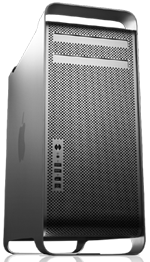
Mac ProMy greedy little mind is naturally leaning toward a Mac Pro. Now that’s a computer. I imagine two internal hard disks, two SuperDrives, 2 GB of RAM, and enough graphics power to drive the 30″ display I’ll probably never get. But when I loaded one of these up on the Apple Store’s Web site, the price tag was staggering: over $3K. I don’t have that kind of money sitting around to buy a computer. And if I did, would I want to blow it on a computer rather than, say, a two-week vacation in Hawaii?



But with a computer like that, I could do anything a Mac could do.

But do I need to do everything?

When I bought my last G3 — it was the last beige model — I made sure it had video in/out ports. The old-fashioned, color-coded kind. I don’t know what they’re called. (I’m really not as technical as people think.) I was certain that I’d be processing video on that machine and I wanted to be prepared. I think I used it exactly twice. Once when I got the computer because I had the feature and figured I should try it. And once to actually create a video that I never finished and eventually deleted as a half-finished project. Ditto for other features I’ve loaded into past computers, thinking I would use them. The SCSI card in my recently sold G4. The 250 MB Zip drive in the same machine. (Come to think of it, that machine really was loaded. The new owner got quite a deal at only $335 plus shipping. No wonder she was so happy.)

I was hoping to put off the purchase for at least six months. Actually, what I was really hoping was that Apple would introduce a new desktop Mac in the Mac Pro line at Macworld Expo in January and drop the price of the existing model. That’s usually how I choose my computer — buy the second or third model down from the top.

Maybe that model is an iMac these days. Seems that way to me.

If only I could break my mental block against those machines. Stop thinking about the ridiculous “ET” model I had on an editorial loan for about six months. I hated that computer. It seemed to mock computing with its silly design. I was not in the least bit sorry when I was asked to return it after using it for less than 50 hours of runtime.

So I’m looking for advice from folks who have purchased a desktop Mac within the past 6 to 12 months. Which model did you buy and why? What do you use it for? Are you happy with it? Use the comments link to share your thoughts with me and other readers.

The Definitive Guide to Apache mod_rewrite

Hardcore .htaccess stuff for mere mortals like me.

Somewhere along the line recently, I got this idea in my head that I wanted all subscribers for my main feed here to get the FeedBurner version of the feed. Those of you who are familiar with RSS know that a feed icon appears in the address bar of most modern Web browsers, offering visitors a quick way to get the feed URL or create a live bookmark. Other folks might know that they can enter the URL for a WordPress-based site followed by the word feed to get a feed URL. There are a few other formulas that can be used to generate a workable feed URL for subscribing to a feed, too.

While that’s all well and good, with so many methods to subscribe to feed content, it’s nearly impossible to get a real count of subscribers. How many people are subscribed to my feed? Beats me. How many hits a day does it get? I don’t know.

And those of you who have been reading this blog for a while know how much I love stats.

So a did a little poking around on the Web and found a few articles that explained how to use .htaccess to redirect hits to WordPress-generated feeds to my FeedBurner feed. One was this thread on the FeedBurner site, which has special instructions for WordPress users (scroll down on that page). Another was this article on oneafrikan.com, which offered some additional tricks I found useful.

Unfortunately, these solutions had one thing in common: they redirected all feed links to a single FeedBurner feed link. While that’s fine for most people, I’ve just gone through a lot of trouble to set up and promoted category feeds on my site. The last thing in the world I wanted was for someone to subscribe to a category feed and then get the main feed in their feed reader.

Of course, all of this redirect magic is done with .htaccess, the “invisible” file that works with your Web server to provide some last-minute instructions for your site. I’d already played a bit with .htaccess settings to make sure that outdated URLs published in some of my older books still pointed to the right thing on my current site. And, of course, WordPress uses the .htaccess mod_rewrite module to change ugly PHP URLs into something more attractive and logical (although very lengthy, if you ask me). I knew only enough about .htaccess to be dangerous with it, but since I treat it like a vial of nitroglycerin, I haven’t gotten myself in trouble yet.

So I figured I’d take the oneafrikan.com settings and modify them to meet my needs. The trouble is, when I looked at the code, I couldn’t translate them into a language I understood (such as English), so I couldn’t modify them to meet my needs or anyone else’s.

I spent some more time on the Web and found lots of documentation. Unfortunately, all of it assumed I knew the basics of what I now know are called regular expressions: those punctuation marks that mean something completely different from the punctuation I’m used to as a writer. Not knowing what they were called made it impossible for me to look them up online. When I started looking at the same apache.org page over and over and it never changed (not that it should, mind you), I realized I needed more advanced (or perhaps basic) help.

What I needed was a book.

I don’t just write books. I read them, too. Although I very seldom read a computer book cover to cover, I have a bunch of them that I consult when I need to figure something out. Oddly enough, some of them are books I’ve written; I tend to forget things I’ve written about when I don’t use them regularly. (And they call me an expert! Ha!) I have a book by another author that covers Apache, but the information I needed was not in there. In fact, I’m trying to figure out why I bought that particular book in the first place.

The Definitive Guide to Apache mod_rewriteSo I went on Amazon.com and I searched for .htaccess. I came up with a list of books that referenced it, but were not about it. Then I searched for mod_rewrite. And voila! I found The Definitive Guide to Apache mod_rewrite by Rich Bowen.

Not anxious to plunk down $30 for a book I might not find my answers in, I did some more research on the Web. I found a few book reviews and they were all positive. It appeared that this 160-page book covered the topic quite completely. It was definitely the book I wanted on my shelf.

Of course, I didn’t feel like waiting for Amazon.com to ship it to me. (I like immediate gratification almost as much as stats.) So when I realized that the publisher’s Web site offered the book as an eBook for only $20 (half the cover price), I bought it online and downloaded it. In five minutes, I had the answer to my question and enough information to tackle the problem. But rather than read the book on my 12″ PowerBook’s tiny (well, 12 inches, right?) screen (my G5 is still feeling sickly), I printed the whole thing out, punched holes in the pages, and put it in an old binder I had sitting around.

I realize that once again I’ve turned a short story — I found a great book about using mod_rewrite — into a long and drawn out one. (There are no short stories here.) My apologies to those of you in a hurry.

The point I wanted to make is that The Definitive Guide to Apache mod_rewrite is an extremely well organized, reader-friendly, well written, and informative book that explains exactly how to use mod_rewrite for anything you might want mod_rewrite to do: rewrite URLs, control access, set up virtual hosts, and so much more. Plenty of examples, each of which is analyzed and discussed. It’s all there.

I’m only about 30 pages into it so far, but I’m already very pleased.

Backup at the Touch of a Button?

We’ll see.

The first thing I did when my hard disk failed on Friday (for the fourth time in less than 10 years) was to go online and find an external hard disk that had enough capacity to back up my computer’s entire hard disk. And while I was at it, I’d get one that was bigger than my current hard disk so I could use it for my next computer (which will probably be purchased sometime before the end of this year).

Seagate ST3300601CB-RK 300 GB External Hard Drive with FireWire and USB 2.0 InterfaceI started at the Apple store, figuring that the products sold there would work effortlessly with my Mac. I found a Seagate 300 GB model (the Seagate ST3300601CB-RK) that boasted “pushbutton backup.” Now that sounded like the right thing for me. I did a little Web searching and found the same hard disk on Amazon.com for $40 less. I ordered it. It should arrive sometime next week — hopefully right around the same time TechTool Pro finishes doing whatever it can to recover my data.

SmartDisk FWFL80 80GB Firelite 2.5In the meantime, I still have two 80GB Smart Disk FireLite portable Firewire hard disks to capture whatever can be scavenged from the disk.

I’d like to hear from readers about backup strategies and solutions, as well as any experiences with Seagate’s “award-winning Bounceback Express software.” (I’m extemely skeptical about this solution.) Use the Comments link. And if you want to share a hard disk crash story with us, please do. I can’t be the only one out there losing hard disks.

Computer Woes

Again.

If you were starting to wonder whether I’d fallen off the face of the earth, stop wondering. I’m still here. It’s my main computer’s hard disk that has decided to take an extended leave of absence from work.

It happened on Friday. It was doing four things at once as it usually does and it completely locked up. I had to power it down to unlock it. When I powered it back up, I had a blinking System folder icon. Never a good sign on a Mac.

Long story short: TechTools Pro has been working on the disk for about 37 hours now, trying to recover what was on the disk. It’s not even halfway finished, so I figure it’ll be done by Tuesday or Wednesday. Until it’s done, the computer is pretty much dead in the water. And maybe even after it’s done.

This has happened to me before, so most of my stuff is backed up. But a few things aren’t. Like 4 hours worth of work on Chapter 6 of my Excel 2007 Visual QuickStart Guide. What annoys me most about that is that it was the second time I went to work on that Chapter. The first time, I didn’t like the way it was coming out so I scrapped it.

If the data can’t be recovered by me or by experts elsewhere, I’ll have to rebuild the hard disk’s contents from scratch on a new hard disk. I’ll know if I need to do that sometime near the end of the week.

In the meantime, I have three laptops to work with: My trusty 12-inch PowerBook G4 (which I’m writing on right now), my new MacBook Pro (which is resting until it needs to do duty as a test mule for my upcoming Leopard book), and my Dell laptop (which is what I was running Excel 2007 on while revising my Excel book). So I can keep blogging, keep writing short articles, and write my outline for my Leopard book.

I’m just a bit depressed about the work that faces me and the possibly hundreds of photographs stored only on that computer’s hard disk. I couldn’t back up everything. But that’s going to change very soon.