
About the work I’ve started that I’ll probably never finish.
I started writing a novel when I was thirteen. It was an adventure/love story, based roughly on an image I’d had in a dream. I wrote it in a series of five college-ruled notebooks, single-spaced, in the crude printed handwriting of a teenager. I actually finished it, although I can’t remember how long it took. When it was finished, it was about five hundred pages long.
It sat in a locked drawer for years. When my family moved, I took it with me. By that time, I’d started another novel, this one about a successful business woman who was targeted for murder by a rival businessman. I was in my late teens when I started it and it was far more mature than the first book. It covered pages in two thick college-ruled notebooks. I never finished it.
In 1984, I bought my first computer, an Apple IIc. One of the first things I did with it was to type the work I’d done on the second novel into the word processor that came with the computer: AppleWorks. The pages filled several 5-1/4″ disks. You know — the old “floppy” kind. I added pages to the work as time went on. I also dug out that first novel and began rewriting it, now with the knowledge of a 23-year-old.
Time went on. In 1989, I bought my first Macintosh. I wasted no time coming up with a method that would transfer all those bytes of fiction from the old computer’s floppy disks to the hard disk on my new computer. It required a special serial cable and a telecommunications program. I basically downloaded the information from one computer to the other. The limited formatting I’d been able to apply in AppleWorks was lost, but at least I didn’t have to retype hundreds of pages of text.
The first novel nagged at me. I worked on it regularly, changing the story but never finishing it. Instead, I started a second book with some of the same characters two years later. Then went back and started a book with some of the same characters a year before the first book. They became named Book 2, Book 3, and Book 1. One of the characters that was supposed to die at the end of Book 3 managed to survive. (He was too good a guy to lose.) He came back in Book 4. And I even have some ideas about Book 5, although I haven’t actually started it yet.
I’ve also written short stories about some of the characters. The stories were written as a means of clearing my head about prior events in a character’s life. You see, all of my major characters had lives before I started writing about them. It’s important to know about those lives to accurately write about each character’s actions and motivations.
What does all this mean? At this point, I have the modern version of an unfinished book I started writing nearly 30 years ago, as well as hundreds of pages of fiction about the same characters. I carry the files around with me on my laptop and keep a backup copy on my desktop computer’s hard disk, as well as in a Backup folder on my .Mac account.
When I’m on the road and want something to read, I open up one of the book files. I enjoy the story very much. Sometimes I read what I’ve written and am proud of my work. Other times, I read passages that I know need to be fixed up. Some of the passages are especially awful; I’m not too vain to admit it. Sometimes I add new scenes. Other times I make minor corrections to existing text. I’ve put hundreds — if not thousands — of hours into this work. But it isn’t done.
At this point, I don’t think it’ll ever be done. It’s a personal work, something I think I write just for myself. It would be great to see it in print, but at the same time, I wonder what people would think of me after they’ve read it. Some parts are very violent, not unlike some of the action/adventure movies that Hollywood keeps churning out. I find it entertaining, an escape from reality. My escape.
I’ve got other novels in progress as well. A bunch of years ago, I started writing a mystery that I got about 5 chapters into before I stalled. Last year, I started another mystery with some of the same characters. These pieces, if I ever finish them, will be marketable and I’ll do everything I can to see them in print.
So when I complain about writers block, as I did in a previous blog entry, it’s my inability to work on these pieces of fiction that’s the problem. Sure, I can write computer how-to books when an editor is waiting for them. The big motivation there is the milestone advance payments that are dangled like a carrot in front of my face. No computer books, no money. No money, no life. Pretty simple. I can also write blog entries because they’re easy and they help clear my mind of the things that clutter it. But fiction? Adding to a work in progress is like squeezing water from a stone.
Anyone else out there in the same situation? I’d be interested in hearing what you do to overcome this problem.
 I wrote a bunch of books, mostly revisions. Quicken 2004: The Official Guide, which I finished earlier in June, was published. That was followed by Microsoft Word 2003 for Windows: Visual QuickStart Guide, Mac OS X 10.3 Panther: Visual QuickStart Guide (expanded to 600+ pages!), Microsoft Excel 2003 for Windows: Visual QuickStart Guide, QuickBooks Pro 6 for Macintosh: Visual QuickStart Guide. As I write this, I’m finishing up Quicken 2005: The Official Guide and have two new titles and a revision under contract for the rest of the summer. Oh, yeah. I revised the Spreadsheet chapter for the latest edition (I’ve lost count) of The Macintosh Bible. The Panther book sold like crazy and continues to sell well, although returns from the Jaguar book are eating into royalties now.
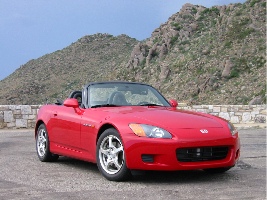 I bought a new car. It’s my midlife crisis car, a Honda S2000. Very fast. Very difficult to keep clean on the dusty roads where I live. In 10 months, I put only 4500 miles on it. Heck, this car has to last the rest of my life. I’ll drive the Jeep into the ground first. I sold my RC Helicopter, which I wasn’t flying. Heck, it’s easier to fly the real thing.