Didn’t I pay someone to do this?
A few months back, you may have read various blog posts and tweets from me regarding a video project I’m working on. October was the big film shoot and I the guys I hired and an enormous amount of money to do the project shot about 10 hours of raw video footage all over Arizona.
At the conclusion of each day of the shoot, I was assured that they shot “awesome” footage and that the final product would be “mind boggling.” I assumed (silly me — when will I learn?) that these guys knew what they were doing, so I didn’t micromanage, as I sometimes do. I then sat back and waited for the promised hard disk full of footage (my copy) and the shot log.
When You Want Something Done Right…
I waited a long time. Weeks. What I finally got was three sheets of paper with print so tiny I couldn’t read it — even with my cheaters on. There was virtually no usable information and the list of scenes didn’t cross reference to any video clips by name or any other identifying information. In other words, the catalog was useless.
So it looked as if I’d have to do it myself.
After all, I needed a catalog so I knew what video I had to work with. I needed to know what video was good and whether anything needed to be reshot. I needed a reference I could consult to write my script and make sure I had footage to illustrate everything I wanted to talk about.
I also got the raw video on a 500GB Seagate drive. I assumed (dumb, dumb, dumb) that it was neatly organized and that all the clips would be in some kind of order. But when I plugged it in, I discovered that there was no rhyme or reason to the organization on the disk. Files and folders were randomly named and there were backups of some files on the same hard disk — resulting in duplicates. Video was in multiple formats, some of which simply could not be read on my Mac with the tools I had. I spent two days hunting down conversion software that would enable me to open video files in formats that included MTS, M2T, M2TS, DV, WMV, AVI, and MXF.
This is what I had to catalog.
And that’s what I’ve spent a total of 3 work days doing so far. I’m about 1/4 done.
The Nitty Gritty
 To give you an idea of what I’m working with and how I’m dealing with it, consider the screen shots here. The first shot shows a frame of a movie I’m reviewing. I converted its original high definition format to QuickTime for easy viewing. The movie was shot from my helicopter while flying over Lake Powell. It shows a particular stretch of shoreline. I need to know — at least approximately — where on the 135-mile long lake this shoreline is.
Enter Google Maps. I displayed Lake Powell in a big browser window and, based on my knowledge of the lake, zoom in to an area I think the footage might correspond to. This is made slightly easier by the fact that most clips are in named with numbers corresponding to the order in which they were shot. So if a specific piece of shoreline falls between two easily identified canyons, I can usually find the shoreline on Google Maps.
 Here’s the same place on Google Maps. And yes, I’m sure it’s the same place.
Then I whip out my handy Stan Jones map of Lake Powell, find Google Maps location on the map, and use a FileMaker Pro database to enter the corresponding lake mile marker as part of the clip’s description. I add some other info about the clip, including its time, a rating on a scale of 1 to 5, and a screenshot of a representative scene.
I only have to do this about 1,000 times.
There are several problems with this technique:
- The water level determines the appearance of the shoreline. Google Maps has the highest water level and Stan Jones has the lowest. Our video is right in between.
- Google Maps uses satelite images. Those images point straight down. In most cases, our video is shot at an angle to the scene, at various altitudes.
- On Gootle Maps, north is always up. On our video clips, north can be any direction.
- The direction we’re flying and the videographer who took the shot determines which shore I’m looking at. I have to think back to those October days to remember what we did and when, including what time of day.
So matching things up isn’t as easy as you might think. And if you think it’s easy, come on over and give it a try. You can buy the drinks when you give up.
And no, I really didn’t expect the videographers to catalog clip locations right down to the mile marker. What I expected was something like “Bullfrog Area” or “Near Escalante” or “Downlake from Rainbow Bridge.” That would have been a starting point, something for me to work with.
Anyway, I spent all day today doing this and will likely spend all day tomorrow and most of Wednesday. I need to get through all the Lake Powell aerial clips by then. I make good use of my two 24 monitors for this job, putting the QuickTime, FileMaker Pro, and Finder windows on one display and Google Maps in a big browser window on the other display. The thought of doing this on a 15 inch laptop pumps up my blood pressure. The sooner I get it done, the sooner I can move onto other things.
 The writer is sitting up front beside me, taking notes and using my Nikon D80 to shoot images of what she sees. Although a good portion of the shots have some unfortunate glare — not much you can do about that when shooting through Plexiglas — many of them are really good. Like this shot she took of a herd of wild horses we overflew on the Navajo Reservation two days ago.
 I’m treating myself to a few of the activities my excursion guests get to enjoy. For example, on Tuesday, I joined the crew for a boat ride on Lake Powell that visited the “business side” of the Glen Canyon Dam before squeezing about a mile up Antelope Canyon (see photo) and gliding up Navajo Canyon for a look at the “tapestry” of desert varnish on some cliff walls. I skipped the Sedona Jeep tour and Monument Valley tour to work with one of the video guys or just rest up. Normally, while my guest are touring, I’m scrambling to get the luggage into their hotel room and confirming reservations for the next day. You might imagine how tired I am after 6 days of playing pilot and baggage handler.
 The first point isn’t even on the lake. Horseshoe Bend (A) is a horseshoe-shaped curve in the river a few miles downstream from the dam. It’s often photographed from the viewpoint at the outside “top” of the bend, which you can walk to from a parking area right off Route 89. Here’s a photo I took today from the overlook.
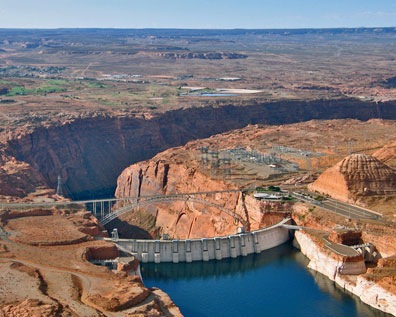 The Glen Canyon Dam (B) is the dam that keeps all the water in the lake. It’s accompanied by a bridge a few hundred feet downstream that crosses Glen Canyon. From the air, you can get good views of both.
 Gregory Butte (G) stands out in my mind primarily because of its photogenic qualities. If you’re flying uplake early in the day and take a photo up Last Chance Canyon with Gregory Butte in the foreground…well, you get the photo you see here. It’s one of my favorite views of the lake. This shot was taken by my husband on one of our first helicopter trips to the lake together. The water level is a bit higher right now. If it rises some more, Gregory will become an island.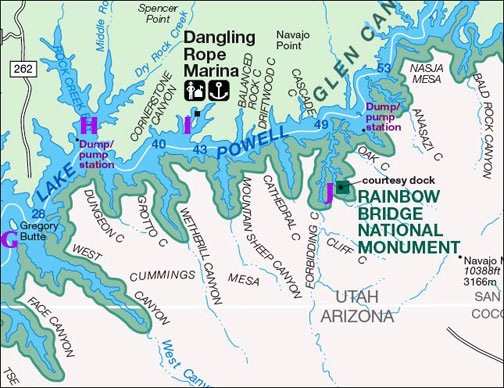
 Everyone wants to see Rainbow Bridge (J) from the air. Everyone, that is, except those who know better.