I experience a Zen-like calm while assembling Scandinavian-designed shelves and cabinets.
Okay, so I’m exaggerating. But it certainly was pleasant — at least for a while.
Our storage shed at Howard Mesa was in desperate need of some shelves and mouse-proof cabinets.We needed the solution to be cheap.
In a fit of confusion, we’d gone to a Wal-Mart in Prescott and bought some crappy, Chinese-made modular shelves. Of course, we didn’t know they were crappy at the time. Although I hate Wal-Mart and hadn’t stepped foot inside one for more than two years, for some reason we thought we could find what we needed there. After all, Stan raves about the place. Maybe it had changed in two years. It hadn’t. (People say I’m too hard on Wal-Mart but I know I’m not.) And the “furniture” we bought was so poorly made that we brought back all the pieces we hadn’t assembled. We’re still trying to figure out what we’ll do with the three pieces we did put together.
Back to square one.
I was going to try Office Max when Mike suggested Ikea. There’s one down in Tempe, near Phoenix. I didn’t think they’d have what we wanted, but got online to check their catalog. That’s when I found the Träby series of cube-like shelves with optional doors and drawers. We went down to Ikea with the truck to see them in person. They were exactly what we were looking for. And — surprise, surprise — all the pieces we needed were in stock. I loaded up the cart, checked out, and loaded up the truck. Yesterday, at Howard Mesa, I began assembly.
If you’ve never assembled Ikea furniture, you really are missing out on an experience.
First, open the box in which the item’s pieces are packed. You’ll find the box completely filled in with furniture pieces, bag-wrapped hardware, and the minimum number of foam inserts. There’s no wasted space in that box. Since Träby had a natural wood finish, each piece was wrapped in clean, blank newsprint paper.
Now unwrap the hardware and sort it out. There will be pieces you’ve never seen before (unless you’ve assembled Ikea furniture in the past). You might want to sort out the furniture pieces, too. Each one will be slightly different and have tons of holes pre-drilled into it.
Open the instruction booklet. The whole thing is pictures. Line drawings of furniture pieces and hardware with arrows and numbers. In fact, it looks a lot like a coloring book before a kid has gotten to it with crayons. My favorite picture is the one of the man with the pointy nose on the phone; they phone wire is connected to the Ikea store. In words: Call us if you need help.
Next, get your tools ready. You’ll need a philips head screwdriver. That’s it. Okay, sometimes you might need a hammer, but if you do, the hammering job is so light that you can use the heel of your shoe or the handle of the screwdriver.
Now sit on the floor with everything around you. And follow the numbered pictures in the instruction booklet. You’ll screw in weird, tall screws that stick up an inch or more, then stand a panel on top of them and use round do-dads to hold it in place. It’ll be rock solid when you turn the round thing, as if there are ten more screws doing the job. Back panels slide into slots and are held in place with other slots.
What’s amazing about the assembly process is that everything is so incredibly well designed that the pieces can only go together one way. When you’re finished assembling a piece, you feel as if you have performed the final function in a long string of tasks that bring that piece of furniture into existence. You feel as if you’re part of the Ikea team. Like there are a bunch of Europeans nodding their approval at you from across the ocean.
I say Europeans because Ikea is a Scandinavian company and the Träby shelves I bought were made in Poland. The workmanship was quite impressive for such inexpensive furniture. And everything is designed right down to the last screw hole.
The cabinet doors went on just as easily. The only hard part was bending my body in such a way to get the screws into the right pre-drilled holes. The hinges had all kinds of adjustment screws, but I found that if I just used the center setting for each screw, the door hung properly — the first time, every time. Sheesh.
Things changed when it came time to do the drawers. I’d bought two sets of them. Each set had a big drawer and a small drawer. When I opened the box, I got a shock: the drawer insides were lavender. You know. The color. Popular around Easter.
I followed the instructions to assemble the drawers and found that the pieces fit together admirably well. But I hit a snag when I screwed the roller tracks into the cubes I’d already assembled. I kept stripping the screw heads before I could get the screw all the way in.
Now this was weird. I’d been screwing things in all afternoon and hadn’t changed my technique. I hadn’t stripped a single screw up until that point. Now I was stripping the heads on every single screw, unable to get them all the way in. What had changed?
I looked at the box the drawers had come in and saw my answer: Made in China. I guess Poland wasn’t cheap enough for the folks at Ikea headquarters. They’d outsourced to China, like everyone else. The Europeans who’d been nodding their approval were now snickering at me.
I got fed up and stopped only halfway finished with the job. I’ll need Mike to get two of the screws out so I can try again with a fresh set. I’ll go to the hardware store today and buy new screws. Hopefully, they won’t be made in China. Or, if they are, they’ll be made with slightly better quality metal.
Lessons to be learned here? Cheap is cheap for a reason. Even Ikea outsources to China. The best-designed furniture can still be rendered useless by poor-quality hardware.
Today I’ll put together the last shelf cube. With luck, I’ll get that same feeling I had yesterday at the end of all my successful assemblies. But when I feel those Europeans nodding their approval, I’ll ignore them.
As for the Träby shelves and cabinets — they look great and are rock solid.
[posted with ecto]
Ikea, furniture, Poland, China


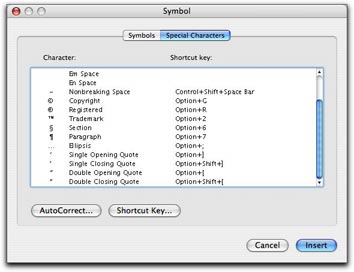 In Word, you can also use the Special Characters pane of the Symbols dialog. Choose Insert > Symbol to display the dialog and click the Special Characters tab or button. Scroll down to find the character you want (they’re listed at the bottom of the list) and double-click the one you want to insert it. This is a rather cumbersome way to get the job done, but it does work.
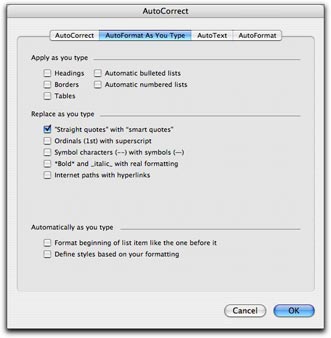 Fortunately, Word offers a better, automated way. You can set an option in the AutoFormat as you Type pane of the AutoCorrect dialog that will automatically convert every straight quote you type to the corresponding smart quote. Choose Tools > AutoCorrect and click the AutoFormat as You Type tab or button in the dialog that appears. Then turn on the “Straight quotes” with “Smart quotes” check box. (As you can see, that’s the only feature I have enabled in this pane on my copy of Word; I don’t like Word messing with the formatting of what I type, as I discuss in “
 First double check to make sure that the “Straight quotes” to “Smart quotes” feature is enabled as discussed above. Then choose Edit > Replace to display the Find and Replace window. Type the same plain old double quote character in the Find What and Replace With boxes. Then click Replace All. Word will replace the dumb double quotes with the correct smart quotes and tell you how many it replaced. Click OK to dismiss the confirmation dialog. Then type the same plain old single quote character in the Find What and Replace with boxes and click Replace All. Word replaces all the dumb single quotes with smart single quotes. Click OK to dismiss the confirmation dialog and close the Find and Replace window.