Typical Late Autumn Weather Time-Lapse

Lots of fog coming and going all day long.

I knew when I woke up yesterday morning that it was going to be a foggy day. How could I tell? I looked out my window and didn’t see a single light anywhere. The fog was all around me, blocking out the thousands of lights down in Wenatchee that keep my home from getting dark at night as well as closer in lights in at my neighbors’ homes. It was pitch black dark.

But with fog and low clouds moving around, it would be a good day for a time-lapse.

The Equipment

I went down into the garage and rummaged around in a box full of old camera equipment until I found my Canon PowerShot G5. This was my first “serious” digital camera, which I bought back at the end of 2003 for aerial photography. (Back then, I had the crazy idea that my future wasband was capable of taking satisfactory photos from the helicopter to meet the needs of aerial photo clients. That turned out to be a very expensive exercise in futility.) With 5 megapixel resolution, it was a big deal — all my digital cameras up to that point had shot in 2.1 megapixels or less. I even took it with me to Supai, the Havasupai village at the bottom of the Grand Canyon, when I went on an Arizona Highways photo excursion in April 2004.

So yes, the camera is old. At least by today’s standards.

But I don’t throw anything useful away. Even when I got better digital cameras — like the Nikon D80 I bought in 2007 and the Nikon D7000 I use now — I kept the old Canon.

Years ago, I bought a Pclix intervalometer for it and started using it as a dedicated time-lapse camera. An intervalometer, in case you don’t know, is a device or camera feature that tells the camera to shoot an image periodically per your specifications. That and a tripod are the two things you need to make time-lapse movie images. You then use an app on your computer (or smartphone, I suppose) to compile those images into a movie.

G5 and Pclix
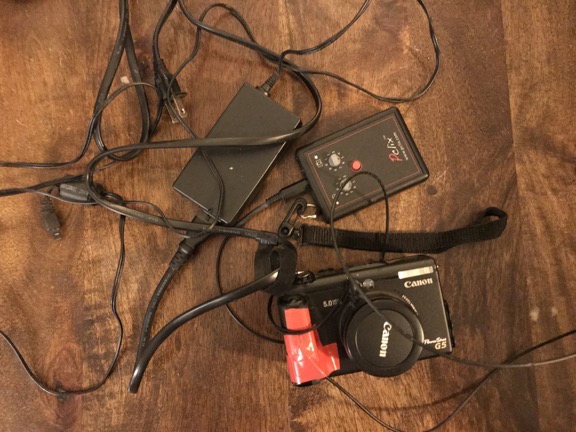
Shown here: my Canon G5 with optical cable taped on, Pclix intervalometer, and the power supply for the camera, which is not USB.

The Pclix I have uses an optical trigger mechanism. That means it sends a beam of light down a fiberoptic cable. The light is seen by the old Canon G5 as if I’ve pointed a remote at it and it clicks the shutter. To get this to work, I used electrical tape to attach the business end of the optical cable to the G5’s remote sensor. Of course, the camera needs to be plugged into power — its old battery won’t hold a charge and, even if it did, it wouldn’t last all day. The Pclix runs on a pair of AAA batteries and I was very surprised to see that they still had enough juice to power it. But I guess an electronic timer and tiny beam of light don’t need much power.

When I dug out all this stuff yesterday morning, I was kind of surprised to find it all. (Note to self: putting things away really is a great strategy for making them easy to find in the future.) Although I still do time-lapses once in a while, I’ve been using my GoPro, which is a lot more compact and easy to set up. But my GoPros and my Nikon D7000, which has a built-in intervalometer, are all in Arizona, waiting for me to join them. The G5 was my only option.

Setting Up

I’ve always been interested in time-lapse movies. There’s nothing quite like them to show the movement of slow-moving things. You can see the ones on this blog by checking out the time-lapse tag.

Of course, the challenge is to set up a time-lapse camera before something interesting happens. I can’t tell you how many times I’ve tried to create a time-lapse of clouds on days that clouds never made an appearance. The good thing is, the images are all digital, so if a whole day shooting results in a dull time-lapse, I can just delete it all.

Yesterday’s challenge was pointing the camera in the right direction with the right zoom magnification. (This is one of the benefits of using the G5 instead of a GoPro: optical zoom.) It was barely light out and the fog was thick when I got it all set up. I was also concerned about focus; I let the camera’s autofocus feature take care of that, but when there’s no detail to lock in on, the camera can’t focus. So I suspect there are some focus issues with individual shots.

I let it run all day from the corner of my deck, plugged into one of the outlets there, with 1 shot every 15 seconds. That’s how the Pclix was set up. I’d lost the instructions and didn’t want to mess with reprogramming it.

The Results

I checked on the camera at about 3:30 PM and discovered that its tripod had fallen over. Oops. I brought it in and saw that the last shot taken was after 2 PM, so I did get most of the day.

I brought the camera up to my loft where my office is now. It took a while to find a cable that would connect the old camera to my computer — I knew there was no chance I’d find a card reader for the Compact Flash card (which isn’t compact at all by today’s standards). I worked some magic and got the images into my computer.

Then I ran them through an app that resized them and put the time in the corner.

Then I fired up QuickTime 7 Pro — which I’ve always used for time-lapses — and created a movie with 30 frames per second. So each second of this movie is 7-1/2 minutes of the day. Here it is:

What surprises me most is just how much of the day was foggy. Keep in mind that my home sits on a shelf about 800 feet above the river. In the winter, we often get inversions that fill the valley with fog. Sometimes I’m above it, sometimes I’m in it, and sometimes I’m below it. Yesterday, I was mostly in it and above it. At one point, I looked out my office window, which faces south towards the cliffs, and it was perfectly clear. Yet at the same time, the view through the camera was nearly completely fogged in.

Of course, this has motivated me to do some more time-lapses. Maybe I’ll produce a few in Arizona when I head down there for the winter. But I think I’ll leave my clunky G5 setup home.

Self-Publishing a Paperback with Amazon KDP

Easy enough, but not ideal.

Part 107 Explained
Want to become a commercial drone pilot? Start by learning all about the FAA’s Part 107. This book will help. Buy the ebook edition on Amazon or from Apple. Or buy the paperback edition on Amazon.

Back in April, I wrote and published a short guide to FAR Part 107, which are the regulations governing commercial small UAS (drone) pilot operations. In the U.S., a pilot who wants to fly a drone for hire must get some training on these rules and then prove they know them by taking a test. If you’re not already a pilot, there’s additional certification and training that must be done. The FAA has recognized that a small UAS is an aircraft and must be regulated as such. As a helicopter pilot sharing airspace with drone pilots, I’m pretty happy about that, although I’m not happy about the folks who operate with little or no regard for the rules.

In preparing for the test and later answering people’s questions about the regulations, I looked for a guide that explained everything in plain English. When I couldn’t find one, I wrote one. It was my first book project in about four years and it wasn’t very tough for me. When it came time to publish it, I did it the easy way: I created ebook files in the correct formats and published them in the Apple bookstore and on Amazon.com.

Understand that I’m a big proponent of ebooks and very rarely buy printed books anymore. It’s a lot more convenient for me to read on my iPad and I get the added benefit of taking as many books as I want with me on trips without adding any weight to my luggage. I assumed that the folks who wanted a book like this would be on the same page as me.

But apparently that isn’t so. Lots of people seem to really like printed books, even for something as short as this one.

I normally use a print on demand publisher for my paperback book publishing needs: Lightning Source. They are affiliated with Ingram, so any book I publish using their service is automatically listed in Books in Print and appears in bookstore book catalogs, including Amazon and Barnes and Noble. The service isn’t difficult to use if you have the ability to create a PDF in the correct format. I usually write my books in InDesign, which can spit out documents in the formats I need. I fill out a few online forms, I upload the content and cover files, I pay a nominal fee, and I wait. The books are usually available within a week or so.

But yesterday, while checking the sales for the Part 107 book on Amazon, I saw a link for creating a paperback using Kindle Direct Publishing (KDP). I did some research on how it worked, what it cost, and how royalties were calculated. It seemed straightforward enough so I thought I’d give it a try. I figured that if I didn’t like the results, I could cancel publication and get the paperback printed through Lightning Source.

I spent about five hours yesterday prepping the manuscript for print publication. The trouble was, the manuscript I’d published as an ebook was absolutely filled with links to references on the web and cross-references to book content. In the ebook, you could tap a link to go right to that source — another benefit of ebooks over printed books. I had to manually convert all of the references to URLs in footnotes or page references in parentheses. I also had to remove all of the URL formatting that had been applied to link text. And because many of the URLs were really long, I had to use a URL shortener — I prefer bit.ly — to give each link a short, custom URL.

When I was done, I tried creating a PDF but didn’t like the results. I was working with Microsoft Word 2011 — I never did go to the Office 365 suite — and it doesn’t offer many options for PDF files. And, for some reason, it was spitting out a separate PDF for each section of the document. (I used sections to add custom headers for each chapter of the book.)

Since the KDP system accepted Word documents, I uploaded in that format. I then spent another half hour recreating the book cover for print.

When I was all finished, I previewed the book. That’s when I discovered that KDP had changed pagination for some reason that wasn’t immediately apparent, thus making my table of contents incorrect. Great.

I was offered the option of downloading a “corrected” Word document, so I did. When I opened it up, I discovered that the “correction” included changing the margins for the document. I knew what they said the margins should be, but I thought that was a suggestion. Apparently, it was a requirement. So I opened my “uncorrected” file, changed the margins, updated the table of contents and cross-references page numbers, and made a few other minor tweaks. Then I saved the file, uploaded it again, and previewed the results. It was fine.

Ready for Publishing
Here’s the dialog that appeared when I clicked Publish.

I clicked the buttons that needed clicking and eventually saw a dialog box telling me that my paperback had been submitted. Although one message had told me it could take 72 hours, this one said 12 hours. Whoa.

I shut down my computer for the day and went about my business. It was only 3 PM. I think I spent a total of 6 or 7 hours on the conversion process.

This morning, a little black dog who will remain nameless in this discussion decided she needed to bark at the coyotes howling off in the distance at 3:15 AM. That was all I needed to wake me up.

I lay in bed for a while with my iPad, checking weather, doing a word puzzle I do every morning, and checking in on Twitter. Then I decided to check Amazon to see if my paperback book appeared. I was very surprised to see that it did.

Book Listing
Here’s my book, all ready for purchase. I think it might be #1 in New Release and #11 in in Books > Arts & Photography > Photography & Video > Aerial because I bought two copies this morning.

Of course, I bought two copies right away: one for me and one for my friend Jim, who got me into drones. The only way I’m going to see the book is by buying it. At least I earn royalties on the purchase.

I guess what blows me away is just how quickly the book was made available. When they said 12 hours, they weren’t kidding. I used standard Prime shipping; my book will arrive Monday because today is a holiday and they don’t deliver on weekends. Still, that means they’ll print and ship the book tomorrow.

If the book looks as good as the ones I get through Lightning Source, I might have a new provider for my limited audience paperbacks. Let’s face it: Amazon sells more books than anyone else. For a book that normally would not appear in a brick and mortar bookstore, there isn’t much of a reason to get it in that Ingram catalog. And although I need to run the numbers, I suspect I might actually make more money publishing through Amazon; I’ll have to do a cost analysis to see.

As for ease of publishing, well, if you don’t try to get fancy and you use the Word template Amazon provides, it’s pretty darn easy to publish a book. So easy that I’m thinking of doing it again this month. The only thing I miss is the flexibility of getting my manuscript just the way I like it. Maybe it’s time to fire up InDesign and use that to create PDFs that KDP can’t change.

Instant Pot Goat (or Lamb) Tagine

Another quick and tasty pressure cooker meal.

Last spring, I bought a half a lamb and a half a goat from a local organic rancher. The meat came butchered (of course), packaged into a variety of cuts, and frozen solid. Each package of meat was tightly wrapped with plastic and then covered with white butcher paper. Some of it spent a little more than a year in my freezer with no ill effects.

Goat Tagine
Goat tagine, prepared in an Instant Pot.

As I’m working on clearing all the meat out of my big garage freezer for a new batch of meat next spring, I’m searching for recipes that are easy, tasty, and, if possible, Whole30 compliant. I found one called Goat Tagine with almonds and apricots on The Guardian website. I fiddled around with it a bit to Americanize the ingredient list and turn it into a recipe for my Instant Pot pressure cooker. Here’s my version.

Ingredients

  • 1 tsp cumin seeds. Not easy to find; ground cumin, which I use a lot, is widely available.
  • 1 tsp coriander seeds. I could not find these locally; all I could find was ground coriander. So I used slightly less than 1 tsp of that.
  • 2 whole cloves
  • 12 black peppercorns. I don’t see why they can’t be rainbow peppercorns if that’s all you have.
  • 2 tbsp olive, rapeseed, or sunflower oil. I used olive oil.
  • 2-1/2 pounds goat or lamb, trimmed and cut into bite-sized pieces. The original recipe specifies shoulder of kid or goat, but I went into my freezer and pulled all all the remaining goat packages I had: steaks, chops, shanks. Goats are small animals so although that might sound like a lot of meat, I think I came up short on the total amount of meat after I’d cut out the bones and trimmed away what little fat there was. My main goal, however, was to finish up all the goat left in the freezer and I succeeded.
  • 2 onions, peeled and roughly chopped. I used yellow onions.
  • 1/2 cinnamon stick.
  • 3 cloves garlic, minced. I suppose you can use the kind in a jar.
  • 1/2 teaspoon sea salt
  • 2-inch piece of ginger, peeled and grated.
  • 1 tsp hot, smoked paprika. I didn’t have this so I used 1 tsp of regular (sweet) paprika and about 1/8 tsp chili powder. I also added a drop of liquid smoke, but I think I could have used 2 or more drops because I didn’t taste any smokiness at all.
  • 1 15-oz can crushed tomatoes. I used a pint-sized jar of chopped tomatoes in their natural juice. I’d canned them earlier this year. I really love being able to use my own garden vegetables in recipes year-round.
  • 1 cup dried apricots, cut in half. I got Turkish apricots in the natural foods section of my supermarket. They’re available in bulk. They’re not the pretty orange ones that come prepackaged and are available elsewhere in the store. Instead, they were dark colored and didn’t look very appetizing. They tasted great and weren’t nearly as sweet as the orange ones. (That’s all I’m buying from now on.)
  • 1/2 cup whole blanched almonds. I used slivered almonds because I prefer smaller pieces in my food.
  • 1 small bunch fresh cilantro, chopped.

Instructions:

  1. Set up the Instant Pot and make sure the pot is clean and dry. Press Sauté and allow the pot to heat. Then add the cumin, coriander, cloves, and peppercorns. Toast lightly for a few minutes, stirring frequently to prevent scorching.
  2. Transfer spices to a mortar and pestle (or spice grinder). Pound or grind into a powder and set aside.
  3. Add 1 tbsp oil to the Instant Pot and allow it to heat. Then add the meat and brown it. You might have to do it in two batches with some additional oil; I didn’t. Transfer the meat into a bowl and set aside.
  4. Add 1 tbsp oil to the instant pot. Then stir in the onions. Cook, stirring occasionally, until tender; about 5-10 minutes.
  5. Stir in the ground spices, cinnamon stick, garlic, ginger, paprika, and salt and cook for another 2-3 minutes.
  6. Stir in the tomatoes and their juices. While cooking, use a heat-resistant rubber spoon or wooden spoon to scrape away at any dark bits stuck to the bottom of the pan. The liquid in the tomatoes should make this easy.
  7. When the mixture has come to a boil, stir in the meat and any of its released juices.
  8. If necessary, add hot water to bring the level of liquid up to nearly cover the meat.
  9. Add the apricots and almonds and stir well.
  10. Cover the pot and lock the lid. Turn the steam vent so it’s closed.
  11. On the Instant Pot, press Off, and then Manual. Set the time to 30 minutes.
  12. Allow the stream to release naturally for about 10-15 minutes, then carefully open the pot.
  13. Stir in the chopped cilantro and serve.

A few notes about this recipe:

  • You might need to add more salt. The original recipe was vague on what was needed so I made it without salt. It definitely needed salt so I added about a half teaspoon before locking down the lid. I try to minimize my salt intake for health reasons so you might want more.
  • The original recipe, which was written for the stovetop, instructs you to cook kid for 45 minutes or goat for 60-75 minutes before adding the apricots and almonds and then cook for another 45 minutes. This would obviously cook the apricots less. You could simulate this in the Instant Pot by pressure cooking without the apricots and almonds for 20 minutes, adding them, and then pressure cooking for another 10 minutes. Then you’d have to deal with pressure release to open the pot to add the apricots and almonds. I’m lazy so I didn’t bother. It’s up to you. I don’t think the flavor will change.
  • Reduce the pressure cooking time by 5 minutes if you’re using kid instead of goat.
  • The recipe suggested serving with couscous, rice, or flatbread. But since I’m trying to avoid grains and gluten — yes, I’m still on that Whole30 thing and I’m actually liking it — I cooked up some finely chopped cauliflower and pretended it was rice. I poured some tagine right over that. Excellent.

Aerial Photography: Helicopter vs. Drone

Picking the right tool for the job.

I’ve been thinking a lot lately about aerial photography work with helicopters and drones and thought I’d take a few moments to share my thoughts and conclusions. If you think one or the other is the perfect aerial photography platform, think again and read on.

My Helicopter Aerial Photo Experience

I’m a commercial helicopter pilot and have been one for about 17 years now. Of the modest 3,600 or so hours I’ve spent flying, a lot of it has been on aerial photography missions:

    Airplane over Horseshoe BendOne of my favorite clients, Mike Reyfman, shot this photo of Horseshoe Bend near Lake Powell from about 3000 feet up. Note the tour plane, which was probably flying about 1,000 feet over the “shoe.”

  • Fine art photo flights over Horseshoe Bend, Lake Powell, Monument Valley, Canyonlands National Park, and the Four Corners area near Shiprock, New Mexico. (I’ve probably spent more hours with photographers over Lake Powell, mostly from 2006 to 2011, than any other commercial helicopter pilot. At one point, I could identify every point along the lake from an aerial photo.)
  • High speed desert racing photo flights at the Parker 425 in Parker, AZ.
  • High speed boat racing photo flights at Lake Havasu in Arizona.
  • Bike racing photo flights in the Lake Wenatchee and Leavenworth areas of Washington.
  • Automotive promotional photo flights over proving ground test tracks in Arizona.
  • Architectural and construction photo flights in major cities like Phoenix and Las Vegas as well as remote areas such as Burro Creek in Arizona.
  • Geographical photo flights along the Wenatchee and Columbia Rivers, Lake Chelan, and Stehekin in Washington, Colorado River in Utah, and Salt River in Arizona.
  • Agricultural photo flights in the Quincy, George, and Wenatchee Valley areas of Washington.
  • Wildlife photo flights over the Navajo Reservation and Verde River Valleys in Arizona.
  • Nighttime panoramic photo flights over a crowded football stadium at night in the flight path of Phoenix Sky Harbor airport.
  • 360° panorama photo flights over Lake Powell, Horseshoe Bend, Goosenecks, and Bryce Canyon National Park.
  • Air-to-Air photo shoots with everything from another helicopter to the world’s largest biplane to a 747 outfitted for firefighting.

Each mission had a different purpose, a different focus (pardon the pun). Each required a different kind of flying, from 4,000-foot (AGL) hovers to low-level, high-speed chases in obstacle-rich environments. Some required top speed level flying just to catch a target, others required tight, often difficult maneuvers in a choreographed dance with the target. In each case, my helicopter and I were the tools the photographer used to get the shots he needed. The photographer provided instructions and I positioned us where we needed to be.

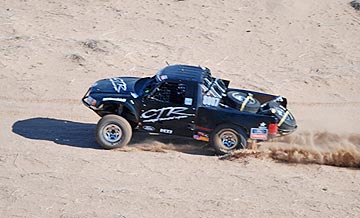
Desert Racing TruckThere’s nothing quite like chasing trucks through the desert with a helicopter.

I love aerial photo work, especially the challenging high-speed work I did over desert race courses. There’s nothing that can give me a buzz more than chasing a trophy truck down a twisty dirt track 80 feet off the ground at 80 miles per hour, so close I can hear his passing horn when he comes up on a competitor.

My Drone Aerial Photo Experience

As I’ve written elsewhere in this blog, I was not happy when I started losing aerial photo work to drones. I fought back for a while but, as technological improvements in both the flying and photo capabilities of drones made amazing results easier to achieve, I eventually got on board. I bought my first drone last winter and got my commercial drone pilot certificate soon afterward. (Yes, if you can’t beat them, join them.)

Here’s some footage from a recent practice flight around my home.

I don’t have nearly as much drone photo experience as I do helicopter photo experience, but I’m learning more every time I go out for a flight. I’ve been doing practice flights around my neighborhood, picking photo targets and flying around them for video fly-by shots and still images. I’ve also been taking my drone out to new locations to practice in target areas I find interesting. This winter, I’ll be using my drone to take photos of campsites out in the desert, as well as my activities on various Arizona lakes and rivers. Practice makes perfect and I’d like to get as good at drone photography as I am flying my helicopter on photo missions.

The Best Tool

I have, however, already come up against the limitations of drone photography, primarily related to speed, altitude, and operating temperature. I figured I’d list a few kinds of photo missions and explain which tool I’d pick and why.

Low-level, Low-Speed Operations

This is pretty much a no-brainer: when you’re operating below 200 feet at speeds of less than 20 miles per hour, a drone is probably going to be the better tool for the job. Yes, a helicopter can fly that low and that slow, but it’s far more likely to cause a disruption.

My best example of this is an aerial photo job I did for a local video production company. Believe it or not, they got the Wenatchee Symphony Orchestra to set up and play at dawn in a local park. The park had lots of tall evergreen trees and the orchestra was set up in a clearing. I had to get the videographer low enough for his closeups. The first time we passed, the helicopter’s downwash blew the sheet music off half the stands. (Oops!) A drone would have been a much better tool for this particular mission — and I actually said so during the flight.

Of course, blowing things around isn’t the only issue a low-flying helicopter can cause. It can also be a distraction to people on the ground. One of the flights I did for the same video company was a flight down Wenatchee Avenue not much higher than the highest buildings in the area. I had to fly sideways since the videographer was shooting out a side door. Although we got the job done, I think a drone could have done it better: it could have flown lower without distracting or disturbing drivers and pedestrians. The fight was short — we got the footage in less than 30 seconds — but a drone could have done the same thing without anyone on the ground even noticing it.

Better Choice: Drone

Low-Level, High Speed Operations

Of course, when you add speed, the drone simply can’t do the job. Consider my work chasing vehicles on land or over water. I’m usually flying at 50 miles per hour or more. (Seriously: on some of the boat shoots, I could not keep up; those things are fast.) I know that my drone’s top speed is about 22 miles per hour; even if a drone could go faster, could it keep up? I doubt it. And what happens when it gets out of range of the operator and his controller?

Better Choice: Helicopter

High Altitude Operations

While too many drone pilots seem to ignore drone altitude restrictions, they do exist and violating them is a good way to get into hot water with the FAA. Of course, trouble is a lot better than the possible alternative: flying into the path of another aircraft and causing a crash. As a helicopter pilot with no minimum altitude, I’m terrified that this might happen to me.

In the U.S., the FAA has established a maximum altitude for drones of 400 feet. Although it may be possible to get a waiver for a specific mission, it can take up to 90 days to get that waiver. How often do you know what you need to shoot 90 days in advance?

Helicopters, on the other hand, don’t have any altitude restrictions — other than those related to the helicopter’s performance capabilities. I’ve done photo flights where I had to hover at 9000 feet above sea level. Even if a drone could get up there, without a waiver it would not be legal.

Better choice: Helicopter

Operations Where Drones Aren’t Allowed

One of the things that really bugs me as a drone pilot is the number of places where drone operations are simply not allowed.

Some of them make sense — after all, do you really want to step up to the rim of the Grand Canyon and see a cluster of drones buzzing around in your view? Or attend an outdoor concert with drones flying back and forth over your head?

Meanwhile, drone restrictions in other places seem to make little or no sense. There are parts of Death Valley, for example, that are so remote they have few (if any) visitors and no wildlife. Why not let someone use a drone to take a few great photos that show off the barren wildness of the terrain?

Whatever.

The point is, there are places you can’t take a drone and, oddly enough, you can still take a helicopter. While flight over the Grand Canyon might be off-limits below 14,500 feet in most places, there are many national parks and other places where drone flights are prohibited but there are no restrictions on helicopter operations.

Let me be clear here: Most national parks are charted and pilots are requested to maintain at least 2,000 feet above the highest terrain in the area. Note the use of the word requested. I’ve written about this before. Although it is legal to fly lower in these areas, it’s not something you should do if you can avoid it. If you become a nuisance, you will be cited and will likely have to fight the FAA to keep your certificate. That’s why a lot of commercial pilots simply say no. Also, if people keep flying low-level through these areas, the FAA will make it illegal.

Until then — well, get those shots with a helicopter because without a waiver, you won’t get them legally with a drone.

Better Choice: Helicopter

As for flying low-level over crowds, that’s just plain stupid. Don’t do it with any aircraft, no matter what size it is.

Operation in Extreme Temperatures

All drones have operating temperature limitations, often due to battery capabilities. My drone, for example, will only operate in temperatures between 32°F and 104°F (0°C to 40°C).

My helicopter, however, doesn’t have any temperature limitations specified in the pilot operating handbook — although many people will argue that since performance charts aren’t available below -20°C or above 40°C, flight at those temperatures isn’t allowed. Newsflash: I’ve seen in-flight OAT temperatures of 112°F (45°C) in my helicopter and it still flew. I’ve also flown it when the outside temperature was about -10°F (-23°C) — the hardest part was getting it started; when it finally warmed up, it flew fine. (Unfortunately, it was a door-off photo flight; I don’t think I’ve ever been so cold in my life.)

The point is, if you need to do the shoot in very hot or very cold conditions, you might have to use a helicopter — or wait until conditions change.

Better choice: Helicopter

Operations Over Long Distances

I once had a photo shoot that included dozens of target locations along a 30-mile stretch of the Wenatchee River, a 50-mile stretch of the Columbia River, and the remote lakeside town of Stehekin on Lake Chelan. In my helicopter, we were able to knock off every location on the list in a total of three hours.

None of the flying was very special. It was relatively low and slow stuff, with some slow circling around points of interest. In fact, all of the shots could have been made with a drone. But that drone would have had to be driven to each location and launched for a flight there. It would have taken many hours to get all the shots and, if light was important — as it was for this shoot — the drone pilot/photographer probably wouldn’t have been able to shoot more than two to four locations each day. Add to that a half-day ferry ride to Stehekin, an overnight stay for the best light, and the half-day return trip and the project could have taken up to a month to complete.

Yeah, it would have been cheaper to do it with a drone. But time is money.

Better choice: Helicopter

Not Quite What I Expected

Part 107 Explained
Want to become a commercial drone pilot? Start by learning all about the FAA’s Part 107. This book will help. Buy the ebook edition on Amazon or from Apple. Or buy the paperback edition on Amazon.

In writing this and thinking about the kinds of aerial photo flying I’ve done, I’m surprised at how few photo missions are better handled by a drone than a helicopter. It seems to me that drone aerial photo flights are pretty much limited to situations where the camera needs to fly low and slow. Anything else would probably exceed the capabilities of the drone or violate the law. That might be where a helicopter can get the job done.

Fortunately for commercial drone pilots, there are plenty of missions that require low and slow flight. So there will never be a shortage of work for them.

But what makes me very happy is the knowledge that drones will never fully replace manned aircraft — including helicopters — for aerial photo missions. After all, that’s the kind of flying I really like to do.

Prepping and Planning for my Winter Migration

In waiting — and planning — mode.

Autumn is just about over. The leave are mostly gone and nighttime temperatures are dipping into the 30s. There’s been frost on the ground every morning. As the sun rises and fills the valley north of my home with light, odd little patches of evaporation fog form over the Columbia River 800 feet below the shelf where my home perches. I often stop my morning activity to watch, wishing I had one of my good GoPros around to create a time-lapse of the slow cloud formation and dissipation.

Of course, by the time that happens, I’ve already been up for a few hours. I’ve had my coffee and usually my breakfast. I’ve probably finished my daily journal entry and maybe even a blog post. I wake very early no matter what the season is, usually between 4 and 6 AM, although sometimes earlier. I’m a morning person and I have been for at least the past 20 years. It’s hard for me to believe that I had trouble attending 8 AM classes when I was in college. These days, by 8 AM, I’m usually ready for my mid-morning snack.

Sunlight and the Shadow Time

Living this far north — latitude 47.34° — the days start getting very short around the middle of October. By mid November, there’s only 9 hours and 15 minutes of daylight each day and we’re losing about 2 minutes of it every day. By the Winter Solstice, the sun is up for only about 8 and a half hours a day. That means the sun isn’t up for 15 and a half hours a day.

But worse than that is what I call the Shadow Time — the six weeks each year that the sun fails to clear the cliffs south of my home. For that brief period, sunlight does not shine at all on my house, although it does still reach out and fill the Wenatchee Valley. For the days leading up to the start of Shadow Time — December 1, I think — there’s less and less light on my house. Yesterday, there was about an hour of it starting around 1 PM. I love the way it shines into the high windows on the south side of my home, sending warm light at weird angles into my living space. But it’s weird looking out the north windows and seeing a big shadow in the foreground with the brightness of the valley behind it.

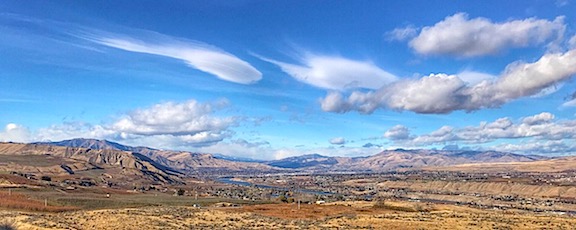
November View
I shot this photo yesterday afternoon from my deck. The clouds were great and the river was so blue. It’s a panorama for a reason — I cropped out the shadow in the foreground.

And I don’t have it bad at all. Some of my neighbors on the south side of the road have been in it for weeks already. Their Shadow Time lasts months. I can’t imagine living that long in the shadows, without the rejuvenating properties of warm, direct sunlight coming through the windows. Honestly, I don’t know why some of them built their homes where they did, especially when I see the occasional boulder coming down off the cliffs dangerously close to one neighbor’s backyard. It seems like it’s only a matter of time before one of those basalt columns lets go and ends up in their living room.

The Shadow Time is one of the reasons I go away for the winter. I’m a sunlight person — I need to be in the sun. That’s one reason why I like living on the east side of the Cascade Mountains. People think it rains a lot in Washington, but that’s not true. It rains a lot in Seattle. It doesn’t rain much here. And those short days turn into gloriously long ones in the summer time; it’s actually light out when I wake up and sometimes when I go to bed.

My goal is always to be gone during the Shadow Time and I’ve been pretty good about that for the past few years. But this time, I’m can’t get out quite as early as I hoped to.

Killing Time

So as November winds down, I find myself waiting for my departure date.

I’m spending much of my time at home goofing off and doing odd jobs around the house, with a few occasional forays down into town to catch a movie, have dinner or cocktails with friends, or run errands. My home and its menagerie — currently 13 chickens (including a rooster just learning to crow properly) and two garage cats (for rodent control) — are pretty much prepared for winter. There’s always something to do around here, but none of it is pressing and some of it has to wait until spring.

I’m also working on glass projects again — something I haven’t done for years. The goal is to create some recycled glass wind chimes for sale in Quartzsite, AZ in January. I’ve been working with my new kiln for a few days now but have had disappointing results. Apparently, I’ll be spending a few more days troubleshooting before I can start churning out new pieces.

And, of course, garage reorganization is something I’m always working on. I’ve still got boxes to unpack. I’m also prepping for a garage sale in the spring. I have a lot of stuff I don’t want/need anymore — some of it from my old home/life in Arizona. While Craig’s List has been instrumental in offloading the larger items, there’s a ton of little stuff I can sell cheap.

My helicopter business is slow this time of year — and only gets slower as winter creeps in. I do have a nice charter later this month; I’ll be working with two other helicopters to take a group of nine men on a flight to various points of interest (to them) around the state. I’m hoping our flight path takes us past my house; my next door neighbor’s kids love it when I fly by with other helicopters — they say it’s like an air show.

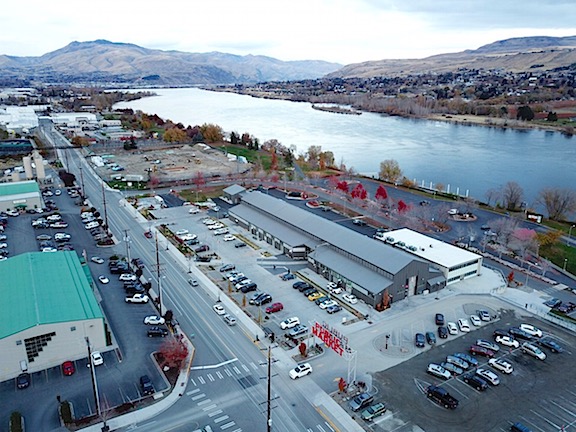
Then, of course, is the primary thing keeping me in the area: my December 3 flight bringing Santa to Pybus Public Market. This is a community service I do every year. (Last year was the first time I missed a flight but that’s because the helicopter was in Arizona for overhaul.) The last time I did it, about 300 kids and parents were waiting on the ground when we landed at Pybus in my bright red helicopter. There were photos in the newspaper. I usually shut down and stick around for a while so folks can come up to the helicopter and get their photo taken with it. I’ll do that this year if the weather cooperates.

Pybus Market
An aerial view of Pybus Public Market, shot with my Mavic Pro the other day. I land the helicopter in the corner of the parking lot in the lower right part of the photo, not far from the white building. One year, we rolled the helicopter into the main (gray) building where I left it on display for a week.

Of course, that doesn’t mean those are the only days I’ll fly the helicopter. There’s a pretty good chance I’ll take it out today. I have two wine club shipments waiting for me at Cave B Estate Winery down in Quincy. That’s an hour drive but only 20 minutes by helicopter. I figured I’d take a few friends down there for lunch — I fly for food — and pick up my wine while I’m there.

And the helicopter will go to California for its sixth season of frost control work, likely in mid February.

Going South

Once I’m done with the few things I need to do in the area, I’ll hop on a flight to Phoenix with Penny the Tiny Dog. My truck, camper, and boat are already down there waiting for me. With luck, a month from today I’ll be camped out on one of the Salt River Lakes, soaking up the sun while I explore the lake in my silly little boat.

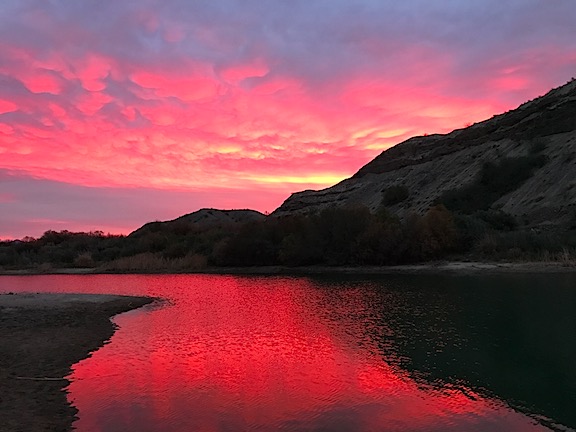
I’ll spend Christmas along the Colorado River with some friends, camped out in the desert. The site I hope we get — we got it last year — has a boat ramp and easy access to a stretch of river that runs 76 miles from the Palo Verde Dam north of Ehrenberg, AZ to the Imperial Dam north of Yuma. I brought along my new tent and some tent camping gear so I can do overnight boat camping trips along the river. My friends are seriously into fishing and I know we’ll do some of that, too. Last year, we had fish tacos a few times. We have a campfire nearly every night; it gets cold but not too cold to enjoy the outdoors.

Sunrise at the River
We were treated to a few amazing sunrises during our stay along the Colorado River last year.

Then in January, we move to Quartzsite where my friend sells her artwork at a 10-day show at Tyson Wells. This year, I got a booth, too. I’ll be selling drone aerial photography services for folks camped out in the desert, as well as my recycled glass wind chimes (if I can get the problems with the new kiln worked out). It’ll be weird and it might not make any money, but I’m really in it for the experience more than anything else. Besides, my booth at Tyson includes a full hookup and it’ll be nice to get a bit of “civilization” after more than a month camped out in the desert.

After that, I’ll likely start heading north along the Colorado River with my truck, camper, and boat. I’m hoping to do some camping and boating at each stretch of the river between dams, all the way up to Hoover. I’ll definitely revisit Arizona Hot Springs — this time in my own boat — and tent camp for a day or two in the mouth of the canyon there.

In mid-February, I’ll come home (via commercial flight), fetch the helicopter, and take it down to the Sacramento area for its frost contract. From that point on, I’m “on call.” This is different from cherry season, when I need to stick around with the helicopter to be called out on a moment’s notice. Instead, I get my callout at least 12 hours before they might need me. That’s enough time to hop on a flight from wherever I am to Sacramento.

I’ll be in the Vegas area for a week or so in late February to explore Lake Mead, visit some friends, and see HAI’s big helicopter show. When that’s over, I’ll continue north and west, eventually ending up in the Sacramento area. I’ll stick around there, boating on Lake Berryessa and Clear Lake, wine tasting in Napa Valley, and hiking in the foothills of the Sierra Nevada Mountains until March. If I’m lucky, I’ll get a few callouts while I’m already there; this can really be lucrative when I don’t have to hop a commericial flight, rent a car, and get a hotel room. Then, depending on weather in California and back home, I’ll make my way back north. I did a coastal route last year, but I might try a more inland route this time. It’s all about going new places and seeing new things.

It’s the typical migratory route I’ve been doing with minor variations since 2013 but I’m going to make it count this year. It might be the last season I go to Arizona for the winter; I’m hoping to begin researching retirement destinations in Mexico, Costa Rica, Belize, and possibly New Zealand in future winter seasons. We’ll see.

Of course, I will be working every day. I’m writing a book about my flying experiences and am determined to finish it before I get home. So I expect to spend at least 4 hours at the keyboard daily — likely early in the morning — to knock out a manuscript. I’ll handle publication next spring.

While I’m gone my house will be in good hands. I have a house-sitter who will live there for the entire time I’m gone. We did a trial in October when I took a 2-week vacation south to visit friends, re-explore a few national parks in Utah, and reposition my portable winter home in Arizona. While I’m gone, he’ll make sure the chickens and cats have food and water and collect eggs. Maybe he’ll even put up my Christmas decorations, which I haven’t bothered to do in years.

Waiting

So I’m in a sort of limbo right now, waiting for my departure date to roll along.

I feel as if I spend most of my life waiting. In the old days, I was waiting for my wasband to get his head out of his butt and start enjoying life. It was frustrating, to say the least. The older I get, the less time I have left. Waiting for someone else was like idly watching my life slip by without being able to do anything to enjoy it.

Now, with him out of the picture, I do a lot less waiting and a lot more doing. I spend a lot of time traveling when I’m not busy with flying work. When I’m home, I spend my time building and learning new things. My life is much more full and interesting; my time is much more flexible.

But I still have responsibilities that tie me to my home, even if I’m not kept here by work. So I’m waiting for calendar pages to flip by again so I can do the few things I need to do.

And then I’m outta here.