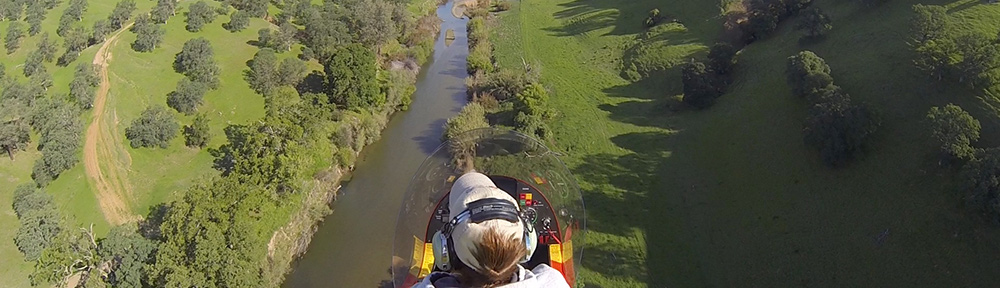
The three condors of the day.
Actually, there were four. But since the subtitle matches the photo and it’s a great play on words, I couldn’t resist. But now I’m getting ahead of myself.
I had a Grand Canyon charter yesterday. It was a pleasant surprise. Wickenburg is pretty much dead this time of year, so getting a call from someone who wants to fly up to the big ditch for a day isn’t actually expect. Of course, this person doesn’t live in Wickenburg. He’s visiting someone here. This would be a day trip during the visit.
I had three passengers — two adults and an 8-year-old girl — and they were extremely pleasant people. (I can say that honestly about the vast majority of my charter passengers.) They wanted a helicopter tour over the canyon, but since I can’t do that, I fixed them up with Grand Canyon Helicopters, which flies new EC 130 helicopters. After that, the plan was to go into the park and spend a few hours on lunch, walking along the rim, etc. I wasn’t in a hurry to get back to Wickenburg. At the Grand Canyon’s south rim, it would be 85°F. In Wickenburg, it would be over 100°. My helicopter does not have air conditioning.
We left Wickenburg at 8 AM sharp and had an extremely cool and pleasant flight up to Grand Canyon Airport. We walked over to GC Helicopter’s terminal and my passengers checked in. I waited with them until they boarded their flight, then left to place a fuel order and do some scavenging for brochures I needed for the info packets on my Southwest Circle Helicopter Adventure package. My passengers had selected the long tour of the east side — which really is the best tour of the canyon and well worth the money (if you can afford it) — so I had plenty of time. Still, I was back at the terminal reading a paperback when their flight came in.
We took the Xantera shuttle into the park. It took almost as long to get through the entrance gates as it had taken to fly up there. (Okay, so I’m exaggerating. It took an hour and fifteen minutes to fly up there and forty-five minutes to get through though the gates.) I took them through Bright Angel Lodge to the Rim. I pointed out where they could find restaurants, bathrooms, shops, and rim trails. Then I left them on their own until 4:30.
I grabbed some lunch in the Arizona Room. It’s a crime that they put so much food on your plate there. No wonder Americans are obese. I ate about a quarter of what I was served and drank two full glasses of iced tea in an attempt to ward off dehydration without drinking local tap water. Outside, things were much more interesting than the food on my plate. The condors were flying.
The Grand Canyon has been home to a group of California Condors for some time now. Once on the verge of extinction, the condors were reintroduced to the canyon and are reproducing. They spend their summers at the South Rim and their winters at the Vermillon Cliffs area, about 80 or so miles to the northeast, not far from Page.
The birds are amazing, primarily because of their size: they can have a wingspan up to 9-1/2 feet.
To see a bird like this in soaring flight is something not to be missed. And I was sitting in a restaurant in front of too much food while the show was going on outside.
I left the restaurant.
Outside, the condors had stopped flying. I walked west along the rim, hoping to catch a glimpse of them in the canyon. What I found was even better: two of them were perched on the wall at the edge of the canyon at the Lookout Studio.
The lookout studio is a stone building at the edge of canyon. It’s a gift shop that sells a lot of rocks and t-shirts. You can walk through the building onto a back patio. From there, you can follow steps down to a series of lower patios. The birds were perched on the lowest patio’s surrounding wall with a crowd of people remarkably close to them.
 I took a photo from the rim, then moved in closer. Another photo. Closer. Another photo. Through the building to the edge of the first patio. There were three of them now. Another photo. Down the first flight of stairs. There were four of them now, although one of them was hiding behind a tree. Another photo. Closer. Another photo. I was 15 feet away now, on the outskirts of a crowd. I watched as a young girl who didn’t look much bigger than the birds, got within 5 feet of them to take a photo with her disposable camera. One of the birds was watching her closely, with beady little eyes. I think he was imagining how she would taste.
Now matter how beautiful condors look in flight, they’re downright ugly when on the ground. They look like vultures — very big, very ugly vultures. It was interesting to watch them watch the literally dozens of people around them. They were obviously as entertained by us as we were of them. The only difference is, they didn’t have cameras.
From the moment I first saw them, I wondered where the ranger was. With wildlife this close, there had to be a ranger nearby. Well, the ranger arrived late to the show. As he came down the steps, he said, “Sorry folks, but I’m going to have to chase these boys away. Can’t have them getting used to people.”
Somebody made a comment that I didn’t hear. The ranger replied, “You want them closer? Just lie down here and play dead.” That, of course, was a reference to a condor’s favorite food: dead animals.
 Then he clapped his hands gently a few times while walking forward. The birds jumped off the cliff and into flight.
That’s when the real show began. The four birds flew together in a group, soaring through the sky, climbing and circling. The only camera I had with me was the little Canyon PowerShot I keep in my purse, but it was enough. I got a few photos of the birds in flight. This was far more interesting than watching birds and tourists stare at each other on the patio.
 Throughout the rest of the day, I kept my eye out for the condors. I caught sight of them a few times when I returned from a short hike and settled down in the grass near Bright Angel Lodge. I was lying back on the grass, looking through the leaves of the tree over my head, when they flew by.
I was thrilled to overhear a young boy tell his mother that the difference between a vulture and a condor was that the condors had white on the bottom of their wings. I’m sure that’s oversimplified, but who cares? The kid was looking at wildlife, thinking about it, showing real interest and stating his observations. I overheard a lot of little things like that, things that showed that kids were getting something positive out of their trip to the canyon and view of nature.
My passengers found me a while later. It was just after 3 PM, but they were pooped and ready to go. We relaxed a while in the shade, then called for the shuttle, climbed aboard, and went back to the airport. A while later, we were on our way back to Wickenburg. I caught sight of the Grand Canyon Railroad’s steam engine and train on its way back to Williams and did a flyby for my passengers. Then, to make the return flight a little more interesting, I flew over Prescott and down the Hassayampa River. We were back in Wickenburg by 5 PM.
It had been a nice day out for all of us. But then again, how many days that include flying are not nice days?
helicopter, Grand Canyon, condor, California Condor
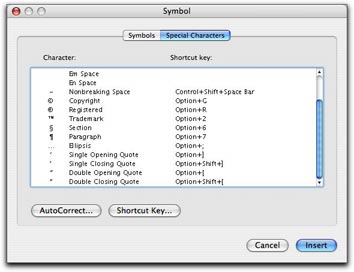 In Word, you can also use the Special Characters pane of the Symbols dialog. Choose Insert > Symbol to display the dialog and click the Special Characters tab or button. Scroll down to find the character you want (they’re listed at the bottom of the list) and double-click the one you want to insert it. This is a rather cumbersome way to get the job done, but it does work.
 Fortunately, Word offers a better, automated way. You can set an option in the AutoFormat as you Type pane of the AutoCorrect dialog that will automatically convert every straight quote you type to the corresponding smart quote. Choose Tools > AutoCorrect and click the AutoFormat as You Type tab or button in the dialog that appears. Then turn on the “Straight quotes” with “Smart quotes” check box. (As you can see, that’s the only feature I have enabled in this pane on my copy of Word; I don’t like Word messing with the formatting of what I type, as I discuss in “
 First double check to make sure that the “Straight quotes” to “Smart quotes” feature is enabled as discussed above. Then choose Edit > Replace to display the Find and Replace window. Type the same plain old double quote character in the Find What and Replace With boxes. Then click Replace All. Word will replace the dumb double quotes with the correct smart quotes and tell you how many it replaced. Click OK to dismiss the confirmation dialog. Then type the same plain old single quote character in the Find What and Replace with boxes and click Replace All. Word replaces all the dumb single quotes with smart single quotes. Click OK to dismiss the confirmation dialog and close the Find and Replace window.