Dieting…Again

I really need to lose weight.

Without going into specifics, let’s just say that like the majority of Americans these days, I’m overweight. I’m tall, so I can “get away with it” — to a certain point. But I don’t want to. I want to be thinner.

Why I Want to Lose Weight

Please understand that this isn’t an appearance issue as much as its a health and practicality issue.

I had a friend who was overweight and constantly dieting. One day, she told me she didn’t care how much she weighed. She wasn’t succumbing to the pressure to be thin, just to make some man happy. (She was divorced.) So she stopped dieting and basically went to hell physically.

I don’t want to lose weight to make a man happy. My husband doesn’t seem to care that I’ve developed “love handles.” There isn’t any other man I want to impress. I’m forty-something. Those days of flirting are over.

But as I age, my weight is holding me back — almost literally. I have bad knees and the more I weigh, the more my knees hurt (or creak) when I’m walking up stairs or hills. I’ve always been short of breath when going uphill, but now it’s worse. And I can’t help but wonder how these extra pounds are affecting my overall health: heart, arteries, blood pressure. Stroke runs in my family on both sides. I don’t want to go there.

Then there’s the practicality side of the matter. Every six pounds is a gallon of fuel on my helicopter when I’m flying with a bunch of other fatties. I’ve done plenty of weight and balance calculations and I’ve realized that if you put a 250+ pounder up front with me and lightweights in the back, we’re going to be nose heavy. Being lighter would give me more flexibility with loading passengers, too.

In the spring of 2004 — just four years ago! — I weighed 30 pounds less than I do now. When I met my husband in 1983, I weighted 60 pounds less. (That was a bit on the thin side, in all honesty, but I wouldn’t mind going back there.) And for a while in college, I weighed 85 pounds less than I do now. (That was way too thin for someone my height and I was having digestive problems because of it.)

I want to go back to what I weighed in 2004. And I want to do it by March month-end.

What I’m Doing About It

Okay, so I’ve restated my “lose weight” goal as a New Year’s resolution. Big deal. I’ve been doing that for the past three years.

But now I’ve decided that I’ve really had enough. And I’ve begun watching what I eat.

You know, everyone says that Weight Watchers works. I know why. It’s because you look at every thing you eat and see the impact in terms of calories, fat, and other nutrition.

I don’t want to go to Weight Watchers, but I found an alternative. It’s a Web site called FitDay. I’d actually stumbled upon it at least a year ago, but a Twitter friend (@truecolor) mentioned it just the other day and I went to check it out again. This time, I decided to use it.

FitDay is a Web-based nutrition program, that is designed to help you meet weight and other nutrition goals. You tell it exactly what you ate and it tells you how many calories and other nutritional units you’ve consumed. You can set goals, specify additional activities (like exercise programs), and, of course, enter your daily weight. FitDay performs all kinds of calculations to tell you how your diet and exercise affect your nutrition and calorie burn.

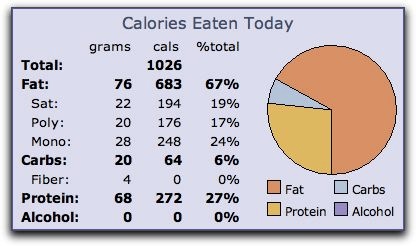
Calorie BreakdownFitDay tracks all your data and prepares charts and graphs, like this one from the other day. I’m trying to keep my carb count low, since Atkins has worked so well for me in the past, and that’s why you’re seeing so many calories from fat. I’m going to try to shift those calories to protein. FitDay makes this relatively easy by letting you view the nutritional information from a vast database of foods.

For example, this morning I really wanted some oatmeal instead of eggs. But after consulting the FitDay database, I realized that a serving of oatmeal would put me way over my maximum goal for carbs for the day. So I stuck with a nice spinach, egg, scallion, and cheese omelet. FitDay gave me the total counts for my breakfast, which included two large cups of coffee with real sugar and 2% milk:

Today's Foods

Just seeing how each item I eat affects the overall picture of my nutrition is making me think twice about everything I eat.

So far, I’ve lost 2-1/2 pounds in 3 days. While it’s too early to make a call on whether this is working, it has to work — as long as I stick with it.

FitDay also has a PC-based application that you can buy, download, and use on a PC. I’m thinking of getting it for my mom, who has always struggled with weight. I’m not a PC user — I use a Mac — and don’t think it’s worth firing up Parallels just to track food when I can do it on the Web.

What I Think

While I’m not especially pushing FitDay — the Web-based program is far from perfect — I do think that it’s a useful tool for dieting.

What do you think? Have you tried any dieting tools that really helped you out? Share your comments here.

Some Photos from a Desert Trek

A handful of photos.

I don’t usually put a lot of large photos on this site, but I thought I’d give it a try today. Yesterday, Mike, Jack the Dog, and I went for a combination Jeep ride/hike out in the desert northeast of Wickenburg. All of these photos were taken within 15 miles of my home, so it gives you an idea of the landscape I live in.

Winter is a great time for enjoying Arizona’s Sonoran desert. Oddly enough, however, our party of seven (including Jack the Dog) didn’t run into anyone else along the way.

We started at the Rodeo Grounds on Constellation Road in Wickenburg, then headed out on Constellation Road. We made the left hand turn just before Monte Cristo Mine, followed that road for a short while and took a right where it forked off. We drove through one drag gate, closing it behind us to keep the cattle on their appropriate sides of the fence, and continued down the road. Eventually, it merged with Slim Jim Creek. We followed the dry creek bed as far as we could, maneuvering around and over two nasty places where the last flood had scattered boulders in the wash. When we reached a point where we could follow the creek no further, we pulled onto the side and parked our pickup and two Jeeps. The road continued, but there were two narrow places just beyond where we parked. Besides, it climbed away from the creek, which was our intended trail.

We geared up with drinking water, lunch bags, and cameras and headed down the creekbed on foot. I figure we walked about 1-1/2 to 2 miles. The creek wound through some of the most beautiful Sonoran Desert scenery before ending abruptly at the Hassayampa River. Although there isn’t a drop of water flowing under the bridge in town, there was quite a bit at the mouth of Slim Jim Creek.

Here are my favorite photos of the day, along with some captions.

The south-facing hills were absolutely covered with saguaro cacti.

I played with my fisheye lens here. This rock face was actually quite flat, but the lens makes it look like it curves out into the river. Not very realistic, but it looks cool.

Here’s Jack the Dog with that fisheye lens again. He found some quicksand near this spot and almost got stuck in it.

The river flowed a lot higher earlier in the week. This sand shows the pattern from the receded water. It was still quite wet.

Believe it or not, this is the skeletal remains of a type of prickly pear cactus. (We also found the decomposing body of a javelina, but I didn’t photograph it, primarily because it was really gross.)

This is the windmill near the remains of Sayer’s Station, which we passed on our way on Constellation Road. The road climbs past the windmill and I took this shot from the road, just about level with the top of the windmill. I like taking photos of windmills.

Comments? You know where to put them.

Article Length

My biggest challenge.

Yesterday, I began writing an article for a travel magazine. The magazine is relatively well-known and it pays pretty darn well. I’ve never written about travel — beyond what you’ll find in this blog — but I think I’m up to the task.

But I am facing a challenge: word count. The article cannot be more than 1,500 words.

I’m not accustomed to working with length constraints. On my blog, I can make an article as long or as short as I want to. The same goes for the articles I write for InformIt and other Web-based publishers. (That’s one of the benefits of publishing on the Web — it costs the same to publish no matter how long it is.) Even my book publishers don’t usually limit my page count.

But this is a print publication and the limits are real. And I seriously doubt that the editors there will love my words enough to make an exception for me.

Keeping It Short

The way I see it, there are two ways to keep an article short:

  • Write it short. I’m using Word 2004 (old habits really do die hard) to write the piece. Word includes a live word count feature, so I can monitor word count as I type. This is how I’m trying to write the piece. What I’m finding is that I’m about 1/4 finished writing, but have used up more than half my alloted words. As a result, I keep going back and shortening up earlier paragraphs and sentences to make room for the rest of the story. I don’t think this is the best approach.
  • Write it without worrying about page count, then go back and edit the hell out of it. This is how I usually tackle length problems — especially when I have to shorten up text that appears on a page I’m laying out. In those instances, I’m cutting out 10 to 30 words. But at the rate I’m going with this article, I’ll have to cut more than 1,000 words. This can’t possibly be productive. After all, I’m writing material that I’m just discarding.

Another Way?

It occurs to me that there probably is another way to keep it short: rethink the entire article and reduce the amount of information I want to provide.

This is probably a more professional way to go about it. It requires me to come up with an outline of what I want to discuss and budget a certain amount of words for each part. If there are too many parts, I need to cut out the parts that don’t really communicate the theme of the piece. Once I have a handle on how to approach the article, I should be able to write it close to the proper length. I can then edit it down as needed.

The key, of course, it to stay within budget for each part of the article.

And I think this is a good example of how blogging and writing for the Web can hurt a writer. When I blog, I have no editor — it’s just me. I can write whatever I want, whatever way I want to write it. Sentence fragments? No problem. Slang? Go for it! Extensive use of parenthetical commentary? Why not (since I always have more than just one thing to say)? Bloggers who are also professional writers can lose the discipline they need to produce high-quality work for publisher with very specific needs.

But I think I’ll tackle blogging and how it affects writing skills in another post.

Any Thoughts?

Do any writers out there have some advice for me? Speak up! Use the Comments link or form.

A Look at OmniFocus

A quick overview.

I tried OmniFocus for a few weeks to set up and maintain a Get Things Done (GTD) routine. I’m always interested in easy-to-use productivity tools that I can integrate into my workflow.

What OmniFocus Does

OmniFocusOmniFocus enables you to set up any number of projects, each of which can contain specific actions. For example, I might have a project for Flying M Air to send out a marketing letter to travel agents. Within that project might be the individual actions to get the job done: get a mailing list of travel agents, write the marketing letter, print out the materials, stuff envelopes, mail. You can set up a project so its actions must be completed in order (sequentially) or so that they can be completed in any order or concurrently (parallel). Unfortunately, there didn’t seem to be any way to set up some actions within a project to be sequential while others in the same event were parallel without creating groups of actions.

Each action can also be related to a context. A context is “where the work happens.” This is a lot less intuitive but, I suppose, it can be useful once you get an idea of how to use it. For example, you might set up contexts for telephone follow-up or errands. Personally, I had a problem distinguishing between context and projects and couldn’t maintain a consistent approach.

OmniFocus offers a number of commands and options that help you “focus” on specific projects or tasks. You can flag things, set priorities, enter start or end dates, and choose from a bunch of different status options. You can then create “perspectives,” which are views of tasks matching criteria. But setting these things up can be time consuming and isn’t very intuitive.

On Intuitiveness

I did not find OmniFocus to be very intuitive. For example, each time I entered a new action, I pressed Return. Return is usually the command programs use to end or accept an entry. In OmniFocus, it starts a new one. That’s likely because of the Omni Group’s experience with OmniOutliner, which this is apparently spun off from. But when I create a list of things to do, I don’t think of an outline. I think of a list of individual items. iCal doesn’t create a new item when you press Return after completing the entry of a new one. It doesn’t make sense to me that OmniFocus does.

The perspectives view looks and works just like the main OmniFocus window. Great. Except that a perspectives view contains a subset of all items and, if the View bar isn’t showing, it’s not clear that you’re looking at a subset. You wonder what happened to an event you’re looking for and maybe, like me, you think it’s been eaten by a quirk in the software. So you re-enter it and wind up with a duplicate when you finally realize you’re just looking at a subset of all actions.

Some items don’t appear at all, depending on how options are set and how the item is coded. That makes you think twice about whether you want to set sequential items as sequential — they might not appear in some views.

And I’m still not sure how OmniFocus applies color coding to tasks. I understand the red, but blue, gray, and purple? What does it mean? Without documentation during the beta process, I couldn’t be sure. (Now I don’t really care.)

Syncing…Sometimes

One of the features that attracted me to OmniFocus was its ability to sync with iCal. I had a heck of a time doing this with the beta versions, until tech support suggested that I turn off the Birthday’s Calendar in iCal. Evidently, there’s a bug in iCal and that was messing things up. When I disabled it, syncing worked okay.

But OmniFocus syncs based on context, not project. So I needed to not only use the context feature, but set up corresponding calendars in iCal to properly sort out the tasks. Then, when I manually synced with iCal — automatic syncing is not an option — each task’s project was appended to the task name in brackets. This made the task names in iCal unnecessarily long.

OmniFocus syncs only iCal tasks, not calendar events. I also had some trouble when I marked off tasks as done in one program, it would not consistently sync to the other. So tasks didn’t “go away” when they were done.

I should mention that I need iCal syncing because I sync between iCal and my Treo to have a complete list of events and tasks when I’m on the road. My memory is bad (and steadily getting worse) and I rely on my Treo to remind me of things I need to do when I’m away from my office.

What OmniFocus Doesn’t Do

OmniFocus is supposed to make it easy to “capture” tasks from other applications. This is extremely limited. For example, although I can capture a task from a mail message, there’s no way within OmniFocus to easily link to that message — even though each message in Leopard has a unique URL. Instead, I found myself copying and pasting message text into OmniFocus.

OmniFocus falls short as an outliner in that it only gives you three levels of outlining: projects, actions, and “sub-actions” (created when you group actions within a project). Four levels, if you also create folders to organize your projects. But I suppose that if you want an outliner, you’d use OmniOutliner.

There’s no easy way to relate one action to other actions because contexts are not like keywords and you can only assign one per action.

Printing is also extremely limited, so if you want to print off a list of actions to take to a meeting or on the road, you’re stuck with standard formatting with large fonts.

When Productivity Software Reduces Productivity

My main gripe with most of these GTD software “solutions” is that they make you do so much work to set them up and implement them.

OmniFocus is a prime example of this. I wasted an entire morning trying to get my iCal events into OmniFocus , sorting them into projects, and applying contexts. And then, when I synced them back to iCal, I wound up with a bunch of duplicate items in both programs that I had to weed out. While this might be due to buggy beta software, I can’t be sure. I could be a problem I’d be dealing with every time I completed a sync.

It’s far easier for me to simply open iCal and look at my task list, which is already sorted by my existing project-related calendars, to see what needs to be done.

I was hoping that OmniFocus would introduce features that were not in iCal. It did, but none of them were features I needed or even wanted. The ones I did want — primarily calendar and task list printing flexibility — were missing.

At the introductory price of $39.95, OmniFocus was a program to consider. I might have sprung for it and made it work. But when the folks at The Omni Group upped the price to its regular price of $79.95, they made the decision for me. I’ve already paid enough money for software I don’t use regularly.

OmniFocus simply isn’t the solution I’m looking for. It isn’t intuitive enough to be a good productivity tool for me.

I only wish I could get back the two to three days I spent trying to make it help me get things done.

On the Edge, Looking In

One geek’s look at Macworld Expo and the state of the Mac.

Next week, I’ll be heading to Macworld Expo in San Francisco, mostly to do a presentation at the Peachpit Press booth.

For a 10-year period starting in 1992, I went to every Macworld: San Francisco, Boston (and then New York), and even the little-known Toronto shows in the mid 1990s. I was part of the Macworld Expo Conference Faculty and did a presentation in the Conference hall. One year, I did a solo panel and was on two other panels, too.

Those were the good old days of Macworld, when the speaker lounge was hopping with lots of friendly Mac “experts” and the attendees really did want to hear what we had to say about using Macs or specific applications. Everything was new and cool and even a writer who writes about something as ho-hum as operating systems and productivity applications for “end users” could put together a dynamic, interesting presentation in a room that was filled to standing room only.

Things change. Changes in show management and theme a bunch of years ago have left me feeling a little out of it. As Apple’s market share shrunk, only the Mac faithful and the Mac core user base — designers — came to Macworld in significant numbers. Productivity software and topics were out; design software and topics were in. I’m not a designer and I had little of value to share with conference attendees. I couldn’t come up with good ideas for conference sessions, so I just dropped out of the conference faculty.

Then, after a while, I just stopped coming to Macworld Expo. It didn’t seem worth the bother. I’d settled into a routine, writing revisions of a relatively large collection of books — mostly Visual QuickStart Guides — and that kept me busy. I didn’t need to go to the show to see what was new.

Instead, I’d tune into the live Webcast of the keynote address and learn about all the new products and features as Steve announced them while sitting at my desk, working on a book or another project.

Then Apple stopped doing the live Webcasts. I’d visit the Home page of Apple’s Web site after Steve’s gig and learn about the new stuff there. A while later, I’d download the Webcast and watch the show.

Things change. Apple’s introduction of innovative new products — starting with the original Bondi blue iMac all those years ago and the iPod much more recently — has gotten the Mac faithful excited about using Apple products again. Tiger was great; Leopard is pretty darn good, too. The ability of Intel-based Macs to run Windows effectively — either booted to Windows or while Mac OS X is running, as is possible with Parallels desktop — has gotten the attention of Windows users who are pretty unimpressed with the long-awaited Vista operating system. (Can you blame them?) Now Macs can run their Windows software. People are switching from Windows PCs to Macs. The Mac market share is growing.

This is great news for me. Although I write about Windows topics, I much prefer working with and writing about Macs. And with more Mac users comes more Mac-compatible products. In fact, there are more than a few software products that I use daily — TextWrangler, Scrivener, ecto 3 (in beta), EvoCam, iShowU, and Time Palette come to mind — that are only available for Mac OS. This not only gives me more great software to to choose from, but it gives me more Mac software to write about.

And that’s a good thing. Back in the early 90s, there were still lots of new computer users, people who needed step-by-step instructions for using software like Microsoft Word and Excel. Nowadays, these programs are old hat. Kids use them in school, for heaven’s sake! They don’t need books. And many of my old productivity titles are starting a slow spiral down to the backlist, never to be revised again.

So I’m going to Macworld. And I’m speaking at the Peachpit booth (on Wednesday, January 16, at 2 PM) about my new Leopard book and the cool things I’ve done with Leopard and Mac OS X.

But I’ll also be looking around at what’s new and exciting, ready to grab on to something different, something that’ll drag me deeper into the Mac community again.

It’s good to be a Mac user.