Country Dog in the City

Jack the Dog is bored and confused.

One of the things that’s new about my life this year is our place in Phoenix, nicknamed “Rear Window.” You can read more about it here.

When Mike and I go to Rear Window, we bring along Alex the Bird and Jack the Dog.

Alex is easy. We set up his old cage in the living room by the window, stocked it with toys and food, and let him do his thing. He’s not particularly happy to be here — he likes his cage at home better, even though it’s smaller — and he doesn’t seem to want to come out of his cage in the strange surroundings. But at least he does his bird thing and doesn’t seem distressed.
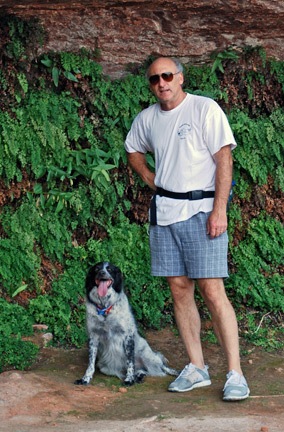
Jack and MikeJack is another story. At home in Wickenburg, he spends most of the day outside, loose. He hangs out on the back patio to watch the cars and trucks coming down the road so he knows when a strange vehicle needs barking at. (We’re at the end of the road and there are only three houses down here, so any strange vehicle qualifies.) He stretches out in the yard to soak up some sun while napping. He patrols the yard for mice or rabbits or, in warmer weather, lizards, and chases them accordingly. Once in a while, his friend, Charlotte, from the house across the wash, comes over and they chase each other for a while. When the weather is good, he often spends the whole day outside, on his own, to do whatever he likes. He never does anything that bothers us or our neighbors. He rarely leaves the property. And, of course, we take him with us for more off-leash fun on hikes all over Arizona.

It’s an idyllic life for a dog.

But in Phoenix, things are different. The apartment is in a complex where people come and go. He can’t see them, but he can hear their noises and he wants to bark. But we need to keep him quiet because we don’t want to annoy our neighbors, so we’re shushing him all the time. Rear Window has two patios, but they’re both too small for him to get any pleasure out of them — and certainly too small for him to do his business, even though they both have untiled dirt patches. Because he’s rarely on a leash at home, his leash skills are very limited. He also doesn’t like to do his business on a leash. In fact, the only way we can get him to do #2 is to let him loose.

Needless to say, this is quite a challenge for all of us. I feel bad for him because I can tell that he’s bored silly in the apartment, even with toys to play with. And I feel bad for all of us because this walking on a leash thing is a real pain in the ass.

And it makes me wonder why people in cities bother having dogs at all.

Anyway, I got a lead on a dog park about 2 miles from here. I figured I’d take him out and give it a try. It might be within walking distance — I have to drive it once to see. I’d hate to walk all the way out there to see a No Dogs sign.

No Dogs SignOne more thing I need to mention here…one reason there are so many No Dogs signs in parks is because so many people fail to clean up after their dogs. What’s the big deal here? Bring along a plastic grocery bag. When the dog does his business, use the bag to pick it up and seal it. Then drop it in the nearest garbage bin. If everyone did this, we wouldn’t have a need for so many No Dogs signs.

Waiting for the Cable Guy

No, not a movie review.

At this moment, I’m sitting cross-legged on a comfy new red leather sofa, listening to NPR and staring at a blank “parchment” (think pale pink) wall. The wall will soon house our first HDTV. And, with luck, it will also sprout a cable Internet connection.

I’m waiting for the cable guy.

He’s supposed to be here between 8 AM and 10 AM — a nice, narrow range. It’s 8:21 AM as I type this.

We spent a lot of time researching our Internet and television options for the Phoenix apartment. We discovered that we could get cable Internet that was 7 times faster than what we have in Wickenburg for half the price. (Chalk that down to another benefit of life in a city over life on the edge of nowhere.) We also discovered that if we went with DirectTV (rather than Dish Network or the cable company providing the Internet), we could get HD television service set up in up to four rooms, with DVR (think TiVo) for half of what we were paying Dish Network in Wickenburg for two rooms.

I should point out here that we’re not getting anything other than “basic cable” television channels. Why? Well, there are a few reasons. First and foremost, this is a part-time residence. It’s idiotic to buy premium cable channels for a home we’ll be occupying only part of each week. Second, we have a Netflix subscription. Why be at the mercy of television provider schedules — or pay extra for on-demand television programming — when you can get the movies you want to see on Netflix?

Netflix LogoBut that’s not all. Netflix also has the ability to play many movies on demand on your HDTV through your Internet connection if your connection is fast enough and you have a compatible device to handle the incoming Internet content. Our connection here will be fast enough. Devices to handle this start at $99; we just have to decide which one to buy.

Of course, all this television stuff is moot right now, since we don’t have any television down here right now. I don’t miss it too much, but I am looking forward to watching movies in high definition on a big screen.

AirPort ExtremeAirPort ExpressBut I’m hoping the cable guy can put the Internet connection on this big empty wall. I’ll use an AirPort Express that I brought from home to set up a wireless network and attach a printer, which I’ll also bring from home. If we wind up with a Netflix-compatible device that isn’t WiFi compatible, I’ll bring down a spare Airport Extreme base station from home and swap it with the Express, which doesn’t have an Ethernet out port. Otherwise, the AirPort Express should do the job.

So I’m waiting for the cable guy. It’s now 8:46 AM. He should be here any minute now.

Instant Tilt-Shift Faking

Kind of takes the fun out of it.

A while back, I wrote a blog entry about my foray into the world of tilt-shift photography. Although I have no interest in investing cold, hard cash in the hardware to do real tilt-shift photography, I learned how to fake in in Photoshop by reading “Tilt Shift Photography in Photoshop Tutorial.” I was pleased with the results and found the whole thing fun and rather addictive.

Today, I stumbled upon a site that fully automates the entire process: TiltShiftMaker. You upload a photo and it applies the unfocus mask, which you can adjust. You toggle a check box to determine whether you want colors enhanced. It then spits out a photo with the effect applied, as shown below. Any idiot can do it. Even me.

TiltShiftMaker in Action

The photo I started with was an aerial shot of the Grand Coulee Dam, taken this summer when my husband and I flew down the Columbia River. There’s nothing special about this shot; I didn’t even bother to spruce it up for this experiment. So the colors are a bit washed out and the framing is far from perfect:

Grand Coulee Dam

After processing with TiltShiftMaker’s default settings, it looks like this:

Tilt-Shift Grand Coulee Dam

For a quick and dirty tilt-shift, it ain’t bad. I tried to manually modify the original image using Photoshop and my results weren’t significantly better. Sure, I had a lot more control over the amount of blur, the size of the in-focus area, and the amount of saturation to give it those punched-up colors, but when I compared my final product to the automatically generated one, I had to admit that the automatically generated one looked more like a photography of a model scene.

But it certainly does take the fun out of playing around with this technique.

To me, the real challenge of faking tilt-shift photos comes from trying to take photos that would work well as fake tilt-shift miniatures. Aerial photos are great for this, especially if they include buildings and/or cars. They can’t be straight-down images, though. They need to be shot at an angle, so there’s an obvious reason for one portion of the photo to be in focus while the other parts are not.

Anyway, if you’re interested in this sort of thing, give TiltShiftMaker try.

Cataloging Video

Didn’t I pay someone to do this?

A few months back, you may have read various blog posts and tweets from me regarding a video project I’m working on. October was the big film shoot and I the guys I hired and an enormous amount of money to do the project shot about 10 hours of raw video footage all over Arizona.

At the conclusion of each day of the shoot, I was assured that they shot “awesome” footage and that the final product would be “mind boggling.” I assumed (silly me — when will I learn?) that these guys knew what they were doing, so I didn’t micromanage, as I sometimes do. I then sat back and waited for the promised hard disk full of footage (my copy) and the shot log.

When You Want Something Done Right…

I waited a long time. Weeks. What I finally got was three sheets of paper with print so tiny I couldn’t read it — even with my cheaters on. There was virtually no usable information and the list of scenes didn’t cross reference to any video clips by name or any other identifying information. In other words, the catalog was useless.

So it looked as if I’d have to do it myself.

After all, I needed a catalog so I knew what video I had to work with. I needed to know what video was good and whether anything needed to be reshot. I needed a reference I could consult to write my script and make sure I had footage to illustrate everything I wanted to talk about.

I also got the raw video on a 500GB Seagate drive. I assumed (dumb, dumb, dumb) that it was neatly organized and that all the clips would be in some kind of order. But when I plugged it in, I discovered that there was no rhyme or reason to the organization on the disk. Files and folders were randomly named and there were backups of some files on the same hard disk — resulting in duplicates. Video was in multiple formats, some of which simply could not be read on my Mac with the tools I had. I spent two days hunting down conversion software that would enable me to open video files in formats that included MTS, M2T, M2TS, DV, WMV, AVI, and MXF.

This is what I had to catalog.

And that’s what I’ve spent a total of 3 work days doing so far. I’m about 1/4 done.

The Nitty Gritty

Sample MOV FileTo give you an idea of what I’m working with and how I’m dealing with it, consider the screen shots here. The first shot shows a frame of a movie I’m reviewing. I converted its original high definition format to QuickTime for easy viewing. The movie was shot from my helicopter while flying over Lake Powell. It shows a particular stretch of shoreline. I need to know — at least approximately — where on the 135-mile long lake this shoreline is.

Enter Google Maps. I displayed Lake Powell in a big browser window and, based on my knowledge of the lake, zoom in to an area I think the footage might correspond to. This is made slightly easier by the fact that most clips are in named with numbers corresponding to the order in which they were shot. So if a specific piece of shoreline falls between two easily identified canyons, I can usually find the shoreline on Google Maps.

Sample on Google MapsHere’s the same place on Google Maps. And yes, I’m sure it’s the same place.

Then I whip out my handy Stan Jones map of Lake Powell, find Google Maps location on the map, and use a FileMaker Pro database to enter the corresponding lake mile marker as part of the clip’s description. I add some other info about the clip, including its time, a rating on a scale of 1 to 5, and a screenshot of a representative scene.

I only have to do this about 1,000 times.

There are several problems with this technique:

  • The water level determines the appearance of the shoreline. Google Maps has the highest water level and Stan Jones has the lowest. Our video is right in between.
  • Google Maps uses satelite images. Those images point straight down. In most cases, our video is shot at an angle to the scene, at various altitudes.
  • On Gootle Maps, north is always up. On our video clips, north can be any direction.
  • The direction we’re flying and the videographer who took the shot determines which shore I’m looking at. I have to think back to those October days to remember what we did and when, including what time of day.

So matching things up isn’t as easy as you might think. And if you think it’s easy, come on over and give it a try. You can buy the drinks when you give up.

And no, I really didn’t expect the videographers to catalog clip locations right down to the mile marker. What I expected was something like “Bullfrog Area” or “Near Escalante” or “Downlake from Rainbow Bridge.” That would have been a starting point, something for me to work with.

Anyway, I spent all day today doing this and will likely spend all day tomorrow and most of Wednesday. I need to get through all the Lake Powell aerial clips by then. I make good use of my two 24 monitors for this job, putting the QuickTime, FileMaker Pro, and Finder windows on one display and Google Maps in a big browser window on the other display. The thought of doing this on a 15 inch laptop pumps up my blood pressure. The sooner I get it done, the sooner I can move onto other things.

On Keynote Queues

Wondering about the kind of person who would wait in line overnight to see an Apple keynote.

I’m not going to Macworld Expo this year. I used to go regularly and didn’t miss a show for about 10 years. Then I started skipping them. It just didn’t seem worth the time and expense. I went last year but am skipping this year.

I always watch the Apple keynote presentation, though. For a while, it was available as a live Webcast. Since then, it’s been available a day or two afterwards as a streamed QuickTime movie. That’s good enough for me.

Evidently, it isn’t good enough for some people. When I finally tracked down the date and time for this year’s Keynote address on the Macworld Expo Web site, I also stumbled upon some information for attendees wishing to see the presentation live. Here’s part of the instructions:

FOR PLATINUM PASS ATTENDEES:
As a Platinum Pass attendee, you have priority seating to view the Keynote in the main presentation room, based on availability. You may queue up on line any time beginning Monday evening, along 4th Street adjacent to the Moscone Center. We urge you to make every effort to be on line by 7:00am Tuesday morning to ensure your place in the queue, as we cannot guarantee seating late arrivals. Show management staff and security will be present to assist with any questions.

I should probably mention here that the folks who have “platinum passes” spent $1,695 to get them — if they bought them before December 1. If they waited, they paid $1,895.

I don’t know about you, but the thought of waiting on line in San Francisco overnight in January after paying nearly $2K for “priority seating” seems a little extreme. What kind of person would do this?

Now there’s a lot of hoopla over the fact that Steve Jobs is not doing this year’s keynote address. There’s even a bunch of whiners who claim they’re going to give Phil Schiller, who is doing the presentation, the cold (and silent) shoulder with each announcement. (These could be the same people who are willing to wait in line overnight to see a trade show keynote address.) So although I don’t expect a bunch of people to be standing out in the cold tonight on 4th Street (or Howard Street for the people who don’t have “platinum” passes), I do wonder how many people stood on line overnight in the past. Anyone have this info? Use the comments link or form for this post to share it.