
My Geotagging Workflow

How I add GPS coordinates to my photos.

A while back, I decided I wanted to include the GPS coordinates in the EXIF data for my photos. Because my cameras (a Nikon D80 and a Nikon CoolPix something-or-other) don’t have built-in GPS features or communicate via bluetooth (or any other method) with a GPS, I have to manually attach the GPS coordinates to the photos.

I say manually, but I do this with software that automates the process. (I’m not a complete idiot.) Still, there’s a slightly convoluted workflow to get this all together. I thought I’d outline it here for two reasons:

  • Some blog readers might be genuinely interested. I’m not the only photo-snapping geek around.
  • By documenting this, I can look back, years from now, and see yet another example of how technology changes to make things easier and how I solved a “problem.”

So here’s the workflow rundown. I skipped the nitty gritty details to keep it short. (I read somewhere that people don’t like to read long blog posts.)

Step 1: Acquire the Photos

GlobalSat BT-335Bluetooth GPS w/ ChargersWhen I go out to do photography, I take minimal equipment. I don’t like to carry a bunch of stuff. But one of the things I do take with me (other than my camera) is a GPS data logger. I bought a GlobalSat BT-335 Bluetooth GPS Data Logger. I made my choice after lots of research, including this excellent review on bioneural.net. Three things sold me:

  • Price. It’s $69.95 on Amazon.com.
  • Size. It’s small and lightweight.
  • Connectivity. It’s Bluetooth, so I don’t have to deal with cables. (I hate cables.)

As an added bonus, when paired with my MacBook Pro, it puts live GPS data on my computer. Which is kind of cool, even though I currently have no use for this capability.

I’m not saying you should go out and buy this. I’m just saying that I did and I’m very satisfied. And while I certainly welcome comments that suggest other models, my choice has been made, so please don’t try to sell me on your solution.

A GPS data logger like the BT-335 does one thing, and it does it well. It keeps track of where you’ve been by recording GPS coordinates and corresponding times. It stores all this data inside itself with virtually no user interface. I attach it with a wrist strap I bought at a camera store to my camera’s shoulder strap. Before I start shooting photos, I turn it on and it does its thing. I basically forget all about it.

So when I go out to do photography, I turn on my GPS data logger and use my camera to take pictures. Pretty simply stuff, no?

It’s important to note here that the time on my camera must be right — at least within 10-20 seconds (if I’m on the move) or 1 to 2 minutes (if I’m moving more slowly). I check it against my computer’s clock (which is set by atomic clock) and adjust it a few times a year. The GPS data logger gets its date/time information from the GPS satellites.

Step 2: Get the Data and Photos on the Computer

The next step is to get all of the GPS data and the photos onto my computer.
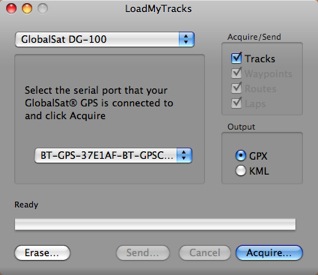
LoadMyTracksAlthough GlobalSat has a perfectly fine utility for getting the data off its unit and onto a Mac, I use the freeware application, Load My Tracks. I tell it I’m using a GlobalSat DG-100 and because the unit is paired to my computer, it finds it. I can then download tracks into either GPX (which I need) or KML format. I download both — heck, why not? — into the folder where I’ll soon be downloading the photos. I then erase the data logger so I don’t have extra track points in it the next time I use it.

Next, I use a card reader with Image Capture, which comes with Mac OS X, to download all photos from my camera into the folder where I saved the track logs. They don’t have to be in the same folder, but I like it that way. Nice and neat. And it makes it easy to back up the logs with the photos.

Now I’ve got the GPS data and photos on my computer.

Step 3: Match GPS Coordinates to Photos

Next, I launch GPSPhotoLinker, another freeware application. I use the Load Tracks button to load up the GPX data file for the photo shoot. Then I use the Load Photos button to load all the photos I took during the shoot. I go into batch mode, which has my settings saved from the last session, and click Batch Save to Photos.

GPSPhotoLinker uses my settings and the data to write the GPS coordinates, including altitude, to each photo. It displays a progress bar as it works. When it’s done, the Latitude and Longitude for each photo appears in the appropriate columns in the list of photos. Here’s what it looks like while it’s working. (Yes, I took pictures of very big, red rocks.)
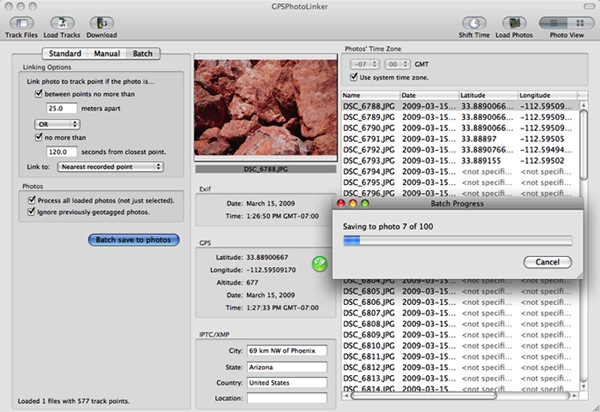
GPSPhotoLinker In Action

As for the big, red rocks, you can find them here. (But it seems to be off by a 10-20 feet; maybe it’s time to adjust the camera time again.)

Step 4: Backup

After losing a hard disk for the third time two years ago, I have become fanatical about backing up my data. After importing photos and linking the GPS data to them, I burn them onto a CD or DVD (depending on the capacity needed). When the burn is done, I check the CD or DVD to make sure it functions properly. Then I apply a label with the date and some descriptive information and file the CD or DVD in a box with a bunch of others.

I format the memory card for my camera in my camera to clear it out completely.

I then feel good about deleting photos off my hard disk, adding them to iPhoto, or modifying them in Photoshop or some other image editing too.

Sounds Like a Lot of Work?

It really isn’t a lot of work. It’s a whole workflow thing. Do it enough times and you can do it quickly. Steps 2 through 4 take about 15 minutes from start to finish.

That’s my flow for geotagging. What’s yours? Got a camera with a GPS or GPS connectivity built in? Please do brag about it by adding a comment here. I’d love to learn more.

Leaving Red Creek

Another helicopter video.

I’m finding a bunch of gems on my hard disk. Figured I’d share them online.

We’d stopped at the Red Creek landing strip on our way down the Verde River when we saw another helicopter parked there. We were working on a video project and wanted to interview the pilots. They must have been down by the river because they weren’t anywhere near the helicopter. So after screwing around on the ground for a while, we took off back down the strip and turned downriver to complete our flight. This video was taken with a nose-mounted POV.1 camera.

Night Flight into Wickenburg

It’s dark at the edge of nowhere.

I was going through a bunch of old video I had stored on my computer and came across some clips from a night flight from Falcon Field (FFZ) in Mesa, AZ to Wickenburg Airport (E25), in Wickenburg AZ. This particular clip was kind of cool. In it, I’ve just flown over town at night and the sky is pitch black. I turn on the runway lights by clicking my mic button, line up for landing on the taxiway, and set down on the ramp.

If you’ve ever wondered how dark it gets at the edge of nowhere, this video will give you an idea, from a helicopter pilot’s perspective.

Enjoy.

Why Print Publishing is Doomed

At least in my opinion.

This morning, while preparing to write a blog entry about the importance of creating a meaningful bio for your social networking presence, I came across a link in my Twitter stream:

jenniferwhitley Reading @cshirky: “We don’t need newspapers, we need journalism.” http://tinyurl.com/bpxulr

Easily distracted by any task at hand, I followed the link. I found myself on a plain vanilla — indeed, default WordPress template — blog page with a long column of full-justified text just large enough to read without putting on my cheaters. It was unbroken by advertising (including unattractive or animated ads featuring jiggling fat bodies), images (including meaningless stock photos, inserted as eye candy), or even subheadings (used by so many writers, including me, to help the reader skip head to the “important” parts). It was pure content with only a trio of centered asterisks to indicate a shift in the author’s thought.

And it was good.

The blog post, “Newspapers and Thinking the Unthinkable,” was by Clay Shirky. It summarized what has brought us to the middle of a revolution in publishing. Print publications are discovering that they can’t compete with the Internet for content delivery, no matter what they try. They’ve refused to see the reality of what’s going on. As a result, they’re not able to survive in the changing world of publishing.

Shirky compares what’s going on with the Internet and publishing today with the revolution of Gutenberg’s movable type and Aldus Manutius’s introduction of small “octavo” volumes that were less expensive to produce and easier to carry around. (I wonder…if Web publishing can be compared to movable type, can e-books and devices like the Kindle be compared to octavo volumes?) These innovation changed publishing. The brought about a revolution in how information was shared and who had access to it. This isn’t any different from today — information is more widely available than ever before.

My point here is not to summarize Clay Shirky’s excellent post. Instead, I urge to you read it. If you’re a journalist or serious blogger or any kind of writer at all, the history he summarizes and the points he brings up may be vital to your understanding of what’s going on in publishing. Indeed, I wish all of my publishers and editors would read it and begin to face the reality of what’s going on in our world. I believe that what he says applies not only to newspapers and journalism but to all publishing, including the kind of work I do.

My point is this: his finely articulated, well-researched, and extremely thoughtful piece is an example of why print publishing will ultimately go the way of hand-copied, “illuminated” texts. It’s quality content, easily accessible, for free, without advertising, on the Web.

It’s Worth the Extra $58.80 per Month, Right?

I bet the driver doesn’t think so.


Take a drive on dirt for the last 1/10th mile to my house.

As I’m typing this, I’m watching the town’s garbage collection truck rumble down the unreasonably steep and rugged road that leads to my home and my two neighbor’s homes. This is the third time the driver has come down the unmaintained road and he hasn’t quite gotten the hang of it yet. The loose rocks slip under his wheels on the way down and move aside to make deep ruts on the way up. His round trip from the last house on his route to our three garbage pails takes him about 15 minutes each day. He does this twice a week.

But that’s what the Town of Wickenburg wanted, I guess.

Four years ago, they annexed our three homes, against our will, into the Town. Apparently shopping and operating businesses in town wasn’t enough for our land-hungry mayor (who has since, thankfully, been defeated by someone who isn’t quite as obsessed with empire building). They wanted our property taxes, too. It didn’t matter that they weren’t interested in providing additional services for those tax dollars. The road to our homes remains unmaintained, there’s still no fire hydrant within at least a half-mile, we can’t get cable or DSL or town water or sewer services. They assure us that the town’s police and ambulance will come to our homes when called, but none of us have tried that yet. I don’t think they’ll find us. They gave us all new addresses, putting us on a street that apparently doesn’t exist — there’s no sign for it anywhere. My neighbors may have taken the hit of a “move” on their credit reports, but we didn’t — we changed our address right back to what it was.

But it’s worse for the rest of the folks annexed with us. They were promised that their road would be paved. That’s why they voted yes for the annexation, dragging us in with them. Their road remains unpaved to this day.

About two weeks ago, the Town added yet another insult. The town lawyer, who really ought to consider going into a different line of business, sent us a letter telling us that we were in violation of some town code because we didn’t have a contract with the Town for garbage pickup. The letter threatened legal action, with a daily fine of $300 or so dollars a day. The letter was nasty and accusing — as if we were purposely denying the town $19.60 per month of revenue.

I don’t take kindly to threatening letters. I got seriously pissed off and started making some angry phone calls.

Turns out that when the Town annexed us, the letter they sent to inform us of all the changes we could expect — like our new address — also told us that garbage service was available from the town. I don’t have the letter anymore — I tossed it long ago — but I don’t recall the letter saying garbage pickup was required. There’s a big difference, especially to a writer, between available and required. We already had garbage pickup from the local sanitation company and it was cheaper, so I didn’t see any reason to make the change.

My call to Town Hall got me many apologies from the person I spoke to. She told me they’d gotten a lot of complaints about the lawyer’s letter. I’m glad. It means that I’m not the only person who gets angry when some idiot backwoods (or back desert, in our case) lawyer flexes her fingers without thinking on a word processor’s keyboard. Apparently, the townspeople aren’t quite as lifeless as I thought they might be.

Since garbage pickup with the town was now roughly the same cost as with the private company and they’d come pick up twice a week rather than just once, we signed up with the town. It’s unfortunate for the other company. If they keep losing business to the town, they’ll soon go out of business. But heck, what does the Town of Wickenburg care about the viability of local businesses?

So now the garbage truck lumbers down our steep, rutty, loose gravel road twice a week to collect garbage from three pails. We make very little garbage because we recycle so much — and no, they won’t pick that up — so they’re not collecting much from us on every visit. The truck crawls back up at 5 to 10 miles per hour, spinning its tires once in a while to dig one or two new ruts that it’ll have to drive back over a few days later.

After the next rain, my neighbor will pull out his Bobcat and scrape down the road surface. My other neighbor will drive up and down with a home-made smoothing bar — think railroad steel and chain link fence dragged behind a pickup truck. We’ll do our part by driving up and down the hill at 15 miles per hour without stopping or with 4WD turned on in our pickup — the only way to avoid making ruts.

And the town will collect an extra $58.80 per month in revenue for the 2 extra hours it takes its truck and driver to include us on the route.