Writing Tips: Writing Accurate Descriptions

A response to a blog comment, and more.

I need to say that I really can’t thank blog commenters enough for taking the time to write. Not only do they often add useful information beyond what I know — thus adding incredible value to this blog — but they sometimes post questions or comments that get my mind going and give me fodder for new blog posts.

I received such a comment this morning and it prompted me to write a new article for my Writing Tips series.

The Importance of Accurate Descriptions

I touched upon the topic of accurate descriptions in fiction in a post I wrote last month: “Facts in Fiction.” In it, I explained why I thought it was important to get the facts about the “real” parts in fiction correct. I talked about the depth of a fictional world and how it would determine what facts and descriptions needed to be accurate.

My goal in that piece was to urge fiction writers to get the facts straight. Errors, when noticed by readers, can seriously detract from the work. For example, I believe I cited the example of a bestselling author who claimed that when a helicopter was low on fuel, it would be safer to fly lower than higher. This is downright wrong, no matter how you look at it. The author’s reasoning proved he knew nothing about the thought he was putting in a character’s head — a character that should have known better. This absolutely ruined the book for me, making me wonder what else he’d gotten wrong.

You can argue that fiction is fiction and that the writer can make up facts as he goes along. I disagree. My “Facts in Fiction” post explains why, so I won’t repeat it here.

Today’s Question

Today’s question comes from a comment on my recent blog post, “Dan Brown Doesn’t Know Much about Helicopters,” in which I painstakingly (and perhaps nitpickingly) point out a bunch of errors in Brown’s latest literary masterpiece (and yes, that is sarcasm), The Lost Symbol. The errors revolve around the inclusion of a helicopter as a repeating plot component throughout the book. Brown used his descriptive skills to make several claims about helicopters that simply were too far fetched to be believable. (But then again, isn’t that what Dan Brown’s work is all about?) I detailed them for blog readers.

One reader found the post useful. She wrote:

I just wanted to let you know I found this blog immensely helpful as I am writing a chapter in my book that involves a helicopter ride. I must say that I am striving to find new ways to describe the sound a helicopter makes. It’s rather unmistakable when you actually hear it, but to describe it to a reader is much more difficult. I recently wrote… “the deafening drill of the helicopter’s rotors made conversation impossible…” and one of my proof readers balked at the use of the word “drill.” I’d love to hear your comment on that one!

I started to respond in a comment, but the length of the comment soon bloomed into blog post length. So here’s the response.

First, I definitely agree about the word “drill.” Now here are some points to consider:

  • Have you actually heard a helicopter close up? Or at the distances you’re trying to write about? First piece of advice is to go someplace where you’re likely to hear helicopters and listen to them. Then describe what you hear.
  • Does the word “deafening” really apply? I think Dan Brown used that one, too. Deafening is a strong word. Unless the listeners were standing/sitting right outside the helicopter or inside with a door open/off, I don’t think deafening would be accurate. Helicopters are not as loud as people think — unless you’re right up next to them.
  • Lots of folks think it’s the rotors making all that noise. Close up, it’s the engine you mostly hear. Piston engine helicopters sound like airplanes; turbine engine helicopters sound like jet planes. Are you trying to describe the sound of the helicopter’s engine or spinning blades?
  • The tail rotor on many helicopters actually makes more noise than the main rotors. Why? The tail rotor blade tips are sometimes traveling near the speed of sound. Maybe it’s the sound of the tail rotor you want to describe.
  • How fast are the blades spinning? Is the helicopter just winding up? Is it at idle RPM (usually around 70%)? Is it fully spun up to 100% but still sitting on the ground? Preparing to lift off? In flight? There are differences — significant or subtle — in the sound depending on the blade speed and what the helicopter is actually doing.
  • How many blades does the helicopter have? You’re more likely to hear a rhythmic “wop-wop” sound coming out of a large helicopter with a two-bladed system — like an old Huey — than a smaller helicopter with four or five blades — like a Hughes 500C or D.

As you can see, it’s not as easy as asking someone if you can use the phrase “deafening drill” to describe a helicopter’s sound. There are too many variables. And at least three components are making that noise: engine, main rotor, and tail rotor. You need to hear the sound to describe it.

Do Your Homework

As I writer, I’m more bothered by the introduction of stereotypical descriptions — even if they’re not actually cliches — than inaccurate descriptions. Yes, it’s easy to ask a pilot whether a description you’ve written about flying rings true. But it’s lazy (for lack of a better word) to use a stereotype or cliche to describe a sound when you have the ability to hear it for yourself. And its irresponsible, as a writer, to expect a pilot or proofreader to come up with a better descriptive word for you. That’s your job.

If you want to write about the sound of a helicopter, for example, get your butt down to an airport or police helicopter base or medevac base. If you’re writing about a helicopter ride, as this commenter is, go for a helicopter ride.

Talk to the folks at the helicopter base about flying. Be straight with them — tell them you’re a writer and are doing research. (That is what you’re doing, isn’t it?) Let them read a passage or two from your manuscript if you think they can check it for authenticity. Then wait around until a helicopter operates in the area and listen. Get the permission (and possibly an escort) to stand or sit where you need to be to hear the sound as you need to hear it. Record it if you think it’ll help. Make sure you get the right sound for the right phase of flight. After experiencing this, you should be able to accurately describe it.

Do not rely on what you see/hear on television or in the movies. Many sounds are usually added after the fact. I’ve seen clips where the sound of an aircraft didn’t match the type of aircraft being shown. Movies also show helicopters departing almost straight up or landing almost straight down — a pilot will only do this if he must. (Read “The Deadman’s Curve” to learn why.)

Authenticity is Worth the Effort

There’s an added benefit to doing your homework: authenticity now and in the future.

For example, a visit to a helicopter base or ride in a helicopter will give you all kinds of additional details about the helicopter or flight operation. Do people really need to duck when getting out of/into a running helicopter? How is downwash different between an idling helicopter and a helicopter that’s just lifting off or arriving? How strong is the downwash from a hovering helicopter? What does it feel like? How does it smell? What does a turbine helicopter’s engine sound like when first starting up? (Think of your gas barbeque grill and you won’t be far off.) What are the pavement markings like on the helipad or helispot? What’s the pilot wearing? What’s he holding?

These little details will not only add authenticity to what you’re writing now, but they’ll give you plenty of useful material for the next time you need to write about helicopters.

It’s Not Just Helicopters

I’ve used the example of helicopters throughout this post because that’s one of the things I know from experience — and that’s what the question that prompted this post was all about.

But the advice in this post applies to anything that’s outside your realm of knowledge.

You know the age-old advice about writing: Write what you know. Well, you know what you experience. The more research you do — the more things you experience firsthand — the more you know. And the more you can write about accurately and authentically when you need to.
The Bible and Science

PZ Myers explains; I agree.

Just a quick blog post to give you all something to read and think about. Not here. On The Humanist Web site.

That’s where you’ll find an article titled “Comes a Horseman” by PZ Myers. In it, you’ll find this paragraph, near the end, which (to me) sums up why we should all be concerned about religion, especially in our schools:

And this is why I oppose religion. It’s not because it kills people, although it does. It’s not because it poisons everything, although it does. It’s not because it is nothing but a philosophical construct even though that’s all it is, and I actually kind of like philosophical constructs. Even moderate religion is an exercise in obscurantism, the elevation of feel-good fluff over substance. I oppose it because it is a barrier to understanding, a kind of simplistic facade thrown up to veil knowledge with a pretense of scholarliness. It’s an imaginary shortcut that leads people astray, guaranteeing that they never see the real glory of a cell or of the stars. And I honestly hope that once people see the creation story for what little it is–one thin sheet of tissue paper–they will be able to crumple it up and toss it aside.

Read the whole thing.

Why Isn’t “Childhood’s End” in my Local Library?

But boatloads of religious and mystical crap are?

Sir Arthur C. Clarke died in 2008. He was an award-winning science fiction author — and that’s an incredible understatement given the number of awards and his impact not only on science fiction but science itself. Most people know him for his novel 2001: A Space Oddyssey, which was made into a ground-breaking science fiction film in 1969.

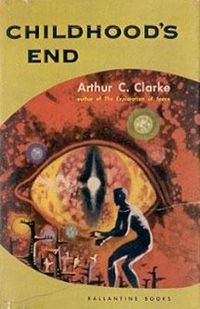
Childhood's End CoverOn the day he died, Twitter was filled with commentary about his work. But it wasn’t 2001 that came up again and again. It was his 1953 book, Childhood’s End.

From Clarke’s Wikipedia entry:

Many of Clarke’s later works feature a technologically advanced but still-prejudiced mankind being confronted by a superior alien intelligence. In the cases of The City and the Stars (and its original version, Against the Fall of Night), Childhood’s End, and the 2001 series, this encounter produces a conceptual breakthrough that accelerates humanity into the next stage of its evolution. In Clarke’s authorized biography, Neil McAleer writes that: “many readers and critics still consider [Childhood’s End] Arthur C. Clarke’s best novel.”

Indeed, Childhood’s End is so outstanding among Clarke’s work that it has its own Wikipedia entry.

I’m pretty sure I read the book, but I honestly don’t remember it. My science fiction reading was done mostly in my late teens and I consumed a lot of Clarke’s work. Rendezvous with Rama remains my favorite of his books. But when so many people on Twitter were raving about Childhood’s End, I made a mental note to track it down and read it (again).

Time passed. I’ve halted all book buying in an effort to stem the tide of incoming clutter at my home. I wanted to read something other than the books on my reading pile. Something to escape the real world. And I remembered Childhood’s End.

So I visited Wickenburg’s Public Library to pick up a copy.

And was surprised to learn that they didn’t have it.

Not that it was simply out on loan. They just didn’t have the book in the library.

They had 2001, 2010, 2061, and even 3001 (which I didn’t even know existed). And there was another Clarke title on the shelf — although it wasn’t listed in the computerized card catalog. But no Childhood’s End — which many consider his best work. No Rama, either.

I was disappointed, but not terribly surprised. They didn’t have Carl Sagan’s Contact, either. That book had been made into a movie starring Jody Foster. You’d expect it to be present on the shelves, but … well, I’ll get to my reason why in a moment.

I looked around the library for what they did have. The New Arrivals section bore little resemblance to the New Arrivals tables at the Barnes and Noble I visit near our Phoenix place. Those were new, noteworthy books. I only found one of them in Wickenburg: The Murder of King Tut by James Patterson. I grabbed it. There was very little fiction and much of the fiction they did have had Christian crosses on the binding. That’s Wickenburg’s way of noting that a book is Christian literature. They do the same thing with mysteries and science fiction, but the New Arrivals area had far more crosses on bindings than other symbols.

I wandered back to the paranormal section of the nonfiction shelves, hoping to find some of the books I’d seen listed on various skeptics sites. To their credit, they had Flim Flam! by James Randi — an excellent read that I reviewed here. But that was the only title for skeptics. Meanwhile, they had over two dozen titles by Sylvia Browne. And the health section was stuffed with books about unproven remedies and health regimens.

I wandered back toward fiction and started actually looking at the bindings. That’s when I started noticing that there was an unusually high percentage of books with that Christian cross on it. Christian fiction. The library was full of it.

But it only had four books by Arthur C. Clarke.

I looked around. Other than a young woman surfing the net on her MacBook Pro, I was the youngest patron in the place. I’m in my 40s. The rest of the patrons were 60+.

I went to the desk and asked if the library could get books from other libraries in Maricopa County. I was told no, the library is run by the Town of Wickenburg and is separate.

I asked why the library didn’t become part of the Maricopa County library system. I was told that then Wickenburg would be told what books it had to carry.

“Maybe that wouldn’t be such a bad thing,” I said.

“Yes, it would,” the librarian replied. “We know what our patrons want to read.”

They do? Sure fooled me.

I’m a patron, but I don’t want to read any of the Christian fiction and pro pseudoscience crap that fills the shelves. I want to read bestsellers, the classics, and award-winning fiction. I want to read non-fiction that educates me about science and philosophy and opens my mind to critical thinking.

Clearly, I’m not going to get any of that at Wickenburg Library.

And that brings me back to my suspicions on why Contact and more books by Arthur C. Clarke and other thought-provoking authors are not in the library: the themes of these books have the audacity to suggest that there might not be a God. That the meaning of life might be something beyond what’s in the Bible. That science and a reality based on known facts are important to our survival as a species or civilization, more important than man’s religions.

Censorship at our local library? I’m convinced. Why else would they refuse to be a part of one of the biggest library systems in the state?

And my tax dollars are paying for this?

When I asked whether I could get a Maricopa County library card, the librarian confirmed that I could — but not there. “Aguila has a branch,” she told me.

Aguila is a farming community 25 miles west of Wickenburg. I’d estimate that at least 25% of the population doesn’t even speak English. Most people live in trailer homes. It’s a sad, depressed community with nothing much to offer. The possibility that it might have a better library than Wickenburg boggles my mind.

“If you get a Maricopa County library card, it’ll cost us money,” the librarian said. It was almost as if she were asking me not to, just to save them a few bucks.

What she didn’t realize was that she gave me even more reason to get one. I think my husband will have to get one, too.

Fortunately, there’s a branch of the Maricopa County Public Library walking distance from our Phoenix place. I guess I’ll be getting my reading materials there, on Wickenburg’s dime.

Creating a Photo Calendar with InDesign

An overview of how I did it and the results.

This year, I decided that I needed an affordable yet memorable holiday gift to send out to all my customers and the folks I do business with. I wanted this gift to be an in-your-face-all-year-long item. That means it had to be something the recipients would want to keep and refer to.

A calendar seemed to fit the bill.

Now every year, I get sample calendars with my company name on it from various printers who print promotional items. They’re usually pretty boring; certainly not the kind of calendar you’d want to use all year long. Clearly, I had to do better than that.

The solution was a custom calendar using the photos I’ve taken over the years to show off the places I fly to and my helicopter. The challenge was to make a professional-looking, attractive calendar that was cost-effective to print.

iPhoto’s calendar printing option was the obvious choice for creating the calendar. It offers several different formats, many of which would meet my needs. What did not meet my needs, however, was the price: $19.99 per calendar. Since I figured I’d need at least 50 of them, that was far more than I wanted to spend.

My husband suggested MagCloud, which I’ve been using for other print-on-demand needs. At first, I didn’t think it would work out. After all, MagCloud produces stapled magazines sized just under 8-1/2 x 11. But then I held a sheet of paper up to the Robinson Helicopter calendar on my wall. And guess what? It was the same size.

So I decided to go with MagCloud for printing.

At that point, it looked as if I’d be creating a 28-page calendar from scratch. Not something I looked forward to. But I did a Google search for 2010 InDesign Calendar Template, which directed me to the 2010 InDesign Calendar Template by Juliana Halvorson on the Adobe Web site.

I downloaded it and discovered that it was almost what I needed. The template assumed a landscape orientation. I wasn’t sure if MagCloud would accept the document created that way. So I modified the template to make it portrait orientation and rotated all the calendar grids. A few adjustments to the margins and bleeds (which I initially got wrong) and it was a good starting point for my own project.

First up was reviewing the holidays. Juliana had included several extra religious and “Hallmark” holidays that just weren’t appropriate for a general use calendar. I removed them. I also changed the wording of some holidays — for example, changing Thanksgiving Day to just plain Thanksgiving.

Then I needed to redo the thumbnail calendars for the previous and next month that appear on each calendar page. The type was just too small. That turned out to be a time-consuming chore, as I had to basically reformat each little calendar individually. But it was worth the effort; the numbers are now far more readable.

Here’s a little movie of the calendar’s pages. You’ll need QuickTime to view it.

Then the big task: finding the images I needed in my calendar — 12 full-page images and about 16 smaller ones — cropping them for the right proportions, saving them as TIFFs, and dragging them into my working file. It took me two full days to get the job done. In the end, it was very tedious and I just couldn’t wait to finish it.

Since the calendar’s pages had to be in multiples of 4, I had to stretch my 26 page document to 28 pages. That also meant filling in 2 more pages with something. I decided to put information about Flying M Air’s services, along with thumbnail images from the big pictures.

Once completed, I created the PDF MagCloud needed to print my calendar. The first upload (which took 4 tries on my miserably slow Internet connection here in Wickenburg) resulted in an error. I’d gotten the bleed measurements wrong. I fixed them and (fortunately) did not need to adjust the layout. Two hours later, after about 8 upload attempts, the file was online. The preview looked good.

I ordered the free proof and am now waiting for it to arrive. If it passes muster — and I’m about 95% sure it will — I’ll order about 50 copies to give as holiday gifts to clients and friends.

In the meantime, I’ve “published” the calendar so others can preview and (hopefully) buy their own copies. There is one caveat, however. Because MagCloud publishes magazines and not calendars, if you buy from MagCloud, you’ll have to punch your own hole in the top of the calendar.

I’ll be doing a lot of hole-punching next week.

Spelling Checkers Don’t Work if You Ignore Them

Reminding my brain not to block out the red underlines that indicate potential spelling problems.

Check Spelling as You Type has been a built-in feature of many word processors for years. It’s now in most applications I use — including my Web browsers, for Pete’s sake! — and the red squiggly or dotted underlines are an integral part of my writing life.

If you’re not sure what I’m talking about — do you live in a cave? — I’m referring to the feature that indicates when a word you’ve typed may have been spelled wrong. This is supposed to flag the word so you can check and, if necessary, correct it.

A Blessing…

I vaguely remember when this feature first appeared in Microsoft Word years ago. It was a blessing — and a curse.

I initially loved the feature because it often identified my typos. I’m a touch typist and can get up to 80 words per minute when I’m tuned in. But those aren’t always error-free words. Check Spelling as You Type was a great feature for finding typos as I worked, eliminating the need to run a spell check periodically or at the end of document creation.

As you might expect, it also found spelling errors. My spelling was always pretty good, so it usually found more typos than actual spelling mistakes. But that’s okay. An error is an error and I want to remove all of them from my work, whenever I can.

…and a Curse

But over the years, I’ve found some problems with the Check Spelling as You Type feature — and spelling checkers in general.

The feature does not identify all typos or spelling errors as errors. For example, suppose you type bit but you really meant but. A spelling checker doesn’t see any problem with that, so it won’t flag it. That means you can’t depend on a spelling checker to proofread your work. (And yes, in case you’re wondering, a grammar checker would likely identify this as a problem. As well as the sentence you’re reading right now, because it isn’t really a proper sentence. And this one, too.)

So you’ve got a feature that makes you lazy by doing about 90% of the proofreading work for you, as you type. If you neglect to do the other 10% of the proofreading work, you could be very embarrassed — especially if you write professionally and editors expect your work to be error-free.

The unflagged error that zaps me most often? Typing it’s instead of its. At least I know what it’s supposed to be.

It’s worse, however, for people who don’t know the correct word. How many times have you seen people use then instead of than? There instead of they’re or their?

The feature has degraded my spelling skills. In the old days, before spelling checkers, I simply knew how to spell. If I wasn’t sure of the spelling of a word I needed, I looked it up in — can you imagine? — a dictionary. It made it worthwhile for me to actually learn how to spell words. Knowing the proper spelling saved me time in the long run.

But now, I simply type the word as I think it might be spelled and wait to see if it’s flagged. If it is, I use a context menu — Control-click or right click the word — to choose the word I meant to type. Yes, it’s convenient. But I seem to be doing it an awful lot more than I used to use a dictionary.

(Perhaps it’s also expanding my vocabulary by making it easier to use words I’m not as familiar with? There’s something there.)

The feature identifies any word it does not know as a potential spelling error. That means that if your document is filled with jargon, technical terms, place names, or other words that do not appear in a dictionary, those words will be flagged as possible errors. The word unflagged, which appeared earlier in this post, was also flagged. Is it an error? Or does my spelling checker simply not recognize it? Seems like a word to me, so I let it go.

And herein lies my biggest problem: I’m so accustomed to seeing words flagged in my documents that I’ve managed to tune out the red underlines. (It’s kind of like the way we all tune out advertisements on Web pages these days.) This happened to me just the other day. I typed the word emmerse in a blog post. My offline editing tool flagged it with a red dotted underline — as it just did here. But for some reason, I didn’t see it. I published the post with the error in it. A friend of mine, who referred to himself as a “spelling Nazi,” e-mailed me to point out my error. I meant immerse, of course. He knew that. Readers likely knew that. But I got it wrong and I shouldn’t have. How embarrassing!

Spelling Checker

Here’s a look at the spelling check feature in ecto, my offline blog composition tool of choice. It works just like any other spelling checker. (And yes, I do compose in HTML mode.)

The correct way to go about this is to look for every single possible spelling error and resolve it so those red lines go away. That means learning or adding the unknown word so it’s never flagged again or ignoring it so it doesn’t bother you in this document. All of this should be done with the appropriate menu command. Simply telling your brain to ignore a problem just sets you up to be blind to it when it occurs. That’s not how the software was designed to work.

The Point

This post has a point — most of mine do — and here it is: spelling checkers, including any Check Spelling As You Type feature, are only as good as allow them to be. Use them, but don’t depend on them. Follow up on any flagged words and resolve them using the software so the red underlines go away.

Spelling checkers are just a tool. Like any other tool, it won’t help you if you don’t use it correctly.