UPS Package Invoice Scam

Yet another email scam to be on the lookout for.

UPS ScamToday, I got an email message from UPS Quantum View . On the surface, it looked almost legit. There was the from field, which certainly looked legit and a subject of “UPS Delivery Notification, Tracking Number CDE31400FCA9E1A9.” That didn’t sound right to me — I’ve never had a UPS tracking number that started with the letter “C.”

I first saw it on my iPad, so that’s where I opened the message. When I read the contents, I knew something was wrong. It was a plain text message that said:

You have attached the invoice for your package delivery.

Thank you,
United Parcel Service

*** This is an automatically generated email, please do not reply ***

I’ve never received any communication from UPS that wasn’t in HTML. And I’ve never received one with poor English (note first sentence). And finally, I’ve never received any communication from UPS that included an HTML attachment — this one was named invoiceCDE31400FCA9E1A9.html.

Of course, to verify my suspicion that this is some sort of scam, I had to open the attachment. I wanted to do that on my Mac, but not with a Web browser. Instead, I used a plain text editor, TextWrangler. Inside, I found the usual collection of HTML code that would display UPS-looking text and graphics. But most of the links inside the document were to the domain www7apps-myups.com. A quick Whois lookup revealed that the domain is registered to someone in China.

Not UPS.

Other than a bit of javascript at the end of the message that appears to be some sort of counter, the attachment looked harmless enough. I can only assume that clicking the links within the attachment is what triggers whatever this scam attempts to do.

I can imagine someone more gullible than me getting this email message and wondering what package UPS was telling them about. They open the linked file, see what looks like a legitimate UPS communication, and click the link to learn more about the mystery package. Their computer then becomes infected with some sort of virus or perhaps the page itself attempts to get information that the scammers can use for financial gain. I don’t know. I’m not about to try it. You shouldn’t either — not on a computer that isn’t quarantined for this kind of work.

I’ve said it before and I’ll say it again: Don’t open file attachments you aren’t expecting, especially from people you don’t know. Don’t click links from strangers.

Oh, and if you get one of these, forward it to fraud@ups.com.

The $49 Kindle

This should be free.

KindleTwo days ago, one of my Facebook friends posted a status update that linked to a CNET article titled “Get a Kindle with Special Offers for $49 Shipped.” The article detailed the hoops you’d have to jump through to get a 6″ refurbished Kindle for just $49. The device normally retails for $69.

No Need for a Kindle

I don’t have a Kindle. I never wanted one. I had a NOOK on order when they were first announced, but since B&N took so damn long to deliver and the iPad was announced while I waited, I canceled my NOOK order and bought an iPad. I’ve upgraded it for various reasons ever since.

I love my iPad. I use it for all kinds of things, from monitoring the weather (Weatherbug, Intellicast apps) to planning and tracking long flights in my helicopter (Foreflight app). I also use it as an ebook reader with the iBooks, Kindle, and NOOK apps.

Ironically, it’s the Kindle app that I prefer. Amazon has a good selection of books and can synchronize them between up to 5 devices. There are Kindle readers for iPad, iPhone, and Mac OS — as well as other devices. So I can buy a Kindle ebook and read it on any device at any time — and keep my pages synchronized. No, it doesn’t support the kind of Interactive features available in books created in iBooks Author, but since Apple takes so damn long to approve those books, there aren’t many to choose from. And if there was an Interactive book I wanted, I could look at it in iBooks. If I had just a Kindle device, I couldn’t do that.

In my mind, the Kindle is an extremely limited ebook reading device. While I know some folks think the Kindle Fire is pretty close to an iPad, they’re only fooling themselves.

A Sucker for a Good Deal?

As an ebook author, I always wondered what my books would look like on a real Kindle. So there was a certain desire to get my hands on one — even temporarily — to see what it could do and how it looked. $49 seemed a pretty low price to pay to satisfy my curiosity, especially since I had a $300 credit on my Amazon.com account from selling my iPad 2 to them. So there wouldn’t even be any out-of-pocket cost.

So I jumped through all the hoops — not an easy task on a day when my 3G connection was in full frustration mode — and bought one.

It arrived today.

My Observations

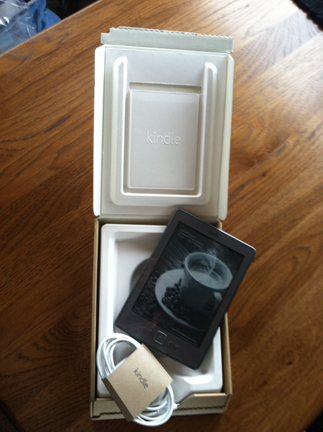
Kindle with Packaging
Smart packaging. Really. (But no, that isn’t a cup of coffee on my Kindle. It’s one of the ads that appear automatically when it powers down.)

Amazon obviously took some cues from Apple on the packaging. They designed a simple cardboard box just the right size for the device and the USB cable that comes with it. Tasteful, simple. Slap a label on it and throw it in the mail. Amazon calls this “frustration-free packaging” — and it is.

When I first pulled out the Kindle, I admit I was somewhat impressed. It was very small and lightweight — like a thin paperback book. I could imagine myself reading a book on the device — throwing it in my purse and pulling it out when I was having lunch or waiting on line somewhere. Of course, I already do that with my iPad — would I take one instead of the other? I doubted it.

I plugged it into a power source to make sure it was fully charged. It came to life, prompting me for my language.

And that’s when the frustration began.

You see, I’m so accustomed to a touch-screen that I couldn’t immediately figure out how to use the buttons. To make matters worse, every time I tried to press the Select button (in the middle of a 5-way controller), I wound up pushing either the up or down button on the controller. Seeing the button I needed to “press” onscreen and not being able to just tap it was driving me bonkers.

But I got past that — at least at first — and got my next surprise: a wifi connection was required to use the device. For some reason, I thought all Kindles had built-in wireless capabilities. Silly me.

So, for a bit more irony, I connected the Kindle to my iPad’s wifi hotspot. That got my account set up so I could start looking at my library.

Around then, I was a bit irked to see that the bottom part of the screen was taken up with a banner advertisement. This 1/2 inch ad appears on the Home screen and changes periodically. I’m not sure where it comes from, because it appears even when wifi is disabled. Right now, it’s advertising an HGTV show called “Design Star.” I don’t think there’s any TV show that could possibly interest me less. Odd that Amazon.com, which knows what I’ve been reading about and buying for the past 5+ years, can’t target an ad toward my interests.

I fumbled around a bit and then realized that I really needed to learn more about how to use the Kindle before trying to read one of my own books. It doesn’t come with any printed documentation — which is really no surprise — and I didn’t have much trouble finding and opening the manual that’s included on the device. I read up about it but before I could do anything else, I got a phone call and stepped away.

When I returned to the Kindle, it was displaying a fullscreen ad.

Apparently, when you leave it alone, it displays a “screensaver.” In the world of Kindle, screensaver = advertisement. It took me a while to figure out how to make it go away. I had to power it back up. The screensaver remains on screen when the device powers itself off. Repeatedly turning the device on and off displays a different “screensaver” each time it’s powered down.

I realized then that Amazon had gotten me to pay $49 for an advertisement delivery device. That’s downright offensive to me.

I played around with it a little more. I found the page turning buttons unintuitive, requiring me to push down instead of in. That might seem like a minor distinction, but with a device small enough to hold in the palm of my hand, it seems more logical to turn a page by squeezing it instead of using a finger on my other hand to press down while holding it. And, of course, my brain keeps telling me to press the right button on the 5-way controller.

And did I mention the delay when turning pages in the books it’s designed for reading? The current page kind of blurs or darkens out before the other page appears. Like a blink. I thought they’d fixed that problem.

As for the much-touted annotation feature, to enter notes on this Kindle, you have to deal with its keyboard. That opens a whole new world of hurt. The keyboard has tabs for symbols, lowercase, uppercase, and international characters. You need to get to the right tab to type the right character. (God help you if your wifi password is a mix of upper- and lowercase letters, numbers, and symbols; it could take quite some time to enter those characters.) Then you need to use the 5-way controller and its center button to highlight and select characters. Rather than presenting them in standard QWERTY order, they’re alphabetical. I could imagine myself forgetting what note I wanted to type before I’d typed the first few words.

Even defining words requires you to use the controller to navigate to the beginning of the word you want to define. I’m not sure if I’d care enough to bother.

My Conclusions

Before actually getting my hands on this, I thought, hey what’s $49? Seems like a good deal to me. But in the less than 60 minutes I played with the Kindle, getting more and more frustrated every time I tried to do something, I realized that this device should be free, like razors used to be.

Do people actually like this device? Use all of its features — including the nightmarishly designed keyboard? Tolerate its never-ending stream of uninteresting ads?

I can’t and won’t. I’d lose my sanity trying to use this regularly. I could burn a $50 bill and get more satisfaction for money spent.

This puppy is going back to Amazon. I’m sure there are plenty of other suckers out there who think it’s a good deal. Let them give it a whirl.

Domain Service Notice Scam

Yet another attempt to part fools from their money.

Today I got an email from Domain Services . (If you can’t tell from the email address that this is a scam, you really should not be reading email without supervision.)

It included a big fancy “notice” with one of my domain names and the information I provided when I registered it years ago. Here’s the meat of the message:

Attn: FLYING M PRODUCTIONS|MARIA LANGER
As a courtesy to domain name holders, we are sending you this notification for your business Domain name search engine registration. This letter is to inform you that it’s time to send in your registration and save.

Failure to complete your Domain name search engine registration by the expiration date may result in cancellation of this offer making it difficult for your customers to locate you on the web.

Privatization allows the consumer a choice when registering. Search engine subscription includes domain name search engine submission. You are under no obligation to pay the amounts stated below unless you accept this offer. Do not discard, this notice is not an invoice it is a courtesy reminder to register your domain name search engine listing so your customers can locate you on the web.

This Notice for: WWW.ARIZONAPHOTOADVENTURES.COM will expire on January 18,2012 Act today!

So if I don’t “register” with these people by tomorrow, this offer may be canceled, making it difficult for my customers to locate me on the web? Yeah, right.

But here’s the punchline — the payment schedule:

Domain Services Scam

Good thing they told me which was most recommended. I think I’ll write a check out to them right now!

Not.

Those of you who, like me, recognize a scam when you see one might be wondering why I’m blogging about such an obvious example of a ripoff. Well sadly not everyone recognizes email messages like this as scams. I’ve actually gotten calls from friends and family members asking me what they should do when they get crap like this in email.

And, believe it or not, the blog posts I write about scams are surprisingly popular. People get email like this, are not sure what to do, and Google it. What do they find? Among other things, they find me telling them not to get ripped off.

Don’t get ripped off. Don’t let scammers scare you into paying them money for no reason. Mark this email as junk and don’t give it a second glance.

What People are Saying about Groupon

A list of links of interest to people who want to learn more about how Groupon is screwing small businesses and customers.

A while back, I wrote a few posts about Groupon — including “Why Groupon is Bad for Business…and Consumers” — that continue to be among the most popular posts on this site. But if you really want to learn more about the dark side of Groupon, I urge you to check out some of the links I’ve collected over the past year or so:

  • Groupon gripes: Are daily deals headed for disaster? – Like I’ve been saying, SOMEONE has to pick up the tab on these great deals, and it’s usually the business owner, sometimes disastrously.
  • Why Groupon is bad for your business (and mine) – “Groupon, the so-called social buying site (even though there is very little social going on outside of the manipulation of basic human behaviors like their reaction to a situation where there is sense of scarcity) and the fastest growing company in history, is bad for your business.” Read why on EmergenceMarketing.com.
  • Groupon Reviews: Worst Marketing For Your Local Business – “Just because millions of merchants have fallen under the spell of Groupon, a PR juggernaut, and their like, it doesn’t mean you should. It’s a killer alright, a profit-killer.” Read a real case study on RetailDoc.com.
  • Groupon’s big discounts: how its coupon business could eventually cripple the merchants that rely on it – The author of this piece almost gets it. “The logic is simple: Merchants are encouraged to use the deals to attract new customers, who in theory will return at full price. But, in what seems to be an increasing number of cases, customers come for the deals and then leave for deals offered by other merchants through Groupon. So the number of “new” customers attracted by cheap prices increases, and the number of loyal customers decreases as shoppers prefer to become “new” again for whomever offers the best deal.” Read more on Slate.
  • 2 of 2 Daily deal sites: retailers tell their side of the story – Another objective look at Groupon, this time from the retail side.
  • Groupon Was “The Single Worst Decision I Have Ever Made As A Business Owner” – More on Groupon.
  • Why I Want Google Offers And The Entire Daily Deals Business to Die – Thank you, TechCrunch, for bring more attention to this problem.
  • Why Groupon Is Poised For Collapse – “Businesses are being sold incredibly expensive advertising campaigns that are disguised as “no risk” ways to acquire new customers. In reality, there’s a lot of risk. With a newspaper ad, the maximum you can lose is the amount you paid for the ad. With Groupon, your potential losses can increase with every Groupon customer who walks through the door and put the existence of your business at risk.” I couldn’t have said it any better. On TechCrunch.
  • Why Groupon is Bad for Small Business – Some specific notes on what’s wrong with Groupon from the small business owner’s point of view. Excellent points.
  • Groupon Is a Straight-Up Ponzi Scheme – Why Groupon can’t work in the long run: “The vast majority of local merchants can’t discount more than 10 percent. Some can go maybe 25 percent in special situations. But 75 percent is a wholly unsustainable number. If all local merchants begin using Groupon then it can’t send loyal customers to anyone; Groupon can only send discount chasers to merchants. Which means that as Groupon grows, both local merchants and their competitors will find that Groupon’s main argument no longer works (if it ever did) — Groupon simply can’t send them loyal new business. So they all stop using Groupon in its current form.” Read the rest of this interesting article on Knewton.com.
  • Groupon amends IPO filing to remove odd accounting – Read about it in Business Week.
  • Groupon’s loss jumps in second quarter – “Groupon Inc.’s second-quarter loss more than doubled as it hired more than 1,000 new employees, even though the Internet daily deals company trimmed back its marketing costs.” Read more in Crain’s.
  • Groupon IPO: Could the company really be worth $30 billion? – While investors may be stupid, analysts usually aren’t. Did anyone really fall for Groupon’s creative accounting? Read about it in Slate.
  • Are online coupons worth it? – Another aspect of Groupon: online reviews of your business. Interesting experience and food for thought.
  • The economics of Groupon: The dismal scoop on Groupon – The Economist provides some real-life numbers on Groupon, showing that original estimates of their IPO value were extremely optimistic. Marketing expenses are currently eating up more than 60% of their revenues. I can’t see how that could possibly be sustainable, especially when they’re losing merchants and customers every day.
  • Groupon demand almost finishes cupcake-maker – Simple math: sell enough product at a loss and you will find yourself in deep financial do-do. Don’t let Groupon fool you into offering a deal like this.
  • Groupon Snafu Leads Baker to Produce 102,000 Cupcakes – Another Groupon horror story indeed.
  • Groupon to be investigated by Office of Fair Trading – “Advertising watchdog refers daily deals website after it was found to have broken UK ad regulations 48 times in 11 months.” And so it begins in the UK.
  • more to come…

I’ll update this regularly as I find more links.

Got a link to another Groupon-related piece you’d like to share? Put it in the comments.

Amazon’s Bribe to Publishers: KDP Select and the $6 Million Fund

And why I’m giving it a try.

I published my first real ebook back in the end of October: Making Movies: A Guide for Serious Amateurs. I built the book in InDesign, spun off a color print-on-demand version through MagCloud, and then painstakingly prepared ebook formats for the iBookstore, Amazon Kindle, and Barnes & Nobel Nook. Within a week, it was widely available and actually began to sell.

The Kindle Owners’ Lending Library

Not long afterwards, Amazon.com sent a chill through the publishing industry by announcing that Kindle owners who were also Amazon Prime subscribers would be able to borrow books — for free — from Amazon.com. The program is called Kindle Owners’ Lending Library and its an obvious ploy by Amazon.com to make its Kindle hardware more attractive to readers. After all, you must have a Kindle — the actual device and not a Kindle app on an iPad or computer — to borrow the books for free. So for those readers who don’t need all the features of a real tablet computer, this program makes a Kindle a bit more attractive.

I immediately questioned one of my publishers in its private Facebook group:

As an author, I’m wondering how Peachpit’s participation in this program (if they do participate) will impact royalties.

After all, I don’t earn royalties from borrowed book; I only earn royalties on purchased books. Apparently, I wasn’t the only one thinking about this. The Mac Observer published a piece titled “Amazon’s Lending Library Raises Publisher & Author Hackles” that explored the program and responses to it in some depth.

In the Facebook group, the publisher’s response was quick and to the point:

[Publisher Name] is not participating.

I found this reassuring. The reason: If readers knew they could get my books for free, they might stop buying them. If they stopped buying them, I would not be able to earn a living. Pretty simple, no?

So I saw the program as a threat to my livelihood and was glad to hear that my biggest publisher was not going to participate.

Fast Forward to Last Week

On Thursday, I got an email message from the Kindle Direct Publishing service. That’s the service publishers use to get their ebooks for sale on Amazon.com. It started like this:

We’re excited to introduce KDP Select — a new option dedicated to KDP authors and publishers worldwide, featuring a fund of $500,000 in December 2011 and at least $6 million in total for 2012! KDP Select gives you a new way to earn royalties, reach a broader audience, and use a new set of promotional tools.

It went on to say that if I opted to include my book in the Kindle Owners’ Lending Library, I could get a cut of a monthly $500,000 fund based upon the total number of times my book was borrowed. Of course, Kindle owners would be attracted to these books because they were free to borrow. And now I could get a royalty payment on a borrowed book.

It seems like win-win-win:

  • Amazon wins because it gets more books in the Kindle Owners’ Lending Library, thus enhancing the value of the Kindle and Amazon Prime programs.
  • Kindle Owners with Amazon Prime memberships win because there are more books available to borrow for free.
  • Authors/Publishers win because they actually get paid when people read their work.

I thought long and hard about why I might not want to give this a try with Making Movies.

The only drawback for me as a publisher is that I had to give Amazon.com the exclusive right to sell/loan my ebook for at least three months. I could not distribute an ebook version of the title anywhere else — not on Apple’s iBookstore, not on Barnes & Nobel, not on MagCloud, and not even on my own website or blog.

I looked at the sales figures from all the places my book appeared. I’d already sold more copies with Amazon.com than with all of the other retailers combined.

It was a pretty easy decision.

So today I enrolled Making Movies in KDP Select.

The way I see it, three months is not a very long time. If I fail to bring in enough royalty money during that period to continue allowing Amazon to have an exclusive on my ebook, I’ll drop out of the program.

And I know of at least one other author who has enrolled his title: Andrew Dambe with his novel Soleá. (I started reading it; it’s a neat book.)

It’s worth a try, right?