
Why I don’t Genius Bar hop and other comments regarding my recent hard disk problem.
One of my jobs as a blogger is to produce at least one blog entry a week. As you may have noticed if you follow this blog, it looks like I’ve been slacking off lately. Well, I just want to take a few moments to assert that looks may be deceiving.
Last week was a busy one for me. I finally got my computer back up and running after its second hard disk crash in a year. This crash was far more serious than the last and required the geniuses at the Apple Store to fix.
Now I know that lots of Mac pros laugh at the word “genius” when applied to the Apple Store’s tech support folks. And I do agree that it would be difficult to call any of them geniuses in the true sense of the word. (Think Einstein.) But if you were to compare their computer skills to the average Mac user’s, they could indeed be considered geniuses. They know a lot more about the current computer models than 95% of Mac users. Sadly, I fit into that 95% these days. I could tell you all kinds of things about fixing a Mac II cx or a PowerMac 7100/66 — and that’s because I used to teach a course about troubleshooting those computers running System 7. Nowadays, my troubleshooting capabilities are limited to what I need to know — like much of my other knowledge — and I don’t really need to know all the things the geniuses need to know to do their daily fix-it jobs.
So I’m not uncomfortable applying the word genius to many (but not all) of them. To me, some of them really are geniuses when it comes to diagnosing and fixing Mac problems.
I’ll also be the first to say that the capabilities of an Apple Store genius staff on any given day for any given store is hit or miss. It all depends on each staffer’s experience, knowledge, and interest in the topics he or she needs to know. I was at the Genius Bar in the Chandler, AZ store on Monday and the geniuses that day were pretty good. One of them was a super genius, the one who helped me was definitely above average, and the guy working the iPod slot was about average. (Let’s face it: it doesn’t take much skill to fix an iPod problem. Every iPod should come with a cheat sheet printed on back that explains how to reset it; that will resolve 95% of an iPod’s problems. The iPod guy probably resets a lot of iPods in a day. I’ve gotten so good at it that I can reset mine with one hand while flying my helicopter. Darn vibrations lock it up more often than I’d like to admit.)
I’ve had repeatedly bad luck at the Biltmore Apple Store in Phoenix, which is at least 30 miles closer to my house. The two times I tried to get assistance there, the lead Genius didn’t seem interested in looking deeply into my problem and didn’t seem to care whether it was resolved or not. On my fried motherboard problem, it seemed that she spent more time telling me how much it would cost to fix the problem than diagnosing what the problem was. This, coupled with her obvious lack of sympathy, made me doubt her diagnosis, so I had to go to another store (Chandler) to get a second opinion. I got a bad taste in my mouth (so to speak) from the experience. And that’s why I don’t go to the Biltmore store anymore.
Oddly enough, sympathy for my problem seems to be important to me. My main work computer or “production” machine (currently a Dual G5) is like a partner to me. It holds onto the projects I’m working on, it has the tools I need to get the job done as smoothly as possible. When it works right, we’re a team getting the job done. When it starts acting up, I get concerned. It’s not just a machine on the fritz. It’s a work partner feeling ill. What’s the problem? Can I fix it before it becomes critical? Is its motherboard about to go (again)? Or its hard disk? Will I lose data? Will I need to take it to the hospital (fix-it place) to get it working right again? How long will we be apart? And, of course, the selfish questions, like how long will I be unable to work?
The geniuses at the Chandler store are always sympathetic to my problem. They understand that my computer isn’t just a machine I use for e-mail and to surf the Web. They understand that its hard disk contains lots of important information — including books in progress — and the tools I need to get my work done. They understand that without my production computer, there’s very little real work I can do. And even though they don’t necessarily push any harder to complete a job for me than they do for anyone else, they make it seem as if my problem is one of the most important ones they’ll tackle that day. And they soothe me with reasonable reassurances that make it easier to face the 90-mile drive home and wait for their call.
This time around, the problem was a toasted hard disk. Personally, I believe it has something to do with my Firewire ports — it occurred while my iSight was plugged in and I was attempting to suck something off a portable Firewire hard drive. (My motherboard problem also manifested itself when working with multiple Firewire devices, including an iSight, so I’m very wary of using it these days.) They replaced the hard disk — which IS something I could have done myself if I really wanted to — and managed to get about 50% of the data off my old hard disk before it ceased to function at all. This cost me dearly, but the way I see it, I was paying for my own stupidity. If I’d had my entire Home folder backed up, recovery wouldn’t have been necessary at all and I could have saved the $150.
What hurts even more is that I’d written an article for Informit.com about backing up with Fetch before I had the problem and neglected to utilize my own instructions to protect myself.
The computer was done the next day and my husband, Mike, picked it up on his way home. It isn’t exactly on his way — he works about 15 miles north of there — but it was a lot more convenient for him than for me to make the 180-mile round trip drive. On Wednesday morning, I set about restoring the whole computer to it’s normal setup. I didn’t like the way the Apple folks had set up the machine — for some reason I was really bugged about my home folder being called maria (note the lowercase) rather than its usual mlanger (which I’ve used on all my computers for years). (Is that anal or what?) So I pulled off the recovered data, reformatted the hard disk, and spent the next two days installing software and updates. The updates were particularly painful now that I’m on the super-slow wireless Internet connection I whined about elsewhere in this blog. The 139 MB Mac OS X 10.4.8 combined updater took quite a while to suck off the Internet before I could install it.
Fortunately, I managed to pull e-mail messages, endo settings and contents, ecto contents, and some other stuff off my PowerBook. My iCal and Address book data was already set up to synchronize with .Mac, so getting all that data moved over was very easy. The only thing of real value that I lost was Chapter 6 of my Excel 2007 for Windows book, which I’d been working on for the second time. (The first revision went bad and I started from scratch. So today I look forward to starting my Chapter 6 revision for the third time. I knew it would be the book’s Chapter from Hell, but I couldn’t imagine how hellish it would be.)
By Friday, the computer was 90% back to its old self and I was working on it regularly instead of my laptop. So I was out of commission for two full weeks. I blame myself for that, too, letting the disk recovery software run as long as I did before finally bringing it to the geniuses.


 That tends to push me toward a 24″ iMac. But there’s this weird mental block in my head about iMacs. Traditionally, they’ve always been Apple’s low-end model of computer. While they were perfectly acceptable as test mules for my work, I never seriously considered them for my actual day-to-day production tasks. But in looking at the current iMac specs on the Apple Web site, it’s pretty clear that today’s iMac isn’t your Aunt Tillie’s iMac. It’s a pretty serious machine, which ample processing power for all but the most serious graphics/video/gaming tasks. And frankly, it would probably be able to tackle some of those tasks pretty well, too. Considering the price of the most loaded iMac, that’s to be expected. They ain’t exactly cheap these days. When I loaded one up on the Apple Store’s Web site, the price tag exceeded $2K. For an iMac. No wonder I have a mental block.
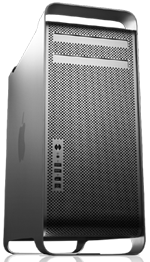 My greedy little mind is naturally leaning toward a Mac Pro. Now that’s a computer. I imagine two internal hard disks, two SuperDrives, 2 GB of RAM, and enough graphics power to drive the 30″ display I’ll probably never get. But when I loaded one of these up on the Apple Store’s Web site, the price tag was staggering: over $3K. I don’t have that kind of money sitting around to buy a computer. And if I did, would I want to blow it on a computer rather than, say, a two-week vacation in Hawaii?