People are Pigs

A tenant moves out and I am amazed by the way some people live.

She was not the perfect tenant. She often paid her rent late and always seemed to have some excuse involving a health problem. Yet there was a brand new car in her driveway this year, a hot tub in the backyard, and I often saw her going into the tanning salon. Obviously, her priorities were screwed up.

But she never complained about things being broken or asked us to come fix something for her. There may be two reasons for this, as I learned yesterday. Either she never used anything (like the stove) or she had everything fixed herself, just so I wouldn’t have to come into the house.

I didn’t bother her. I’m not the kind of person to snoop on my tenants. They have their lives, I have mine. Pay rent on time and I’ll leave you alone. Pay rent late and I’ll charge a late fee and leave you alone. I got a lot of late fees out of Lisa. But probably not enough to cover the damage she did to my house.

The house is a two bedroom, two bath house that shares a triple lot with a small apartment building I also own. (The apartment building contains four fully furnished studios.) It’s actually quite a nice little house, with a big, long room that comprises the living room, dining area, and kitchen and two smaller rooms, each with their own bath. The kitchen is full of cabinets and has a nice pantry. I didn’t recall there being a dishwasher, but yesterday I saw a portable dishwasher rolled to one side.

Destroyed RugsLisa and her teenage son and their dog(s) trashed the place. First of all, it appears that either Lisa didn’t own a vacuum cleaner or she didn’t know how to use one. I’ve never seen dust bunnies as large as the ones on that living room carpet. But it doesn’t really matter that much. Their dog(s) had done a real number on the carpet. Evidently Lisa decided to keep the backyard clean by letting her dog shit in the house. On the carpet. Although the carpet hadn’t been in great condition when she moved in, at least it was clean. Now it’s ready for the trash heap. And the house reeks of animal smell. Fortunately, the kitchen floor, which I’d replaced before she moved in, survived her abuse. The back bedroom’s carpet, which was also new when she moved in three and a half years ago, may be salvageable. It depends on how often the dog visited Lisa’s son.

Checkerboard WallLisa’s son is obviously a decorator-in-training. He gave each wall in his bedroom a different paint scheme. The big wall is now a black and white checkerboard, with squares about 12 inches on each side. The back wall is painted dark red with playing cards tacked up onto it. And the other big wall looks as if it were the victim of an experiment with squeeze bottles of paint. Oh, and I almost forgot about the shiny CDs tacked neatly onto the entire ceiling. They also neglected to remove much of their kitchen trash. The pantry is half full of food and garbage. The cabinets have McDonald’s catsup packets and related fast-food paraphernalia in them. The refrigerator is partially stocked with groceries.

Destroyed WallMy cleaning woman, who is due to arrive at the house at 8 AM today, will probably have a heart attack and die on the spot when she sees the mess she faces. The carpet cleaning guy already told me there isn’t much he can do. The painter will have a good laugh over the checkerboard, right before telling me that it’ll need three coats of paint to cover up. And I’m just praying that the place isn’t as big as it looks when the carpet replacement people come to measure. The cheapest carpet available in town is $17.50 per yard installed.

And Lisa? Disappeared. She left no forwarding address; I’m sure she realizes she’ll never see a cent of her security deposit. I’ll make a half-hearted attempt to track her down and get a small claims court case going against her. Then, with judgment in hand, I’ll wait on line behind the dozens of other people she owes money to, including the phone company, which turned off her phone last month, and the Town of Wickenburg, who was ready to turn off her electricity this week. And maybe, if I’m lucky, I’ll get the court to garnish her wages — if she ever gets a job — so I can see some of the money I’ll be pouring into that house this month.

If anyone in Wickenburg is reading this and knows who I’m talking about, you obviously know Lisa. But if there are any landlords in Wickenburg who are wondering just who this nightmare tenant is, call me and I’ll give you a full name. People like this don’t belong in Wickenburg and we should consider it our duty to keep them out.

But then again, how often did Lisa use one of the town’s two cash advance businesses to get up the cash to pay her rent? And what does that say about Wickenburg?

Do It Yourself Layout

How and why I lay out my own books.

I do layout for most of my books. That means I submit finished pages to my editors. What they see on the page is what the book will look like when printed.

I write the book as I lay it out, in Adobe InDesign CS. InDesign is an incredibly powerful page layout program, but I use only a fraction of its features. I start with a template that has all the elements of page design. I use text boxes to position text in the appropriate place. I actually type the text right into the text box — I don’t use InDesign’s separate text editing window. I use styles for paragraphs and characters. I’ve even taken advantage of InDesign’s nested styles to automatically format text like numbers in numbered steps and bullets in bulleted lists. That saves a lot of time and ensures consistent formatting.

I create figures using screenshot software on my “test mule” computer. That’s the computer I run the software on while I write about it on my production computer. My Macintosh test mule is an eMac; my Windows test mule is a Dell Dimension PC. Both are networked to my production computer, a dual processor Macintosh G5. I pull the screenshots over to the G5, open them with Photoshop, and run an action on them to convert them to grayscale (or CMYK, depending on the book) and save them as uncompressed Macintosh-format TIFF files with 72 dpi resolution. Then I literally drag the image icons from a Finder window to the InDesign document. I downsize them to fit, which also enhances resolution, and drag them into position. Then I use InDesign’s library feature to insert a pre-formatted caption, which I fill in for each screen shot. This is probably the most time-consuming part of layout. No, that’s not true. Callouts — those little lines that run from labels to exact positions on a screen shot — take far more time to do. I have InDesign library elements for other items, too, like thumbtabs (for my Visual QuickStart Guides) and callout lines (for my Visual QuickPro Guides).

I write each book a chapter at a time. When a chapter is finished, I create a PDF format file of its pages that includes printers marks such as registration marks and cut marks. (Can’t remember the exact names of these things.) I then upload the PDF file to an FTP site where my copy editor and production editor can download them. There’s a workflow over at my publisher’s place that varies depending on the editors assigned. What I see at the end of the process is printed pages that have been marked up by both editors. I get them a few chapters at a time via UPS. I normally take care of the edits in the afternoon, after submitting a chapter for the day. (I try to do a chapter a day for revisions and a chapter every two days for new titles.)

I review the edits and make about 98% of the changes that are requested. Most changes are of a typographical nature — I have a habit of repeating words and leaving characters out of words — but some are of a layout nature — rewrapping text to prevent widows, moving a callout up two points to improve spacing, etc. And of course, there are always a few grammatical errors that need fixing. (I wasn’t an English major!) Any time I don’t make a requested change, I note the reason why on the marked up pages. I don’t ignore a change without good reason. Then I print the manuscript and send it back to the editor with the markups. If the production editor is a freelancer, I usually have to print up a second copy for him or her. It usually takes about 30 minutes to turn around edits for a chapter, so I can knock them off quickly. The final InDesign and TIFF files get FTPed to the production editor or, if he or she requests it, put on a CD. The production editor sometimes puts a few finishing touches on the final files.

When I finalize a chapter, I also create a finalized PDF and upload it to the FTP site for the indexer. Sometimes, if the book is on a tight deadline, the indexer will work on draft pages. This is usually pretty safe, especially for revisions, since pages rarely have significant changes from draft to final. When the indexer has indexed all chapters, she submits a Word or RTF file to me via e-mail. I then pour the index into an Index template and reformat it to fit the number of pages allotted. Sometimes that means making the font size really small — my last book had 7.2/8.2 font for index entries. Other times, that means making font size and leading normal but increasing the spacing between paragraphs or above headings. The book’s total page count has to be evenly divisible by 8, and it’s my job to make sure I submit exactly the right number of pages. Fortunately, Peachpit is not normally page count driven. A book can be as long or as short as it needs to be — as long as the total number of pages is divisible by 8. That’s great for me, because I can write just what I need to.

Generally speaking, it takes about a week from the time I finish all chapters in my first draft to the time the final files and index are ready to send to the printer. It then takes about three weeks from the time the files get to the printer to the time I see a printed copy of the book. Add another week for copies to get to stores and you have a 4-week turnaround from finished manuscript to book available in stores. Obviously, this is the greatest benefit of doing my own layout. Let’s face it, computer how-to books are extremely time sensitive. To get a book out quickly, you have to prepare it quickly. I have a knack for doing my job quickly and since I don’t have to depend on someone else at the publisher to do time-consuming layout, each book can be turned around very quickly.

There are other benefits to doing my own layout. It’s great for me because I have a lot more control over my work and can write in a way that takes advantage of the book’s layout. I also get a bit higher royalty rate to compensate me for my additional work and the cost of labor I’ve saved my publisher. It’s great for my editors because they can see the “final” product as they are editing. So if the layout isn’t quite right — for example, a figure would be better on one page than another or could be improved with a callout — they can tell me and I can fix it as part of the editing process. Otherwise, the book would have to go through multiple editing processes, each of them handled by someone different who may or may not care about the quality of the book. I’m the author of my books and I care about all of them, so I do my absolute best to make sure they’re something I’d be proud to have my name on.

Peachpit, to my knowledge, is the only publisher that allows authors to handle what they call “packaging.” And they won’t let all authors do it. You have to prove that you have the ability to handle layout to their standards. I’ve been doing layout for my own books since 1996 and have produced over 40 titles for them, so I’m proven.

Other publishers don’t work this way at all. In fact, they are completely opposed to the suggestion that an author layout out the book. The reason: they are worried about losing control over the book’s contents. They don’t seem to understand that they do get final possession of the manuscript’s files and can make any changes they like before sending the manuscript to the printer.

One of my other publishers, in fact, has an extremely complex production process. First the author writes the manuscript using a Word template that has macros built in for formatting. Some of the macros work, others don’t. The author is required to insert special codes in the manuscript to signal certain types of styles. Meanwhile, the author creates screenshots, which are supposed to be submitted as full screen images. The author is supposed to print each one and mark where the image should be cropped. (I refuse to do that because it wastes time and paper and relies on a production person to get the cropping right. I send cropped images and I don’t even bother printing them anymore. Nobody complains. Frankly, I think they’re relieved that I’ve spared them this extra work.) From the author, the Word file and images go to a copy editor and a technical editor. The copy editor uses Word’s change tracking feature to mark up the manuscript and insert all the codes the author has either neglected to insert or inserted wrong. The Word file then goes back to the author for review. The author further messes up the file by using the change tracking feature to accept or reject changes. The author also gets comments from the technical editor and changes the Word file to make necessary corrections. A production editor gets it next and incorporates the copy editor and author changes to finalize the file. Then it goes into production, where it’s converted into a Ventura Publishing file (I kid you not) with the images inserted. The images are usually in-line images, meaning that text doesn’t wrap around them. It also means that the images might not appear where the author thinks they should. (But that doesn’t seem to matter much.) The author gets “proofs” of these pages, in print, and is required to mark them up and send them back to the publisher. About 10% of the author’s suggestions are incorporated into the final pages. To be fair, any change that corrects an error goes in but any change that tweaks the layout is basically ignored. The book eventually makes it to the printer where it is printed and sent out. Time elapsed from completion of first draft to printed copies: 8 to 12 weeks.

Is the quality of a book better when a professional publishing staff takes it from manuscript draft to printed book than when an author takes it most of the way? I don’t think so. But I also think that quality isn’t the most important aspect of book production to some publishers. But that’s a topic for another blog entry.

A Trip to California

I take a trip to California with my family to see Zero-Mike-Lima.

I’d been wanting to see my helicopter being built. And I’d been wanting to get a look at the recently expanded Robinson Helicopter factory in Torrance, CA. And I needed an interesting outing to take my sister, brother, and sister-in-law on. So I made a few phone calls and got an appointment for a factory tour.

I wanted to fly us all out there and make it a day trip, but it would have cost $200 per person and I wasn’t willing to dump $800 on airfare. So on Monday morning, we packed overnight bags and hopped in Mike’s new Honda Accord. Road trip!Torrance is about 350 miles from Wickenburg. MapQuest, which I consulted before the trip, said it would take about six hours. But I had some side trips planned for along the way.

The first was a brief stop at Quartzsite, AZ, where I hoped to do some helicopter rides in January. I needed to find a good landing zone that was highly visible and safe. I thought that the area near the first Quartzsite exit (coming from the east) would work. Sure enough, it had the right layout for an operation. But I had a strong feeling it would be occupied in January when I wanted to use it. We stopped for lunch at a McDonald’s drive-thru and I made a quick trip into the nearby truck stop to buy a map of California. (Yes, I’d actually left the house on a 350-mile road trip without a map.) Then we hit the road again.

The Langer KidsAbout an hour later, we passed through Chiriaco Summit, which is the highest point between Blythe, CA and Palm Springs, CA. Five minutes later, we turned on the exit for Joshua Tree National Park. This would be my third visit to Joshua Tree and, like all the other visits, it would be a visit where I just have a few hours to drive through. But one of these days, I need to come to Joshua Tree and spend some real time. It’s a great park, with mountains, valleys, two different deserts (Colorado and Mojave), and lots of vegetation. On Monday, it also had snow — quite a bit of snow, in fact, especially on the northern side of the park. We drove through the park, making a few stops here and there. Norb, my brother, and Missy, his wife, did a little hike to a dam. My sister, Laura, and I would have gone with them, but we were wearing the wrong shoes for a trip through the snow. So we hung out in the car and listened to the XM radio.

We exited the park on the north side, then drove down the west side, back to I-10. By this time, it was late in the day and the sun was sinking low in the horizon. Sun glare was a real pain in the neck for about 20 minutes. Then, with the sun behind the mountains, we emerged at I-10 near Palm Springs and the windmills. The windmills impressed my passengers quite a bit. I was more impressed by the high-rise casino hotel that had sprung up between Palm Springs and Banning.

We took I-10 to 60 to 91 to the 605. My companions were introduced to Los Angeles area traffic, which was as bad as usual. We wound up on the Pacific Coast Highway near Long Beach and, after driving through a few bad neighborhoods, made our way to downtown Long Beach. The Renaissance Hotel there looked very inviting after so many hours of driving and traffic, so we pulled in and got two rooms. Then, after a quick meal at the brewery across the street, we turned in for the night.

I was exhausted, but not too exhausted to sleep past 3 AM local time. I spent two hours lying in the dark, trying to get back to sleep, before my roommate, Laura, woke up. Then I busied myself with the previous day’s USA Today while I lounged in bed. Laura and I went down for breakfast an hour before my brother and his wife were due to appear. By the time we were eating, I’d already been awake five hours.

FishWe checked out, stowed our luggage in the car, and walked down to the Aquarium of the Pacific, which was just opening for the day at 9 AM. I’m rather fond of fish — I have a 55-gallon fish tank in my living room — and I think aquariums are very interesting. But this one went beyond that. The highlights: the jellyfish displays, the shark-petting tanks, and the lorikeet feeding aviary. We spent two hours there and enjoyed every minute of it.
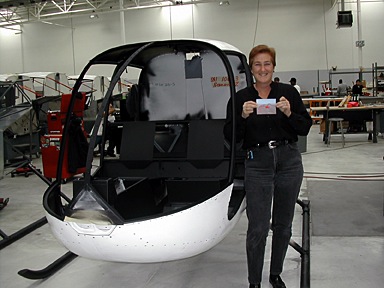
After a brief stop at the Queen Mary — which I personally don’t think is worth $20+ to tour — we hit the road for Torrance. Our tour was set for 1 PM. We arrived 20 minutes early and Milly Donahue, who is in charge of dealer/factory relations, met us in the lobby. She took us for a quick walk-through both factory buildings. Robinson Helicopter Company has owned a 360,000 square foot factory on the southwest corner of Torrance Airport for quite some time now. This year, they added a 315,000 square foot building right beside it. They moved the machining equipment from the old building to the new building and bought a bunch of new machining equipment to help fill the space — and to help them fill orders for helicopters. Robinson makes almost every single part in the helicopter (other than the engine, which is Lycoming) and they’re all made on the premises. My personal highlight for the walk-through came only moments after stepping out onto the factory floor. The helicopters are built on a series of assembly lines. The serial number for each helicopter is plainly written on the back wall of the cabin. 10603, which is my helicopter’s serial number, was the second R44 cabin frame I laid eyes on. I was actually looking at my helicopter before it hit the assembly line!Milly let my companions take my picture standing beside what was essentially Zero-Mike-Lima’s skeleton. Then we did the walk-through, returning to the lobby just before 1 PM.

The tour, which was led by Milly’s assistant, Vanessa, was more comprehensive, although it didn’t go into the new factory building. We were accompanied by four Asian men, of which only one spoke English, and a man who turned out to be from Prescott, AZ, who was thinking of buying a helicopter. Vanessa led us around the factory, stopping to explain many of the assembly areas. That’s when I realized that the assembly line had shifted up one space, leaving an empty space at the end. The last helicopter on the line was 10602. We walked around the factory and into the finishing area. We also stepped into the old delivery room, which was being used by a maintenance class to work on helicopters. Ed Taylor, my mechanic, was there, working on the cyclic control for an R44 with two other mechanics. I stopped and said hello, then left him alone to learn. When the tour was over, we passed by the end of the assembly line again. The last spot wasn’t empty anymore. What would be N630ML was sitting in its place on the line.

N630ML Under ConstructionI ask you: what are the chances of visiting a factory the very day that the item you’ve purchased goes onto the assembly line?

We climbed back into the Honda, feeling good about the tour. After a quick stop at a fast food place (can’t remember the name of the place, but its logo has a smiling star), we hit the highways (and traffic) for the ride home. It was about 2:40 PM. Los Angeles has the worst traffic in the world. It took us a good two hours to clear it. We stopped at the new casino between Banning and Palm Springs for a bathroom break and gas. Norb drove the rest of the way home. We got home at 9:15 PM local time and went right to sleep, exhausted.

Books of 2004

I bring readers up to date with the titles I churned out over the past year.

I realized, in writing my last blog entry, that the last book I’d mentioned finishing on these pages was my Mac OS X 10.3 Panther: Visual QuickStart Guide last October. Don’t think for a minute that I’ve been idle since then.

It’s been just over a year and, believe it or not, I had to consult a list of the titles I’d put out to see just what I’d been up to. I just couldn’t remember them all. Here they are:

Microsoft Office Excel 2003 for Windows: Visual QuickStart Guide was the most recent revision of my Excel for Windows book. Not much new in the way of content because there’s not much that Microsoft can already add to that feature-packed program. It came out in December 2003.

QuickBooks Pro 6 for Macintosh: Visual QuickStart Guide was a brand new title for me (and Peachpit). I’d proposed it early in the year, when I was looking for work and it took several months for them to say yes and come up with a contract. By that time, I had other work lined up. (Feast or famine.) The book underwent a lot of content changes as I wrote. For example, it was originally going to include payroll coverage, but since payroll is done with a separate program bundled into QuickBooks and the future of the bundling was questionable, we decided to drop it. (Frankly, I think payroll is so confusing that a whole book could be written about it, but don’t think I’m volunteering.) The book came out in May 2004 and is doing surprisingly well. So well, in fact, that Peachpit wants me to revise it for the recently-released new edition.

Quicken Premier 2005: The Official Guide is the sixth revision to my original Quicken Official Guide. It was finished in June 2004 and published in August 2004.

Creating Resumes, Letters, Business Cards, and Flyers in Word: Visual QuickProject Guide was a brand new title in Peachpit’s brand new Visual QuickProject Guide series. The series is great for beginners or people with computer phobias because it shows every single step in a process, with callout lines and numbered instructions. It makes a VQS look like a technical guide for MBAs. And it’s in full color! It’s 160 pages long and costs only $12.99. A great deal. The only thing I don’t like about it is the title — it’s way too long! It came out in September 2004.

Creating Spreadsheets and Charts in Excel: Visual QuickProject Guide is another brand new book for me. This one offers the basics of working with Excel spreadsheets and charts in a format anyone can understand. It’s eight chapters took me eight days to write and lay out. (That’s not the record. My record is a 350-page book that I knocked off in 10 days back in 1993. Of course, I didn’t do layout for that title.) I think it’s a great book and I’m extremely pleased with the way it came out. Like the Word book, it’s cross-platform. It came out in October 2004.

Microsoft Word 2004 for Macintosh: Visual QuickStart Guide is the latest revision to my Word for Macintosh book. It has a bunch of new stuff inserted throughout the book and a brand new chapter covering Word’s new Notebook Layout view feature. I finished it two days ago and it’ll go to the printer today. I expect to see it by the first week in December and, of course, it’ll be at Macworld Expo.

So in the course of a year, December to November, I finished six books. Of these, three were revisions and three were brand new titles. (That’s not a record. My record is 10, set a number of years ago, and I hope I never do that again. Talk about burnout!)

In addition to writing all those books, I also managed the Wickenburg Airport’s FBO (for a short time, anyway), did helicopter tours in the area, got a part-time job flying at the Grand Canyon, and wrote a handful of articles. So anyone who says I have an easy life obviously doesn’t have the big picture.

I’m not complaining — certainly not! I usually take a week or two off between books and spend that time catching up on things like bills, surfing the ‘Net, shopping, and writing in my blog. If I had a helicopter, I’d be flying, but I’m between ships right now and grounded. This week, I’m trying to write three or four articles that I owe various editors. I knocked off one yesterday and started a second one. I’ll finish that and write at least one more today. Tomorrow, my brother, his wife, and my sister are coming in for a week, and my mother and stepfather are showing up on Tuesday for a week, so I’ll spend time with them.

Then it’s back to the salt mines for me. Mac OS X 10.4 Tiger is on its way and I have to revise the existing book to turn it into Mac OS X 10.4 Tiger: Visual QuickStart Guide. I always have the first Mac OS book out in stores and I’m not about to ruin my record this year.

After that, it looks like a QuickBooks revision, but if I’m lucky, they’ll let me write one or two more Visual QuickProject Guides. I proposed a bunch of titles, and they finally seemed to like one of them. Cross your fingers for me. I’m also writing an eBook about iBlog 2.0 for Spiderworks. I’ll probably finish that sometime in December, if I can find time for it between my work on the Tiger book. I’m also working on a book about the Grand Canyon with a photographer and hope to have that ready for publication in May. It’ll be nice to have a book that doesn’t need revising every one or two years. (The Canyon doesn’t change much.) And I’ll always be writing articles. Informit.com likes my work and I like writing for them. FileMaker Advisor also wants me to write for them, but I’m always having trouble coming up with fresh ideas for them, so we’ll see how I do.

That’s it in a nutshell: the past year and the next four to six months. Busy, busy, busy.

I Bought an iPod Photo

I didn’t want to do it, but I had to.

The biggest problem I have as the author of computer books and articles is that in order to write about hardware and software, I have to own it. Or at least have it in my possession for enough time to learn and write about it.

That’s why I bought an iPod years ago. I had to write about using iTunes with an iPod for my Mac OS X book. I couldn’t get a loaner from Apple and I didn’t know anyone who had one. So I had to buy one. I still have it and still use it. It’s the original iPod, which held 1,000 songs on its whopping 5 GB hard drive. At the time, it was an incredible breakthrough in MP3 technology. But today, it’s a dinosaur, almost embarrassing to admit owning. (I own a Newton, too. But let’s not go there today, huh?) But it works, so I don’t care.

Want to know where I spent the most time listening to my ancient iPod? In my old helicopter, Three-Niner-Lima. I had Paul, my old mechanic, install an audio patch into the intercom system and put an RCA jack on the side of the instrument panel. I bought a nice leather case for the iPod with a mounting do-dad so I could hang it beside that jack. Then I used a standard Radio Shack cable (not bought locally; those guys don’t have anything you need when you need it) to patch the iPod into the helicopter’s intercom system. I could listen to tunes while I flew. Best of all, when there was a radio transmission, the music would automatically cut out so I could hear the radio. Ditto when I talked on the radio. A great arrangement. It made some of those long cross-country flights over Arizona and California and Nevada deserts a bit more pleasant.

The iPod Photo came out about a month or so ago. Probably less. I can’t remember. Anyway, Apple took the next logical step and made it possible to put photos on an iPod. So they’re worth looking at, they changed the screen to color. And since 10 or 20 GB isn’t enough to hold all your music and photos, they come with either 40 GB or 60 GB worth of storage.

I tried to get one from Apple as a loaner. They have an editorial loan program that is extremely difficult to get hardware from. I succeeded twice times in the past — I got an iBook loaner once and an iMac (ET style) loaner another time. But this time I wasn’t as lucky. I was told the waiting list was “a mile long.” Wow. So I bought one.

It came yesterday. I had company so I couldn’t tear open the box and immediately play with it. So I took it to work this morning. I’d just finished work on [yet] another Word book and was waiting for the index to come from the indexer so I could lay it out. I’d promised articles to two publishers. But I could spare a few hours to configure and learn about my new toy — I mean, vital piece of hardware.

It’s cool. No doubt about it. The dock it comes with sure beats that FireWire cable I left on my desk for syncing and recharging the old iPod. And the color screen is beautiful.

I stuck it in the dock and immediately started putting songs on it. I was able to fit my entire iTunes music library, which really isn’t much — only about 1,600 songs. (No reason for me to copy all my CDs to my computer’s hard drive when they weren’t going to fit on my iPod anyway.) Then I copied my iPhoto photo library to the iPod. All 2,600 photos. When I was done, I’d used less than half of the iPod’s 40 GB. Sheesh.

I got an e-mail from one of the editors waiting for articles and wrote back to her, mentioning that I’d just gotten an iPod Photo. How about an article that explains how to create a custom slide show with music on the iPod? She wrote back saying that they’d been talking about iPod photo in a meeting that morning. Write the article! So I did. And I submitted it this afternoon.

So I guess it must be an important piece of hardware, necessary for my work. After all, I’d owned it for less than 24 hours when I wrote an article about it that earned me $300. Another article and it’ll be paid for.

And yes, the new helicopter will be iPod-compatible. It has a built-in audio jack. But I think I’ll stick the old iPod in there, just for old time’s sake. After all, 1,000 songs really is enough.