Do It Yourself Layout

How and why I lay out my own books.

I do layout for most of my books. That means I submit finished pages to my editors. What they see on the page is what the book will look like when printed.

I write the book as I lay it out, in Adobe InDesign CS. InDesign is an incredibly powerful page layout program, but I use only a fraction of its features. I start with a template that has all the elements of page design. I use text boxes to position text in the appropriate place. I actually type the text right into the text box — I don’t use InDesign’s separate text editing window. I use styles for paragraphs and characters. I’ve even taken advantage of InDesign’s nested styles to automatically format text like numbers in numbered steps and bullets in bulleted lists. That saves a lot of time and ensures consistent formatting.

I create figures using screenshot software on my “test mule” computer. That’s the computer I run the software on while I write about it on my production computer. My Macintosh test mule is an eMac; my Windows test mule is a Dell Dimension PC. Both are networked to my production computer, a dual processor Macintosh G5. I pull the screenshots over to the G5, open them with Photoshop, and run an action on them to convert them to grayscale (or CMYK, depending on the book) and save them as uncompressed Macintosh-format TIFF files with 72 dpi resolution. Then I literally drag the image icons from a Finder window to the InDesign document. I downsize them to fit, which also enhances resolution, and drag them into position. Then I use InDesign’s library feature to insert a pre-formatted caption, which I fill in for each screen shot. This is probably the most time-consuming part of layout. No, that’s not true. Callouts — those little lines that run from labels to exact positions on a screen shot — take far more time to do. I have InDesign library elements for other items, too, like thumbtabs (for my Visual QuickStart Guides) and callout lines (for my Visual QuickPro Guides).

I write each book a chapter at a time. When a chapter is finished, I create a PDF format file of its pages that includes printers marks such as registration marks and cut marks. (Can’t remember the exact names of these things.) I then upload the PDF file to an FTP site where my copy editor and production editor can download them. There’s a workflow over at my publisher’s place that varies depending on the editors assigned. What I see at the end of the process is printed pages that have been marked up by both editors. I get them a few chapters at a time via UPS. I normally take care of the edits in the afternoon, after submitting a chapter for the day. (I try to do a chapter a day for revisions and a chapter every two days for new titles.)

I review the edits and make about 98% of the changes that are requested. Most changes are of a typographical nature — I have a habit of repeating words and leaving characters out of words — but some are of a layout nature — rewrapping text to prevent widows, moving a callout up two points to improve spacing, etc. And of course, there are always a few grammatical errors that need fixing. (I wasn’t an English major!) Any time I don’t make a requested change, I note the reason why on the marked up pages. I don’t ignore a change without good reason. Then I print the manuscript and send it back to the editor with the markups. If the production editor is a freelancer, I usually have to print up a second copy for him or her. It usually takes about 30 minutes to turn around edits for a chapter, so I can knock them off quickly. The final InDesign and TIFF files get FTPed to the production editor or, if he or she requests it, put on a CD. The production editor sometimes puts a few finishing touches on the final files.

When I finalize a chapter, I also create a finalized PDF and upload it to the FTP site for the indexer. Sometimes, if the book is on a tight deadline, the indexer will work on draft pages. This is usually pretty safe, especially for revisions, since pages rarely have significant changes from draft to final. When the indexer has indexed all chapters, she submits a Word or RTF file to me via e-mail. I then pour the index into an Index template and reformat it to fit the number of pages allotted. Sometimes that means making the font size really small — my last book had 7.2/8.2 font for index entries. Other times, that means making font size and leading normal but increasing the spacing between paragraphs or above headings. The book’s total page count has to be evenly divisible by 8, and it’s my job to make sure I submit exactly the right number of pages. Fortunately, Peachpit is not normally page count driven. A book can be as long or as short as it needs to be — as long as the total number of pages is divisible by 8. That’s great for me, because I can write just what I need to.

Generally speaking, it takes about a week from the time I finish all chapters in my first draft to the time the final files and index are ready to send to the printer. It then takes about three weeks from the time the files get to the printer to the time I see a printed copy of the book. Add another week for copies to get to stores and you have a 4-week turnaround from finished manuscript to book available in stores. Obviously, this is the greatest benefit of doing my own layout. Let’s face it, computer how-to books are extremely time sensitive. To get a book out quickly, you have to prepare it quickly. I have a knack for doing my job quickly and since I don’t have to depend on someone else at the publisher to do time-consuming layout, each book can be turned around very quickly.

There are other benefits to doing my own layout. It’s great for me because I have a lot more control over my work and can write in a way that takes advantage of the book’s layout. I also get a bit higher royalty rate to compensate me for my additional work and the cost of labor I’ve saved my publisher. It’s great for my editors because they can see the “final” product as they are editing. So if the layout isn’t quite right — for example, a figure would be better on one page than another or could be improved with a callout — they can tell me and I can fix it as part of the editing process. Otherwise, the book would have to go through multiple editing processes, each of them handled by someone different who may or may not care about the quality of the book. I’m the author of my books and I care about all of them, so I do my absolute best to make sure they’re something I’d be proud to have my name on.

Peachpit, to my knowledge, is the only publisher that allows authors to handle what they call “packaging.” And they won’t let all authors do it. You have to prove that you have the ability to handle layout to their standards. I’ve been doing layout for my own books since 1996 and have produced over 40 titles for them, so I’m proven.

Other publishers don’t work this way at all. In fact, they are completely opposed to the suggestion that an author layout out the book. The reason: they are worried about losing control over the book’s contents. They don’t seem to understand that they do get final possession of the manuscript’s files and can make any changes they like before sending the manuscript to the printer.

One of my other publishers, in fact, has an extremely complex production process. First the author writes the manuscript using a Word template that has macros built in for formatting. Some of the macros work, others don’t. The author is required to insert special codes in the manuscript to signal certain types of styles. Meanwhile, the author creates screenshots, which are supposed to be submitted as full screen images. The author is supposed to print each one and mark where the image should be cropped. (I refuse to do that because it wastes time and paper and relies on a production person to get the cropping right. I send cropped images and I don’t even bother printing them anymore. Nobody complains. Frankly, I think they’re relieved that I’ve spared them this extra work.) From the author, the Word file and images go to a copy editor and a technical editor. The copy editor uses Word’s change tracking feature to mark up the manuscript and insert all the codes the author has either neglected to insert or inserted wrong. The Word file then goes back to the author for review. The author further messes up the file by using the change tracking feature to accept or reject changes. The author also gets comments from the technical editor and changes the Word file to make necessary corrections. A production editor gets it next and incorporates the copy editor and author changes to finalize the file. Then it goes into production, where it’s converted into a Ventura Publishing file (I kid you not) with the images inserted. The images are usually in-line images, meaning that text doesn’t wrap around them. It also means that the images might not appear where the author thinks they should. (But that doesn’t seem to matter much.) The author gets “proofs” of these pages, in print, and is required to mark them up and send them back to the publisher. About 10% of the author’s suggestions are incorporated into the final pages. To be fair, any change that corrects an error goes in but any change that tweaks the layout is basically ignored. The book eventually makes it to the printer where it is printed and sent out. Time elapsed from completion of first draft to printed copies: 8 to 12 weeks.

Is the quality of a book better when a professional publishing staff takes it from manuscript draft to printed book than when an author takes it most of the way? I don’t think so. But I also think that quality isn’t the most important aspect of book production to some publishers. But that’s a topic for another blog entry.

A Trip to California

I take a trip to California with my family to see Zero-Mike-Lima.

I’d been wanting to see my helicopter being built. And I’d been wanting to get a look at the recently expanded Robinson Helicopter factory in Torrance, CA. And I needed an interesting outing to take my sister, brother, and sister-in-law on. So I made a few phone calls and got an appointment for a factory tour.

I wanted to fly us all out there and make it a day trip, but it would have cost $200 per person and I wasn’t willing to dump $800 on airfare. So on Monday morning, we packed overnight bags and hopped in Mike’s new Honda Accord. Road trip!Torrance is about 350 miles from Wickenburg. MapQuest, which I consulted before the trip, said it would take about six hours. But I had some side trips planned for along the way.

The first was a brief stop at Quartzsite, AZ, where I hoped to do some helicopter rides in January. I needed to find a good landing zone that was highly visible and safe. I thought that the area near the first Quartzsite exit (coming from the east) would work. Sure enough, it had the right layout for an operation. But I had a strong feeling it would be occupied in January when I wanted to use it. We stopped for lunch at a McDonald’s drive-thru and I made a quick trip into the nearby truck stop to buy a map of California. (Yes, I’d actually left the house on a 350-mile road trip without a map.) Then we hit the road again.

The Langer KidsAbout an hour later, we passed through Chiriaco Summit, which is the highest point between Blythe, CA and Palm Springs, CA. Five minutes later, we turned on the exit for Joshua Tree National Park. This would be my third visit to Joshua Tree and, like all the other visits, it would be a visit where I just have a few hours to drive through. But one of these days, I need to come to Joshua Tree and spend some real time. It’s a great park, with mountains, valleys, two different deserts (Colorado and Mojave), and lots of vegetation. On Monday, it also had snow — quite a bit of snow, in fact, especially on the northern side of the park. We drove through the park, making a few stops here and there. Norb, my brother, and Missy, his wife, did a little hike to a dam. My sister, Laura, and I would have gone with them, but we were wearing the wrong shoes for a trip through the snow. So we hung out in the car and listened to the XM radio.

We exited the park on the north side, then drove down the west side, back to I-10. By this time, it was late in the day and the sun was sinking low in the horizon. Sun glare was a real pain in the neck for about 20 minutes. Then, with the sun behind the mountains, we emerged at I-10 near Palm Springs and the windmills. The windmills impressed my passengers quite a bit. I was more impressed by the high-rise casino hotel that had sprung up between Palm Springs and Banning.

We took I-10 to 60 to 91 to the 605. My companions were introduced to Los Angeles area traffic, which was as bad as usual. We wound up on the Pacific Coast Highway near Long Beach and, after driving through a few bad neighborhoods, made our way to downtown Long Beach. The Renaissance Hotel there looked very inviting after so many hours of driving and traffic, so we pulled in and got two rooms. Then, after a quick meal at the brewery across the street, we turned in for the night.

I was exhausted, but not too exhausted to sleep past 3 AM local time. I spent two hours lying in the dark, trying to get back to sleep, before my roommate, Laura, woke up. Then I busied myself with the previous day’s USA Today while I lounged in bed. Laura and I went down for breakfast an hour before my brother and his wife were due to appear. By the time we were eating, I’d already been awake five hours.

FishWe checked out, stowed our luggage in the car, and walked down to the Aquarium of the Pacific, which was just opening for the day at 9 AM. I’m rather fond of fish — I have a 55-gallon fish tank in my living room — and I think aquariums are very interesting. But this one went beyond that. The highlights: the jellyfish displays, the shark-petting tanks, and the lorikeet feeding aviary. We spent two hours there and enjoyed every minute of it.
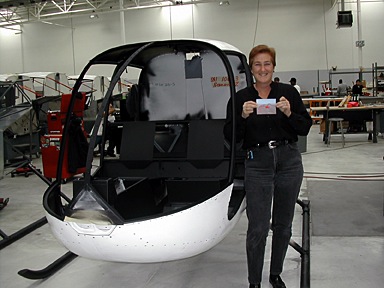
After a brief stop at the Queen Mary — which I personally don’t think is worth $20+ to tour — we hit the road for Torrance. Our tour was set for 1 PM. We arrived 20 minutes early and Milly Donahue, who is in charge of dealer/factory relations, met us in the lobby. She took us for a quick walk-through both factory buildings. Robinson Helicopter Company has owned a 360,000 square foot factory on the southwest corner of Torrance Airport for quite some time now. This year, they added a 315,000 square foot building right beside it. They moved the machining equipment from the old building to the new building and bought a bunch of new machining equipment to help fill the space — and to help them fill orders for helicopters. Robinson makes almost every single part in the helicopter (other than the engine, which is Lycoming) and they’re all made on the premises. My personal highlight for the walk-through came only moments after stepping out onto the factory floor. The helicopters are built on a series of assembly lines. The serial number for each helicopter is plainly written on the back wall of the cabin. 10603, which is my helicopter’s serial number, was the second R44 cabin frame I laid eyes on. I was actually looking at my helicopter before it hit the assembly line!Milly let my companions take my picture standing beside what was essentially Zero-Mike-Lima’s skeleton. Then we did the walk-through, returning to the lobby just before 1 PM.

The tour, which was led by Milly’s assistant, Vanessa, was more comprehensive, although it didn’t go into the new factory building. We were accompanied by four Asian men, of which only one spoke English, and a man who turned out to be from Prescott, AZ, who was thinking of buying a helicopter. Vanessa led us around the factory, stopping to explain many of the assembly areas. That’s when I realized that the assembly line had shifted up one space, leaving an empty space at the end. The last helicopter on the line was 10602. We walked around the factory and into the finishing area. We also stepped into the old delivery room, which was being used by a maintenance class to work on helicopters. Ed Taylor, my mechanic, was there, working on the cyclic control for an R44 with two other mechanics. I stopped and said hello, then left him alone to learn. When the tour was over, we passed by the end of the assembly line again. The last spot wasn’t empty anymore. What would be N630ML was sitting in its place on the line.

N630ML Under ConstructionI ask you: what are the chances of visiting a factory the very day that the item you’ve purchased goes onto the assembly line?

We climbed back into the Honda, feeling good about the tour. After a quick stop at a fast food place (can’t remember the name of the place, but its logo has a smiling star), we hit the highways (and traffic) for the ride home. It was about 2:40 PM. Los Angeles has the worst traffic in the world. It took us a good two hours to clear it. We stopped at the new casino between Banning and Palm Springs for a bathroom break and gas. Norb drove the rest of the way home. We got home at 9:15 PM local time and went right to sleep, exhausted.

Books of 2004

I bring readers up to date with the titles I churned out over the past year.

I realized, in writing my last blog entry, that the last book I’d mentioned finishing on these pages was my Mac OS X 10.3 Panther: Visual QuickStart Guide last October. Don’t think for a minute that I’ve been idle since then.

It’s been just over a year and, believe it or not, I had to consult a list of the titles I’d put out to see just what I’d been up to. I just couldn’t remember them all. Here they are:

Microsoft Office Excel 2003 for Windows: Visual QuickStart Guide was the most recent revision of my Excel for Windows book. Not much new in the way of content because there’s not much that Microsoft can already add to that feature-packed program. It came out in December 2003.

QuickBooks Pro 6 for Macintosh: Visual QuickStart Guide was a brand new title for me (and Peachpit). I’d proposed it early in the year, when I was looking for work and it took several months for them to say yes and come up with a contract. By that time, I had other work lined up. (Feast or famine.) The book underwent a lot of content changes as I wrote. For example, it was originally going to include payroll coverage, but since payroll is done with a separate program bundled into QuickBooks and the future of the bundling was questionable, we decided to drop it. (Frankly, I think payroll is so confusing that a whole book could be written about it, but don’t think I’m volunteering.) The book came out in May 2004 and is doing surprisingly well. So well, in fact, that Peachpit wants me to revise it for the recently-released new edition.

Quicken Premier 2005: The Official Guide is the sixth revision to my original Quicken Official Guide. It was finished in June 2004 and published in August 2004.

Creating Resumes, Letters, Business Cards, and Flyers in Word: Visual QuickProject Guide was a brand new title in Peachpit’s brand new Visual QuickProject Guide series. The series is great for beginners or people with computer phobias because it shows every single step in a process, with callout lines and numbered instructions. It makes a VQS look like a technical guide for MBAs. And it’s in full color! It’s 160 pages long and costs only $12.99. A great deal. The only thing I don’t like about it is the title — it’s way too long! It came out in September 2004.

Creating Spreadsheets and Charts in Excel: Visual QuickProject Guide is another brand new book for me. This one offers the basics of working with Excel spreadsheets and charts in a format anyone can understand. It’s eight chapters took me eight days to write and lay out. (That’s not the record. My record is a 350-page book that I knocked off in 10 days back in 1993. Of course, I didn’t do layout for that title.) I think it’s a great book and I’m extremely pleased with the way it came out. Like the Word book, it’s cross-platform. It came out in October 2004.

Microsoft Word 2004 for Macintosh: Visual QuickStart Guide is the latest revision to my Word for Macintosh book. It has a bunch of new stuff inserted throughout the book and a brand new chapter covering Word’s new Notebook Layout view feature. I finished it two days ago and it’ll go to the printer today. I expect to see it by the first week in December and, of course, it’ll be at Macworld Expo.

So in the course of a year, December to November, I finished six books. Of these, three were revisions and three were brand new titles. (That’s not a record. My record is 10, set a number of years ago, and I hope I never do that again. Talk about burnout!)

In addition to writing all those books, I also managed the Wickenburg Airport’s FBO (for a short time, anyway), did helicopter tours in the area, got a part-time job flying at the Grand Canyon, and wrote a handful of articles. So anyone who says I have an easy life obviously doesn’t have the big picture.

I’m not complaining — certainly not! I usually take a week or two off between books and spend that time catching up on things like bills, surfing the ‘Net, shopping, and writing in my blog. If I had a helicopter, I’d be flying, but I’m between ships right now and grounded. This week, I’m trying to write three or four articles that I owe various editors. I knocked off one yesterday and started a second one. I’ll finish that and write at least one more today. Tomorrow, my brother, his wife, and my sister are coming in for a week, and my mother and stepfather are showing up on Tuesday for a week, so I’ll spend time with them.

Then it’s back to the salt mines for me. Mac OS X 10.4 Tiger is on its way and I have to revise the existing book to turn it into Mac OS X 10.4 Tiger: Visual QuickStart Guide. I always have the first Mac OS book out in stores and I’m not about to ruin my record this year.

After that, it looks like a QuickBooks revision, but if I’m lucky, they’ll let me write one or two more Visual QuickProject Guides. I proposed a bunch of titles, and they finally seemed to like one of them. Cross your fingers for me. I’m also writing an eBook about iBlog 2.0 for Spiderworks. I’ll probably finish that sometime in December, if I can find time for it between my work on the Tiger book. I’m also working on a book about the Grand Canyon with a photographer and hope to have that ready for publication in May. It’ll be nice to have a book that doesn’t need revising every one or two years. (The Canyon doesn’t change much.) And I’ll always be writing articles. Informit.com likes my work and I like writing for them. FileMaker Advisor also wants me to write for them, but I’m always having trouble coming up with fresh ideas for them, so we’ll see how I do.

That’s it in a nutshell: the past year and the next four to six months. Busy, busy, busy.

I Bought an iPod Photo

I didn’t want to do it, but I had to.

The biggest problem I have as the author of computer books and articles is that in order to write about hardware and software, I have to own it. Or at least have it in my possession for enough time to learn and write about it.

That’s why I bought an iPod years ago. I had to write about using iTunes with an iPod for my Mac OS X book. I couldn’t get a loaner from Apple and I didn’t know anyone who had one. So I had to buy one. I still have it and still use it. It’s the original iPod, which held 1,000 songs on its whopping 5 GB hard drive. At the time, it was an incredible breakthrough in MP3 technology. But today, it’s a dinosaur, almost embarrassing to admit owning. (I own a Newton, too. But let’s not go there today, huh?) But it works, so I don’t care.

Want to know where I spent the most time listening to my ancient iPod? In my old helicopter, Three-Niner-Lima. I had Paul, my old mechanic, install an audio patch into the intercom system and put an RCA jack on the side of the instrument panel. I bought a nice leather case for the iPod with a mounting do-dad so I could hang it beside that jack. Then I used a standard Radio Shack cable (not bought locally; those guys don’t have anything you need when you need it) to patch the iPod into the helicopter’s intercom system. I could listen to tunes while I flew. Best of all, when there was a radio transmission, the music would automatically cut out so I could hear the radio. Ditto when I talked on the radio. A great arrangement. It made some of those long cross-country flights over Arizona and California and Nevada deserts a bit more pleasant.

The iPod Photo came out about a month or so ago. Probably less. I can’t remember. Anyway, Apple took the next logical step and made it possible to put photos on an iPod. So they’re worth looking at, they changed the screen to color. And since 10 or 20 GB isn’t enough to hold all your music and photos, they come with either 40 GB or 60 GB worth of storage.

I tried to get one from Apple as a loaner. They have an editorial loan program that is extremely difficult to get hardware from. I succeeded twice times in the past — I got an iBook loaner once and an iMac (ET style) loaner another time. But this time I wasn’t as lucky. I was told the waiting list was “a mile long.” Wow. So I bought one.

It came yesterday. I had company so I couldn’t tear open the box and immediately play with it. So I took it to work this morning. I’d just finished work on [yet] another Word book and was waiting for the index to come from the indexer so I could lay it out. I’d promised articles to two publishers. But I could spare a few hours to configure and learn about my new toy — I mean, vital piece of hardware.

It’s cool. No doubt about it. The dock it comes with sure beats that FireWire cable I left on my desk for syncing and recharging the old iPod. And the color screen is beautiful.

I stuck it in the dock and immediately started putting songs on it. I was able to fit my entire iTunes music library, which really isn’t much — only about 1,600 songs. (No reason for me to copy all my CDs to my computer’s hard drive when they weren’t going to fit on my iPod anyway.) Then I copied my iPhoto photo library to the iPod. All 2,600 photos. When I was done, I’d used less than half of the iPod’s 40 GB. Sheesh.

I got an e-mail from one of the editors waiting for articles and wrote back to her, mentioning that I’d just gotten an iPod Photo. How about an article that explains how to create a custom slide show with music on the iPod? She wrote back saying that they’d been talking about iPod photo in a meeting that morning. Write the article! So I did. And I submitted it this afternoon.

So I guess it must be an important piece of hardware, necessary for my work. After all, I’d owned it for less than 24 hours when I wrote an article about it that earned me $300. Another article and it’ll be paid for.

And yes, the new helicopter will be iPod-compatible. It has a built-in audio jack. But I think I’ll stick the old iPod in there, just for old time’s sake. After all, 1,000 songs really is enough.

Busy Busy Busy

I realize that I’ve been so busy that I haven’t made a blog entry in nearly a week.

I’ve been busy this past week. Too busy to write in my blog.

I’ve been working hard on my latest book, Microsoft Word 2004 for Mac OS X: Visual QuickStart Guide. I was moving along at a pretty good rate — about a chapter a day. I expected to finish it on Friday, but a sudden storm moving in sent me home early that day. I arrived home to get the horses out of their lower corral in the wash just as the water started flowing. So I finished it today. This afternoon and tomorrow, I’ll be going through the edits. The index should arrive from the indexer on Thursday. The book goes to the printer on Friday. I’ve lost count again, but I think this is either my 59th or 60th book. I dedicated it to Ted Waitt, my editor on this project. I’ve kind of run out of people to dedicate books to.

The book has a picture of Ted in it, too. Chapter 17, I think. I don’t remember the page number. There are a few other interesting photos in there, including the one Bert Monroy helped me cook up for Flying M Air marketing materials.

Speaking of that, the postcards I ordered arrived and they look absolutely fabulous. I spent part of today distributing them around town. I picked up the slides last Monday and dropped one of them off at the movie theater when we went to see The Incredibles. (What a really great movie!) It should be in the tray by now.

I also talked to my editor at Informit and she’s very interested in getting some new articles from me. I told her the best time to get work from me is between books, so I guess I’ll have to start producing this week. I figure I’ll knock off 2 to 4 articles for her. I also have to write one for FileMaker Advisor.

Vertical wants to publish my jumper article. I had a nice conversation with the publisher, Mike Reyno, the other day. But I’ve spoken to the folks at Papillon and they’re not too happy about the article coming out. So I’m not quite sure what to do. I certainly don’t want to piss them off.

I ordered and received some Robinson R44 materials, including a maintenance manual, parts catalog, and passenger briefing card. This is all stuff I need for my Part 135 certificate. I haven’t done any work on that since my meeting at the FSDO last Monday.

Today I stopped by Kwikprint to get a tabloid-size document printed (my printer doesn’t print on paper that big). Later I went back with a new order for business cards and letterhead. With luck, that’ll be ready by next week.

On Sunday, I met someone who has read all of my blog entries. She’s married to someone Mike works with down in Phoenix. She and her husband and his mother came up to Wickenburg for the Bluegrass Festival at the rodeo grounds. I didn’t go with them. I’m not much of a bluegrass fan. Anyway, she already knew what I looked like from photos in my blog. She talked to me a little about my entries. It was kind of weird. I didn’t think anyone read what I wrote here. She’s probably reading this right now!

Hello Barbara!

Right now, as I write this, I’m listening to a live audio stream from JFK Ground/Tower. You can listen online via a link on www.liveatc.net. JFK tower is kind of cool because the controller has an unbelievable New York accent. It’s like being back there again. I didn’t think it would work on my Mac, but when I clicked the link, it automatically opened in iTunes and started playing. Way cool.

I also spent a few minutes bothering my brother via MSN Messenger. Why people use chat software when they can just pick up the phone is beyond me. My brother types very slowly. I’d much rather talk to him on the phone than wait for him to type messages to me.

He and his wife and their dog are coming with my sister on Saturday. My mother and stepfather arrive on Tuesday (next, not tomorrow). They’re all coming for Thanksgiving Dinner. So I have to get all my work done this week so I can spent the whole week with all of them.

Two days after all of them leave, Mike’s mother and her friend come for 10 days. Then it’s his turn to do the entertaining. I have to start another book.

Busy busy busy. No wonder I’m so tired at the end of the day.