Taking Notes … in Scrivener

I get tired of looking up the same things up over and over again and do something about it — with a software tool that I already have.

My memory for little facts and figures is something I can neither understand or explain. I can tell you the phone number for the house I grew up in (and left in 1977), as well as phone numbers for my grandparents’ homes and even my aunt — all of whom have been dead for more than 20 years now. (Heck, my dad’s parents died in the 1980s!) But, for the life of me, I can’t remember the pixel dimensions of a YouTube video thumbnail, which is a piece of information I need every time I publish a video on YouTube.

Little things like this haunt me. I found myself looking up the same information, over and over. It was a frustrating waste of time, especially when I didn’t have a way to look it up. In case you’re wondering, the Internet isn’t always available when you’re on a boat in a remote area of British Columbia. (And yes, I’d have a Starlink by now if I did’t think Elon Musk was such a shithead. By I digress and I definitely don’t want to discuss the Space Karen here.)

So I started taking notes.

It didn’t go very well. The problem is, I took notes on paper. Notebook paper, usually. But I didn’t always take notes in the same notebook and I’d sometimes misplace notebooks with notes. And I travel a lot and usually forget to take the notebooks with me. So I start new notebooks. And even if I did stick with a notebook for more than a week, the notes weren’t organized in any way. It was just a mess.

And then I thought about my To Do software, which exists on my computer, my phone, and my tablet. I can add an item to my to do list or consult the list or check off a completed item pretty much anywhere I was because I always had at least one of those devices at hand. The app on each device shared the same databases and automatically synced. Clearly, I needed something like that for note-taking.

I know Apple has a Notes app, but I’ve never been able to get it to sync between all my Apple devices. But there was one app I already had on all the devices and it was already sharing one database: Scrivener.

Scrivener is supposed to be a writing app. People on social media who write books (or want to write books) rave about it. They rave so loud and frequently, that I’ve tried using it to write books. I’ve tried at least three times with three different versions of the app. And I’ve failed as many times as I’ve tried.

The trouble is, I’ve been using Microsoft Word since 1989. I have written all kinds of things with it, including entire books and the scripts for video courses about it. I know Word (and Excel, for that matter) better than almost any other software I use. Scrivener does things Scrivener’s way. I do thing Word’s way. I just couldn’t be bothered learning enough about Scrivener’s way to use Scrivener to write books. Why learn to use a new tool when the old tool is working fine?

I could, however, use it to take notes.

My memory issue extends to the work I do as a silversmith. When I make items such as earrings and bracelets for sale, I need to have consistency in the way they are produced. I don’t make one of each earring design. I make dozens. And I don’t make them all the same day. The only way to ensure that I was making them the same way every time I made a batch — given my crappy memory for details — was to create what I called a “Recipe Book” for my jewelry.

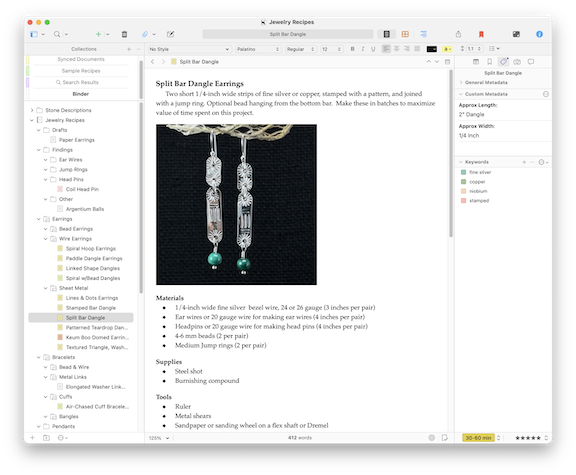
Years ago, I created a Scrivener file, which lives in a Dropbox folder. (Dropbox is a cloud computing storage service where I put things I want to be able to access from all of my devices.) The Mac OS and iOS versions of Scrivener all have access to this file. I created folders for the type of item, such as Findings, Earrings, Bracelets. And then subfolders inside each of those folders such as the Sheet Metal, Wire Earrings, and Bead Earrings folders inside the Earrings folder. And then actual pages inside the appropriate folder. Each page listed the “ingredients” — materials, supplies, and tools — and steps for making one specific item.

Jewelry Recipes Example
Here’s one of the pages in my Jewelry Recipes file, which has expanded over the years to include descriptions of the stones I use in my work as well as boilerplate text I use in online shop listings.

This works like a charm, provided that I create page for each item. For example, my Split Bar Dangle earrings page describes the earrings, shows a picture of them, and lists all the materials, supplies, and tools I need to make them. That’s how I know that I need 3 inches of 1/4 inch wide 24 or 26 gauge fine silver bezel wire (among other things) for each pair. I don’t have to guess what I used last time I made them or measure a pair I might still have in inventory. I have the recipe and I can follow it, step by step, with the same ingredients.

What if I created another file that just had miscellaneous notes in it? Organized onto pages and maybe with folders to keep things easy to find?

It seemed like a no-brainer, so that’s what I did.

This is a life-changing (for me) productivity hack. Not only am I using it to note down the dumb things I find myself looking up online (and elsewhere) over and over again, but I’ve also begun using it as a place to keep notes for projects I’m working on.

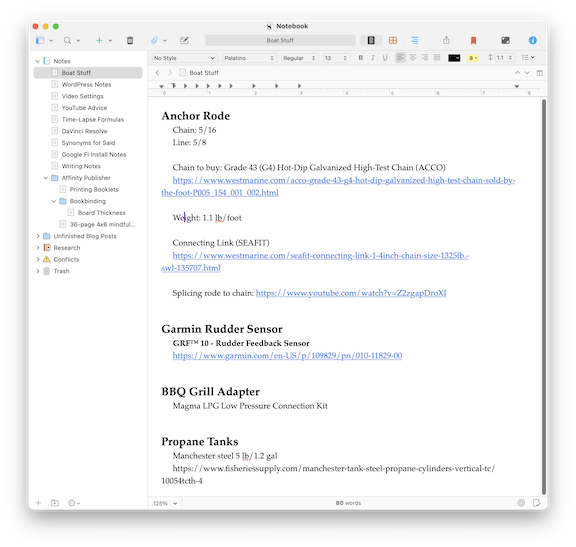
For example, I’m currently preparing to get my boat on a charter program next season and I need to take care of some upgrades. As I do research and get answers from knowledgeable people on the TugNuts forums and elsewhere, I copy and paste the info into a page in my Notebook. When I need the info, it’s right there.

Notebook page example
Here’s my note page for the upgrades I need to complete on my boat this winter. Everything is right where I need it.

So sure, Scrivener might be “the go-to app for writers of all kinds, used every day by best-selling novelists, screenwriters, non-fiction writers, students, academics, lawyers, journalists, translators and more.” (Per Literature and Latte’s marketing material for Scrivener. But it also makes a damn good notebook app, keeping your data anywhere you need it.

Now if only I could stop buying empty notebooks…

Another Clouds Time-Lapse

With clouds in the valley before dawn, I set up a time-lapse camera to capture the cloud movement throughout the morning.

I don’t know about you, but I absolutely love time-lapse movies. They make it possible for us to see movement that is normally too slow to perceive.

On October 31, 2024, there were thick clouds in the valley below my home. I know from experience that our winter thermal inversions can put on a good cloud show and those inversions are happening earlier and earlier every year. I set up a GoPro in Hyperlapse mode and let it run all day. Here’s the first few hours of the cloud show, sped up with the hyperlapse as well as a 400% increase in speed in video editing. The result is a smooth, high-speed look at what the clouds did that morning.

Enjoy!

I’m Not Your Support Person

Just because my blog addresses one of your problems doesn’t mean I’m willing to spend time giving you more help or advice than what you find here.

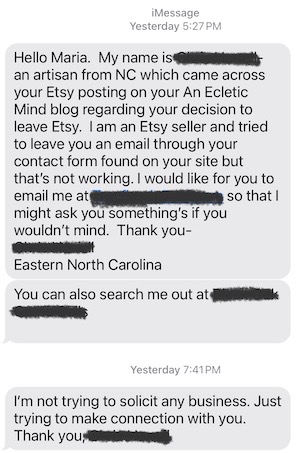
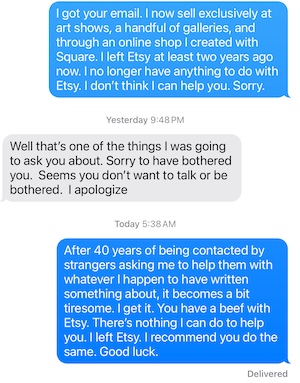
The other day, I got an email and three texts from a fellow maker. He sells on Etsy and has had a bunch of problems with them, all of which he listed in his email message. He had read the post I wrote last year about why I left Etsy and seemed to think I would be his go-to source for help finding an alternative for his niche market handmade items.

I saw the email and got the gist of it after reading just a few lines. It was early evening — unlike too many other folks, I don’t sit with notifications turned on and respond to every bing emitted by my phone. Email, in fact, is one of the worst ways to reach me because I hate checking it. So I figured I’d give it a closer look in the morning.

Text Messages
Here are the initial three messages. I did get the email he’s referring to. I just don’t drop everything to answer emails from strangers. Does anyone?

I’m not much better with texts, which is the next way he chose to reach out. He sent three of them.

That got me kind of annoyed. Yes, I wrote a blog post about why I left Etsy. And I believe that every creator of quality merchandise should do the same. (I won’t repeat why here. Read the post.) But just because I left Etsy and wrote about it doesn’t mean I’m anyone’s source for one-on-one support for Etsy dissatisfaction.

Deja Vu All Over Again

It’s just like when I wrote computer how-to books for a living. Someone would buy one of my books for about $20 — of which I’d be lucky to see $1 of income — and they’d automatically assume that I would answer all of their questions regarding the topic of the book. I cannot tell you how many email messages and phone calls I got in the early 2000s. That’s why the Contact page on my blog says this, right at the top of the page:

Support and Frequently Asked Questions

I no longer provide support for my books, articles, Web site, or anything else by email, contact form, U.S. mail, or telephone. There are no exceptions to this rule. I simply cannot provide one-on-one support for my work — especially work that is no longer in print.

Note that it includes “Web site” and “anything else.” This person used the form on that page without bothering to read what was right on the top.

Unfair Expectations

More Text Messages
Here’s the first round of responses. When he came back with more nastiness this morning, I responded and then deleted the thread.

Rather than just delete the email message and text messages — as, in hindsight, I really think I should have — I answered him honestly, trying to be gentle about it. But he got snippy and sarcastic. When I told him that I’ve been dealing with requests for help for the past 40 years — okay, maybe just 30 — he came back with more nastiness and told me I should give up blogging.

Oh really? Being a blogger means you’ll help any schmuck who reads your words and wants personalized assistance?

I told him that after blogging for more than 20 years that wasn’t likely.

I also told him that he needs an attitude adjustment and he needs to stop expecting strangers to help him with his problems. (I wish I still had the actual text I sent, but I deleted the whole exchange right after sending that last one and, for once, Apple has actually removed it from Messages on all of my devices. Go figure.) I wasn’t being nice anymore. I was being blunt. I wanted this guy to go away and I really don’t give a damn if he likes me or not.

But that’s my point of view on the issue. Yes, I wrote about it. I wrote 2600 words about it. That’s all I have to say on this matter in a public forum. My blog does not exist as a gateway to using me for support. It’s all of the support I am willing to give, all packaged up in individual blog posts.

Solve Your Own Problems

And that brings me to this, which I see as a major problem in today’s world: no one wants to do their homework anymore. Everyone would rather just get all the answers from someone else, even if that person is a stranger.

Like me, this guy has become dissatisfied with Etsy. Well, Etsy isn’t the only place to sell. There’s Shopify and some maker co-op that the folks on Mastodon keep pushing and the solution I went with: setting up a shop with my Square account. A Google search for “where can I sell my homemade widgets” will get him started on possible solutions. Reading reviews and blog posts and forum posts about those solutions can help him learn the pros and cons of them — so he can pick the one that’s right for him and his business.

Expecting a perfect stranger to take him by the hand in a phone call and walk him through the process of finding his perfect solution is unrealistic.

I have a full life and lots of things to take up my time. (Including, apparently, ranting about situations like this in my blog.) I’m running three small businesses by myself and trying to bring in some extra income in early retirement, before taking social security payments. I should be working on my Great Loop book or making jewelry right now. (I hope to do both with the rest of my day.)

Maybe our text exchange will be a wakeup call for him.

Or maybe it won’t.

Journaling My Year

I start, on January 1, to keep a daily journal and 10 1/2 months later, I’m still at it.

Over the years, I have tried and mostly failed to keep a daily journal of the things going on in my life. I’d start with good intentions and then stop, mostly because I forgot to keep writing. Then I’d start up again, swearing I’d keep at it, but then stop.

What I Tried

I tried handwritten journals in beautiful blank books. Stopping midway through one of them was especially painful since I really wanted to fill them and have a record of a long, uninterrupted period in a really nice looking book.

I tried using calendar-style planners with a whole week on each spread. Not much space to write there; I could simply put down a few bullet points about my day. These suffered the same fate. I have many partially completed calendar books floating around my home.

I tried marble notebooks like the ones we used in elementary school. The local Fred Meyer sells them for just 50¢ each once the Back to School buying rush is over. I have a lot of them. (I have a paper addiction.) They fared no better than all the other handwritten options.

And yes, I tried digital journalling. I tried apps designed just for that purpose. (I was very excited about Apple’s Journal app until I actually tried it; what good is a digital journal if you can’t export or print it? How many people will be using the same Journal app in 20 years? Definitely not me.)

Scrivener Document Sidebar
As you can see in the sidebar for my Scrivener Journal document, I was very bad about writing journal entries.

I also tried using Scrivener, the darling of the writing world. I created a Journal file with folders for months and files for days. The screenshot of the document’s sidebar shown here should give you an idea of how that went.

Understand that my desire to journal every day has been very intense throughout my life. Heck, this blog was started as a journal of sorts. Not a daily journal but just a journal of the interesting things I was doing or thinking that I wanted to share.

That desire ramped up as I aged and I started forgetting about things I’d seen or done. The only remnant — or trigger, in some cases — of a memory was a photo I took at the time. But I don’t take photos of everything. I worried that I was permanently forgetting the things I did, things I might want to remember in the future.

Things that would be so simple to just jot down right after they happened.

In a journal.

Another Try

This came to a head when I was trying to write up the days of my Great Loop trip in the My Great Loop Adventure blog I created to document the entire trip. It isn’t easy to blog in detail every day so I slacked off. And then, when I was trying to fill in the gaps in the blog, I realized that I just couldn’t remember the details I wanted to share.

I needed to do something about this. My memory was starting to get iffy and I didn’t want to lose days of my life. I had to try journaling again and stick to it this time.

The Journal I bought
I bought a yellow one in the largest size; they come in a lot of colors and three sizes.

I started on January 1. I prepared by buying a very nice journal book on Amazon (don’t judge me) that had 365 pages. One page per day. They were not dated or numbered but they did have spaces for both bits of info. And lines close enough together to fit a few hundred words.

I started on January 1 in Key West FL, where I was on my boat with my friend Jason. And, for the first time ever, I’ve kept to it, providing an entry for every single day of my life. It’s now October 16 and I have entries right through yesterday.

Covid Entry
I backtracked to fill in the pages for days I was really suffering with Covid. All I remember from those days was sleeping.

I’ll be honest: I don’t always write every evening or the following morning like I want to. Sometimes I miss a few days and have to go back. I’ve found that going backwards from the current day usually helps. The only days when the entry is unreasonably short were the few days that I slept nearly the entire day due to my bout with Covid in August.

Why It’s Working this Time

Why am I finally doing so well at journaling this year? I think there are three reasons, one of which I already touched upon.

  • Motivation. I’m tired of forgetting days and weeks of my life. I’m tired of looking at photos I shot 3 years ago and seeing places I forgot I’d visited. I don’t think my memory is any worse than the average person my age — it’s not like it’s a problem — but the only way I see being able to remember stuff is to jot notes about the day at day’s end or the following morning.
  • Success leads to more success. After ten and a half months of keeping this up, I feel that I’d really be letting myself down if I didn’t continue to do it. So the more I write, the more I want to write.
  • 365 single pages to fill. The book’s design makes it easy — and, in a way, required — to journal every day. There are exactly the right number of pages to fill. (Actually, there were 366 days this leap year, but I can always insert an extra sheet if I have to.) Second, the pages aren’t that big. There are only 25 lines! That’s nothing for someone like me. And who says I have to use every single one?

I bring the journal with me whenever I know I’ll be away for more than just one night. I try to write my entries at the end of the day, but if I miss that, I’ll try to do it in the morning when I’m having my coffee in bed.

What I’ve got so far is a summary of what I’ve been up to so far this year. Sometimes I write about when I woke up, how I slept, and what I ate. Sometimes I write details about a travel day’s experiences. Sometimes I write notes to myself about how I have to do something or change a dumb behavior. And once in a while, I write what’s on my mind socially, politically, or romantically.

And yes, I can squeeze a lot into 25 lines when I need to. I don’t write full sentences. It’s not like it’s going to be published anywhere. It’s just something I can look back on in years to come to remember what those pictures I might have are all about. Or to fill in the gaps when I didn’t take pictures.

One thing is for sure: it’s definitely going to come in handy when I fill in the gaps in the My Great Loop Adventure blog.

Aurora Out My Window

I see the aurora for the first time — well, sort of — right from the comfort of my own home.

If you pay attention at all to science-related news, you are probably aware that the sun is near the peak of its 11-year solar activity cycle, with lots of sunspots and coronal mass ejections. This has made aurora a lot more visible than usual, making it possibly for people to see it as far south as Arizona and Texas.

I don’t live that far south. I live in north central Washington state. Opportunities to view the aurora abound at my home — which has a perfectly unobstructed view to the north, right to the horizon — but I’ve spent much of the past two years away from home. Ironically, from June through August, I was traveling at latitudes farther north than where my home is, but I just didn’t see the aurora on any nights I might have. I could blame weather (clouds), ambient lighting (being near a city), or a lack of clear view to the north (from trees or mountains).

But when I got home, I became determined to see the aurora from my home.

The Science of the Aurora

I would be remiss if I did not mention the excellent Space Weather and Aurora Dashboard pages constantly updated by the National Oceanic and Atmospheric Administration (NOAA). It provides a wealth of information about the aurora, from forecasts and current conditions to basic and detailed information about what causes the aurora.

For example, NOAA’s Aurora Tutorial page starts its explanation of the aurora like this:

The aurora is formed from interactions between the solar wind streaming out from the sun and Earth’s protective magnetic field, or magnetosphere. The aurora is one manifestation of geomagnetic activity or geomagnetic storms. As the solar wind increases in speed and the interplanetary magnetic field embedded in the solar wind turns southward, the geomagnetic activity will increase and the aurora will become brighter, more active, and move further from the poles. Even moderate solar wind creates aurora so there is usually a weak aurora somewhere even when there isn’t a big geomagnetic storm.

There are two types of solar events that create big geomagnetic storms that are associated with bright and active aurora. The first is a Coronal Mass Ejection, or CME, which can be described as a billion tons of plasma ejected from the sun, traveling at a million miles per hour. When a CME arrives at Earth, it can produce some of the biggest geomagnetic storms and thus, some of the brightest and most active auroras that extend furthest toward the equator. The second solar event that can create moderate sized geomagnetic storms is called a coronal hole. Coronal holes are the source of high speed solar wind streams. When these high speed streams arrive at Earth, they can produce active auroras. But the geomagnetic storms and aurora associated with coronal holes is less active than those from the biggest and fastest CME’s.

Later on that page, it explains what causes the individual colors you might see. This is a great place to start if you want to learn more about how the aurora forms and when viewing is best.

Forecasts < Actual Conditions

My quest to see the aurora started with the forecasts on the Aurora Dashboard page. Each day, NOAA provides a forecast for tonight and tomorrow night. You can see an example in the top two images in the screen capture below. Like any weather forecast, this is a prediction of what might happen based on data and models. In this particular example, the forecast looked good for two nights in a row.

Aurora Dashboard
In the early morning hours of October 10, the forecast for that night was a lot more optimistic than reality.

I’ve lost a lot of sleep trying to see the aurora. In this example, the forecast told me it should be visible where I live. But this page also provides a very short term forecast for the next 35 minutes. The image on the left is for the northern hemisphere and it painted a truer picture of the situation. The chances of seeing the aurora where I lived was slim. And, of course, I didn’t see it on the night of October 9-10.

Short Term Forecast
The short term forecast looked a lot better on the night of October 10-11.

But things were different on the night of October 10-11. I knew they were different when my social media feed on Mastodon began filling with aurora photos. I watched the Aurora Dashboard and was rewarded with a very promising short term forecast image. I set up a GoPro pointed mostly at the northern horizon and sky and turned on the night hyperlapse feature. Then I turned off all the lights in my home, including the solar string lights on my deck, and hung out on the deck to watch the sky.

Understand that my home might be 2 miles down a gravel road 10 miles from town, but it has a commanding view of the entire valley, including the brightly lighted cities of Wenatchee and East Wenatchee. This is not a good place for stargazing. No matter how much I tried to get my eyes adjusted to the dark, it simply wasn’t dark. But soon, after a while, I started seeing a reddish glow in the sky. I took a photo with my iPhone 13 Pro — yes, I know it’s time for an update; maybe after Christmas — and was shocked to see auroral streaks of pink lines in the photo.

First Aurora Shot
This was the first photo I took from my deck. It was 7:13 PM, less than an hour after sunset.

For the next few hours, I moved from inside my nice warm (but dark) house to outside on my cool deck. I tried hard to see beyond the faint streaks in the sky, but every time I took a photo, the photo revealed far more than I was seeing. It was out there but my eyes just couldn’t take in enough auroral light to see it very well.

Antoher Aurora Shot
I took this photo a little while later. The predominant colors were a pink and an almost lime green.

Another Aurora Shot
Here’s another shot from a while later.

It was rewarding but also frustrating. This was probably the first time in my life when I could photograph something better than I could see it. But I wanted to see it! With my eyes!

The sky started to cloud up a little and my frustration got the better of me. After a while, I gave up.

The Video

This was apparently a mistake. I should have tried again around midnight. How do I know this? Well, remember that GoPro I set up? Here’s what it captured before its battery died:

The Next Aurora Viewing

I’m watching the forecast pages closely. The next time we have a strong forecast, I’ll be ready with multiple cameras — including my Nikon, on a tripod — to capture it. But next time, I’ll set up a lounge chair on the deck, snuggle in a sleeping bag, and watch until I can see it better with my own eyes.