The High Cost of Writing Tech Books

Only the big names get it all for free — and they’re the ones who could afford to buy!

I’ve been writing computer how-to books since 1992. Right now I’m working on a revision of my Mac OS book for Leopard. It’ll be my 70th title.

A lot of people think that I get all the hardware and software I need to write for free. Nothing could be further from the truth. I have to buy most of the hardware I write about. Although I do get much of the software I write about for free, I don’t get the software I need to do my work. So while I might get Office 2007 right from Microsoft and Quicken 2008 right from Intuit (thanks, guys!), I don’t get Photoshop and InDesign from Adobe — and those two very expensive software packages are what I need to lay out and prepare images for my books.

My Past (and Current) Computers

I’m a Mac user and have had numerous Macs since the first one I bought in 1989. Let’s see if I can come up with a complete list.

First, the production machines, which I use to do all my work. These are machines I’ve customized so they look and work just the way I wanted them to. Each of them lasted 2-4 years.

  • Mac IIcx – this system cost me $8K including a color monitor and laser printer. It had 1MB RAM.
  • PowerMac 7100/66
  • PowerMac 8500/167?
  • PowerMac G3 (beige; can’t remember speed)
  • Power Mac G4/866
  • Power Mac G5Power Mac Dual G5/1.8 – my current production machine

The 8500 and G4 became servers when they were retired from production duty; indeed, the 8500 ran 8 Web sites, a mail server, and an FTP server until 2005. I also had 2 SE/30s (not listed) way back in the beginning that I used as BBS servers. And, believe it or not, I still have them.

Then there are the laptops. I’ll admit that the first laptop I “owned” was provided by one of my clients to help me do my training job for them. I had it for about 3 years. By then I was hooked and needed my own laptop. A laptop normally lasts me about 4 years.

  • PowerBook 180
  • PowerBook 520c
  • iBook SE (clamshell) – gave it to my neighbor’s kids
  • PowerBook G4 (12″) – current laptop; I love this machine

Next, the test mules. These are the machines I bought to run the software I was writing about on. This is where you’ll find a mixture of Macs and PCs, since I do write about PC software (Word, Excel, Quicken, etc.).They’re kept in factory-installed condition — in fact, I commonly reformat and reinstall operating system software on the Macs. (Doing that is a HUGE hassle on the PCs.)

In the old days, I used to use my old production computer as my Mac test mule. But as technology evolved, those older machines didn’t have the hardware features I needed to write about. So I wound up buying new computers for the task and keeping them at least 4 years. Lately I’ve realized that laptops make excellent test mules because of their portability (duh), so I’ve switched to those.

First, the Macs:

  • Strawberry iMac (G3) – in my garage; I need to unload this thing
  • eMac (G4) – is now a server for Internet streaming at the local radio station. (Yes, the same radio station where they’re doing their accounting with an 18-year-old Mac.)
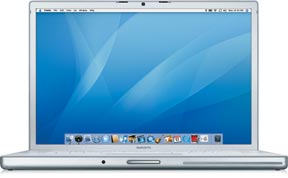
  • 15-in MacBook ProMacBook Pro (15″) – current test mule; had thoughts of using it to replace the 12″ PowerBook but I like the PowerBook’s size better for taking it on the road.
Then the PCs:

  • Gateway – can’t remember model; it ran Windows 95, which was brand new at the time
  • Dell Dimension 944r? – I gave this to the local library; it runs XP so why not?
  • Dell Latitude (laptop) – my current test mule. But I think that if Parallels or Boot Camp work out well, I might get rid of it while it still has decent resale value.

Other Hardware

The other hardware list is long and frankly not very interesting.

The list includes the usual collection of monitors (including 2 of the ill-fated 17-in Apple displays). I didn’t replace a monitor when I got a new computer — the Dell Dimension, for example, used the Gateway’s monitor and I’m still using the 20″ Sony monitor, which I think I first connected to my G3 all those years ago, every day. (And yes, I am ready for something bigger now that my close eyesight is starting to fail.)

It also includes printers — five laser printers (four of which are still at work in my house — don’t ask) and a collection of junky dot matrix and later inkjet and “photo printing” printers. I’m sold on laser printers and won’t get conned into buying anything else unless a better technology comes along. Oddly enough, I do very little printing these days, since all of my manuscripts are now submitted electronically. I don’t see my work in print until the edits come back for review.

I’ve had at least 3 scanners, including a SCSI scanner that cost a whopping $1,000. I now use a junky little Canon scanner which is far better and far cheaper than that first one.

imageI’ve had to buy numerous AirPort products, including four base stations (two of which I still own) and one AirPort Express. (I got a second one as a gift from Apple for making several appearances at Apple Stores.) I also have two iSight cameras, one of which powers my WebCam.

Speaking of cameras, I’ve also had to buy digital cameras, starting with the QuickTake. I’ve had five of them over the years, each better than the one before it. (My current Canon PowerShot has just died after less than 2 years of life so I’ll probably have to get another one soon.) And digital video cameras — I’ve had three. Why do I need cameras? Have you ever read any of my Mac OS X books? I need to cover how to use Mac OS X with these devices.

Black iPodAnd that’s also why I have three iPods, starting with the original 5GB model and ending (so far) with a sleek little black video iPod.

In the weird department is the Newton Message Pad (call me a sucker; I deserve it) and Twentieth Anniversary Macintosh (which sits in my living room, providing stereo sound and a digital picture frame when hooked up to one of my iPods).

My husband just told me to mention the huge plastic storage bin of cables. That’s where I was able to pull out a vintage 1989 ADB mouse for my friend Jo. I had a bunch of SCSI cables in there, too, but after trying unsuccessfully to give them to an Apple store, I just tossed them into a trash can in the mall. (Those cables cost $25-$50 each when new!) The cable bin is also where you’ll find various microphones and speakers, Zip drives, Jaz drives, and the cartridges that go with them. It’s an antique computer peripheral bin and if anyone needs any of that kind of stuff, Comment below and let me know. Most of it can go for the cost of postage.

Do the Math

That’s about it for the hardware. Do some math. I’m willing to bet that I’ve spent well over $75,000 on computer equipment over the years. In fact, I bet it’s close to $100K. But this is the cost of doing what I do. It’s part of my business expenses.

And yes, I can write it off on my taxes, but I still have to pay for it. A write off is nothing more than a rebate for me. It reduces my total tax liability, but not by the amount I paid — just by my tax rate applied to the amount I paid. For example, if I paid $100 for a piece of hardware and am in a 30% tax bracket, I’m only getting $30 off on my taxes. So the item still cost me $70. It’s nice to be able to write this stuff off, but it doesn’t mean I get it for free.

I’m Not Complaining

Not really. It’s great to be able to work with state of the art hardware. Who could complain about that?

But it would be nice if I got to work with it for free. I don’t mind paying for the stuff that I want to keep and use daily — like my production machines, which I really work hard over the years. But the equipment that I need just to write a few pages of a book — like an iSight camera or the latest AirPort base station — is tough to cough up the dough for. And let’s face it: how many iPods does a person really need? (If your answer is zero, you’ve probably never had an iPod.)

AirPort Extreme Base StationRecently, Apple very graciously agreed to loan me the new AirPort base station so I could write about the new AirPort Disk feature in my Leopard book. I’m looking forward to getting it and giving it a try. But I’m also looking forward to sending it back when I’m finished and not having to see it on my American Express bill. The AirPort Disk feature looks good, but I simply don’t need it.

(When I get my next production machine in October — probably a 24″ iMac — the dual G5 will be wiped clean and set up as a file server, perhaps with an inexpensive 17″ flatscreen monitor attached. I envision it sitting in my living room near the Twentieth Anniversary Mac, displaying a constant slideshow of photos when guests are around. A true digital picture frame with 120 GB of storage space and an AirPort card ready to accept all the files I want to back up via Time Machine.)

Meanwhile, the big names — and you know who I’m talking about — get everything they want any time they want it for free. In fact, Apple and other hardware/software developers call them and offer it up! It’s the reason why many of these guys have come across as real Apple fanboys. How can you be objective when you know that the first negative thing you say in the pages of the New York Times or Wall Street Journal may stop the next phone call from Apple? And the whole time, these guys are pulling in the big bucks and can actually afford to buy any hardware they want.

Am I jealous? Bitter? What do you think?

But because I pay for it all, I can stay objective. While I really do like what Apple develops and sells, I’m not afraid to mention the shortcomings in a product. (For example, I still can’t figure out why people are buying Apple TVs. At least the Newton I bought was kind of cool.) I can’t ruin my chances of getting the latest gadget — iPhone, Apple TV, etc. — for free because I wouldn’t get it for free anyway.

The Point?

The point of all this is that writing computer how-to books can be a costly endeavor. But I think it’s worth it.

Pro Writing Fundamentals: Editors

Who are these people and what do they do?

Posts in the Pro Writing Fundamentals Series:
Editors
Contract Negotiation

Since writing my multi-part series about copy editors, I’ve been thinking about taking a step backwards, for the benefit of new writers, to discuss the various types of editors a writer may work with on a book project. Copy editors are just one type, but there can be quite a few others.

So here’s that discussion, along with a summary of how they all work together in the book production process.

Acquisitions Editor

The first kind of editor you’re likely to work with is an acquisitions editor. This is an editor whose job is to acquire new books.

When you write a book proposal and send it to a publisher, this should be the person you contact. After all, this is the person who knows what the publisher is looking for. It’s also the person who is able to make you an offer and get the contract process going.

Keep in mind that not all publishers have acquisitions editors. These days, as many publisher trim the fat, they’re combining multiple jobs to make them one person’s responsibility. Also remember that although “acquisitions editor” is a standard title, not all publishers use standard titles. When I talk about an acquisitions editor, I mean the person acting in that capacity, no matter what her title is.

(I use feminine pronouns to refer to editors throughout this article. That’s not because I’m a feminist. It’s because the vast majority of my editors over the past 15 years have been women.)

Here’s how it works. You approach an acquisitions editor with a book proposal. If she likes it, she starts talking dates and money. If things continue to move smoothly, she’ll make an offer. You’ll make a counter offer. You’ll meet somewhere in the middle, likely closer to her number than yours.

Then she’ll get the legal department involved. They’ll draw up a standard contract with your money terms and dates. You’ll go over the contract and either ask for certain points to be changed or sign it. Throughout this whole time, you’ll be working with an acquisitions editor.

Of course, if you have an agent, your agent will do this stuff. Heck, he should. After all, he’ll be taking 10% to 15% off the top on your advance and royalty checks. This is how he earns his keep.

(And no, I don’t have, and never have had, an agent.)

Project Editor

Next, you’ll work with a project editor. Her job is to keep you on track, review your work as it comes in, and guide you in terms of content and style. She’s also responsible for making sure you meet your deadlines. Later in the process, she’ll coordinate all phases of the book’s pre-production work, including your interaction with other editors.

Your project editor may also act as the impartial judge if disagreements between you and your other editors arise. So it’s very important to treat your project editor with all the respect she deserves and to not be a pain in the ass. Remember, you’re not the only one she’s dealing with. She may have half a dozen or more other books and authors and production teams to deal with at the same time.

These days, I work primarily with two publishers. At both publishers, my project editor is also the acquisition editor. So I work with her for the entire project. I like it that way. I feel that the publisher has someone with a vested interest in the project from start to finish.

Technical Editor

If you write technical books, like I do, you might have a technical editor. Your technical editor’s job is to make sure your text is technically correct.

A good technical editor will repeat every instruction you wrote in the manuscript to make sure it works as you said it should. She’ll check all your screenshots to make sure they reflect what she’s also seen on her screen.

Some technical editors go a step further by suggesting topics they think are important that you may have omitted. For example, if you’re discussing the use of a software program’s dialog box and there’s a check box in there that you haven’t mentioned but she thinks is important, she’ll query you in the manuscript, asking if you want to mention it.

As the author, you get to review all of the technical editor’s comments. You should make changes as needed to correct errors. You can also make changes per the editors suggestions — or blow them off. But if you blow off a suggestion, you should have a relatively good reason for doing so.

If your technical editor makes a lot of suggestions that you don’t think are worth dealing with, you might want to mention it gently to her or to your project editor. Make sure you have a good excuse. Page count always works: “If I covered every option in ever dialog box, the book would need an extra 50 pages.” (Some publishers are very sensitive to page count and want to avoid adding extra pages at all costs.)

Copy Editor

The copy editor is the person who goes through the manuscript, checking for grammar, spelling, and punctuation errors. She’ll also look for sentences that don’t make sense or aren’t as clear as they could be. I discuss copy editing in a lot of detail in my Copy editing article, so I don’t want to repeat it here. Read that. You might want to read the other parts of that series, which include my thoughts on copy editors in general.

When the copy editor is finished reviewing your manuscript and making changes, you’ll get a chance to review it. Keep your temper. Your job is to make sure she didn’t change the meaning of anything. (Believe me, it does happen.) If there’s a change you can’t live with, make a note in the manuscript to indicate why it’s objectionable. Your project editor will make the final call.

Production Editor

The production editor is the person responsible for turning the files you submitted into files that can be sent to a printer. Sometimes, the production editor does the layout herself. Sometimes she’s in charge of a production pool, of sorts, where your book is laid out by a team of layout people using a template.

Hope for the first kind of production editor. This person will ensure consistency in the appearance of pages. (I’ve had instances where I could tell which chapters of a book were laid out by each of its three production people, just by the way small images were placed on pages. Not good.)

The production editor should not — I repeat, not — make any editorial changes. By the time the manuscript gets to the production editor, the content is engraved in stone (so to speak). A production editor that changes content — for whatever reason — is not doing her job. (I once had one who changed the content to make it easier for him to lay out. You’d better believe I wigged out when I saw the proofs.)

When the production editor finishes her work, she’ll print out proofs for review. These are sometimes referred to as “galleys” or “galley proofs.” For my books, they’re usually printed by chapter and I get a bunch of chapters at a time. For other kinds of books that aren’t so time sensitive, they’re probably printed out as entire books so they can be reviewed as a whole.

The proofs will go out to a bunch of people, including you, the project editor, a proofreader, and an indexer.

Proofreader

A proofreader isn’t exactly an editor, but she does have an editing responsibility. She goes through the proofs and reads every single word and looks at every single image and caption. Her job is to identify typos and other errors that slipped by the editing process.

A good proofreader will find problems. There are always problems in the proofs. I usually find them when I revise the book for the next edition. (Do you think I actually read my books once they’re printed and bound as books?)

My role as a proofreader is usually to make sure that the figures and illustrations are in the right place and are called out properly in the text. (I hate seeing “as shown next:” at the end of a paragraph when a small screenshot is placed beside the paragraph instead of after it.) I’ve also occasionally caught incorrect screenshot placement.

The problems found are marked up and sent back to the production editor, who fixes them. She then turns the book into files and either uploads them to the printer’s FTP site or sends them to the printer on a CD-R disc.

Indexer

The indexer is also not really an editor. But she is, in a way, because she also reads the proofs and occasionally finds problems. In fact, I fired a proofreader I’d hired for a book when the indexer found more problems than the proofreader did!

The indexer usually uses indexing software to create the book’s index. She submits it to the project editor, who has it edited by the copy editor. It then goes to the production editor to be laid out with the rest of the book.

You probably won’t see the index until the book is printed and bound. That’s ironic, since many book contracts require the author to pay the cost of indexing the book.

How Long?

How long this takes varies from publisher to publisher. It also varies depending on the kind of book. Computer how-to books are extremely time-sensitive, so the process seldom takes more than a month from the time you submit the last chapter’s original manuscript to the time the production editor sends it to the printer. For other topics and books and publishers, the process can take months or even years — which is something I simply can’t imagine.

That’s It in a Nutshell

That’s the editorial process for publishing a book — at least as I’ve experienced it. Has it been different for you? If so, share your experiences in the Comments for this post.

And if all this is new to you, don’t be afraid to use the Comments to ask questions.

Copy Editing – Part III: Editing for the Sake of Editing?

That’s what it sometimes looks like to me.

In the first two parts of this series, I told you what I think copy editing should be and told you about my experiences, over a period of 10 years, working with copy editors for the annual revision of one of my books.

In this part of the series, I’ll sum up with a few of my conclusions and observations.

Stet!Editing for the Sake of Editing

I don’t think a copy editor should make a change unless there’s an error in the text he’s editing. Error means something wrong. Not something that’s equally correct his way or the author’s. If an editor’s change does not make an improvement, it should not be made at all. Period.

This is my opinion, but I think that most people in the publishing industry — especially the authors, of course — would agree. In fact, it seems like a no-brainer.

But it does not explain the commas that have come and go with each edition of this particular book. Or numerous other changes that have not improved the book’s content. Those, I think, are edits for the sake of editing — the editor’s way of proving that he’s on the job, doing what he’s being paid to do. Almost as if he’s being paid by the edit and wants to maximize his revenue or worth.

Unfortunately for these copy editors, it’s the copy editor who understands his job and does it as instructed who will be called for the next job. My recent copy editor certainly won’t be working on any of my books again. (Most likely because the PE doesn’t want to have to deal with my complaints.)

A publisher has no need for an editor who pisses off all the authors — even if some of them are prima donnas. Who wants headaches when you’re putting together a book? Why make changes when the changes aren’t needed?

Frustrated Writers?

A lot of writers (note that I didn’t say authors here) believe that editors are just frustrated writers. The thought goes something like this: If you can’t do, teach. If you can’t write, edit.

Double-ouch!

In general, I don’t think this is true. I think some people just like to edit. They might have the skill set or patience for it. They might enjoy reading an author’s work and fine-tuning it to make it better for the reader. They might simply lack the desire to do what’s required to write a book: organize, research, compose, etc. for 300+ pages of text. That doesn’t mean they can’t do it. Just that they’ve chosen not to.

[In my case, the reverse might be true: If you can’t edit, write. My editing often comes down to rewriting. That’s not a crime if my name is on the book cover, but it is unforgivable if my only mention is fine print on the copyright page. So there’s no career as an editor in my future.]

But like other writers, I also suspect that some editors are frustrated writers. They just haven’t had the break they need to get their own work published — for whatever reason.

After all, it isn’t exactly easy for a writer to become a published author. (Again, I think there’s a big distinction here.) Sure, in the era of Web 2.0, anyone can write and be published. But it’s still a more traditional publishing process — one that involves acquisition, project, copy, and technical editors — that turns a writer into an author. And that process isn’t as easy as writing your thoughts in a form and clicking a button to publish it on a blog.

Got Something to Add?

If you’ve got something to add to this discussion, don’t be shy. Use the comments link or form to add your comment to this post so others can take advantage of your insight on this matter, too!

Could it be? Piracy site shut down?

To early to be sure, but not too early to hope.

Last night, before shutting down for the night, I decided to check a pirate Web site I’ve been monitoring to see if any new ebooks had arrived. I’ve been finding my books — and the books of author friends — on a number of pirate Web sites, but one of them was especially blatant and offensive. It listed literally hundreds of ebooks and complete training DVDs by dozens of publishers and scores of authors. If you can’t figure out why this bothers me, read this.

After a long wait, an error message appeared in place of the site’s home page:

ERROR
The requested URL could not be retrieved
While trying to retrieve the URL: http://[omitted]/
The following error was encountered:
* Connection to [omitted] Failed
The system returned:
(111) Connection refused
The remote host or network may be down. Please try the request again.

I tried a few more times and got the same result.

Then my normal state of paranoia set in and I thought that the site’s owner may have blocked my IP address. I’d been checking the site with an alias user ID that pointed to a domain name I never use for personal stuff. But I didn’t mask my IP address. So I asked Jonathan at Plagiarism Today to try. He got the same result (and taught me a trick for checking for IP blocking another way).

About the Site

The site was hosted somewhere in Asia or the Pacific, although the guy who ran it wrote in perfect English. So there wasn’t much to be done as far as DMCA notices to the guy’s site hosting ISP.

Most of the pirated files were being hosted on a Germany-based free file hosting site. That site’s gimmick is that people can download one file at a time unless they pay for a “premium account.” So I think one could make a good argument that the hosting company was selling access to our files.

To the hosting company’s credit, they made it pretty easy to get the files taken down. All I had to do is get the complete URL to the file and send it to them via an online form. Within 24 hours, the link simply stopped working. So even though the pirate site still listed my ebooks, none of the download links would work. To me, that was almost as good as taking the whole site down.

Take Down!

Join us in our fight to stop ebook piracy! Authors Against Piracy is a private Yahoo Group dedicated to educating authors on how they can find illegal copies of their books online and get them off. We can make a difference!

But I do have reason to hope that the site may have been taken down. When I saw the extend of the copyright infringement there, I was outraged. I spent almost two full days contacting authors and publishers to tell them about what I’d seen. Among the publishers I contacted were Pearson, McGraw-Hill, O’Reilly, Symantec, Lynda.com, and Total Training. I thought that if I got some big guns out against this guy, he’d get taken down.

And maybe it did work. Maybe one of them threw a big enough legal staff at either the site owner, his ISP, or the file hosting sites to get the whole thing taken offline. Or maybe just having all those publishers and authors going at him with e-mail and other communications made him realize that his efforts to earn a few dollars by setting up illegal downloads just wasn’t worth the hassle of fighting all these people.

Whacking Moles

I don’t care what the reason might be. I just rejoice in the possibility that we may have succeeded in “whacking this mole.”

Because as one of my publishers pointed out: “Trying to stop these guys is a game of whack-a-mole. You hit one and another one pops up.”

I agree. But there are more people and resources on our team than on theirs. If we work together, we can keep those moles in their holes.

Blog Post Length

Is there a “right” length?

RulerI’ve recently been involved in a discussion with another blogger — we’ll call him Tom — about blog post length. Tom has instituted an “aside” feature in WordPress that applies different formatting to very short posts that he’s identified as “asides.” But the length of his “short” posts is still longer than the length of other bloggers’ average posts.

And while the different formatting of asides comes through on Tom’s site, there’s no differentiation on his blog’s RSS feed, which is how I normally read his blog. So to me, Tom’s blog just suddenly started getting posts that were short, along with the other ones that were relatively lengthy.

Anyone who’s been reading this blog for a while knows that my blog posts range from a single bullet items for a “This Just In…” link (which, by the way, is created automatically by del.icio.us) to 2,000+ word ramblings. That’s why I didn’t think it mattered how long a post was. It doesn’t really matter to me.

But Tom had made a distinction between his shorter posts — perhaps 150-200 words in length — and his longer ones — which probably approached 1,000 words. And that got me thinking (which is always a dangerous thing): what’s the “right” length for a blog post?

The Argument for Long Blog Posts

A long blog post, one can argue, shows that a lot of thought and effort has gone into the topic. The blogger started with an idea, perhaps jotted down some notes about points he wanted to cover, did some research that resulted in useful links, and wrote up the post.

This is [supposedly] what we browse the Web for. Anyone can grab a few links and call it a blog post. But how many people can actually write something original based on an idea and references on other sites and blogs? Surely fresh content backed up with links to references has good value. And that’s what serious bloggers should be striving to create.

The Argument for Short Posts

Short posts can have a certain wham-bam-thank-you-ma’am quality to them. You get a thought, you share it, and you move on to the next thing, leaving the reader to think the rest out for himself. If what you’re sharing is compelling enough, the reader might follow whatever links are included to learn more or do some other research or thinking on their own.

While that might be good for readers who like to think for themselves, I’m not convinced that all of them do. They want the blogger to do the brainwork and report the results. After all, if they wanted to do their own serious thinking and research about a topic, they’d likely become bloggers themselves.

Again, this all depends on the blogger. Some bloggers can, in a short post, put a new spin on a topic that’s been explored by others. Those blog posts are a real pleasure to read.

Other bloggers seem to simply rehash the thoughts of others. You know. Soandso says this and whosewhatsit said that. Here are the links.

Oddly enough, a blogger’s success does not appear to be tied into how well he can come up with original content. Many popular bloggers fill their blogs primarily with links or brief commentaries about other bloggers’ conclusions, without adding much food for thought. Yet they continue to gain a following, for reasons I can’t quite comprehend.

My Argument

My argument is that it doesn’t really matter how long a post is, as long as it provides something of real value to the reader. Does it make him think? Does it give him fresh information? A new way to look a topic?

If the answer is yes to any or all of those things, what difference does it make how long the post is?

My Problem (or one of them, anyway)

But Tom got me thinking hard about post length. And although he’s worried that his asides are too short to be considered posts, I’m worried that my posts might be too long.

My problem is that my blog posts are often a bit too original, based on my own personal experiences. Although they tend to be peppered with appropriate links — when I find them — if you’re looking for a blog post based on someone else’s post or one that’s heavily cross-referenced to others, you’ve definitely come to the wrong place. I’m on another planet sometimes — planet Maria, perhaps — and I draw from the well of useless (or sometimes useful) information that’s in the atmosphere there.

To further complicate matters, my blog posts tend to be very long at times, almost to the point of becoming pointless ramblings. (Yes, I do know this. Sorry. I can’t help it.) If I get an audience for the title, how many members last through the whole post? Even I don’t have the patience to read blog posts as long as some of the ones I write. So clearly, there’s a limit on length.

My Solution (to this problem, anyway)

My solution to the problem is to break up long posts into shorter, multi-part series posts. I’ve already done this with my post about Copyright for Writers and Bloggers. And the other day, I actually went back and broke up my post about Copy Editing, which was insanely long and rambling.

There are two benefits to this:

  • My long posts get broken up into more easily digestible pieces. Now I don’t have to worry about keeping my audience’s attention for 2,000+ words.
  • I can schedule parts to appear in the future. This is a great WordPress feature. Although I usually write multi-part posts in one sitting, they don’t have to appear all at once. That means I might even get a day off from blogging.
  • On the off-chance that I’ve interested a new visitor in the topic of a multi-part post, he may just come back to read the remaining parts. Or, better yet, subscribe to my feed to have them delivered to his reader.

Did I say two benefits? I obviously meant three.

That’s Enough!

And on that note, I think I’ll draw this post to a close. After all, if I keep typing, I’ll just have to chop it into multiple parts.