Tips for Aerial Photographers

The pilot really does know best.

The other day, I had a very unusual aerial photography job. I was hired to take two videographers on an air-to-air photo shoot of the world’s largest paper airplane.

There were a few things about this gig that bugged me and, frankly, it all had to do with the primary videographer on the shoot. He did things that severely limited our ability to get the shots he needed and rendered some of my equipment non-functional after the flight.

I’d like to discuss this in a bit of detail in an effort to help other videographers understand how to make the most of an aerial video shoot.

Bad Seating Position

This was an air-to-air photo shoot requiring me to fly in formation with another helicopter that was towing an 800-pound, 45-foot “paper” airplane. (I put paper in quotes because there was some cardboard and tape and metal spars for stabilization, but it was mostly paper.) When the other helicopter dropped the airplane, I’d have to chase the airplane down to the ground. We had no idea how fast the airplane would fly or whether it would fly smoothly or erratically. And, of course, the other helicopter would be dangling a 150-foot long line, so it was vital that I didn’t fly right beneath it after the drop.

The other pilot and I agreed that I’d form up on him. What that means is that he basically ignores me and I have sole responsibility for maintaining a safe distance from him. He’s the “lead,” I’m the “wing.”

In order to maintain a safe distance, I have to be able to see the other aircraft at all times. Seems pretty simple, huh? Can’t maintain a safe distance from something you can’t see.

And this is where the problem arose. In order for me to see the other aircraft, I need a direct line of sight to it. I can’t see through a videographer’s body.

I asked the videographer to sit in the back, behind me. This would give both of us the same view. This is how I prefer to work. It enables me to keep the helicopter in position for the shot. I’ve done this on numerous photo shoots with fast-moving targets. It works.
Aerial Video Shoot
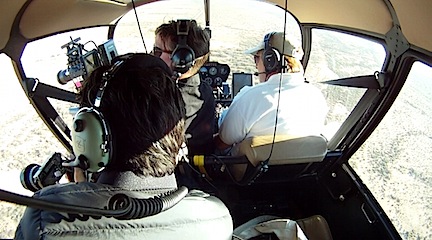
This is a frame-grab from one of my GoPros. Ideally, I should have had only one videographer on board and he should have been sitting behind me.

But the videographer refused to even consider sitting in the back seat. He had to sit in the front. This forced me, in the right seat, to fly with the other aircraft on my left. The videographer’s body obstructed my view to the left toward the other aircraft.

Although I was able to see the other aircraft most of the time, there were two or three instances when I could not see it. To stay safe until I could regain a visual on it, I banked away from where I thought it might be.

The videographer was not happy about this. “Get closer,” he’d say. And I’d reply, “I can’t get closer to something I can’t see.”

On a go-forward basis, I will not allow a photographer or videographer to block my view on any air-to-air photo shoot. If he can’t sit behind me so we can both see the other aircraft, I won’t do the flight. Period.

Poor Choice of Equipment

Two years ago, I spent over $10,000 on a Moitek gyro-stabilized video camera mount. This system uses three Kenyon KS-8 gyros to remove virtually all vibration from a camera while bearing all the weight of the camera equipment and giving the videographer a wide range of motion left, right, up, and down. No, it’s not as flexible as a hand-held camera, but as long as the videographer can keep the subject in the frame, he’ll get smooth video of it.

In an effort to recoup the cost of this system — and compensate me for the 30 minutes of setup and 30 minutes of tear-down time required for use — I charge $500 per day.

I offered this to the client though the booking company they were working with. They declined. I assumed they preferred to hand-hold the camera.
Red and Redder
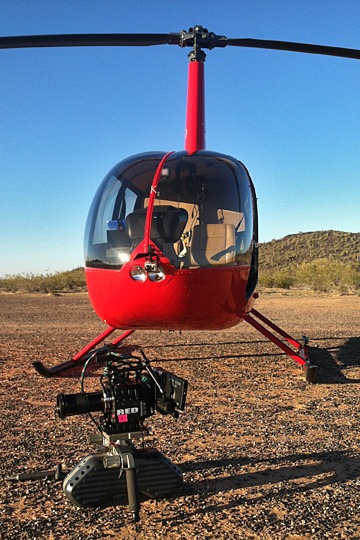
RED and redder.

When I arrived for the shoot, I discovered that the video guy had rented a Tyler Mini Gyro. This device has three smaller gyros mounted on a short monopod. The camera is mounted on top. The videographer usually places the monopod between his legs on the seat or on his lap while shooting. This stabilizes the video but limits motion in that the monopod base needs to be repositioned to make a significant vertical change of view. Without moving the base, the videographer would need to lean out into the slipstream to look down or lean back into the cockpit to look up. This isn’t always possible.

Apparently, the videographer was relying on me to keep in perfect formation with the other aircraft to prevent his need to move the camera. This was not possible, as discussed above. So when the paper airplane was released and it began its steep descent, he was unable to stay locked onto it with his camera.

I think using my mount or hand-holding the camera — possibly with a simpler gyro mount such a Micro-Gyro Mount offered by Blue Sky Aerials would have really benefited him. And I find it odd that although his equipment included a very costly RED camera, he had to rely on a rented gyro stabilizer.

Tampering with My Equipment

As discussed in numerous places throughout this blog, I’m a big fan of GoPro cameras and have three of my own that I sometimes use in flight. The folks from GoPro were at this event and they rigged up a bunch of their cameras all over the paper airplane and lift helicopter. They were thrilled that I already had good mounting solutions and loaned me a Hero 2 for one of my mount positions. So my helicopter had three GoPros, one of which was not mine, each of which had one of my 16GB cards in it. My arrangement with the GoPro guys was that after the flight, they’d pull video off each card and give the card back to me for my own personal (but limited) use.

Note that I mounted all the cameras with the GoPro guys. The video guy did not participate in this at all.

We did the flight and landed out in the desert near where the paper airplane had crashed. They did some video of the recovery on the ground. When we got back to my helicopter, I noticed that one of the GoPro mounts was missing its camera. I assumed it had fallen off and was very surprised because I know from experience how solid that mount is. That’s when the videographer told me he’d already removed them. Sure enough, all three mounts had been tampered with and all three cameras were gone.

Back at base, I went to the GoPro guys to find my cameras and the missing pieces of my mounts. They stuck to their word and I got everything back — except a piece from each of two mounts: a vibration isolator and a thumbscrew. Without these two pieces, two of the mounts are non-functional.

I don’t know who has them: the videographer or the GoPro guys. I suspect it’s the videographer. He likely put them in his pocket when he disassembled the mounts and forgot to give them back. (He also forgot to return a harness I provided for the shoot. That’s being shipped back to me this week.)

It is a Federal offense to tamper with equipment on an aircraft. Obviously, I’m not going to call the FAA to give this guy grief. But I will make sure it doesn’t happen again.

The Pilot Really Does Know Best

When you hire an experienced pilot for an aerial photo or video shoot, you need to fully communicate the needs of the mission before the flight and listen to the pilot’s advice. You need to work with your pilot to make a team to get the job done.

I know for a fact that I could have flown in perfect formation with the other aircraft if I could have seen it out my own window. I have done this before — not only with aircraft but with cars and trucks on the ground on tracks and on desert race courses, and with boats on lakes and rivers. A pilot cannot be expected to fly in formation with something he can’t see.

I know this videographer was unhappy with the results he got. But who is really to blame? I don’t think it’s me.

Snow-Covered Mountains

Late winter storm leaves Weaver Mountains blanketed with snow.

Just thought I’d share a quick photo taken from the upstairs window at my house in Wickenburg. After two days of rain and snow throughout Arizona, the Weaver Mountains about ten miles north of here are completely blanketed with snow. I hope things aren’t too mushy for the folks in Yarnell!

Snow-Covered Mountains

Staying Focused in a Distraction-Filled World

Distractions come in all shapes and sizes.

One of the most difficult things about working these days is simply staying focused. There are far too many distractions in my workplace to stick to the task at hand. And I’m willing to bet that if you work in an office or at a desk, it’s the same for you.

Writers Need to Concentrate

As a writer, it’s vital that I be able to concentrate to organize my thoughts and then get them out in well-written sentences and paragraphs. That’s the task I’m faced with when I need to write something: think about what I need to say and write it.

I’m fortunate. If I can stay focused, I have no trouble writing. Words form sentences, sentences form paragraphs, paragraphs form blog posts, articles, and even books. If I can concentrate on the topic and what I need to say about it, I can get the words out easily. In most cases, I don’t even need to go back and edit other than to check sentence structure and fix typos.

I thought it was like this for most writers. It’s only recently that I discovered that other writers struggle with the actual process of writing. That’s not my problem at all.

My Personal Distractions

My problem is staying focused in an environment full of distractions. Here’s a list of some of the things I face in my office:

  • A cluttered desk. I find that I have a much easier time staying focused when my desk is clear and organized. Yet day after day, I find clutter piles that nag at me and make it difficult to work.
  • Too many open projects. As I summarized in a recent blog post [ADD LINK], I have too many “irons in the fire.” All the time. That’s mostly because I, as a freelancer, need to do work when it comes and keep looking for work so there’s no gap. I’ve been doing this in one form or another for 20+ years. You think I’d be able to compartmentalize better by now. But it’s hard to stay focused on one thing when you know that two (or three or five) other things need attention the same day.
  • Background noise. I have a parrot. Sometimes she makes annoying sounds that can really get under my skin when I’m trying to concentrate. (And yes, getting a parrot was likely a huge mistake. Worse yet, since she’s only 10 years old with a life expectancy of 50, I’ll have her for the rest of my life.) Unfortunately, my parrot isn’t the only source of background noise. At my Phoenix office, there are the landscapers, my neighbor with his loud girlfriend, barking dogs, and the occasional news helicopter hovering over the Apple Store a half mile away any time a line forms for a new product release. Sheesh.
  • The Internet. I could break this down into its components: a Web browser to look up anything anytime I want and an email client to pounce on incoming email as soon as it arrives. Just knowing that it’s there is enough to distract me when I hit even the slightest snag while writing.
  • Social Networking. This is so insidious that it deserves its own bullet point. Thank heaven I’m only addicted — and yes, I do say addicted — to Twitter and Facebook. I bailed out of Google+ about a month ago and am too sick of people trying to sell themselves on LinkedIn to check it more than once a month. But imagine if I’d also jumped in on FourSquare, Pinterest, and those ridiculous “newspapers” people create based on tweets?
  • The weather. In Arizona, almost every day (other than during the summer “hell season”) is perfectly beautiful. Do you know how hard it is to stay indoors when you know how nice it is outside? And then, on those rare days when there are clouds or rain — do you know how hard it is to stay inside and miss the chance to actually get rained on? You think I’m kidding? This weekend, it rained for the first time in three months. I purposely scheduled my work around the expected weather so I could be home to enjoy it.
  • The phone. This is way down on my list because I don’t get many phone calls and I don’t make many phone calls. In all honesty, I don’t like talking on the phone. But that won’t stop me if one of my extra-talkative friends calls and wants to chat. Last month, I used 110 excess primetime minutes on my cell phone — which is my only phone these days — because of long conversations with two chatty friends. (Do you know what that cost? Ouch! I’ve since upped the minutes on my plan.) The phone, of course, is also a source of business for Flying M Air, my helicopter charter service. But at least 80% of the calls I get are people fishing for a cheap flight who tell me they’ll “think about it” when they hear what it’ll cost. And don’t get me started on the ones who need time-consuming flight plan calculations to arrive at an estimate and then never call back.
  • Text messaging. Thankfully, I don’t get or send many. For a while, I had Twitter set to send me Direct Messages on my cell phone. What was I thinking?
  • Chores. Like most people who work from a home-based office, I use chores as a means of “justified procrastination.” For example, “I can’t finish this article now — there are clothes in the dryer that need to be folded!” Or, “I can’t start this outline now — I need to run to the store to buy milk for tomorrow’s breakfast!” (I just did it. I stopped doing this, went outside, toweled off my car (which was wet and clean from the rain), put my Jeep in the driveway, put my car in the garage, and pulled all the clothes out of the dryer. Seriously, I’m hopeless.)
  • Food. I snack all day long. Not huge snacks and not bad snacks. I eat fruit, hard-boiled eggs, cheese on crackers, leftovers. This is not a good thing. I don’t need to snack.

This gives you an idea of what I face. Think about what you face. I bet there’s a lot of overlap.

The Writing Environment

On top of all this is the distraction-full environment of the three applications I normally use to write: Microsoft Word for general writing, Adobe InDesign for book creation, and ecto for blogging.

It’s the formatting options that really get me with Word and InDesign. As I write, I get distracted by the task of formatting my text. With InDesign, the situation is often much worse until I’ve settled on the final styles and template for my book. I’m constantly tweaking things to make them perfect. ecto isn’t nearly as distracting, although since I write in HTML, it’s sometimes more difficult to go back and read what I’ve already written, especially after inserting links and images.

A lot of people swear by applications like Scrivener, which have a full-screen writing mode that supposedly removes all distractions. I’ve tried Scrivener and I really don’t like it for several reasons. First of all, Scrivener has to be learned to be used. That’s an investment in time that I’m not convinced will ever pay off since those skills can only be applied to Scrivener. Second, that distraction-free writing environment has to be turned on. If you don’t turn it on, you have Scrivener’s weird pseudo-outline interface or the cutesy index cards and cork board. That’s not distracting? Third, Scrivener creates Scrivener files, which are generally not readable by other applications. I’ve been bitten in the past when I adopted an application to help me be more productive or “think better” — the program was called Thought Pattern — and wound up with files I could no longer read when the application was abandoned and could no longer run on my computer’s operating system. As a result, I prefer applications that create files in standard formats: TXT, RTF, and DOC/DOCX. (InDesign is a big exception, but worth it for obvious reasons.)

(Just took a 10-minute phone call. Booked a flight for Wednesday. Added two things to my To Do list. Tweeted. )

Now before you use the comments to accuse me of “bashing” Scrivener, please re-read that paragraph. I’m not saying Scrivener is terrible. I’m just saying why I don’t like it. It doesn’t work for me. That doesn’t mean it won’t work for you.

And if all you want is a word processor that has a “distraction-free mode,” why not use Microsoft Word? It’s full-screen mode might be just what you need.

iAWriter
iAWriter’s normal document window is pretty simple.

Of course, I need something more hardcore. So I spent $8.99 for iA Writer, which must be the most basic, distraction-free text editor on the planet. I’m using it to write now. It forces me to concentrate on the actual text by not allowing me to build outlines or format characters or view my document in some sort of print-centric page view that no one really cares about anyway these days. And rather than taking the time to code the links you see throughout this piece, I’m just putting in [ADD LINK] notes to remind me to add the links before I publish.

iAWriter Focus Mode
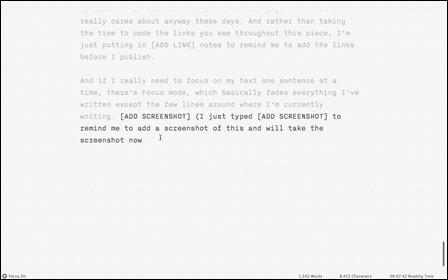
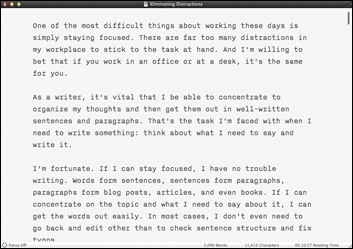
Here’s iAWriter in full screen view with Focus Mode turned on.

And if I really need to focus on my text one sentence at a time, there’s Focus mode, which basically fades everything I’ve written except the few lines around where I’m currently writing. (I just typed [ADD SCREENSHOT] to remind me to add a screenshot of this and will take the screenshot now. There.) The benefit of Focus mode is that it makes it just a little more difficult to go back and review or edit something you wrote earlier in the document. If you’re like me, you know how much productive time can be lost by tweaking text before you’re finished with the first draft.

There’s zero learning curve to this program. It’s about as close as you can get to a typewriter without losing the ability to edit.

I’m hoping to use this more often to get “back to basics.”

Other Remedies

If a super-simple, feature-free word processor is a remedy for distractions inherent in standard word processing applications, it follows that I should be able to come up with remedies for my other distractions. Here’s what I’m thinking.

ProblemPossible Remedy
A cluttered desk.Clear the damn desk. Then clear it again at the end of the work day. Every day. My sister did this at her bank job. Every time I came to visit her, her desk was completely clutter-free. It was spooky, but I think I could work better at a desk like that.
Too many open projects.Organize tasks with a To Do list that prioritizes project work. Stick to it. Also try to work on each project until finished before starting new ones.
Background Noise.Sometimes I can get Alex the Bird to shut up if I move her cage into my office. Sometimes certain foraging toys can keep her quietly busy for hours. I have to work on this. Not much I can do about the other noises. Of course, I could resolve all noise related issues by simply getting a dedicated office in a quiet place — and leaving the bird at home.
The Internet.Close all Internet apps and keep them closed. No browser, no email. Of course, this is impossible sometimes — my work often requires me to consult websites for information, etc. I think I need more willpower. Maybe a sticky note reminding me to stick to business?
Social Networks.Leave the Twitter client app closed. Stay off Facebook. I think if I schedule my social networking activities to certain times of the day, that might work.
The weather.I got nothing. I’m always going to want to get out in the rain — unless it rains for more than one day in a row. I think that if I gave myself a real day off once in a while, I could enjoy an appropriate number of nice days, too.
The phone.Because work comes by phone, I have to answer the phone. Fortunately, I don’t have to restrict myself about making calls because I seldom call anyone else.
Text messaging.Not enough of a problem to warrant a remedy.
Chores.This is an easy one: save chores for break time. Real break time. Scheduled break time. Of course, that means I have to schedule some break time.
Food.See above. Also, keep food out of the house. That might sound weird, but I’m one of those people who shops for groceries almost every day anyway. It’s one of my chores.

What about you? What distractions do you face? What remedies do you use to stay focused and get things done? Share some of your tips in the comments for this post.

One Publisher’s Experience with KDP Select

A mistake, pure and simple.

Back in December, I wrote “Amazon’s Bribe to Publishers: KDP Select and the $6 Million Fund,” a blog post where I discussed the Kindle Owners’ Lending Library and Amazon.com’s attempt to fill that library with books: the KDP Select Program.

The Deal

KDP Select offers Kindle format ebook author/publishers a chance to earn a piece of a monthly $500K or $600K fund. Enrolled books must:

  • Be available for sale on Amazon.com only. In other words, if you enroll a title in KDP Select, you cannot sell the same title as an ebook anywhere else. Amazon.com gets the exclusive right to sell your ebook on Amazon.com.
  • Allow Kindle owners who are also members of Amazon Prime to borrow the enrolled book for as long as they like for free.
  • Keep the enrolled title in the program for complete three-month terms. Once you sign up, there’s no getting out. And if you don’t turn off the automatic renewal option — which is enabled by default, of course — the book is automatically re-enrolled for another three months.

There are other “benefits” as well. For example, you get the option of making your book available for free to anyone on Amazon.com. (Imagine that! They let you give it away!)

The Bait

Compensation comes in the form of a share of the fund. Here’s how Amazon explains it; note the big numbers they use to make author/publisher mouths drool:

Your share of the Kindle Owners’ Lending Library Fund is calculated based on a share of the total number of qualified borrows of all participating KDP titles. For example, if the monthly fund amount is $500,000, the total qualified borrows of all participating KDP titles is 100,000, and your book was borrowed 1,500 times, you will earn 1.5% (1,500/100,000 = 1.5%), or $7,500 for that month.

So according to Amazon, although you’re letting a whole bunch of people read your book for as long as they like for free, you could still make $7,500 (or even more!) in a month on that book.

I Bit

My only ebook title at the time, Making Movies: A Guide for Serious Amateurs, was selling a few copies here and there on Amazon.com’s Kindle store, Apple’s iBookstore, and BN.com’s NOOK store. Not anywhere near enough to make me feel good about my first attempt at ebook publishing.

I thought for a while about KDP Select. I blogged about it. And I figured, what do I have to lose? So I signed up in December and even did a free book promotion for Christmas Day.

The Results

Over the next three months, I saw the following results:

Transaction TypeUnitsEarningsPer Unit Avg.
Sales at 35% Royalty2$2.80$1.40
Sales at 70% Royalty37$92.46$2.50
Free Book (Christmas Promotion)333$0.00$0.00
KDP Select Borrows10$18.40$1.80
All Transactions382$113.30$0.30

Let’s take a moment to analyze this. Here are the points that jump out at me:

  • Over a three-month period, the KDP Select program earned me a total of $18.40 for this title.
  • During the same period, regular Kindle earnings totaled $95.26. These are actually people who bought my book. I would have earned at least this amount if I had not been on the KDP Select program. I might have earned more if the 10 people who borrowed my book had bought it instead.
  • The average earnings per book borrowed was $1.80; the average earnings per book sold was $2.44 per book (that’s $95.26 ÷ 39).
  • Factoring in the free books, my KDP Program average earnings was less than 6¢ per book (that’s $18.40 ÷ 343).

Of course, this does not take into consideration sales that were lost because the book did not appear in buyer-preferred markets such as the Apple iBookstore and BN.com NOOK store. Based on sales figures before and after the book’s enrollment in the KDP Select program, that could be anywhere from 5 to 15 units per month.

So the KDP Select program earned me $18.40 and possibly lost me quite a bit more.

I don’t see any good from this at all. None. Do you? If so, explain it to me.

The Exposure Argument

A friend of mine who published his first novel on the Kindle platform enrolled his book in KDP Select about a week or two before I did. He and I had discussed it briefly via email before I dove in. He had the same “it’s worth a try” attitude that I did.

The other day, I contacted him with the following question:

How did your KDP Select deal go? Did you make any money worth talking about? I’m about to blog about my experience and was wondering what you thought about it.

His response:

Definitely no money worth talking about, unless that would be about $25! And no borrows at all. However, I’m letting it run for another 3 months. What has been encouraging is working with World Literary Cafe’s free promotion day, which runs through KDP Select’s free promotion days. That doesn’t bring in money directly but does at least bring exposure which has resulted in some sales and hopefully reviews at some point.

And that brings up an interesting point: exposure.

A writer who is just beginning to publish his work (such as my friend) has different goals than a writer who has been publishing her work for years (such as me).

Show Me the Money

I’m in it for the money, pure and simple. As print publishing dies and my existing titles no longer warrant revision, I need something to fill in the income gap if I expect to maintain the freelance lifestyle I’ve enjoyed for the past 20+ years. I need to create a book for a definable market and sell to that market at a price it’s willing to pay. In the ebook world, that price appears to be under $10 — more likely under $5. I did the math and realized that in order to succeed on this path, I need to build a library of long-lived titles and sell an average of 60-80 books a day. That’s why I was initially so disappointed in the sales results for my first book. It wasn’t even a drop in the bucket I needed to fill if I wanted to continue earning a living as a writer — which is what I’ve been doing for 20 years.

But I’m not in it for exposure. I have exposure. I’ve written and published more than 80 books, the vast majority of which are with major publishers such as McGraw-Hill, Peachpit Press, O’Reilly, and Macmillan. I support my books via a Website that gets about 1,000 hits per day. I’m occasionally interviewed on podcasts and video podcasts and have appeared numerous times at Macworld Expo. I may not be a “name brand” like some others who write the kinds of things I do, but I’m certainly quite a step up from those just entering this field.

Expose Yourself

My friend, however, is not in the same position. He’s new to writing novels and, as anyone who has done so can tell you, it’s extremely tough to break in. There’s lots of competition, much of it from best-selling authors that people turn to every time a new title comes out. It’s hard to get recognition for your work, let alone try to sell it when there’s just so much competition.

He’s doing the smart thing — the same thing I did years and years ago when I started out: he’s trying to build a name for himself. To do that, he needs to get his work in front of as many people as he possibly can. He needs his book read and reviewed, preferably with lots of stars and good comments. He needs to begin building a base of readers who not only like this first book, but will be anxiously awaiting his second. And third. Readers who will be willing to show support by paying to read his work.

And that’s why he sees KDP Select as something that might help him in the long run.

Is KDP Select Worth It?

In my mind, no. Definitely not. The exclusivity is enough to convince me that it’s not something I ever want to do again. After all, my third Maria’s Guides book, iBooks Author: Publishing Your First Ebook, is selling like crazy on the iBookstore. If I did an exclusive on Amazon.com, I’d lose out on all of those sales.

But for authors/publishers just starting out and trying to do the best thing for the long haul, it might be worth a shot. My friend seems to think so.

A Desert Flying Gig: Day Two

Cut short by a tragic disaster.

The second day of my job got off to a weird start. Although I was supposed to be at the client site at 8 AM, a family emergency had me driving toward Phoenix at 7:10 AM — the same time I should have been driving to the airport to get the helicopter. I wasn’t happy about this; it meant I’d be at least 3 hours late for work. Although my client was understanding, I wasn’t. The mission I was sent to accomplish — get two stranded people to Sky Harbor Airport in time for a 9 AM flight — was impossible to achieve in the time allotted. So not only was I going to let down a good client, but I was doing it for no good reason.

Fortunately, the two stranded people were able to make other arrangements. I was only 5 miles south of Wickenburg’s town limits when I got the call and was able to turn around. I arrived at the airport at 7:30. Even after removing the tie-downs, preflighting, hooking up the helicopter’s nosecam, starting up, warming up, and making the flight, I’d still be there within 15 minutes of my originally scheduled arrival time.

Nothing much was going on at Wickenburg Airport that morning — although there was a twin and a small jet parked in the jet parking area. I took care of business, made my radio calls, and took off to the west.

Along the way, I tried to notice things that I hadn’t noticed before — things I hadn’t included in yesterday’s blog post about Day 1. I realized that there weren’t nearly as many areas of carved water channels as I remembered. And I noticed cow paths. Other than that, there was nothing different, nothing to add to yesterday’s report.

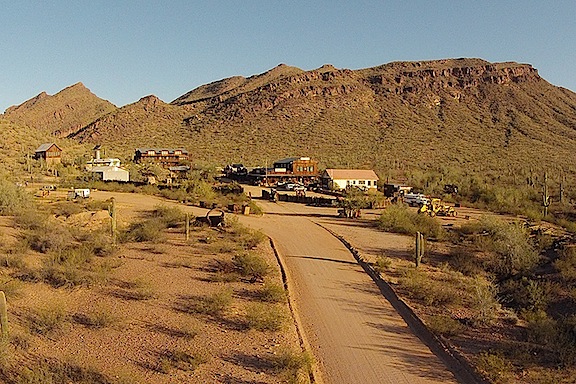
I did a much better job bleeding off airspeed before coming into landing. The day before, I’d spotted an alternative landing zone that was must closer to the “town.” There were only two drawbacks that I could foresee: they were closer to the horse corrals, so I’d be more likely to frighten the horses, and it was much closer to the road, so I’d be more likely to stir up dust. I decided to give it a try.

Arrival at Robson's
This “nose cam” shot from my final approach shows my landing zone (on right, beyond cactus) and the whole town, including the hotel.

As I approached, I began having doubts about the clearance between my main rotor blades and a palo verde tree at the edge of the landing zone. It had certainly seemed like enough space when I walked past the day before. I knew that judging distances could be tricky when airborne and decided to trust my initial thoughts about the spot. I kept coming.

The dust started kicking up when I was still 50 feet up. Not exactly brownout conditions, but a lot more dust than I like to see. Out of the corner of my eye, I noticed two of the horses prancing around a bit as the dust cloud approached them. Not exactly panicking, but far from calm. I wondered if the dust would make it all the way into town.

Knowing that the best way to make the dust stop blowing was to get on the ground and throttle down to idle power, I expedited my landing. The spot I picked was level and firm. I cut the throttle and, as predicted, the dust stopped churning. By the time I was tightening up the control frictions, the horses had already calmed down.

I had plenty of clearance from all obstacles.

Parking, Day 2
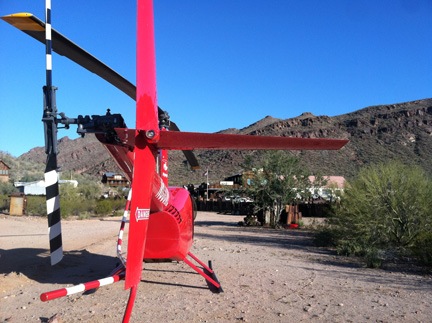
My parking spot on the second day was much closer to town.

I shut down and let the blades spin to a stop while I removed the two back doors. My clients used the back seat area of the helicopter for their equipment and we worked with the doors off. I figured I’d make up for being 10 minutes late by having the helicopter all ready for them when they came out with the equipment.

Not that anyone came running out to meet me. They usually don’t.

I grabbed my gear and headed to the cafe. Along the way, I saw some familiar faces and was greeted with a few waves and hellos. Inside, I met with my main contact and explained the family emergency that had prompted my phone call an hour before. Then I grabbed a glass of orange juice and went out to track down the folks who would be installing equipment in the helicopter.

The Equipment Installation

The tech folks were based in another part of the long building that had been set up like an old fashioned soda fountain. Most of the people reading this probably never even saw the real thing — they just don’t exist in many places anymore. This was made with components taken from real soda fountains — countertop, simple round bar stools, ice cream bins, syrup pumps, blenders, malt dispensers. Most stuff dated from the 1940s through the 1960s. None of it was set up for use anymore; every cabinet and bin was used to store paper and brochures and gift shop items. There were a handful of booths, each of which were being used to stage equipment. The walls were lined with gift shop items, all of which had likely been there at least five years. Some of the items were older than me.

I found the first tech almost immediately. He had a remote controlled camera head that he needed installed. It was part of a kit that included a 50-pound customized Pelican case containing a battery and some electronics. He configured and tested it while I waited, then showed me how he could control the camera head with his iPhone. Cool. We carried it out to the helicopter and found a good place for it on the front passenger seat. I got a few instructions about how to turn it on at flight time and we headed back to the soda fountain.

The antenna/radio guys were next. I watched them assemble and mount their equipment, tested occasionally to make sure it was mounted firmly, and picked up snipped wire ties as they dropped them in an effort to keep my landing zone FOD-free.

By 9:30 AM, the equipment was all set up in the helicopter to everyone’s satisfaction. For purposes of client confidentiality, I don’t share photos of their equipment or setup.

The Wait

Then the waiting began. The helicopter was just part of the testing process; there were vehicles and personnel vests to be configured, too. I knew from experience that this could take hours, but I hoped it wouldn’t be that long.

I took my camera out and began wandering around in the immediate area, shooting images of the few wildflowers that grew beside some of the old iron mining and farming equipment. It was a disappointing spring; wildflowers were limited to desert marigold, some brittlebush, and another yellow flower that might have been desert senna. There were also a few small pale purple flowers. The globe mallow were just starting to bloom. Hedgehog cactus should have been in full bloom, but I didn’t see any anywhere. Ditto for poppies.

Brittlebush
Heavy Metal

I spent about 45 minutes wandering around, trying to get good images. I’d run out of the house that morning without my tripod or monopod, so I set the camera for shutter speed priority and set the shutter speed to 1/1000 second. With full sun on yet another cloudless Arizona morning, there was certainly enough light. But I also got the narrow depth of field that I like when shooting flowers close up. The only disappointment was the lack of flowers to shoot. After a while, I began concentrating on all that old metal equipment.

I had a chat with the cowboy, who was messing with the hardware on the flagpole. I mentioned how I’d scared the horses a bit but they seemed okay. He told me to fly right over them. He and I both knew that the best way to get a horse used to some unusual noise or activity was to subject them to it until they began ignoring it. I had no real desire to overfly the horses, but was glad he’d offered it as an option. That direction was one of two possible “escape routes” if my landing started going south and I needed to do a go-around.

Not wanting to wander too far away from the techs, I returned to the soda fountain, found a table on the far side of the room, took out my laptop, and began reviewing photos and writing this blog post. I’d come prepared for a long wait.

I should mention here that although the place is off the grid, when this client comes, they set up a multi-node network that includes broadband Internet access. So not only could I compose a blog post, but I could check Twitter and Facebook and email. This was a good thing because my cell phone signal was very weak and 3G wasn’t really an option.

The Flight

At 11:30, it looked as if we might actually have a flight before lunch. I headed out to the helicopter and was surprised when two men I’d never seen before approached and announced they’d be flying with me. The reason I was surprised was because I knew one of the techs was planning to fly with me so he could monitor the equipment during the flight on his laptop — that was the usual procedure. But with the camera up front, I only had two passenger seats open in back.

What followed was some minor confusion. The tech told me we’d run the first flight as a sort of dry run for the actual tests, which would be done after lunch. He told me to take the other two men. So I briefed them, loaded them on board, and strapped them in. Then I started up and, during my warm-up processed, pushed the appropriate buttons on the camera equipment sitting beside me. A while later, I lifted off in a cloud of dust, made a 180° turn, and departed down the road, pushing the cyclic forward to accelerate as quickly as possible to clear the dust.

My job was to keep maintain a line of sight with the SUV on the road below me and the main building back in town. My passengers would monitor internet connectivity in the helicopter — yes, we were set up as a WiFi hotspot.

The flight lasted about 15 minutes. The biggest challenge was flying slow enough that I didn’t blow past the SUV and need to keep circling. There was just enough wind coming into the back seat headset mics to force me to turn off the voice activated intercom.

I watched the SUV pull off the road and make a U-Turn. I circled slowly, 500 feet above them. Then my phone rang. It was the tech back at the base, calling me back. They were done with this first test.

I headed back, leaving the SUV behind and landed in my spot. The dust cloud really was outrageous. The wind was blowing at about five mph from behind me — yes, I made a tailwind landing — and the dust kept getting blown into the town area. It didn’t go as far as the cafe, but it did seem to go as far as the soda fountain. No one had complained, though. I think they liked having the helicopter closer, where it was quicker and easier to get to than my old landing zone.

I let my passengers get out while I was still shutting down. Then, since it was already after noon, I headed back to the cafe, where I knew Rosa would have one of her excellent lunches. I found a seat among the techs and one of the long table and soon had a barbecue beef sandwich, cole slaw, and chili in front of me. During lunch, we talked about helicopter and the cherry drying work I do in Washington in the summer. That led to other conversations about weird helicopter work and weird helicopter flights.

I was just finishing desert when my contact stepped into the cafe. She had her phone against her ear, but she was addressing everyone in the room when she said calmly, “You guys might want to move your cars. The hotel is on fire.”

The Fire

We all cleared out of the building and into the street out front. I was expecting to see a thin trail of smoke coming from the building. Instead, the top right of the three-story building was engulfed in flames at least 10 feet high. Guys started running toward it while I ran back into the cafe, not willing to see what was happening. Rosa was there, looking at me, and I told her what was happening. She ran out to look and I followed her.

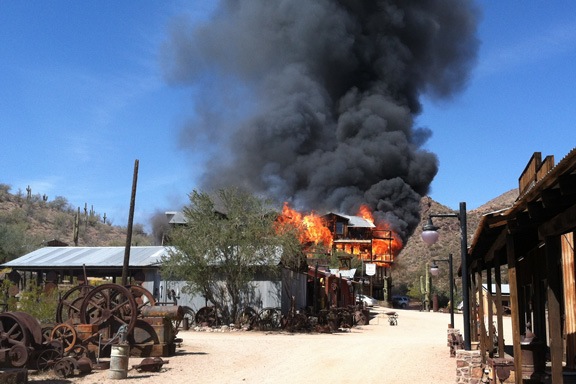
It was the most amazing thing. The fire spread at the rate of about one room per minute, moving right to left across the top floor of the hotel and then down. The rental cars parked at the base of the building were smoldering; as I watched, the hood of one burst into flames. I could feel the heat of the fire from the end of the main building. Guys who had tried too late to retrieve belongings from their hotel rooms were turned back while a handful of other guys ran back toward us holding scattered possessions in their hands. Thick black smoke climbed into the sky. Huge sheets of the hotel’s metal roof lifted into the sky like aluminum foil.

The Fire
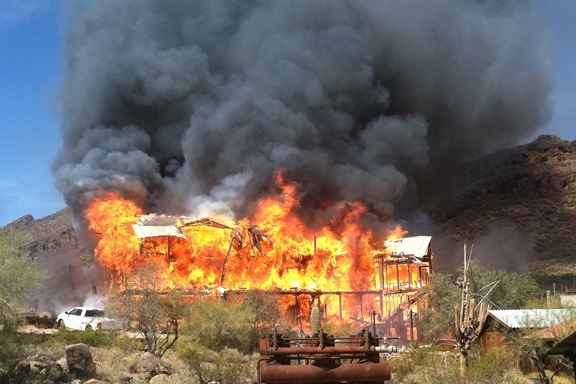
The hotel at Robson’s just minutes after the fire started.

And there was nothing we could do. There were no hoses, no water spigots. It was clear from the start that the hotel was a goner, but the intense heat began to spread the fire closer to us, into the wind. The dry wood frame of a nearby building caught fire. Then another on the other side of the hotel, right beside one of the caretaker homes.

Hotel Fire
In less than 15 minutes the whole building was on fire and the fire was spreading. The truck in this shot was lost; no one could get near it.

The local fire department showed up just as another row of buildings caught fire. They’d brought two tanker trucks filled with water. They drove up the street as far as they could and got to work. One firefighter came toward us and told us to clear out of town.

In the background, we could clearly hear the sound of the rental car fuel tanks exploding.

The firefighters concentrated their efforts on the buildings that could still be saved, mostly to prevent the spread of the fire. I think that if they’d arrived ten minutes later, the whole town would have been lost.

We gathered in a group near the entrance to the town while additional firefighting equipment rolled in. My client had already gone through their list of participants. No one was missing. One guy had been burned running from the fire after retrieving some of his belongings. He’d used his arm to shield his head from the heat and his arm had gotten what were probably second degree burns. No one else was injured.

We all realized that if the fire had broken out at night, people would have been killed. It just spread so quickly.

It was obvious that the event was over. They began making arrangements to leave. At least six cars had been lost; they’d need to carpool back to Wickenburg and Phoenix. They came out to the helicopter and pulled their equipment off. I put the doors back on and prepared to leave.

Back in town, the hotel had been reduced to a single floor of burning rubble. One of the tanker trucks rolled out of town, empty, while another one rolled in.

The Flight Home

I took off in one final cloud of dust. But rather than head right back to Wickenburg, I circled around the back of the townsite to see if the fire had spread into the desert. After all, the wind was blowing that way. I was very surprised to see several other wooden buildings quite a distance away from the hotel completely burned to the ground and still in flames, obviously ignited by sparks. I paused just long enough for the helicopter’s “nosecam” to get a shot, then banked away to the east and headed back to Wickenburg Airport.

Aerial Shot of Fire

The flight back was uneventful. I didn’t pay much attention to my surroundings. I was feeling stunned and saddened by the loss of the old hotel. I knew the original owner would be heartbroken when she found out.

I also knew that it was the end of an era out in Aguila. The hotel would not be rebuilt; without it there wasn’t much to attract the groups that the owners needed to make it financially feasible. My client would not likely return; it was too far away from the closest overnight accommodations in Wickenburg to be convenient. I might not ever work for them again.

It was a hell of a way to end a job.