Art History Book Mystery Partially Solved

So that’s why they sent me a copy!

Last spring, as I was finishing my packing and preparing to leave my Wickenburg home for good, a box arrived in the mail from Pearson Education. I’d been writing for Pearson’s Peachpit imprint since 1995 and assumed the box contained copies of my latest book about Mac OS X, translated into other languages. Of course, all my other books had already been packed and I was bummed that I couldn’t pack this latecomer with the others.

The Mystery

Art HistoryBut when I opened the box, I was very surprised to see that it wasn’t a translation of one of my books. It was an absolutely beautiful 1240-page hardcover book about art by Marilyn Stokstad and Michael W. Cothern titled simply, Art History (Fifth Edition). A quick look on Amazon.com showed me that the book would cost nearly $200 to buy. That wasn’t difficult to believe. The book was beautiful.

I’ll be the first to admit that I have only a passing interest in art history. But paging through this book while trying to figure out why it had been sent to me, I realized that I was holding the definitive guide to the history of art — a book that covered art history as far back as prehistoric times. It was chock full of gorgeous full-color photos. Everything the average person could want to know about the history of art worldwide was in this amazing textbook.

But why the heck had it been sent to me?

I didn’t know the authors and I didn’t write textbooks. I had never voiced an interest in art history to anyone I knew. There was no note with the book. Nothing at all to explain why I’d gotten it. I wound up assuming that someone at Peachpit had sent it to me as a gift — I’d been getting quite a few little gifts from friends who sympathized with my divorce ordeal.

I packed the book carefully in one of the last boxes I sealed up. It would look nice on the coffee table in my next home. And maybe — just maybe — I’d have time to read some of it when I settled down again.

A Partial Solution

This morning, I got two email messages, each referring to permission to use one of my photos.

One message was from a woman named Evi, who I vaguely remembered from the past. In this new message, she told me she needed to “re-clear the rights to use the below picture” for a new edition of Stokstad’s Art, A Brief History. I scrolled down and saw one of my photos of the Grand Canyon.
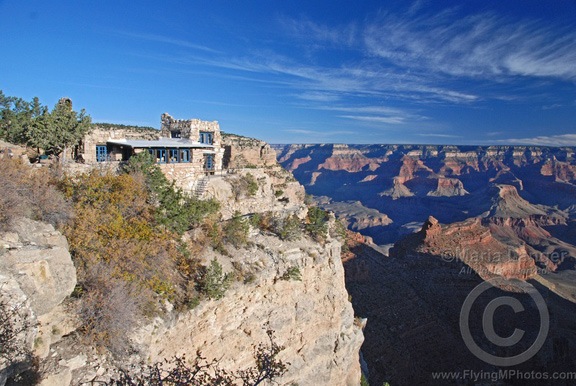
Lookout Studio
I shot this image of Lookout Studio after dawn one day in October 2008, most likely while I was on one of Flying M Air’s Southwest Circle Helicopter Adventures (which I stopped offering when I permanently moved out of Arizona).

It was very important, Evi told me, that my rights be extended to Pearson, the US publisher. The other message was from Pearson and included a permission form. (Pearson has forms for everything.)

Art Brief HistoryI looked up the book on Amazon.com and found a 640-page paperback book titled Art: A Brief History (5th Edition). Although I’d never seen the book before, it did get the wheels turning in my head. I did another Amazon search on the author’s name and found the book discussed at the beginning of this blog post — the book I’d received out of the blue at least nine months ago.

And then I remembered a bit more about my email exchange with Evi. It had been about two years ago. Her company had bought — actually paid — for the rights to use the photo. Somewhere along the line, I must have also requested a copy of the book. Months later, I got the check from the UK-based company drawn on a US bank, cashed it, and promptly forgot all about it.

Is it possible that they used my photo in such a big, beautiful book? Or did they use it in the shorter paperback she mentioned in her email message?

But the dates didn’t jive. The paperback book was published in December 2011. Surely it hadn’t been that long since all this transpired.

And if it was in that 640-page paperback book, then why had they sent me the 1240-page hardcover book?

Without asking for details — which I really don’t think is worth the bother; after all, this poor woman has thousands of pictures to get permissions for — the only way to know is to look through the book they sent me to see if my photo is in there. Of course, that box is still packed and still in storage. I likely won’t unpack it until later this summer, at the very earliest.

Permission Granted

I’ll definitely be giving them permission to use my photo again. And I won’t charge them a fee this time. I’m hoping that the photo did appear in the bigger book and that I get a copy of the smaller book once it’s revised.

Needless to say, I’m tickled that my work appeared in such wonderful volumes. Photography is just a hobby for me; to have my work recognized and used — with permission — in such a way really makes me happy.

You Can’t Get There from Here

Another Apple Maps fail.

I’m planning a trip to Pullman, WA next Thursday to attend a beekeeping seminar. I got the street address of the college campus building I need to go to in an email message. Under OS X Mavericks, I can point to the address to display a map of its location, like this:

Address in Email

I clicked the Open in Maps link to open the location in the Maps application that comes with Mavericks. Then, because I was curious about how long it would take to make the drive, I clicked the Directions button in Maps. I filled in my current location in the Start box and Maps recognized it as my current location. Then I clicked Directions.

Here’s the result:

Maps Fail

If you can’t read the note on the right, here’s what it says:

Directions Not Available
Directions cannot be found between these locations.

Of course, when I went to Google Maps and plugged the same info in, I got complete directions:

Google Maps

Hello, Apple? How about leaving the mapping to the experts? I never asked for Apple Maps on my phone, iPad, or desktop computer.

The apps you provide with the OS are like tools for getting a specific job done. When you provide tools that don’t work, it’s like reaching for a hammer and having it break when you need to bang in a nail.

Shoveling Snow Time-Lapse

I shovel snow for the first time in 16 years.

It snowed last night. Finally.

Yeah, we did have some minor snowfall way back at the end of November or beginning of December, but it wasn’t much. I bought a snow shovel at the local Habitat for Humanity shop for $5 but was better off just sweeping that snow away.

But last night we had the real thing. About four inches of the stuff, slightly wet but otherwise powdery. I saw it in the dark when I woke up and let Penny out. She ran to the edge of the porch, saw the white stuff on the walk and in the yard, and turned tail, running back into the house, obviously afraid. It was 30 minutes later, after she’d finished most of her breakfast and really had to go that she stepped out into it. That’s when I got an idea of how deep it was — she sank in up to her little body and wound up doing her business under the porch.

I walked out, still in my slippers, and stuck a forefinger in the fresh snow on the walkway. My finger was buried before I touched the ground.

At least four inches. Whoa!

I waited eagerly for the sun to rise. I was actually looking forward to using that new shovel.

Those of you in winter wonderlands who have had snow dumped on you all season probably think I’m nuts. I’m not. I grew up in the New York Metro area where the weather was a bit colder in winter than where I am now — and a lot colder than where I lived in Arizona for 15+ years. I didn’t realize how much I missed the snow until I got here, prepped for winter sports, and then waited for the snow to fall.

It didn’t.

Until last night.

Anyway, at about 8 AM, I donned my winter pants and jacket and boots and fashioned my Buff into a balaclava. Then I pulled on my ski gloves and went out to do a chore most people hate: shoveling snow. Of course, I created a time-lapse:

I don’t have to shovel the driveway, which is quite long. The man who owns the house I’m living in right now has arranged for snow plow service if the snow gets too deep. Right now, I don’t think it’s too deep at all — my Jeep has big, gnarly tires that won’t even notice the snow. Besides, temperatures later this week are expected to rise above freezing — heck, it’s already 31°F outside right now — so I don’t expect the snow to linger.

Maybe that’s why I was in such a hurry to get out there and shovel? I didn’t want to miss my opportunity.

Besides, once it starts melting, I suspect it’ll be a lot heavier and harder to move.

Sales Force Email Scam

Yep. Another one.

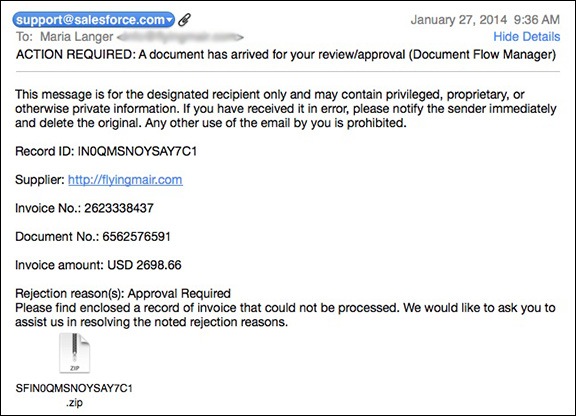
Here’s another attempt to get unsuspecting people — in this case, business owners — to open a file that will likely install malware on their computer. This one supposedly comes from support@salesforce.com and has a ZIP file attachment. It was addressed to my Flying M Air business email address and includes a link to my website. Keep in mind that my business email address is quite generic and could have been guessed by the sender.

The complete message is shown below.

Sales Force Email Scam

Once again I need to remind everyone who might be taken in by emails like this: don’t open any file attachment that you are not expecting, especially if it comes from a person or organization you are not already doing business with.

Crock-Pot Beef Soup

Easy recipe for a winter day.

I love Crock-Pot® — or, more generically, slow-cooker — cooking. There’s nothing like throwing a bunch of ingredients in an appliance, covering it, turning it on, and coming back 6 to 10 hours later for a delicious meal. Best of all, the aroma of that slow-cooked meal permeates your home, greeting you quite pleasantly when you get back from a long day at work or play.

True story: a few weeks ago, I had to make a trip down to Goldendale for some business. it’s a 3-1/2 hour drive — each way. I set up a slow-cooker before I left at 7 AM and completely forgot about it. On my way home that afternoon, I thought about what I could cook for dinner without having to stop at the supermarket. When I turned the key in the door and pushed it open, I smelled the lovely aroma of the chicken soup that had been cooking all day and actually thought to myself, “What did I make yesterday that smells so good today?” I was actually stepping into the house when I remembered the slow cooker-meal waiting for me. What a reward at the end of a very long day!

Anyway, I was in the supermarket Sunday and found some very meaty “soup bones” in the meat department. Remembering the excellent beef soup I’d made last winter in Arizona from similar “soup bones” in my chest freezer from a half cow we’d bought the previous year, I decided to whip up a batch here. But rather than put it on the stove, I pulled out the slow-cooker. Here’s the recipe I used.

Ingredients

  • 3-4 pounds of very meaty beef soup bones
  • 3 carrots, cut into 2-3 inch lengths
  • 2 stalks celery, cut into 2-3 inch lengths
  • 1 medium onion, sliced
  • 4 cloves garlic, peeled and halved
  • 1 teaspoon salt. You might want to put more; I’m trying to limit my salt intake. Remember; you can always add it later.
  • 1 teaspoon fresh ground pepper. Is there any other kind?
  • 1 tablespoon Herbs from Provence. The prepared blend I used includes chervil, basil, rosemary, tarragon, garlic, lavender, marjoram, savory, thyme, and parsley.
  • 3-4 cups water

Root vegetables also work well in this recipe, although I never use potatoes because I’m trying to avoid starches.

Instructions

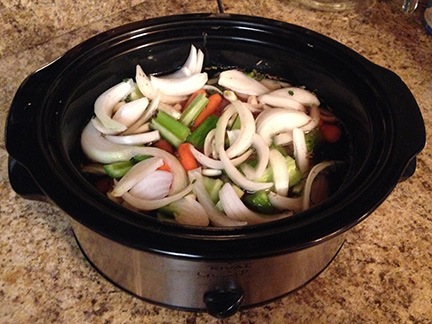
  1. Place beef bones at the bottom of a slow-cooker.
  2. Spread vegetables on top of beef.
  3. Sprinkle salt, pepper, and herbs on vegetables.
  4. Beef SoupPour enough water over slow-cooker contents to barely cover them. In the slow-cooker I’m using, that was just over 3 cups.
  5. Cover the cooker and set to high.
  6. When the cooker contents start to boil or simmer, set to low. If it never starts to boil, that’s okay. It really depends on the slow-cooker. If you need to go out for the day, just set it to low before you leave.
  7. Cook all day. I’m thinking at least 6 hours to tenderize the beef and bring out the flavors of the meat and vegetables.
  8. Remove the beef bones from the soup and allow to cool enough to remove meat pieces from them.
  9. Cut the meat as necessary and return it to the soup.

Serve piping hot with crusty bread.

Again, I’m watching my carb intake so I’ll be skipping the bread. I’m also avoiding pasta. But noodles or orzo would be really good in this recipe. Cook it separately and add right before serving.

This should make enough soup for at least 4 people. I use plastic containers to freeze leftover soup in single-serving portions. I can then pull out a container and heat up a nice hearty meal any time.

One more note: If you expect to be pressed for time on the morning of the day that you’ll be making this, you can put all ingredients except the water into the slow-cooker insert the night before and store it, covered, in the fridge. Then put the insert into the slow-cooker first thing in the morning, add warm or hot water, and turn it on high. Be sure to set it down to low before you leave for the day.