
Drones and Helicopters

A short, engaging video from the UK CAA for drone pilots.

This morning, one of my Twitter pilot friends in the UK shared a one-minute video from the UK CAA that quickly and effectively told drone pilots to be look and listen for helicopters that might be flying at their altitude. Remember drone pilots are supposed to stay under 400 feet altitude (in both the UK and the US) and helicopters have no minimum altitude (at least not in the US). That means we share that space. Of course, if drones illegally (or with a waiver) fly higher, that’s even more space that we share.

I watched the video. It was excellent. A link in the tweet pointed to the “full version” and I clicked it. It’s only 3 minutes long and has the same basic message but includes some interesting B-roll footage of an EMS helicopter and operations. Something to keep watchers engaged while the message is shared. Here it is:

Again, I know this is a UK CAA production, but it applies in the US, too. And likely many other countries that have drone/UAV regulations.

When I retweeted this with a mention the FAA’s Twitter account, the FAA — to my surprise — immediately responded to a link to their YouTube playlist:

I took a look. What I found didn’t surprise me at all. It was the same dull FAA content I’ve been looking at for the past 20 years. Short slideshows that look like they were produced with PowerPoint 95, narrated with a boring authoritative voice. Screen captures of 30+ minute long webinars featuring a tiny talking head and the same dull slide shows. This is the FAA’s idea of continuing education: producing content that no one wants to watch.

See for yourself. Watch the video I embedded above. Then try to watch a few that the FAA linked to. Do you see the difference? I do.

When I critiqued the FAA on Twitter, they responded with this:

I looked at a few of these videos. Some of them are indeed better. One or two are actually pretty good.

Of course, leave it to the FAA to try to enlist me as a volunteer to help them. They have a lot of nerve. Their often absurd rules cost me money that lines the pockets of other businesses without increasing safety. The requirement for VFR-only aircraft to spend $10K to $20K to install a completely useless radar altimeter is one example. The requirement to have a mechanic remove and reinstall my doors when I need them off is another. But now I’m getting way off topic. And angry.

My point is, the UK CAA put together a short, interesting, and informative video (embedded above). We need more of that and we need the FAA — with or without industry partners — to step up to the plate and provide it.

Why I Shop on Amazon

Where else can I get exactly what I want when what I want is something weird?

If you’ve been following this blog, especially lately, you know that I’ve been doing a lot of video work. A bunch of it requires two cameras that create a pair of videos that must be synchronized. As I explain in my video about the setup, I was creating a sort of key frame for synchronization by clapping my hands between the two cameras, which face each other.

That’s not the way professionals do it. They use what’s called a clapboard. It’s the iconic black and white (usually) device that’s snapped together right after the director calls “Action!” Typically, it’s got spaces on it that are filled in with information about the scene being shot, including the date, take, and scene identifying data.

The real benefit of a clapboard is that when you snap it shut hard, it makes a sharp clapping sound. If your video clips have an audio track, this clap appears as a spike in that audio track. That makes it super easy to align the clips so both spikes appear one after the other. Perfect alignment, right up to the frame.

I decided I wanted one of these things.

Now, I live in a rural area. While Wenatchee is a nice little city nearby, it doesn’t have any shops that cater to video producers. This isn’t Los Angeles. Although we have a few video production companies in town — I’ve done some flying work for two of them — the demand for video equipment will never be enough for someone to open a shop that carries the equipment they need.

Besides, I had very specific needs. I wanted one that was small so it would fit in my video kit but not a toy or novelty item. I wanted it to work with dry-erase markers instead of chalk. I wanted it to be sturdy with a good snap.

So I did what most people in the U.S. do these days: I went to Amazon.com and searched for movie clapboard. And Amazon immediately showed me hundreds of search results.

To be fair, some of them were really off-base. A coffee mug with a movie clapboard on it. A novelty director’s party kit that included a fake Oscar, megaphone, and clapboard. A picture frame designed to look like a clapboard. Clapboard keychains. Pillow covers with a movie theme that included a clapboard.

But the vast majority of the hundreds of items listed were actual, usable movie clapboards.

I went through them. It took some time — but not nearly as much time as it would to find a brick and mortar shop that sold clapboards, get to it, make my selection (if they had what I wanted), and get home. I eventually found the one I wanted: Action Cut Board, Andoer Acrylic Clapboard Dry Erase Compact Size TV Film Movie Director Cut Action Scene Clapper Board Slate (whew!). It was $10.99 with free shipping.

I read the reviews with a grain of salt. Amazon reviews are notoriously untrustworthy. You have to read a bunch from “verified purchasers” to get a real idea of the pros and cons of the item you’re considering. Disregard the 5 star reviews that seem a bit too glowing and short on details. Disregard the 1 star reviews that seem too critical and short on details. You know the kind. The rest of the reviews were good enough. One mentioned the solid clapping sound. I think a few complained about the small size — which is actually a feature I wanted.

So I ordered it. It arrived in two days.

The clapboard really is exactly what I wanted, but I admit it did not arrive in perfect condition. Two of the nuts/bolts holding the clapboard on were a tiny bit loose; I tightened them. And the acrylic board that had been glued into a slot on the clapper part wasn’t exactly aligned. Fortunately, it also wasn’t glued in very well, which made it loose in the slot. I pulled it out and glued it back in with more glue and better alignment. What do I expect for $11, right?

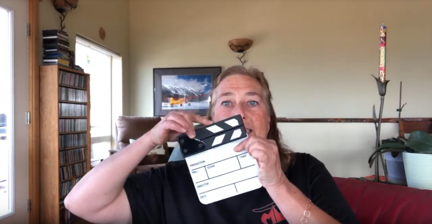
Clapboard
Here I am, showing off my new little clapboard during a livestream event on YouTube.

I showed it off to my YouTube channel viewers at the beginning the AMA Livechat I did last night. I snapped it for them.

This is the kind of thing that’s impossible to find in brick and mortar shops unless you’re in a large enough city with a large enough market for a niche item like this. And that’s why I turned to Amazon. Although it’s often a pain in the butt to wade through the search results and quality is becoming a bigger issue every day as they allow more and more junk to be listed, I will almost always find exactly what I’m looking for, usually at a price that I’m willing to pay.

Behind the Scenes: FlyingMAir Audio/Video Setup

A video on the FlyingMAir YouTube channel.

Ever wonder how I get the great sound and pictures for my cockpit POV videos? This video explains my setup in detail.

Products mentioned in this video

I purchased all of the equipment shown in this video. These are not paid endorsements — I use it all and recommend it based on my experience with the products shown. That said, if GoPro wants to send me a Hero 7 Black, I’ll gladly take it and thank them publicly for it. (Just saying.)

Buy On Amazon

If you want to buy any of these things, please use these affiliate links. When you shop on Amazon with one of my links, I get a tiny commission to help fund my own audio/video purchases and it doesn’t cost you a penny more.

About the Video

  • The video was recorded with an iPhone Xs. ‘Nuff said.
  • The video was edited on a Macintosh using Screenflow software. (Screenflow was the only affordable software I could find that allowed me to do picture-in-picture.) Learn more about it here: https://www.telestream.net/screenflow/overview.htm
  • The intro music is by Bob Levitus, famed “Dr. Mac.” You can find him here:
    http://www.boblevitus.com/

About My Channel

I’m trying to drop POV flying videos every Sunday morning and usually drop “extras” like this one midweek. I’m also working on putting together occasional livestreams with Q&A chat. Subscribe so you don’t miss anything new! And tell your friends. The more subscribers I have, the more motivated I am to keep producing videos like this one.

Still reading? Thanks! Maybe you’ll consider buying a T-shirt, mug, or sticker to help fund my video equipment acquisitions? Check out the Teespring links on any video page.

About the BOGO iPhone 8+

How I got conned into getting a second phone and why I don’t mind.

Back in September, when I was on vacation in Washington, DC, I upgraded my old iPhone 7 to an iPhone Xs. It was just under 2 years since my last upgrade, but the iPhone 7 had a tiny scratch on the camera lens. I was facing either $80 to repair a two-year-old phone or $1000+ to buy a new phone with a much better camera. I went with the upgrade.

While I was there at the Verizon store in Union Station, the salesperson excitedly told me that because I was 55 or older, I qualified for a buy one get one free offer on a second phone. “I don’t need a second phone,” I told her. “I’m one person.”

“But it’s free,” she said.

“What kind of phone?” I asked, figuring I could get it and sell it on Craig’s List. “An old flip phone?”

“Any phone we sell that lists for under $1,000,” was the surprising answer.

“And what about using it?” I asked. “Do I have to pay more every month to have it?”

“No, she told me. “Your monthly service cost will be the same. You just have to keep it for two years.”

Red iPhone 8+
It’s pretty and I am partial to red.

This sounded too good to be true, even though I couldn’t sell it right away. The way I saw it, it would be an insurance policy; if I broke my other phone, I could use this one. I was hooked. I picked out a red iPhone 8+, which is known for having a good camera. That’s the big screen iPhone. Too big for everyday use, in my opinion, but what the hell. It was free.

Except it wasn’t. I had to pay sales tax on it. That was nearly $80.

She activated my iPhone Xs and I tossed the boxes for both phones in a shopping bag. I finished my vacation 2 weeks later, packed them in my luggage, and brought them home. I put the boxes on a shelf in my office, never even bothering to take out the red phone.

Fast forward to the other day. After getting a phone call while I was recording a video, I decided it might be nice to use a different camera for all these YouTube videos I’ve been making. I thought immediately of the red phone still in its box. The big screen would make it easier for my 55+ eyes to see what I was shooting. I retrieved it, plugged it in to charge its dead battery, and called Verizon to make sure I could activate it and use it without paying additional fees.

I was on the phone for over an hour with the customer service person. Turns out that the Union Station salesperson wasn’t exactly truthful. Although my bill was about what I expected every month — higher than the old bill but just enough to cover the cost of the $1200 iPhone Xs I was paying off over 2 years — I was paying extra for that new phone. I didn’t know it because I never bothered looking at my bill. Service was $40 each per phone and I’d been paying $40/month since September for a phone in a box just draining its battery.

Imagine how pissed off I was. Maybe you can’t. I can get pretty pissed off. I could feel my blood pressure rise.

She did more research and we discovered that my old plan had been $85/month for my one phone. That included unlimited talk, text, and data. The new plan with the BOGO phone was $60/month for one phone or $40/month per phone for more than one phone. So, in reality, I was paying slightly less for my plan every month with two phones than I had been paying for one phone.

But I would be paying $20/month less if I had just one phone. Still, $20/month wasn’t going to break me. Hell, I hadn’t even noticed the difference.

I thought about the situation I’d found myself in. In my mind, I was basically getting two phones for the price of one. At the end of my two year period, I could sell both phones and come out fine. (I keep my phones in pristine condition with cases and screen covers.) In the meantime, I could use this new phone for video stuff; it had exactly the same plan as the one I was using every day.

To sweeten the deal, the Verizon customer service rep put a $100 credit on my account, basically covering 5 months of what I’d paid ($80/month paid – $60/month what I would have paid with one phone = $20/month).

Of course, I wound up keeping the phone. It was a hell of a lot easier than fighting with Verizon about taking it back. And I really do like the phone for the video work I’m doing. The big screen rocks and the camera quality is better than I need.

But I did learn a valuable lesson: The next time I upgrade my phone, I’m taking my bill along with me and will compare the current bill with the new bill. I’m not going to pay for equipment I’m not using again.

Super King Air A100 Walk-Thru

A video on the FlyingMAir YouTube channel.

Join me and pilot Woody Woodrum for a walk-thru of the Super King Air he used in early July to deliver three dogs and five cats to a ranch in Montana. Woody explains the plane’s capabilities and other details while I show off the exterior, interior, and instrument panel.

Woody is a retired airline pilot who is co-owner of Canyon State Aero, a helicopter/airplane flight school in Mesa, AZ. You can learn more about them at http://www.canyonstateaero.com/

About the Video

  • The video was recorded on an iPhone Xs. I know the sound is less than perfect; I ordered a microphone for the phone and hope it will improve sound quality on future videos. (I’m taking baby steps at this point. Be patient.)
  • The video was edited on a Macintosh using Screenflow software. Learn more about it here: https://www.telestream.net/screenflow/overview.htm
  • The intro music is by Bob Levitus, famed “Dr. Mac.” You can find him here:
    http://www.boblevitus.com/

About My Channel
I’m trying to drop cockpit POV videos every Sunday morning and usually drop “extras” like this one midweek. I’m also working on putting together occasional livestreams with Q&A chat. Subscribe so you don’t miss anything new! And tell your friends. The more subscribers I have, the more motivated I am to keep producing videos like this one.

Still reading? Thanks! Maybe you’ll consider buying a T-shirt, mug, or sticker to help fund my video equipment acquisitions? Check out the Teespring links on my video pages.