Two Interesting Charters

I find that there’s more to flying helicopters than giving tours.

Lately, I’ve been getting calls from folks who want to use my helicopter for more than just transportation or tourism.

The first good assignment I got came a few months ago, when I flew a camera crew around the a carmaker’s test track in Arizona. I wrote about it in another blog entry. This past week, I did two more.

The first, on Tuesday, was for a professional photographer hired to take aerial and ground photographs of the new bridge being built over Burro Creek on state route 93. There’s already a beautiful bridge there and the construction crew is building a twin on the north side of it (the road runs pretty much east-west there). Burro Creek runs in a deep canyon there and the Sonoran desert landscape is breathtaking. The site is also far from civilization — about 55 miles north of Wickenburg and perhaps 20 miles south of Wickiup.

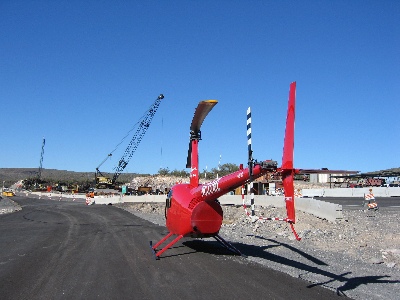
It was a cold morning when we left Wickenburg, so I left the helicopter’s doors on. It took us about 30 minutes at my top cruise speed (110-115 knots with two on board and full fuel) to reach the site. I set down in a fenced-in area where the construction folks were storing cactus to be replanted after work was done. I took the passenger door off while my client got his camera equipment out — a pair of Hasselblad medium format cameras with three different lenses. A construction truck pulled up and my client got out to talk to the driver. He came back and told me that the next time I landed, I could land on the new road right near the bridge. It was closed to traffic and was smoothly paved. We took off and began circling the bridges from various altitudes. My client snapped away, cranking the camera’s advance do-dad after each shot. He was perfectly at ease leaning out the door; he’d flown in many helicopters before. After about ten of fifteen minutes of that, I set down on the road near the bridge and shut down. (I had to set down on the edge of the road, as shown in the photo below, because the road was banked for a curve and the only real level spot I could find was at the very edge of the road.) My client climbed out, filled a smaller camera bag with equipment, and walked off to take his ground shots.
I pulled out my iPod and a book and settled down on the side of the road to read. Cars and trucks drove by and I wondered how many of them were headed to or from Wickenburg.

He was gone about 90 minutes. When he returned and finished fiddling around with his equipment, we climbed back on board and I fired the helicopter back up. The light had changed, so we did another 10 or 15 minutes of circles around the bridge at all different altitudes. Then he told me to head back and I broke off circling and headed back.He took some more photos on the way back — using up extra film on shots he thought he might be able to sell the construction folks. Then we set down on Eric Barnes’s dirt strip, on route 93 near the Santa Maria River, so I could put the door back on. With the door off, it was loud and my speed was limited to 100 knots. With it on, it was quieter and I could get it up to 120 knots. When we got back to Wickenburg, I’d put 1.4 hours on the Hobbs. My client paid for that, as well as for some waiting time.

Two days later, I was in Aguila, doing a job for the maker of a “breadcrumb” communications system. Breadcrumb systems, as they were explained to me, create a wireless network that can be used for voice, data, or video communications. The folks who hired me had an impressive system they wanted to mount in the helicopter. The idea was to have me fly around with the system and a few techs on board to see how well the system stayed connected to other breadcrumbs on the ground and how well video that one of my passengers shot could be seen at ground-based stations.

As the photo here shows, I had to remove both doors on the pilot side so they could mount the unit’s antenna. The breadcrumb box itself was positioned at the feet of the passenger behind me; you can barely see it in this photo because it’s just a flat box standing on one end. Although the unit can be powered by batteries, my helicopter has a 28 volt DC port that looks like a cigarette lighter port. The breadcrumb had a cable that could take this voltage, filter it, and step it down to the 12 volts it needed. So they just plugged it into my DC port. The boss of the operation wasn’t happy about the positioning of the antenna — he wanted to dangle it somehow under the helicopter’s body — but we soon proved that it was fine.

One of the techs also had a GPS and, at first, they wanted to mount it on my tailcone. They claimed that in the work they’d done with RC helicopters, they’d found that there was too much interference from the main rotor disk for the GPS to get a good signal. When I told them that my handheld GPS worked in the cockpit cabin, they decided (to my relief) to give it a try. (For the record, I would not have let them mount it on my tailcone. That’s much too close to the tail rotor! We might have mounted it on a skid if we had to.)

My passengers climbed aboard and we took off, flying circles around their base of operations at Robson’s Mining World. One guy in the back did the video while the guy beside him kept reporting on the status of the breadcrumb: green, blinking green, green, green, etc. We kept in touch with other breadcrumbs on the system at all altitudes and even when we flew behind a mountain. We only lost touch once, and that was for only a few seconds. The video went down to the guys on the ground, who clustered around a laptop set up on the hood of a car in the parking area. We did this for about 20 minutes, then landed.

I didn’t realize it then, but I was done with my assignment. What followed was about an hour spent giving everyone there a ride. I took them three at a time and did a 4-minute ride around the base, climbing up the mountain behind Robson’s and descending back into the desert for landing in my designated landing zone. When everyone had their ride, they told me to shut down and have lunch with them. Some other folks would be taking photos of the setup while I was eating.

I ate outside, with the guys from Rotomotion. They build RC helicopter systems to be used for surveillance and unmanned observation. The company founder started the company when he got frustrated that he couldn’t fly an RC helicopter. (Having owned one for a while, I know exactly how he feels; I couldn’t fly mine, either.) He wrote a computer program that would fly the helicopter for him. His company now builds helicopters that work with his Linux-based software system. They had three helicopters with them: a small electric model (on the table in this photo), a medium diesel model, and a large model powered by a chain saw engine.

The software is extremely cool. Once the helicopter is airborne, the software takes over and can hold it in an absolutely perfect out of ground effect hover. You can also tell it to go to certain coordinates at a certain altitude and it’ll go. It uses wireless communications to control an onboard camera or other equipment. If it loses its radio control signal, it’s programmed to return to its home base. Although they have a routine for software-controlled take off, they need a reliable but small altimeter to judge distance from the ground before a good landing program can be written. I have no doubt that they’ll add this feature soon. These guys definitely know what they’re doing.

While the rest of the group went off to go shooting out in the desert, a small group of us remained to watch the RC helicopters fly. A police officer from Chandler had come up to get a demonstration and we just watched. He said that the system has many applications in law enforcement and he seemed excited about it.

I went home a while later and put my dusty helicopter away. I’d logged 1.6 hours for the assignment — not much, but enough to make it worthwhile. And the technology I’d seen while I was out there was well worth the time spent.

Classic Rock Cuts

I prepare to host my own radio show.

My friend Keri has been hosting a 4-hour radio show on KBSZ-AM 1250 for the past few years. I admire her dedication. And I think it looks like fun.

So I asked the folks at KBSZ if I could host a one-hour radio show on a weekday night. The show would feature classic rock music, presented with a theme. For example, my first show’s theme will probably be classic rock songs from artists who only had one Top 40 hit. (You may be surprised about some of the artists who make that list — they’re not all one hit wonders!) Pete, who has trouble saying no, said yes.

I start next Wednesday. The show will be live on the air at 8 PM MST (that’s 10 PM EST and 7 PM PST). You can listen in on KBSZ’s steaming audio. Or you can pickup the podcast for the show, which should be available the day after it’s aired. I’ll put a link here when I get the podcast set up.

I’m looking for advertisers for the show. KBSZ has incredibly low advertising rates. I’ve already got my publisher, Peachpit Press, tentatively signed up for 2 one-minute ads per week. Because the show will air live on the Internet and be distributed as a podcast, it’ll have a pretty decent sized audience. If you’re interested in advertising, give KBSZ a call during office hours (8 am to 3 pm) and tell them you want to advertise on Maria’s show.

As usual, your feedback is welcome. Use the Comments link.

January 3, 2009 Update: This is an old post and it had a lot of old, broken links. I removed the bad links. I did the radio show for about 3 months before quitting — once the novelty wore off, I found it impossible to stick with a weekly schedule.

KBSZ was sold in April 2008. The previous owner of the radio station, Pete Peterson, passed away this past Monday. Things change but life goes on.

Moving Web Sites

I begin my server project by finding temporary homes for the 18 domains I host.

Rather than try to rush through the server configuration and get it done in a day, I decided to take my time about it. As a result, my Web server is likely to be down for several weeks.

Of course, I can’t keep my Web sites down for several weeks. Although most of the 18 domains I own are mine and support my own personal business endeavors, more than a few are for other people’s businesses. These are businesses I’ve created Web sites for as favors or in return for other goods or services. Although I’m not being paid to maintain the sites, I don’t feel that I have the right to cut them off for a few weeks. And for the few sites I do receive income for, I obviously owe my clients uninterrupted service.

The solution, of course, was to move the sites onto another server for a month or so. I chose GoDaddy.com, which offers inexpensive, feature-rich Web hosting that includes lots of bandwidth and disk space for a very reasonable monthly fee. GoDaddy also has very good customer service by phone (the e-mail based customer service stinks and is not worth the effort). Best of all, I had already registered most of the domain names on GoDaddy.com, so setting up the sites to be hosted there would be quick and easy.

Easy, yes; quick, well, not really. For each domain, I had to set up and pay for a hosting account. GoDaddy no longer allows just one-month hosting contracts; there’s a minimum of two months. That’ll give me more time but cost me about twice what I thought I’d pay. Not a huge deal, because the prices are very affordable. Then I had to tell GoDaddy what domain was being hosted at the new site, thus setting up a new FTP account on the server. I had to go to my domain list and change the DNS settings for that domain so they’d point to GoDaddy’s DNS server.

The big trick was to get the site files to the new server before anyone would be visiting. Normally, I’d use ftp with the domain name (for example, ftp.aneclecticmind.com) with the login settings to connect. But since I’d just changed the DNS server settings, using ftp with the domain name would have pointed me to the server in my office. I had to wait for the domain to be fully propagated through the DNS system to find it using the domain name. So instead, I figured out how to track down the IP address of the new server and I used that for FTP. It worked like a charm. I was able to upload all the site files to the new server so they’d be there when the first visitors arrived.

I had to go through this process for most of my domain names. I say most because a few domain names are for the same site. For those, I tweaked the DNS settings on GoDaddy.com to set up domain forwarding. For example, wickenburgaz.com and wickenburg-az.us point to wickenburg-az.com. This saves me money, of course, because I don’t have to set up a separate hosting account for each of the wickenburg-az.com domain names. To save time, effort, and money, I had a few other domains point to existing domains. For example, I also pointed flyingmproperties.com and wickenburgairport.com to wickenburg-az.com. Although these are separate sites, they’re small and don’t really need to be separate for the next few months.

I was doing fine until I got to langerbooks.com. During the hosting account setup process, GoDaddy’s server had some kind of hiccup and gave me an error message. As a result, the hosting account is set up, but the domain manager there doesn’t recognize the domain as being hosted on GoDaddy. That means I can’t change the DNS settings to GoDaddy’s DNS server. Which means that although the langerbooks.com site is all ready to be visited on GoDaddy’s server, no one will ever find it there because the DNS still points to my server. This is a royal pain in the butt that I’ve been tackling with GoDaddy tech support for the past four days. They say the problem effected several users, and is being worked on, but nothing seems to be getting done. If it isn’t fixed by tonight, I’ll have them delete the hosting account and I’ll start all over.

The only other challenge was for the one site I host that I don’t control the domain name for so I couldn’t easily access the DNS settings. Actually, there are two of those. One of the domains is registered on GoDaddy.com, so it was just a matter of setting myself up as an administrator (or “exec” for the account) and making the DNS change. The other is registered with Network Solutions, which I definitely do not recommend (despite what I wrote in a book several years ago). Network Solutions overcharges for domain name registration — they cost roughly 4 times what GoDaddy does — and they don’t offer nearly as many features, options, or services. But they’re also very difficult to get your domain name away from and my client, who owns the domain, would rather overpay for domain registration than try to tackle the change process. It’s his money. I’ll try again later this month to show him the light.

Anyway, I had to go to his office, where his office manager logged into his account on Network Solutions so I could make the change. It only took a few minutes. I expect the DNS to be fully propagated by the weekend.

The next task was to change where the ssi ini files were being copied to. These files are generated each morning by FileMaker Pro. There are four of them. almanac.ini displays information about the sunrise, sunset, moonrise, moonset, and length of day for the current day and the next day. This information is used by wickenburg-az.com and wickenburgairport.com. sunrise.ini displays sunrise information for the next seven days. sunset.ini displays sunset information for the next seven days. These two files are used by flyingmair.com to display current information for its Sunrise and Sunset tours. calendar.ini displays information about the next event on the wickenburg-az.com event calendar and is used on the wickenburg-az.com home page.

These files are created on my Web server computer and just saved in the appropriate Web folder. But now the files needed to be sent via FTP to the servers where the sites resided. I used an AppleScript to give the instructions to Fetch. FileMaker Pro would trigger the script when it finished generating the files. I just checked it and it doesn’t seem to be working quite right. I’ll have to check it again when I go into the office later today.

The only other change was to set where the webcam images would be saved and make sure the sites would point to the right place. I decided to send all the Webcam images to theflyingm.com, which will continue to be hosted on GoDaddy.com’s servers. I use that domain name for all my podcasts, book sample files, and other large files I don’t want to host locally. The connection is faster and there’s tons of bandwidth and disk space available. It’s a great deal.

So that’s where the project stands so far. The only thing holding me up from taking the next step is the problem I mentioned with langerbooks.com, which will be resolved, one way or another, this weekend.

I’ve done a few other things with the server. I added 512 MB of RAM the other day. I’d tried this two weeks ago, but the RAM I bought was bad. This was the replacement RAM, sent for free from the dealer, All4Memory. I recommend them.

Since I had all that RAM on board, I set up another program to work for me. Audio Hijack Pro is now set up to record the incoming streaming audio from KBSZ. It’ll record the 8 AM news (for immediate and automatic distribution at 8:20 AM), the 9 AM Around the Town show (which will require some tweaking to convert into a podcast), and the first hour of Miss Holley King’s Rock-a-Billy & Beyond show on Saturday mornings (which will also be converted into a podcast). This will save me a ton of time; I won’t have to transfer Around the Town episodes from cassette tape to my computer.

I’m having a lot of fun thinking up things for my server to do for me. I hope to have only one day of server down time — probably Monday of next week — before I start rebuilding the server from the bottom up.

Got ideas, comments, suggestions? Use the comments link or form.

You: The Owner’s Manual

Health for Dummies? Leave it on the shelf.

We have a room in our house which we call the Library. It’s our third bedroom, the one with the futon for overflow guests. It’s also the room lined with bookshelves and full of books — other people’s books — I don’t keep the books I’ve written at my house.

I’ve read or plan to read, or refer to or plan to refer to, all of the books on these shelves. But because there’s a limited amount of shelf space and I’m a major supporter of bookstores, I occasionally have to go through my collection and weed out the ones I don’t want to keep. These fall into three categories: 1) read it once and that’s enough, 2) started to read it and didn’t like it enough to finish it, 3) has been replaced with a newer edition. These are the books — many of which are bestsellers — that I donate to my local library. I figure I give them about 50 books like this a year.

The other day, I went through this process and pulled out a dozen books. On the very top of the pile was You: The Owner’s Manual. Mike bought this book for me, thinking it would help me understand the weird things that go on with a person’s body as he/she ages. I’d seen the book in stores and thought the title was catchy. It looked like a good book. Evidently, lots of people have thought the same way, because this book has been selling like crazy and is available everywhere they sell books.

Don’t let the catchy title and “Bestseller” labeling fool you. This book should have been published as Health for Dummies because that’s what it is. There’s very little meat in this thick book. There are far too many poor jokes, cartoonish illustrations, and oversimplified explanations. Like most of the Dummies books I’ve seen. I’d read a chapter about a topic that interested me and get about halfway through it, wondering when the authors were going to stop trying so hard to be funny and deliver some useful information. What a waste of time.

Health is important. It’s not something to be joked about. When I take the time to read something that’s supposed to explain why I feel a certain way or what I can do to feel better, I don’t want to wade through a lot of fluff to get to the meat of the matter. I want immediate gratification. I want facts, plain and simple, delivered with a writing style geared towards someone above a 2nd grade reading level and TV’s Funniest Bloopers mentality.

In other words, I don’t want this book.

The library will take it gladly, even though they probably have a copy. They’re always happy when I hand over a bestseller for their collection. And maybe someone else will get something useful out of the book.

The Server Project Begins

I [finally] get Mac OS X 1.4 Server and start to plan for installation and deployment.

If you’ve been following this bLog, you know that I recently purchased Mac OS X 10.4 Server from someone on eBay. I got the software at a smoking price — less than the Apple employee discount, in fact — and considered myself very fortunate. The only thing I can’t figure out is why it took the seller more than 10 days to send the software to me in a flat rate Priority Mail box.

The software arrived in good condition. The box looked a little worn, as if it had been handled by too many people or shuffled around from one shelf to another. But the seals were intact and the box appears to contain all the discs, documentation, and proof of purchase info — including the all-important serial number — that a legal copy of the software should. So I’m pretty confident that I did not buy used or pirated software.

Now that I have the software, I have no excuse to put off my big server project.

The goal, as I think I’ve mentioned elsewhere, is to install Mac OS X 10.4 server on my current Web server machine and use the following features:
– Web server (Apache) with PHP and MySQL for dynamic content
– E-mail server
– Mailing List server
– FTP server
– Streaming Video (QuickTime)
– Blog

I’ll also set up secure space on the server to back up my own personal documents, as well as Mike’s.

In addition to all that, the server will continue to run the same other services the server runs now:
– FileMaker Pro databases
– Webcam
– Steaming Audio (for KBSZ-AM)

All this on a Power Macintosh G4 running at 866 MHz. Seems pretty ambitious, but we’ll see how I can do. If all else fails, I’ll take my old G3/300 (beige, mind you) out of retirement and use that for the Webcam and FileMaker Pro databases.

I’ve made a list of steps that need to be done to get the project going. Here’s what I hope to accomplish today:

1) Adjust the upload address for all Webcams. Although the KBSZ-AM Webcam currently uploads to some GoDaddy hosting space I have, I think the wickenburg-az.com and Editor SpyCam Webcams both upload to my current server. I need them to upload someplace that won’t be affected by the change — probably that GoDaddy space — so I don’t lose Webcam service. I also need to adjust all Web page references to that new space.

2) Adjust the file locations for the ini files I use to display sunrise/sunset and upcoming event info on various Web sites. This information is generated each morning as a text file that is inserted in the appropriate locations on various Web pages. I need to change the source location for the ini files in the Web page HTML and then set up an AppleScript that automatically uses Fetch to move the files where I said they’ll be right after the files are created.

3) Set up hosting on the GoDaddy server for the Web sites I host on my server. This is temporary and will give me the time I need to make all the changes on the new server before moving the sites back. Some sites will move over without any major changes. Other sites, like wickenburg-az.com and aneclecticmind.com will undergo complete facelifts using new features available to me in Apache and the blogging software that comes with Mac OS X 10.4 Server. By moving them off my server to a place where they’ll continue to be served without interruption, I won’t be rushed to build the new sites. Some will be at GoDaddy for less than a month; others might be there for several months.

Since it’ll take up to 48 hours for the DNS info on the Web site move to propogate, I’ll have to wait a few days after I finish these steps to move onto the next step. Hopefully, while I’m waiting, the new RAM will arrive. I’d already ordered and installed 512 MB of RAM on the server and quickly discovered that the RAM was bad. When I get the new RAM, I’ll install it and send back the bad RAM. It should arrive today. If this RAM doesn’t work, I can only assume that they sold me the wrong kind of RAM.

When I’m sure that the sites are being served from GoDaddy’s servers, I can move on with the next steps in the project. I’ll write about those later on.

Stay tuned for progress reports, including problems I’m sure to encounter. And wish me luck!