Wildfire Damage Survey by Helicopter

Another video from the FlyingMAir YouTube channel.

Hop on board with me for a quick tour of the July 2020 Colockum Fire wildfire area in the hills near my home. In this video, I take off from my summer cherry drying base and head downriver to the mouth of Colockum Creek. I head up the creek and follow the path of the wildfire that sped up a few canyons and up onto Jumpoff Ridge. We’ll see traces of fire retardant dropped by DC-10 and MD-87 aerial tankers, as well as the burn damage that occurred over a few days in mid July.

I had two cameras rigged up for this video and I switch from cockpit cam to nose cam for most of this flight. Audio is from direct connection to the intercom so you can hear me narrate the flight and make radio calls. You can also hear helicopter engine/rotor sound and rushing wind from the nosecam camera enroute.

Cross-Country Helicopter Flight from Malaga to McMinnville, Part 3

Another cockpit POV video from the FlyingMAir YouTube channel.

Join me for the third part of my cross-country flight from my summer base in Malaga, WA to McMinnville, OR. In this video, I cruise from near White Pass in the Cascade Mountains southwest past Mt. St. Helens toward the Columbia River, dodging low clouds that force me to wander off my desired course and even getting into a tiny bit of scud running. Along the way, you’ll see remote forest with lots of logging activity, mountain lakes and rivers, rocky cliffs, snow-covered ridges, and even Mt. St. Helens. Along the way, I tell you about other flights, flying at the Grand Canyon, and what’s going through my mind as I try to get through the weather in front of me. I also bitch about my radar altimeter. Eventually, weather conditions get so bad in the direction I want to fly that I make a precautionary landing at a tiny airport I almost couldn’t find. I had three cameras rigged up for this video and I switch from cockpit cam to nose cam with occasional inset views of me looking at the camera. Audio is from direct connection to the intercom so you can hear me narrate the flight and make radio calls, plus dialed down volume of the helicopter’s engine/rotor noise.

You can see all of the videos for this flight here:
Part 1: https://youtu.be/pgKDciGP4eA
Part 2: https://youtu.be/CmupuFDXa4Q
Part 3: https://youtu.be/vyveMEm_MhQ (this video)
Pups in a Helicopter: https://youtu.be/eEVq9sRlJK8
Part 4: https://youtu.be/3KXR_D3SliA
Part 5: https://youtu.be/eghRyzhPigg

I should mention here that “cross-country” in the world of aviation is any long flight. For airplanes, it’s 50 miles or more; for helicopters, it’s 25 miles or more. This is only part of a 178 nautical mile trip.

Saving the Season

I start canning. Again.

Saving the Season
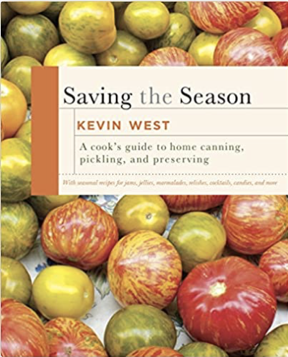
Saving the Season is just the book I needed to come up with creative ways to store what I harvest.

My garden is neither small nor large. It would probably be just right for a family of four.

I am a family of one.

While it’s wonderful to be able to pull 75% of the food I consume right out of my own garden, it’s horrible to harvest far more food than I can possibly eat or give away. After all, my friends and neighbors have gardens, too. Although mine was a bit earlier than most, they’re all caught up and trying to give me zucchini, tomatoes, etc. Needless to say, my chickens are feasting on soft tomatoes, peppers, zucchini, and other things these days.

Canning Tomatoes

Last year, I had what I thought was a pretty good crop of roma tomatoes. I set about canning them with my boiling water bath setup, which, because I have a glass-top stove, must be done on the burner beside my BBQ grill out on the deck.

Canning tomatoes is not fun. First you have to boil the jars and lids to sterilize them. Then you have to wash the tomatoes, remove the skins by scalding them in boiling water, dropping them into ice water, and sliding the skins off. Then chop them. Then put them in the prepped jars with a tablespoon of lemon juice to add acid. Then boil them for the required time in the canning setup.

It took me two hours to can two pints of tomatoes last year. I swore I’d never do it again. After all, what does a can of tomatoes cost at the supermarket? Why am I wasting my time canning mine?

Trying Again with Carrots

A few years ago, I’d bought a book at a bookstore up in Winthrop called Saving the Season. It’s all about canning and preserving what comes out of your garden. This year, I finally opened it when I was ready to “save” something I was taking out of my garden: carrots.

Yes, I grew carrots this year for the first time. I cannot believe how well they grew — even in my raised beds, which are only one foot deep! And as one batch was getting big, I planted another batch.

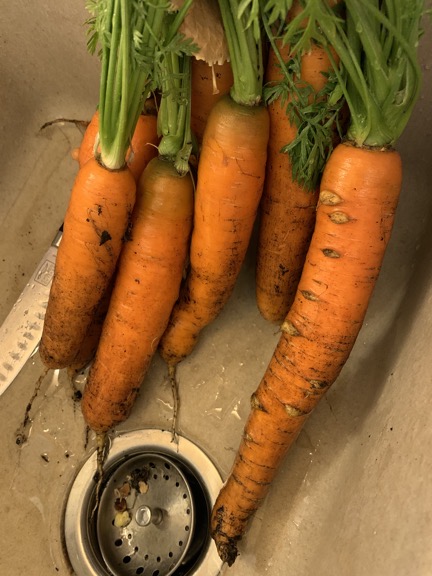
Very Large Fresh Carrots
After pulling one or two carrots a week, I finally pulled the rest of the entire first batch. They were huge.

I soon discovered two things:

  • Carrots keep getting bigger if you don’t harvest them.
  • Freshly harvested carrots lose their stiffness quickly after harvesting. (I won’t tell you what they remind me of after just a few days in the fridge.)

I realized that I’d have to harvest them before the next batch was ready and use them as quickly as I could. Harvesting was easy. Just pull them out from their tops. I had a bunch of really large ones to work with. (Although I only want the orange part, my chickens really seem to love the green tops.) Unfortunately, I just didn’t feel like eating carrots.

The answer was to pickle and can them. The recipe I chose was “Picked Carrots, Taquería Style.” This would produce carrots like those that can sometimes be found at a real Mexican restaurant’s salsa bar. The best part of this recipe: not only would it use up all the carrots I’d picked, but it also called for red onions, jalapeño peppers, and garlic, all of which I also harvested from my garden.

Pickled Carrots
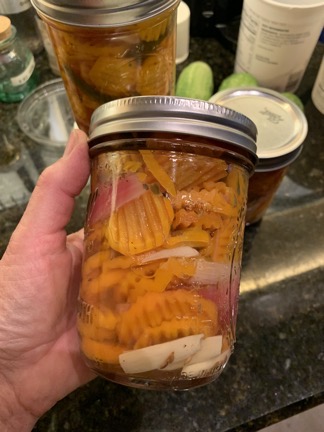
One of my four pint-sized jars of Mexican pickled carrots.

So I put aside memories of peeling tomatoes and got to work following the recipe, dragging my canning setup out of storage in the garage, and prepping the four pint jars I’d need for canning. It went remarkably well, even though I never got the canner up to a full rolling boil. (The recipe said 30 minutes at 180° to 185° was fine.) Although my kitchen looked as if I’d just cooked for a party of 10 when I was done, I had four beautiful jars of pickled carrots that I could store in my pantry until I was ready to eat them.

I also had about a half cup of carrots with some liquid leftover. I put those in a jar in the fridge. This morning, I opened it up for a taste — I knew I wouldn’t like them hot so I didn’t taste them while I was making them. They were delicious.

Now I’m looking forward to that second batch of carrots to be ready to pull. I want to make another four jars to take me through the winter.

And beets….do I have a recipe for those? Let’s see….

Pups in a Helicopter

A FlyingMAir YouTube channel “extra” featuring 7-month-old Lily & Rosie.

Here’s a little extra video featuring my two seven-month-old puppies, Rosie and Lily. They flew with me on a long cross country flight from Malaga, WA to McMinnville, OR and we made a precautionary landing due to weather at this minuscule airport in Woodland, WA. I shut down the helicopter and left them to take a pee; they realize they’re alone and start getting worried about it before they settle down. Happy ending, of course. This was their second time in a helicopter.

You can see all of the videos for this flight here:
Part 1: https://youtu.be/pgKDciGP4eA
Part 2: https://youtu.be/CmupuFDXa4Q
Part 3: https://youtu.be/vyveMEm_MhQ
Pups in a Helicopter: https://youtu.be/eEVq9sRlJK8 (this video)
Part 4: https://youtu.be/3KXR_D3SliA
Part 5: https://youtu.be/eghRyzhPigg

My Thoughts on YouTube’s Mid-Roll Ads

I think I respect my viewers a lot more than other creators respect theirs.

I’m officially what’s referred to as a YouTube Creator. That’s someone who regularly creates content for publication on YouTube, a platform that gets thousands, if not millions, of new videos a day. Much of that is junk but a lot is actually good, valuable content. And some is really high quality, useful/entertaining material. I like to think that my content falls into that middle category — better than junk but not as good as the really high quality stuff. I do what I can with the materials and skills I have. And unlike other Creators there, this isn’t my full-time job and I don’t have a bunch of corporate sponsors feeding me cash. I set priorities in my life and YouTube content creation isn’t at the top of that list.

And now for a shameless plug…

If you like helicopters and/or flying and want to watch videos about helicopters/flying without a lot of hype, I hope you’ll try my channel, FlyingMAir. Many of the videos put you in the cockpit with me as I fly around and talk about what I’m seeing and doing. If you like it, subscribe and tell your friends.

That said, I am fortunate enough to be allowed to monetize my channel. I have 63,000+ subscribers (as I type this), a number that has been climbing steadily for the past few years. I’m not sure if the requirement is 1,000 subscribers or 10,000 subscribers for monetization, but I’ve met it. That means that I get a teeny tiny cut of whatever YouTube gets for placing ads before, after, and possibly during my content.

How teeny? It’s currently hovering around $3 per 1,000 views. So yeah — when 1,000 people watch one of my videos, I currently get about $3. Not exactly a wealth building opportunity for me. Sunday’s video, which has been out for 48 hours as I’ve typed this, has earned me about $5. (Thanks, viewers!)

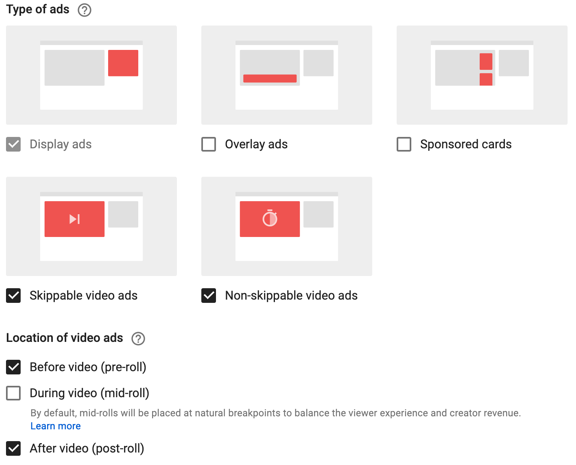
Of course, one of the reasons this number is so low is because I only allow three kinds of advertising on my content and I allow them in only two places. Yes! Creators can specify what kinds of ads appear and when they appear! There are five kinds and three locations and this image from one of my video’s settings pretty much explains them:

YouTube Ad Types and Locations
This is how I normally set options for my videos.

YouTube’s advice — which apparently lots of Creators heed — is to turn on all ad options. YouTube wants the opportunity to sell ads everywhere, even though it does not display ads on all videos. (It’s about 60% for mine and I only make money on my videos when ads are displayed on them.)

My school of thought is this: I need ads on my videos to monetize them. (Yes, I know I’ve got Memberships and Patreon set up for my channel but not everyone can or wants to chip in with real money. Honestly, without monetization, I would not be motivated to create content regularly.) But I don’t want ads to ruin the viewing experience. So where can I put them to be the least obnoxious? The answer is before and after the video using ads that don’t obstruct or interrupt the content. That’s the settings you see above.

Some of my older videos might have Overlay ads and Sponsored cards selected, so don’t be surprised if you see some of those for content published before mid 2019. I don’t think I have During video turned on for any videos. And that’s what this post is about: mid-roll ads that appear during the video.

I’m a big YouTube viewer. I don’t have regular TV in my home. No cable or satellite, no antenna to pick up local broadcasts. I have whatever my smart TV or laptop can pick up through a wicked fast fiber Internet connection: Netflix, Amazon Prime, YouTube, and a variety of other channels I subscribe to or get for free like PBS, Lynda.com, and the Great Courses. I use YouTube to learn new things — even things I don’t need to know — and get ideas. To keep my brain going.

And, as a YouTube viewer, there is one thing I absolutely cannot stand: mid-roll ads. You know what I’m talking about. The ads that appear suddenly and without notice, sometimes in the middle of an onscreen sentence, disrupting the video with something you absolutely do not care about.

Mid-roll ad announcement
This “card” appeared in my YouTube Studio dashboard about a month ago and is still there.

Until recently, mid-roll ads were only available on videos 10 minutes long or longer. But recently, YouTube announced to creators that the ads were now available to videos 8 minutes long or longer. And oh, by the way, this feature will be turned on by default for all your new videos unless you change it by a certain date. (I immediately changed it for my channel.)

I need to point out something important here. Creators who enable mid-roll ads have the ability to specify points where the ads may appear. So say a Creator has made a video that shows a 4-step process with cuts between each step. Logically, a good place to put a mid-roll ad would be at one of those cuts. This is less intrusive in the content. But what I’ve seen lately as the number of mid-roll ads grows on YouTube is that Creators aren’t bothering to set up ad locations. They’re just letting them appear wherever YouTube puts them. The ultimate in annoying for viewers.

To me, allowing mid-roll ads to interrupt your content in such an annoying way is the ultimate way to tell your viewers that you don’t give a damn about their viewing experience. The only thing that matters to you is the fractions of pennies of ad revenue you’ll get by allowing that ad to appear.

And I think there’s something seriously wrong with that attitude.

I’ll admit it here: I’ve begun leaving comments on videos with disruptive ads asking the Creator to turn off mid-roll ads. And I think you should, too.

Of course, there is a way to get rid of all ads on YouTube — and it doesn’t necessarily hurt Creators. You can sign up for YouTube Premium. My understanding is that for $11.99/month, in addition to adding features to YouTube, it also removes ads from content. If you watch enough YouTube, you might find it worthwhile. I don’t watch that much YouTube and I’d rather see my money go directly to a Creator via Membership or Patreon support.

The only thing I’m really left wondering about is this: because I have disabled some YouTube ad options — rather than turning them all on as YouTube recommends — am I triggering some sort of penalty that keeps my videos out of search results? Is there some under-the-hood activity in the bowels of YouTube that will punish me for not flooding my videos with ads by simply limiting the number of potential new viewers? That’s something I’ll likely never know.