Misinformation and Conspiracy Theories Can Kill

Some reflections on the danger of COVID misinformation and conspiracy theories.

Do you want some reliable information about COVID-19? Visit the Center for Disease Control’s COVID page: https://www.cdc.gov/coronavirus/2019-ncov/. This page is especially useful if you’re wondering what to believe about vaccines: https://www.cdc.gov/coronavirus/2019-ncov/vaccines/facts.html

The other day I saw a business owner I hadn’t seen since early in the days of the COVID pandemic. His name is Mike. His business is down in Yakima, WA and I’m pretty sure that the last time I saw him was when I was on my way back from my southern migration in mid March 2020.

The last time I saw Mike

Back then, the pandemic was still new. I’d done a bunch of art shows in Arizona and was scheduled to do one in Borrego Springs, CA on the second weekend in March 2020. I’d voiced some concern to my artist friend, Janet, who was also going to do the show, wondering whether it would be cancelled. She thought I was nuts — that’s how new COVID was. So we both drove all the way out to Borrego Springs, camped out in the desert, and were informed, the day before setup, that the show had been cancelled.

This told me what I’d already suspected: the pandemic was real and it was serious.

I headed home and stopped in Yakima along the way to pick something up at Mike’s shop. He was spewing conspiracy theories as usual — he’d always shared what he learned from far right wing radio talk shows with me and I always tuned them out — suggesting that COVID wasn’t real.

I got what I needed and hurried home.

I don’t like to disagree with folks who share what I think are crazy beliefs — it just isn’t worth it — but I don’t like to hang out with them, either. It’s almost as if I’m worried that some of that crap will take root in my brain and start rotting it.

Mike’s Bout with COVID

Want to read a real story from a COVID survivor? This Twitter thread has plenty of first-hand details.

Fast forward to Monday of this week. I needed another item from Mike’s shop and was already down in Pasco for an art show that weekend. Instead of going straight home, I headed over to Mike’s place in Yakima. I wore a mask when I went inside and, although none of the employees were wearing masks when I showed up, they all put them on right away. I admit that surprised me. Yakima is one of Washington’s COVID hot spots for a reason.

I talked to Mike. He wasn’t vaccinated, of course. He reported that he’d gotten COVID and told me all about the symptoms. How quickly it had come on, how he’d lost his sense of taste and smell, how he’d had a cough and some trouble breathing. He didn’t need hospitalization — or, if he did, he didn’t tell me about it. But since getting COVID, he was having issues with his arms. Pain, mostly, and lack of strength. It had been going on for months. His doctor had tried several pain medications and none helped — although ibuprofen, which I suggested, did. He claimed his doctor told him not to take it long term because it could “mess him up.” So he was living in constant pain after having COVID.

He was suffering from Long COVID.

He knew it. He admitted it. He said the good thing was that now he was immune to COVID so he wouldn’t be getting the vaccine. That was good because there was an Israeli study….

He went on a bit before I interrupted him and told him I had to go. (My fear of brain rot had kicked in.)

It Really Isn’t Worth It

Despite his crazy beliefs, I kind of like Mike. I don’t want him to be sick. I want him to get vaccinated. I want him to understand that what he’s reading isn’t true or is, at the least, misleading.

So when a FactCheck.org article related to misinformation about the Israeli vaccine study crossed my Twitter feed, I sent him a link in a text message.

You mentioned Israeli studies about vaccine efficacy. I hope you’re getting FACTS and not misleading information. Here’s an article from FactCheck.org about a misleading video about the Israeli studies. https://www.factcheck.org/2021/11/scicheck-video-questioning-vaccine-efficacy-pushes-falsehood-about-israel-data/

It got the response I should have expected. I can imagine him typing all this crap into his phone, feverishly trying to convince me that an organization I trust and respect is “bullshit.” I didn’t even read it all. In fact, I didn’t even know until just now, when I selected it to copy and paste, that he’d written so much; it didn’t show up in the text window. But here it is, in its entirety:

Did you know that fact-check.org is a bullshit site ? Deep into censoring, tainted by big Pharma money and tied to Facebook ?
No I’m not misinformed . I know too many Doctors, and RN’s who I talk to that agree with me . I don’t care if someone wants to get the Jab or not. I’ll take my chances with my natural antibodies, could I get sick again, yes, just like those who got the jab . I’m on the same page as Rand Paul. At least I won’t have to worry about all the side effects people have been experiencing.
I read all news left and right and it amazes how gullible and naive people are , for example just look at how many people fell for that phony Russian collision bullshit . You know, the ones that ONLY get their news from CNN or MSNBC, you know the type. The totally misinformed . Now that made up bullshit is coming to light . Durhams investigation has proven it to all be a total fabrication .
As far as studies go to the efficacy of natural antibodies there have been 96 studies so far .

Japan crushes Big Pharma with a small yet effective move


Japan is vaccinating and the Japanese government recently made Ivermectin available too . Since Ivermectin was made available New cases have plummeted from over 6000 per day to around 100 . If used in the early stages it is very effective . You can always tell who the misinformed are when you mention Ivermectin . If Horse Dewormer comes out of their mouth you can tell they are misinformed . Ivermectin was distributed to 300 million people in Africa by Merck for over 30 years, billions of doses taken safely . It is considered by the WHO as one of the ten most important drugs in existence . In 2015 the inventors won a Nobel prize for the good they did . River Blindness, elephantiasis and a host of other disease was eradicated by its use . There is also the Veterinarian Ivermectin medicine .
Believe what you want . I won’t believe anything coming from sources like factchecker.org and Wikipedia . Way too biased for me .

My response was short and simple:

Believe what you want. Sorry to bother you.

It’s kind of heartbreaking.

But there’s one thing I should have told him, one thing I realized after that final text to him.

He didn’t get vaccinated and he got COVID. I did get vaccinated and I mask up in public and I haven’t gotten COVID. Coincidence? I don’t think so.

Another Neighbor Dies

Last week, another one of my neighbors died of COVID.

Understand that I live on a private road with only about 25 lots and maybe 20 homes. In total, fewer than 50 people live here. Yet we’ve lost two of them to COVID.

The first was an older guy who lived by himself and was not well-liked in the neighborhood. I don’t know for certain what his personal beliefs were, but I know he was friends with another anti-vax neighbor who he visited every morning for coffee. I’d see him drive by with his dog — the same one who killed my chickens twice — barking his brains out the pickup truck’s window.

The story that went through the neighborhood is that he got COVID and was hospitalized. He was in for quite a while. They were ready to release him when they discovered he had pneumonia. So they kept him longer. Then, before they could release him, he had a stroke — could it have been caused by a COVID-related blood clot? I don’t know. They sent him off to the Seattle side of the mountains for rehab and he died a while later.

Keep in mind that all this happened before there was a vaccine. Sure, he could have kept safe by wearing a mask, maintaining his distance from others, etc. But he apparently didn’t think that was necessary. Instead, he carried on his morning coffee routine with the other anti-vax neighbor, a man who goes off to work every day and is doubtlessly in contact with many people. And who knows what kind of other socializing he did?

The more recent death was infinitely sadder. The man who died was also unvaccinated, but he was a doctor so I honestly don’t understand why he didn’t get vaccinated. He was in his 50s and had recently built his home. He had a wife and grown kids and probably grandkids. He was in that time of life when the hard work is done and retirement is on the horizon. The time we supposedly work hard for our entire lives.

He and his wife both got COVID. They both wound up in the hospital. She recovered. He didn’t. He went into the ICU. I don’t know if he was intubated — I didn’t ask. But he didn’t come out.

I knew he was dead when I came home from shopping one day and saw the florist’s delivery van coming down the road from the direction of their home. Another neighbor confirmed it later. I was asked to help spread the news among our other neighbors, including the vaccinated couple across the street who had gotten relatively mild cases of COVID from co-workers and the pediatrician at the hospital who likely already knew about our neighbor’s death.

What I find so sad about his death is how preventable it was. A shot or two in the arm may have prevented his COVID infection and likely would have prevented death even if he did get infected. But somewhere, he’d read something that convinced him it was better to not get the vaccine. Did he regret that decision in the days and weeks leading up to his death? I don’t know. I hope his wife, family, and close friends learned something.

I hope my other neighbors learned something. But I know they didn’t. Apparently, these people can’t believe reality until it strikes them.

Hell, even Mike doesn’t believe — and he’s actually suffered through it.

The Pandemic Isn’t Over

This past weekend, I sold my jewelry at an art show in Pasco, WA. The venue was indoors and masks were required. I normally work at home and wear a mask only when indoors in public — for example, when shopping — so I wasn’t used to wearing one for 10 hours straight. I did not enjoy it.

I’m angry that I had to do it.

I’m not angry with the governor or the venue operator or the show promoter who required it. They are doing what they have to do to keep us safe. I appreciate that.

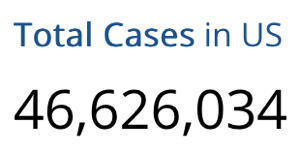
CDC COVID Cases
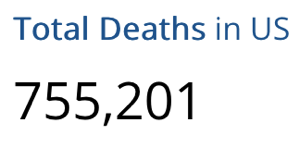
CDC COVID Deaths
As of today, the CDC reports more than 46 MILLION cases of COVID-19 in the US and 755,201 deaths in the US due to COVID-19.

Instead, I’m angry with the stupid, gullible, misinformed idiots who doubt COVID is real or serious when people are getting struck down with it every day. People who think the vaccine does more harm than good when all evidence proves otherwise. People who are keeping the virus alive and allowing it to mutate by giving it a place to thrive and grow — their own bodies — because they’re not taking logical, science-based precautions.

We are nearly two years into this pandemic and it is still affecting our lives. And it will continue to affect our lives until the misinformation and conspiracy theories about it stop.

Do you want this to be over? Get vaccinated. Wear a mask when among strangers or unvaccinated friends. Don’t let your guard down. Stop believing the bullshit. Let’s end this already.

Orange Banana Dessert and Waffle Topping

A quick recipe for a hot fruit topping.

I’ll keep the intro stuff brief since I really hate drawn out intros to recipes and I bet you do, too.

Waffles with Bananas
My breakfast this morning. The waffle recipe I found was very plain/boring and it needed something to spice it up. I had the ingredients for this so I made it.

I made waffles from scratch this morning and needed something — other than maple syrup [yawn] — to put on it. I had the ingredients for this, which I sometimes make to top vanilla ice cream. Try it the next time you want a hot fruity topping for an otherwise plain dessert or waffles.

Ingredients

  • RIPE banana(s)
  • Butter
  • Brown Sugar
  • Orange Juice
  • Orange liquor (optional)

Yeah, I realize I didn’t put in amounts. The amounts you use depend on how much you want to make and how sweet you want it to be. If you’ve got any cooking experience at all, you should be able to figure it out. For the purpose of this recipe, I’m assuming that you use 1 to 3 bananas.

Preparation Steps

  1. Slice up the banana(s) into 1/4 to 1/2 inch slices.
  2. Melt a tablespoon or two of butter in a pan.
  3. Add the bananas and 2 to 4 tablespoons of brown sugar to the pan.
  4. Saute for a minute or two. The banana slices should start losing their definition as they soften. With luck, the brown sugar isn’t a solid mass (like mine was) and will melt quickly. If it doesn’t, it will during the next step.
  5. Add 1/4 to 1/2 cup of orange juice to the pan.
  6. Bring mixture to a simmer. It should thicken a little. The longer you cook it, the thicker it’ll get. I usually cook it until the bananas are heated through and dissolving in a syrup. If the syrup is too thick for your taste, add more orange juice.
  7. If desired, add a splash of orange liquor. Then cook 1 more minute.
  8. Pour hot topping directly over ice cream, pound cake, waffles — whatever.

This absolutely rocks over vanilla ice cream. But it was pretty good over my waffles, too.

Mesa to Sedona by Helicopter, Part 5

Another video from the FlyingMAir YouTube channel.

Join me and fellow helicopter pilot Dave as we fly from Falcon Field in Mesa, AZ (FFZ) to Sedona, AZ (SEZ) along the Salt and Verde Rivers and through the Verde River Valley. I’ve cut this hour+ flight into multiple parts, each highlighting a specific area of our flight. In this video, we begin just north of Jerome, AZ and head north toward the mouth of Sycamore Canyon before turning east and skirting the red rock cliffs en route to Sedona. We land at the helipad. This video has the most red rock footage on a perfect day. Along the way, you’ll hear our in-cockpit conversation about what we’re seeing.

Dave is an airline pilot who was working through his helicopter rating. At the time of this flight, he was a private helicopter pilot; he got his commercial helicopter rating a few weeks later. Dave and I split the cost of this flight; I flew to Sedona and he flew back.

Many, many thanks to channel members and Patreon patrons. It’s your membership dollars that made this flight in Arizona possible. I hope they enjoy their ad-free, 4K version of this video.

NOTE: This is the 1080 HD version of this video. An ad-free 4K UHD version of this video is available to YouTube Channel Members and Patreon Patrons at the Access Premium Content level. You can become a YouTube Channel member here: https://www.youtube.com/channel/UCLGD_GbGsS6YKK_Ekx0QMqQ/join

Landing a Helicopter on a Platform

From the Flying M Air Archives…

I just found this old video from July 2016! In it, you’ll see me landing my old helicopter on its platform on my driveway, shutting down, and dragging it into my garage. The footage was shot with a GoPro mounted on my deck. Not the best quality video, but something you might find interesting.

And I’m interested to see how many people comment about the bounce!

You can find more helicopter videos on the FlyingMAir YouTube channel.

Backing Up Media, Changing EXIF Data

A chore made more difficult by a need for new software.

Yesterday, I spent the day in front of my desktop and laptop computers, gathering together loose media — photos, videos, and sound files — and archiving them on external hard disks I have for that purpose.

A Little about My Media Archiving Method

My archives are organized by year and then within each year by source — GoPro, drone, Nikon, iPhone, etc. — and then by date. Lately, because most of my media is recorded on GoPros or my iPhone, the most recent media is organized in folders by date and event. I also have a lot more media these days, so since 2020, each year has its own 2T disk.

Once I’ve added or removed items on an archive disk, I automatically duplicate it — I use an app called Synchronize Pro — on a like-sized, often identical hard disk. I simply plug in the backup disk and Synchronize Pro launches, compares the two disks, and makes the backup match the master. It then unmounts the backup and quits.

Ideally, I know I should keep those two disks — original and backup — in separate places, but I don’t. That’s because I only have one home these days — which is certainly enough for me — and that’s also where I work. There is no other place to store the backups. Instead, I only separate them when I travel; I take the originals with me in case I need to access or modify them and leave the backups at home.

After all, this is just media, mostly video shot while flying. Losing it would be very sad but not life-altering. My more important data — accounting records and so on — are backed up to the cloud. Media files simply aren’t important enough to me to warrant that treatment.

As for my desktop computer, that’s also completely backed up automatically to a hard disk using the Mac OS Time Machine feature. If you’d suffered as many hard disk losses as I have, you’d be automatically backing up your disks, too.

Yesterday’s Archiving Project

Over the years, I had accumulated photo and video files in a variety of places. I call it digital clutter. You know. Like in your home when you get mail or other items that you are too busy to file or put away? You stack it up somewhere and eventually, maybe, get to it. Or maybe not. I had been accumulating media on my desktop and laptop computers’ hard drives. All over those hard drives. I wanted to find it and file it on the appropriate archive disk.

(I actually don’t purposely keep data on my laptop. Any documents I need on my laptop live in the cloud and are duplicated on the laptop. So if the laptop is lost or stolen or gets run over by a truck, I don’t have to worry about losing a thing. That’s why my laptop issues earlier this year were more of an inconvenience than anything else. I lost my writing tool, but not any of the data I might need in the future. The major benefit of using the cloud like this is that I can access all of those documents from any computer.)

This chore took a remarkably long time. Hours. I could not believe how many old files I found in various places on the two computers. Some of them dated way back to 2016. Being video files, they were huge and took a long time to copy, via USB connection, from a computer to a connected hard disk. So while it worked, I looked for other things to do.

One of those things was to copy all of the photos I’d taken during my recent boat trip that had been automatically copied from my iPhone to the Photos app to my 2021 media archive disk. I wanted them kept separately from Photos so I could use them for another project I’m working on.

So I created a folder on the archive disk and began dragging photos from the Photos app into that folder. I’d done about 50 of them when I realized something: for some reason, my Mac was changing the photo date to the current date — not the date the photo was shot — for more than half of the photos. Not all of them, though — go figure. And that was not acceptable.

It was vital to me that the photos have their photo date and time as the file creation date and time. That would keep them in order and in context. This had to be fixed.

Finding a Fix

Twitter Call for Help
Here are the two tweets I posted to get suggestions for solutions. They didn’t get much engagement.

I put out a call on Twitter for suggestions but didn’t get any immediate responses. So I opened the App Store app and went hunting. What I needed was an app that would change the metadata for the file based on Exif date information.

Info Window Example
Here’s an example of a Mac OS Info window for an image file from my trip: a look at the Newark NY waterfront from a bridge. All of the information under More Info is taken from the JPEG Exif data. Note the dates; the Created date is today, when I dragged the file out of Photos to my desktop.

Exif, in case you don’t know, stands for Exchangeable image file format. According to Wikipedia, Exif

is a standard that specifies the formats for images, sound, and ancillary tags used by digital cameras (including smartphones), scanners and other systems handling image and sound files recorded by digital cameras.

Exif adds metadata tags to certain file formats, including JPEG, TIFF, and WAV files. These tags provide information about the media, including camera type and settings, media size, dates and times, and location (if available). Some of this information is available in the Info window for a file on Mac OS as shown here; I assume it can also be viewed in Windows.

The Exif data includes the exact date and time the photo was taken based on the clock inside the camera. (If the clock is wrong, that date and/or time will be wrong.) For some reason, dragging photos out of the Photos app into the Finder was copying the file but, in too many cases, using the current date and time as the image’s creation and modification dates. I needed to change that file info so it used the Exif photo creation time as the creation and modification dates in the Finder.

I found a few options that claimed to do what I needed to do. The one I found and decided to try first is called Bulk File Redate. It had a “lite” or trial version that enabled full functionality with just 10 files at a time. I think that’s an excellent way for a developer to give users a way to try their app before buying it.

It took me a minute or two to figure out the interface, but soon I was running batches of 10 images through it at a time. It worked like a charm. Great! I clicked the link to buy the full version, knowing I’d soon have hundreds of images to process. And that’s when I got a bit of a shock: it was $29.99.

Whoa.

Let me put that in perspective here. This app was a one-trick pony — an app that did just one thing: manipulate image date info. Yet it cost more than what I’d recently paid for Affinity Photo, a full-blown photo editing app? (Yes, I did get Affinity Photo at half price, but still!) I was not about to spend that much for it.

So I wrote to the developer. I didn’t want to be rude, but as far as I was concerned, he’d just lost a sale to me by asking (what I thought was) too much money for his little app. Surely he could make more sales with a more reasonable price. I wrote:

I just want to say that I was prepared to buy this app — I have about 500 pictures to work with — but I really think $29.99 is a crazy high price for this one-trick pony. If you reconsider your price, I’ll reconsider buying it. Otherwise, I’ll just do the photos 10 at a time. I like to support authors, but my pockets simply aren’t that deep these days.

That last line was a bit of an exaggeration. My pockets are deep enough, but I honestly didn’t think it was worth that much and didn’t want to be rude. And I do have a software budget. I simply can’t buy every single piece of software I might use just a few times a year.

I went on doing the photos 10 at a time. But because there was so much clicking involved — clearing the photo list after each run, adding more photos, dismissing dialogs, etc. — I soon tired of it. I didn’t have 500 photos to do. I had about 900.

So I went back online. I wound up buying Photo Mill: The Image Converter for $9.99. The reviews were good and it seemed to be able to do what I needed to do. I downloaded it, wondered for a while why two separate apps were downloaded onto my computer, launched one of them, and figured out the interface. It certainly had a lot more capabilities than Bulk File Redate. But it was also unable to do what I needed to do. Instead of using the Exif date to change the file created and modified dates, it allowed me to change the Exif date — which is exactly what I didn’t want to do. I went through the necessary steps on Apple’s website to get a refund and deleted the app(s). I wasn’t going to keep an app I couldn’t use.

Info for Photo
Here’s the same image file shown above after changing the dates with Photos Exif Editor. Note that the Created, Modified, and Last Opened dates are all correct now.

Back to the App store. I bought Photos Exif Editor for $4.99. Again, I deciphered the interface. I ran a few files through it. It wouldn’t overwrite an existing file but made a new file with (1) appended to the file name. To get it to work without changing the name of the file, I saved the files to a new folder and then just dragged them to the original folder and let Mac OS overwrite the originals. After playing around with it for a while, I got it to work the way I needed it to. I finished dragging the files over from Photos to the folder, did the date change, and was done.

Photos Exif Editor
Here’s some of the data for the photo in Photos Exif Editor before making any changes.

I then continued the process of archiving all those other media files until it was time for dinner.

Help from Twitter

In the meantime, I did get a response to my Tweet from Greg G, who follows me there (and has been known to comment on posts here — hi, Greg!). He advised me to use Photo’s Export command to copy the photos. I can swear I’ve tried that in the past with undesirable results.

So this morning I tried it again. And I noticed a command I hadn’t noticed before. (I don’t, after all, use Photos for very much other than collecting photos off my iPhone and iPad.)

Another Info Window
Check the dates for this exported image. They’re correct. I could have saved a bunch of time by just using this particular export command.

File > Export > Export Unmodified Original for X Photo(s) sure sounded like it would do what I needed to do. So I tried it.

And it worked.

I guess I could have saved myself a bunch of time and extra work if I just would have explored the options of the software I was already using. Duh.

Thanks, Greg! You sure made me wish I’d checked Twitter before all those trips to the App store.

Some Basic Economic Theory Applied to Pricing

This morning I got a friendly message from the developer of that first app, Bulk File Redate:

Glad to hear this app is desirable for you except its price.

The pricing-logic is easy:
A little bit amount of users work under big-batch-processing mode will pay it.

There is a promo code provided you to download it freely:XXXXXXXXXX
How to use promo code:
macOS App Store: Menu item Store -> View My Account -> Redeem Gift Card

May you enjoy it.

Not what I expected — or even wanted. I wanted to pay for the app. But I wanted to pay what I thought was a reasonable price: $10 or less. Heck, the app I wound up with, which does so much more, was only $4.99. I wanted the developer to be compensated for his work. I didn’t want a freebie handed out to me because I’d whined about the pricing. The unasked for promo code made me feel almost guilty. (What’s that all about?)

So I wrote back:

Thanks for the code, but I already bought another app. It was $4.99. I would have paid $9.99 for yours without batting an eye, and I think others would, too. Instead, I (and others?) went with a competing product.

I guess I’m just suggesting that you rethink your pricing strategy. Sometimes you can make a lot more money with a lower price.

Yeah, I guess was telling him how to run his business. But honestly — there’s always room in my Applications folder for a good one-trick pony and I’ll bet others feel the same way. But how many of them will spend $30 for one? For every 10 willing to do that, I bet there’s 50 willing to spend $10 or 100 willing to spend $5. So that’s $300 in revenue vs $500 in revenue. The app is already written so there’s no incremental cost. It’s simple economics.

And it’s not as if there aren’t other alternatives. There clearly are.

A response from him woke me up to his reality:

Thank you for your valuable suggestions first.

I had ever set the price on $9.99\19.99\29.99\39.99,
and I found the $29.99 was the best one that got me the maximum profits from selling.
I set the price at $29.99 eventually.

By the way,
I browsed ur website and your videos impressed me a lot,
such as Maria Fixes Her Toilet, Making Natural Wood Windowsills, Pole Building Construction, and lots of Helicopter Flying activities.

You are an amazing woman and I had followed you from Twitter.

Please feel free to reach me for helps.
Thank you very much.

(I might mention here (in case you haven’t figured it out) that English is not this guy’s first language. He’s Chinese. You can tell by his phraseology. Perfectly understandable, but a little weird for Americans.)

Well, apparently I’m a cheapskate. I replied:

Thanks very much. I’m sorry to have presumed that you didn’t experiment with pricing. That was very naive of me. Apparently, some folks have bigger software budgets than I do. I guess I’m just a cheapskate! Sorry!

I hope you’re doing well with your software development efforts. Good luck to you!

And for some reason, I don’t feel so bad about using the promo code he sent. We’ll see. I’d love to recommend Bulk File Redate — it really works flawlessly and is very quick. A perfect tool for processing hundreds or thousands of images. For me, I still don’t think it’s worth what he’s asking. I guess it depends on a person’s needs and budget. If you’re looking for an app to do this job, please do give it a try. The developer is a nice guy who does have a solid handle on how to run his business.

And I’m not just saying that because he might read this post. Or that he must have spent hours browsing this blog if he found my pole building construction posts.

The Archiving Continues

This morning, after breakfast, I’ll climb back up to the loft where my desktop computer and those little portable hard drives are waiting for me. I’ll finish up that archive and backup job. And then, maybe, I’ll do what I was really supposed to do yesterday: edit some new video for the FlyingMAir YouTube channel.