How to Set Up and Share a SPOT Messenger Page

It’s included in the Track Progress service, so why not?

SPOT Personal TrackerI’ve been using a SPOT Personal Tracker for the past two years. It was recommended to me by a helicopter pilot friend. We both fly in remote areas — the kinds of places that if you go down, rescuers are probably not going to find you before it’s too late.
Think I’m kidding? Check out this Cessna, which was not located for 31 months. I was just one of dozens of local area pilots who looked for this plane whenever I was in the area where it disappeared.

And what pilot can forget the disappearance of Steve Fawcett? Millions of dollars and lots of high-tech search techniques were used to try to find his plane. Over a year passed before a hiker found Fawcett’s ID and the wreckage was eventually found.

I didn’t want to end up like either one of these unfortunate flights. Even if I suffered a fatal crash, I wanted to be found as soon as possible. And if I simply went down and needed help, I wanted help to be able to find me without relying on cell phone signals.

The SPOT Service

So I bought a SPOT Personal Tracker and subscribed to two services:

  • Basic Service enables the SOS (AKA 911), Help, and Check-in/OK features of the unit. That requires a button push to send the message. This service costs $100/year and is required to use the device.
  • Track Progress drops “breadcrumbs” of your location every 10 minutes so others can track you. The track progress feature automatically plots your location signals on a map that’s accessible online. You can create a shared page, give the URL to whoever you want, and let them track you. The benefit of this — as far as I’m concerned as a pilot — is that if I go down suddenly and am incapacitated, people tracking me will not only know where I was within the previous 10 minutes of my mishap, but they’ll likely know which way I was going. Plus, if the unit is intact, it will continue to broadcast my location every 10 minutes. This non-moving signal should help them pinpoint my location — even if I’m dead. This extra service costs $50/year. While I have another pilot friend with a SPOT who doesn’t use it, I think every pilot who uses this device should cough up the extra dough for this service. You can’t always press a button when you need help.

I need to stress here that this is not a device designed for aviation. It’s really designed for “adventure activities” or travel — for hikers and campers and mountain climbers and kayakers. For folks who get out in the wilderness. Of course, pilots who fly in remote areas can benefit from the device and there are plenty of stories of how it may have saved aviator lives. Just keep in mind that it is not an approved FAA tracking device and that flight plans should always be filed and opened for remote area flights. And, if you’re an airplane pilot who flies at altitudes where FSS Flight Following is possible, why not use that service? Unfortunately, Flight Following is not usually available at the altitudes at which I fly my helicopter.

Creating a Shared Page

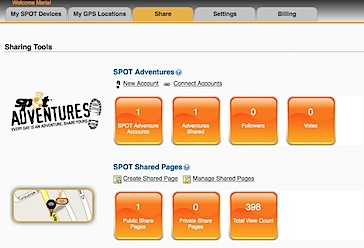
Of course, having a SPOT Personal Tracker with the Track Progress feature means a Share Page (example shown below) is included with your subscription fee. It makes sense to set up this page and share it’s URL with the folks who need to know where you are. You can also share it with the world at large if you’re like me and don’t care who knows where you are when you’re on the go.

Shared Page
Some recent activity; I did 20-minute helicopter rides the other day.

Setting up a SPOT shared page is easy. Assuming you’ve already set up your account on the SPOT Web site and have activated your device, just follow these steps:

  1. Sign into you account at FindMeSpot.com.
  2. Share TabClick the Share tab near the top of the page.
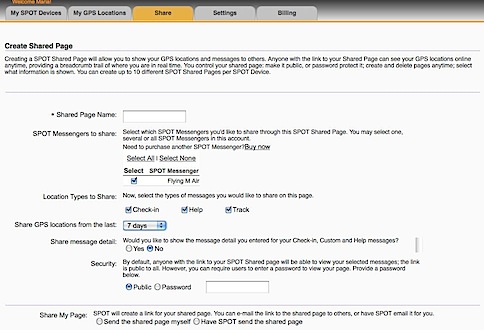
  3. Under SPOT Shared Pages, click the Create Shared Page link.
  4. Create Page SettingsSet the options in the Create Shared Page window that appears. Be sure to enter a Shared Page Name and select your SPOT device. Under Security, you can specify whether the page is Public or requires a Password to access. Personally, I recommend keeping it Public. You can always limit who you give the URL to. It would be terrible if someone needed to access the information and couldn’t remember the password.
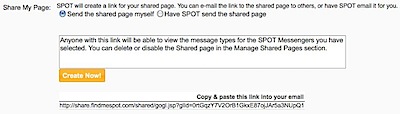
  5. Select one of the options at the bottom of the page to determine how you’ll notify the people you want to share the page with about the page’s URL:
    • If you select Send the shared page myself option (recommended), a message appears, telling you that anyone with the link can view your shared page. Click Create Now to complete the process.
    • If you select Have SPOT send the shared page, a form appears for you to enter up to 50 e-mail addresses and create a custom e-mail message. Be sure to keep the Send a copy to you check box turned on so you get the URL, too. Click Send Now to complete the process.
  6. URL CreatedAt the bottom of the page, a very long URL should appear. Triple-click it to select it and chose Edit > Copy (or press Command-C (Mac) or Control-C (Win)) to copy it to the clipboard. We’ll use it in a moment to test the link and create a short URL.

Shared PagesIf, for some reason, you didn’t get the URL or you need to access it again in the future, click the Shared tab (shown above) and then click the Manage Shared Pages link under SPOT Shared pages. You can click the name of the shared page to display it. You can then copy the link for that page from the Web browser’s address bar.
Creating a Short URL

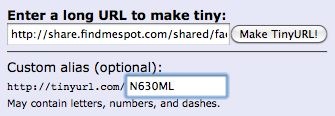
http://share.findmespot.com/shared/faces/viewspots.jsp?glId=0aISLWHRq9KlETLqzcfFGQuD8VboS6R8O is not exactly the kind of URL that’s easy to share with friends. Fortunately, URL shortening services enable you to create a custom URL for any page. Although this step isn’t required, it’s certainly recommended.

Although I originally created my short URL with the TinyURL service, you can use any service you like. Bit.ly makes even shorter URLs, but it requires an account to create a customized one. So in this example, I’ll use TinyURL again.

  1. Point your browser to TinyURL.com.
  2. TinyURLPaste the URL for your shared page in the top text box.
  3. Enter a short word or phrase that’s easy to remember in the bottom text box. In this example, I’ve entered the N-number for my helicopter. My original URL used FindMaria.
  4. New TinyURLClick Make TinyURL!
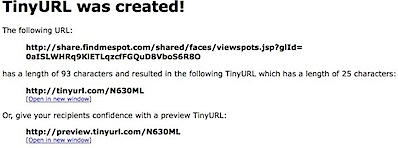
    A message like the one shown here appears, confirming that the new URL was created. You can now give this much shorter URL to family and friends.

Share Your SPOT Page!

Are you already using a SPOT device? If you’ve got a page set up, share it here. Use the Comments link or form for this post. No need to enter any HTML tags; just enter the complete URL. Once your comment has been approved, your shared page will appear. I’d also love to hear comments about the device — good or bad.

Cherries: From Tree to Truck

A mini-documentary.

I need to start off by saying that I didn’t do a mini-documentary about the cherry harvest process because I felt the world had a need for such information. I did it as an exercise, as practice using my video camera and Final Cut Pro. I wanted to see if I had the ability to put together a documentary. This 5-minute video is the result.

This was my second summer experiencing the harvest process at one of the orchards I dry. The Schroeders are great people, friendly and a pleasure to work with. I dried their orchard four times this year. Being present for part of the harvest gave me an opportunity to see whether the work I’d done made a difference. It did.

The Schroeders were kind enough to let me walk the orchard and packing shed area with my Sony Handycam for a total of about 8 hours over two days. I also stopped in around sunset one evening to take some of the establishing shots with the soft “golden hour” light. They and their workers explained the process to me. I shot a total of about an hour of video footage. That that was barely enough. I still wish I’d gotten better shots of some parts of the process.

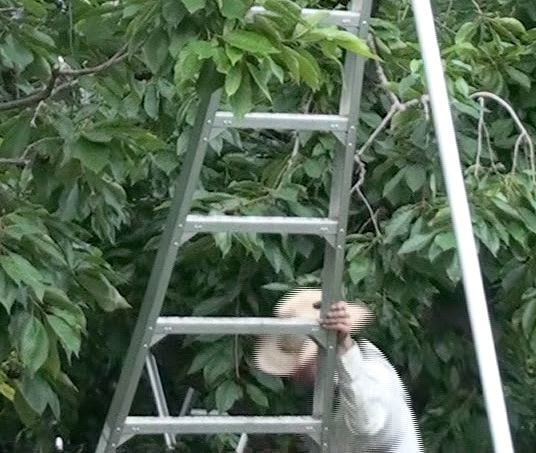
I found the cherry harvest fascinating — and I think you might, too. We’re all spoiled — we go into the supermarket in the summertime and find cherries waiting in the produce section, already bagged and ready to take home. But how many of us consider how the cherries get from the tree to the supermarket? It’s a complex process that requires hundreds of people and specialized equipment. This video shows part of the story, following the cherries from the trees in one orchard as they’re picked, gathered, chilled, and packed into a refrigerator truck. Take a moment to see for yourself:

Done? Not bad for a first serious effort.

From this point, the cherries go to the processing plant in Wenatchee, WA. They’re run through more cold water and lots of custom equipment before they’re picked through by several lines of people who toss out the bad ones. Then they’re sorted by size, run through more clean water, and eventually bagged and boxed up by even more people for shipment. I was fortunate enough to get a tour of that facility (and five more pounds of fresh cherries) a few days after I shot the video for this one. I may do a video of that facility and its process next year.

The amazing part of all this: the cherries are normally ready to ship to stores the same day they are picked.

More amazing stuff: the cherries I saw at the packing facility were headed for Korea and would be there within 18 hours of my tour. Whoa.

The point of all this is that there’s a lot that goes into getting fresh food into stores. Cherries are unlike many fruits — they have a very short shelf life. With proper care, they might last a week. That’s why everything is rushed and why so much effort is put into keeping them cool as soon as they’re picked.

I hope you enjoyed this. Comments are welcome.

On Standby 17/7/60

What being on standby really means.

Occasionally, someone will comment about how I apparently get paid to do nothing during my summer job as a cherry drying pilot. I need to correct them. I’m not doing nothing. I’m on standby.

Specifically: I’m on standby during daylight hours seven days a week during my contract periods.

My Work Day/Week/Term

Let me start by providing a definition of each component of that statement:

  • Daylight hours means the time that it’s light enough to fly. Sunrise is at approximately 5 AM here; sunset is at approximately 9 PM. That’s 16 hours. But I can also fly during the twilight period that begins roughly 30 minutes before sunrise and ends 30 minutes after sunset. If a client wants me to fly the first thing in the morning, he’ll call as early as 4 AM, so my standby day starts then. Generally speaking, it’s not likely that I’ll be launched for a flight after 8:30 PM. I will, however, launch to dry a small orchard as late as 9 PM, so I consider that the end of my standby day. That’s a 17-hour day.
  • Seven days a week is pretty self-explanatory. It’s every day of the week. No days off, no holidays. I was even on call on my birthday — for the third year in a row.
  • My contract periods vary from year to year. This year, I have a total of seven contracts, most of which are for small orchards and overlap each other. From the first day of the first contract to the last day of the last contract is about 60 days. Last year, I had two days off between the end of one contract and the beginning of the last. The year before, I thought I’d have 10 days off, but nine of those days were filled with a last-minute contract.

So, to summarize: I’m on call 17 hours a day, seven days a week, for 60 days. That’s two months straight with no days off.

“On Call,” Defined

What does “on call mean”? On the surface, it means that I have to answer my phone any time a client might call me and be prepared to fly when requested.

What it also means, however, is that I have to do the following:

  • Be prepared to launch within 10-20 minutes of a call. That keeps me pretty close to the helicopter whenever there’s the slightest chance I might have to fly. One day, I waited in my truck where the helicopter was parked for four hours. (I flew 2.1 hours.) On Thursday, I waited in my RV for six hours. (I didn’t fly.) Friday morning, I was up at 4 AM and waited in my RV for two hours for a possible call; I was airborne within 15 minutes of getting it. The 27-acre orchard was dry less than an hour later. That’s the kind of service my clients expect. That’s what they’re paying standby for.
  • Check for voicemail messages. If I take a shower, drive through a dead cell coverage area, or simply don’t hear my phone ring for more than a few hours, I need to check for messages I might have missed. I should always answer the phone when a client calls — even if I’m already on the phone with my husband or a friend. Some clients will actually panic if they can’t reach me on their first try. (I am, after all, hired to help protect a crop worth tens or hundreds of thousands of dollars.)
  • Monitor the weather all the time. I track the weather on the Internet, weather radio, and by looking/walking outside. I have a weather app on my phone that includes in-motion radar. I sleep with my iPad on the bed so I can check the weather before I go to sleep and as soon as I wake up. I also have to be prepared to answer weather questions for clients that aren’t as close to their orchards as I am.
  • Keep the helicopter ready to fly. That means keeping it fully fueled and preflighted between flights. I generally refuel right after landing. I keep the tanks completely topped off so I can get a full 3 hours of flight time if I need it. My clients can’t wait for me to refuel. My clients also aren’t interested in waiting for me to get routine maintenance (like oil changes) or repairs. That means the helicopter has to be ready to fly for the entire season before I get here.
  • Keep fuel for the helicopter available. I buy fuel in bulk for the 82-gallon transfer tank on my pickup truck. There are two places I can get it: In Wenatchee (35 miles away) and in Ephrata (20 miles away). I need to have at least 30 gallons in the tank at all times, so as soon as it drops below 50 gallons, I try to make a fuel run. I have to do it on a clear day when there’s little or no chance of flying. Although I also take that opportunity to run errands I can’t run in Quincy (where I’m based), I always buy the fuel first, just in case the weather turns bad and I have to rush back. That’s happened twice this season so far.
  • Schedule my errands around the weather — and be prepared to change my schedule at the slightest hint of rain. My errands include grocery shopping, banking, post office runs, laundry, and the occasional quick meal out. It also includes familiarizing myself with new orchard blocks I’m contracted to cover.
  • Not drink alcohol. Let’s face it: the rule in aviation is “eight hours from bottle to throttle.” If I’m on call 17 hours a day, there is no eight-hour stretch that I’m not on call. So, theoretically, I can’t drink.
  • Not see a movie. Heck, this bugs me more than the alcohol. Every summer, there are so many great new movies, but I can’t see any of them. The closest theater is 35 miles away and I can’t lock myself up in a dark room without checking the weather for two hours. And at night — well, I do need to sleep.

Two Sides to Every Coin

The other day, a friend of mine came to visit with his daughter and grandson. We had lunch at the golf course restaurant, within view of the helicopter and only 150 feet from my RV. Afterwards, we stopped by the RV for a diaper change.

My friend’s daughter told me how envious she was of me and my job. She said it was the greatest job she’d ever heard of.

I’m not complaining, but I do want to point out that there are two sides to every situation. I seriously doubt whether her job would get her out of bed with a phone call at 4:10 AM. Or live in an RV on a tiny campsite near a busy (read that “noisy”) intersection. Or keep her stuck in a farm town (that doesn’t have very much to offer except about a dozen Mexican restaurants) all day on any day there was the slightest chance of rain.

So yeah, I’m getting paid to just wait around. But there’s a huge responsibility that goes with that — and zero tolerance for not doing the job right.

The Waiting Game

Part of my summer job.

It’s coming up on 5 AM. I’m sitting in my RV, parked at the edge of a golf course in Quincy, WA, 1/4 mile away from where my helicopter is parked at an ag strip. I’m nursing a cup of coffee.

I’m waiting.

I’ve been up since 4 AM when I woke naturally, my brain using its built-in alarm clock to put my body on low alert. After all, there was rain in the forecast. If it rained overnight, the calls would start coming before dawn. If I wanted coffee in my body before I flew, I’d have to get up and make it before the calls came.

If they came.

On waking up, the first thing I did was reach for my iPad. (It, with my phone, is always within reach when I’m in bed here.) A few taps and WeatherBug was displaying local radar. The rain echoes were just to the southwest, moving my way. It was almost as if my brain had been watching the weather while I slept and knew the rain was coming.

While coffee brewed, I stepped outside into the predawn light. I could see the horizon in all directions. Low clouds, brightness to the east where the sun would soon rise. Later, back inside, as I sipped my coffee, WeatherBug would indicate that the rain was right on top of me and at least two of my orchards. Occasionally, my vigilance was rewarded with the sound of a few raindrops pattering on the roof of the RV.

I traded my nightshirt for a tank top, which is what I usually wear under my flight suit. I grabbed a pair of socks. Then I settled back into my comfy chair with my coffee.

I brewed a good cup this morning. Part of me hoped I’d get a chance to enjoy every drop in my 18 ounce mug. The other part of me hoped the phone would ring.

I was ready. I was waiting.

Oddly, I played a version of this game yesterday afternoon and evening. More radar echoes, but no rain. Still, it could come at any time. I spent the evening with my iPad, switching between an ebook, WeatherBug, and the National Weather Service Web site while texting back and forth with a pilot friend in the same situation 30 miles south. Had to keep the phone line open. When the sun set at 9 PM, I moved into the bedroom, finished the book I’d been reading, and went to sleep.

Six hours later, I was awake.

The sun is up now, hidden behind thick clouds to the northeast. I see rain falling out toward Moses Lake — no threat to any of my orchards. I’m waiting for the call that will launch me. I can be airborne in 15 minutes or less.

Will the call come? Who knows? That’s part of the game.

Ebook Costs and Pricing, Part II: The Pricing

Publishers and resellers need to give readers value for their money.

Ebook Costs and Pricing
Part I: The Costs
Part II: The Pricing

In the first part of this series, I discussed, in depth, the costs of publishing any book — ebook or traditional printed book. If you haven’t read that, read it now. I think you’ll learn some important things about how the publishing industry works. My hope, however, is that you understand the value of every book that’s published, no matter what format it’s published in.

Amazon’s Macmillan Fiasco

In January 2010, there was a big hullabaloo in the publishing world. Out of the blue, Amazon, the world’s biggest bookseller, dropped titles by the publishing giant, Macmillan, and its imprints. This turned out to be roughly 1/3 of Amazon’s book catalog. The reason for this? Amazon was attempting to strong-arm Macmillan into accepting its ebook pricing model.

You see, Amazon.com wanted all ebooks to have a maximum price of $9.99 with a certain amount of that price going directly to Amazon.com. Macmillan, however, wanted to use the “agency model.” As Mashable reports in “Macmillan CEO Confirms Dispute With Amazon Over eBooks,”

In this model, Macmillan as publisher would sell digital editions of books to customers through retailers, who as the agents of the sale would take the typical 30% commission standard in many digital media industries.

Whereas currently Amazon caps the retail price of e-books at $9.99, Macmillan proposes to set the price for each book individually at price points between $5.99 and $14.99, starting typically on the high end of the spectrum (between $12.99 and $14.99) and dynamically lowering the price over time.

(This is the model currently used by Apple in its iBookstore.)

Flexing its muscles, Amazon chose the “nuclear option” of refusing to sell Macmillan books, thus putting the first battle of the ebook war out into the public eye.

Those of us in the publishing industry sat back and watched the battle of the titans. Amazon attempted to get customers on its side by accusing Macmillan, in a roundabout way, of being greedy. Macmillan, on the other hand, insisted that it had the right to establish its own pricing. Consumers tended to side with Amazon.com. Authors and others in the publishing industry tended to side with Macmillan.

I sided with Macmillan. I believe that the producer of any item for sale should have the right to set its own prices. Amazon was wrong to try to force Macmillan to follow Amazon’s pricing structure. If a publisher has to cut the price, it’ll also have to cut the costs. And where do you think the first cut will be? I can tell you from experience: the author.

So, as you might imagine, I was relieved when Macmillan won the battle. You can read another author’s perspective of this particular battle over ebook pricing in “Amazon, Macmillan: an outsider’s guide to the fight,” by Charlie Stross.

Unfortunately, however, Macmillan’s pricing strategy has serious problems. Not only does it often result in ebooks that are more expensive than their printed editions, but it fails to take into consideration the perceived value of an ebook.

The Psychological Barrier of Ebook Pricing

Although there is a definite cost to publish (as I discussed in Part I of this series; did you read it?), the vast majority of readers feel — and I agree — that an ebook should cost less than a traditionally printed paper book. How much less depends on the consumer, his budget, and the value he sees in the book.

Unfortunately, publishers and resellers don’t feel this way. A visit to Amazon.com tells the story. I pulled up the pages for the hardcover editions of several books currently on the top of the New York Times Bestseller list. In many instances, the hardcover printed book was priced lower than the ebook. Here are two examples:

Sh*t My Dad Says Pricing

Outliers Pricing

While I realize that the difference in pricing is minor — less than $2 in each example — it’s still roughly 10% cheaper to buy the hardcover, printed book than the ebook.

What’s the difference between the two editions of each of these books? The content is certainly the same — the same words by the same author. The less expensive book has substance. I can carry it around, put it on my shelf, thumb through it, write in it, show it to a friend, loan it out, give it away, or resell it on eBay or at a garage sale. This print book is certainly in a flexible format with ongoing future value. The more expensive ebook exists as a digital file that I can only view in one format on one kind of reader. Sure, I can read it on my iPad, my BlackBerry, and my Mac. But I can’t lend it out, give it away, or resell it.

In other words, the more expensive book has more restrictions on how I can use it.

Is that fair? Of course not.

Why would I pay more money for a book with more restrictions on its use?

I wouldn’t. And neither would the majority of ebook readers.

So what happens? Suppose I want to buy one of these books. I don’t want to buy yet another print book for my bookshelf — I’m trying to downsize. I’m not willing to pay a premium for an ebook edition. So I’ll either not read the book or I’ll pick up a copy at my local library. Does Amazon.com benefit from this? No. Does the publisher? No. The only one who benefits is me, because although I have to deal with the inconvenience of two visits to my local library, I’ll save a few bucks on the cost of a book. I’ll also achieve my personal downsizing goal by not adding more books to my library shelves.

The Magic Price

In addition to being less costly than the printed version of the book, to gain wide acceptance, the book needs to be priced to sell. This is where things get tricky. How can the publisher/distributor determine the price of an ebook?

Consider the “magic price” of consumers. What’s the maximum amount a reader is willing to pay for an ebook? For me, that price is $10 for a relatively new book with the price going down depending on the age of the book. I’d expect to pay more for a new book on the New York Times Bestseller list (but not more than its printed counterpart). I’d expect to pay far less for a 5-year-old book by the same author, even if it also once had bestseller list status.

That corresponds with the “agency pricing” model discussed earlier. But what doesn’t correspond is the starting price (as high as $14.99!) and the length of time before the price drops. I think the price should start much lower, perhaps at paperback book pricing levels. If it doesn’t start that low, it should definitely drop more quickly — within three to six months. Or, in the case, of a bestseller, when it falls off the bestseller list.

You might argue that if a reader knows the price of a book will drop, he’ll merely wait until the drop to buy. For a strong title, it shouldn’t matter. Readers will buy at their magic price. Some people won’t want to wait for some titles and will pay the premium. Others who are more price-sensitive will wait and save.

Pure Profit?

Publishers need to understand that the industry is changing. Information is widely available at low-cost or free. People with access to the internet can get plenty of reading material that’s just as good — if not better — than what they can find on bookstore shelves. This is taking a huge toll on the publishing industry.

As all this is going on, however, the publishers are handed a golden opportunity to sell a product with an extremely high profit margin: ebooks.

What the publisher needs to remember is its main goals, which are, in order:

  1. recoup fixed publishing costs
  2. earn a profit on books sold

Once the fixed costs of publishing (again, covered in detail in Part I of this series) are covered, the unit costs (primarily the author’s and retailer’s cuts) are relatively small. The result is a high profit margin product. Publishers should be doing everything they can to sell as many ebooks as the market will consume. Lowering the price is a good first step, as it will make ebooks more attractive to more readers.

As Charlie Stross points out, this is all part of the price elasticity of demand, an economics term that describes the relationship between price and units sold. Generally speaking, as price drops, more units are sold. That means that with proper pricing, the seller can sell more units and, even if the margins are lower, may be able to make as much — or more — money.

With a product like ebooks, which have a low cost to produce once fixed publishing costs are recouped, every ebook unit sold is profit. The more ebooks a publisher sells, the more money they make. So why wouldn’t they want to price ebooks so they sell more?

Who knows?

Short-Sightedness

The main problem I see with publishers is that they’re typically short-sighted. They know print publishing — they’ve been doing it for years. That formula worked for a very long time. But times change and technology marches on.

No one can deny the convenience of having a dozen or a hundred (or more!) books on a handheld device (or computer or cell phone) for instant access at any time. I don’t know about you, but the last time I took a get-away-from-it-all vacation, I lugged four books with me and still ran out of reading material before the end of the week. (I read fast.) I look forward to my next vacation when I can put all those books on my iPad.

Just as computers replaced typewriters, CDs and MP3 files replaced vinyl LPs, and cell phones are replacing land lines, ebooks will replace printed books. It’s inevitable. (Sure, there will still be books out there, far into the future. But they’ll be special books, like the coffee table books with designs and images that don’t translate well into electronic format — yet.)

Why are publishers fighting it? Why don’t they embrace the ebook revolution by hooking us on ebooks with the lure of practicality and cost savings? Get us addicted, make us demand books in this format. Why are they sticking to a pricing model that makes smart consumers feel like idiots for paying more for less?

We finally have three good ebook reader devices — although I believe two will go the way of the dinosaur when more iPad-like devices start appearing — so there’s no hardware excuse. The only thing holding ebooks back is the inflexibility of publishers regarding pricing and format and the limited availability of ebook titles.

Author and Reader

I’m writing this post from two points of view: as an author and as a reader.

As an author, I want to make as much money as I can. It’s my livelihood. You’d think, therefore, that I’d like the idea of high pricing. But I also like to consider what’s fair and I simply don’t believe that it’s fair to charge more for an ebook than a printed book. I also think more books could be sold if the price were lower, thus earning me the same amount of royalties — if not more.

As an author, I’ve had this discussion with one of my long-time publishers. I’ve pushed to create different ebook formats that take advantage of the display capabilities of computers with more attractive pricing. My reward for this: I’m labeled a troublemaker, a whiner, an annoyance. Whatever. It’ll be interesting to see how certain publishers survive the revolution.

As a reader, I want to be able to save money while increasing the convenience of reading. My iPad has given me, by far, the most pleasant book reading experience I’ve ever had. Clear, bright screen, adjustable type size, one-handed operation, the ability to read in low-light conditions. I never thought it would be this good. But I absolutely refuse to pay more for an ebook than its printed counterpart when there are so many limitations on what I can do with an ebook (beyond reading it) once I’ve got it.

What do you think? As author or reader or publisher, I’d love to get your comments.