So You Want to Be a Helicopter Pilot, Part 5: Check Your Attitude at the Door

Attitude is everything.

You think you’re a hot shot because you’re learning to fly helicopters? Check that attitude at the door. It won’t do you any good if you plan to make flying a career.

Attitude is everything when it comes to any career. A cocky, overconfident attitude will not help you in training and it certainly won’t help you get your entry level job — likely as a flight instructor — when your training is done.

Be open to what your instructor and other knowledgeable pilots have to say. If you don’t understand something, admit it and work with your instructor to learn. Don’t be afraid to ask questions. Show respect for your CFI, chief flight instructor, flight school employees, other students, and FAA examiners. Act mature. (This isn’t high school, grow up.) Be helpful and cooperative. Don’t be a whiner.

Beyond the Flight School Environment

Attitude also extends beyond training and into your jobs.

Just the other day, while flying in the high-traffic area around the Hoover Dam, I had the displeasure of conducting a useless radio exchange with a tour pilot. This little twerp probably had half the flight experience that I have, yet he talked down to me in a sarcastic manner that was obviously his [failed] attempt to prove how much smarter he was. The radio exchange wasted bandwidth and provided little useful information about what could have been a traffic conflict. It was clearly more important for him to try to intimidate me than to provide me with the information I needed to avoid his aircraft, such as position, altitude, and flight path.

Yet only moments later, another pilot operating nearby communicated exactly what he was planning to do and even offered to wait a minute or two until I was clear of the area.

Which one had the better attitude? Which one do you think other pilots would want to fly with? Or employers would want to hire?

Attitude Extends to Safety, Too

And it’s not just a positive attitude that will help you achieve your goals. It’s a safe attitude. If you don’t conduct yourself as a safe pilot, you will simply not move forward in your career.

Back in 2009, I had a run-in with a tour pilot in Sedona. He was upset that I’d parked my helicopter in the spot across from his at the airport. Apparently, he liked that spot kept free so he could fly through it on departure. To “show me a lesson” he departed nearly right over my passenger’s heads as we waited for him to leave the area. His action was foolish and dangerous. I reported him to the airport manager and the FAA. I later learned that this same pilot had demonstrated his bad attitude at the local FSDO within earshot of one of the inspectors. It was the pilot that was taught a lesson that day.

Accidents like the one at Grand Canyon West in 2001 are teaching employers the importance of their pilots flying safely. The accident pilot had a history, backed up with videotape, of performing aggressive maneuvers during tour flights.

One of the [past] passengers stated that there were particularly exciting episodes during the tour that were frightening to some of the others. As part of the tour, they flew over a site that was used in the commercial motion picture film Thelma and Louise, and the pilot pointed out the cliff. … During the return to LAS, the pilot asked if they wanted to know what it was like to drive a car off of a cliff. She stated that they all said “no” to this question; however, he proceeded to fly very fast toward the edge of the cliff and then dove the helicopter as it passed the edge. The passenger reported that it was “frightening and thrilling at the same time but it scared the others to death.”

On August 10, the pilot and six passengers were killed; the other passenger received serious burns on most of her body that have likely destroyed her life. The NTSB report’s probable cause was:

the pilot’s in-flight decision to maneuver the helicopter in a flight regime, and in a high density altitude environment, in which the aircraft’s performance capability was marginal, resulting in a high rate of descent from which recovery was not possible. Factors contributing to the accident were high density altitude and the pilot’s decision to maneuver the helicopter in proximity to precipitous terrain, which effectively limited any remedial options available.

Evidence shows that the pilot may have been attempting to perform the “Thelma and Louise” maneuver when the aircraft crashed. (You can read the details of this accident to learn more by downloading the full NTSB report as a PDF.)

You can bet that if there are any questions about your attitude regarding safety, you simply will not get hired as a pilot.

Start Now

Getting into the habit of having a good attitude should stick with you throughout your career — and your life. Start now, before you even begin your search for a flight school.

Next up, I’ll remind you why flight training is like any other school.

Wickenburg to Las Vegas by Helicopter

Again.

I couldn’t have asked for better weather. That’s what I was thinking as I preflighted my helicopter early on Wednesday morning.

I’d been hired to take three people from Wickenburg to the Las Vegas area with the primary objective of viewing the new bridge near the Hoover Dam from the air. My client, who had flown with me several times before, was willing to make the four-hour round-trip flight by helicopter — and pay for it — just for a look. To make the trip more worth his while, we’d also land at Boulder City Municipal Airport, where they’d rent a car and drive over to the dam for a tour. After lunch, they’d come back to the airport, climb back on board, and I’d take them for a Vegas Strip tour before returning to Wickenburg.

I’d mounted my GoPro Hero camera on the helicopter’s nose and set it up to shoot 720p video of the flight. I expected the flight up there to yield some good images and, if the camera was mounted properly, some smooth video footage. The camera seems to work best with the light behind the helicopter. On the way back, we’d by flying with the sun in front of us, so I didn’t have high expectations. Still, I brought along a pair of 16GB SD cards and the camera’s charger so I could capture it all. The images throughout this narrative are stills taken from that video.

The Flight Up

A thin, almost lacy layer of high clouds veiled the sky as we headed northwest from Wickenburg just after 8:30 AM. There wasn’t a breath of wind. The helicopter glided over the desert, 500 feet off the ground passing over cacti and other desert vegetation, open range cattle, and the occasional manmade water “tanks,” half of which were dry. Our departure from “civilization” to empty desert was almost immediate. As I often tell people, Wickenburg is on the edge of nowhere; I could just as easily say it’s a five minute flight from nowhere. We passed over a lonely ranch alongside the railroad tracks leading to Parker and beyond, then Route 71, which runs between Aguila and Congress, AZ. Then not a single building for thirty miles, when we reached the Wayside Inn and Alamo Lake.

Alamo Lake
Alamo Lake, at the confluence of the Big Sandy River, Santa Maria River, and Date Creek. The trickle of water released from the dam is the Bill Williams River, which eventually joins the Colorado River north of Parker, AZ.

I climbed not only to cross the lake within gliding distance of shore but to clear the mountains on the far side. As we crossed the lake, I was surprised by the number of campers parked alongside its shore and the boats tied up nearby. I suspected that a fishing tournament might be either starting or finishing up. The lake is popular with fisherman, which is probably a good thing. It’s so remote — heck, it’s a 90-minute drive from Wickenburg — that it simply doesn’t appeal to the typical powerboat/jetski crowd. They usually prefer Lake Pleasant, only 30 minutes from Phoenix (or Wickenburg), which is larger and far more interesting for boating.

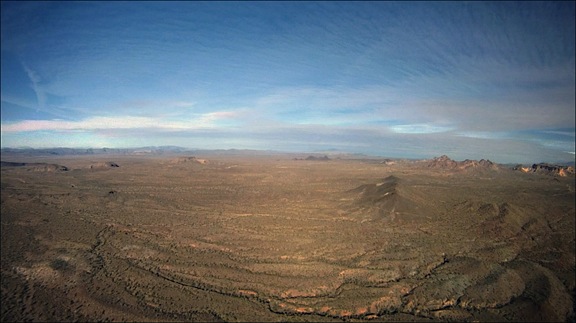
Beyond the lake and the rugged mountains on its opposite shore was yet another stretch of empty desert. But rather than being just a flat expanse, this one was peppered with rock formations left behind by ancient volcanos. There were areas of broken basalt, including flat-topped mesas. In the distance, to our left, we could catch glimpses of the Colorado River. If we’d been in a plane, flying 3,000 feet higher, we’d have a better view of the river and mountains in the distance; at our cruise altitude of 500 to 1000 feet above the desert floor, we could clearly see the details of the rock formations, dry stream beds, and scant vegetation as we flew.

Beyond Alamo
The desert northwest of Alamo Lake is vast and empty.

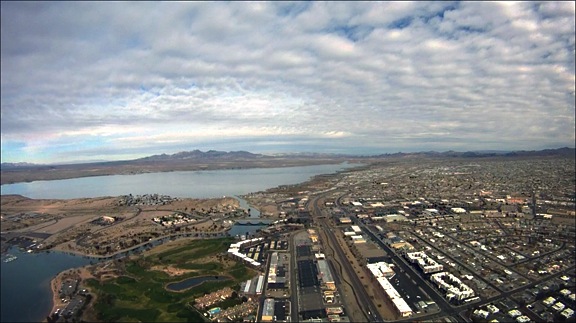
Forty-five miles from Alamo Lake, we reached Lake Havasu, one of the Colorado River’s many lakes. Formed by Parker Dam far to the south, the lake widens in a broad valley. The founders of Lake Havasu City bought the London Bridge — the real London Bridge from England — and had it installed across a manmade canal as a tourist draw. The town formed nearby. It’s popular for water sports and has a huge influx of visitors during boat races and Spring Break. A friend of mine who lives there complains that the temperatures top 100°F six months out of the year.

Lake Havasu
Lake Havasu’s surface was mirror calm as we flew over, reflecting not only the graceful arches of London Bridge, but the clouds high above.

I’d chosen our route carefully. Two hours is a long time to spend in a helicopter, especially out over the desert where the terrain can be — and, up to that point had been — very monotonous. I planned the trip to follow the Colorado River, which was quite scenic. From that point on, we’d be over one shore or another or at least nearby. It would give my passengers something interesting to see for the second hour of the flight.

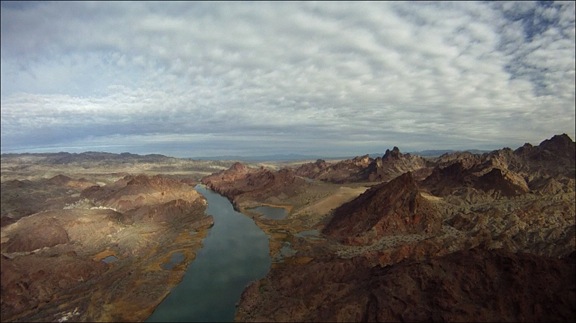
Indeed, the scenery along the river can be breathtaking — especially where the river narrows and passes through mountainous terrain. Topock Gorge is one of those places. Although it’s a short stretch of river and takes only five minutes or so to overfly, it’s dramatic and rugged. During the summer season, when the lake busy, speedboats roar through this area all day long. But that day, the lake was calm and quiet and we were treated to beautiful reflections of the sky and canyon walls.

Topock Gorge
Topock Gorge is one of the more scenic areas along the Colorado River between Lake Havasu City and Bullhead City.

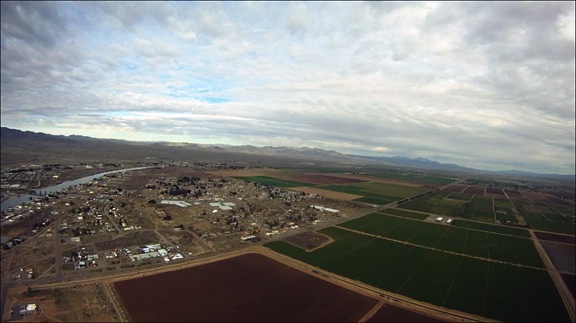
Past the gorge, the river twists and turns in big arcs to the east and west. Rather than follow its course exactly, we headed almost due north. We passed over I-40 where it crosses the Colorado and the farms and communities built up in the Mohave Valley. This was also desert, but desert made habitable by the river that passed through it. Make no mistake: we were still miles from anything remotely resembling a real city — but at least there were people living here.

Mohave Valley
The Mohave Valley, near Needles, CA, is full of farms and small communities clustered up near the Colorado River.

A while later, we were within range of Bullhead City Airport and I called the controller for permission to transition the area along the river. Bullhead City Airport is a real oddity. It was built on the Arizona side of the river to support the casinos in Laughlin, NV. Although it’s well over 100 miles from any international border, it’s an International airport, meaning that you can fly into it from other countries and pass through customs and immigration. It even gets airline traffic; as we flew through the area, a Sun Country 737 was coming in to land. But the airport itself gets very little traffic. This might be because of the natural “wind tunnel” that funnels air up or down the river, resulting in winds that often top 20 knots. But that day, the wind was calm — the first time ever that I’d been there — and other than the jet, we were the only other traffic in the area.

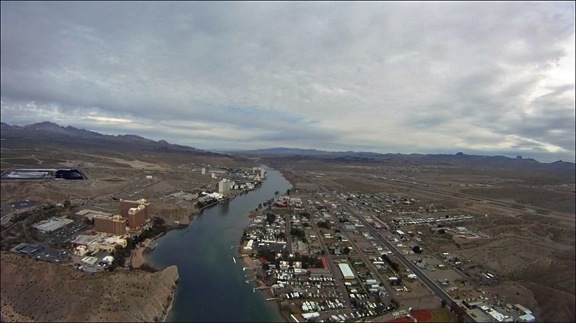
Laughlin, NV
The tall casinos of Laughlin, NV across the river from Bullhead City, AZ. You can see the Bullhead City airport on the far right.

Beyond Laughlin and Bullhead City was the Davis Dam, which forms Lake Mohave. Lake Mohave is another one of the oddities of the desert. Although there are a few marinas and campgrounds along its southern shores, most of the lake is deserted and I seldom see any boat traffic on it. Again, this is likely because of its remote location — although access is easy from the Laughlin area. It seems to me that Lake Mohave would be a great place to become a houseboat hermit.

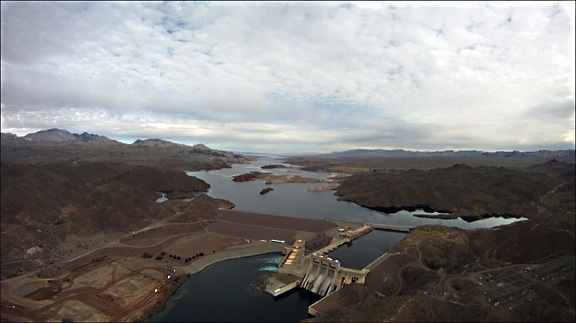
Davis Dam
The Davis Dam is just upriver from Laughlin and Bullhead City.

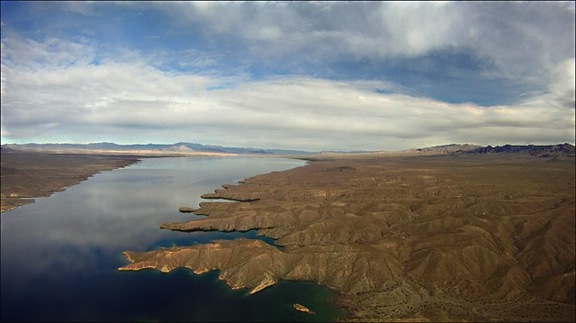
Lake Mohave
Lake Mohave seems like the perfect place to get away from it all on a clear, blue lake.

We flew up the eastern shore of the lake and I kept a sharp eye out for wild burros (donkeys). I’d seen them there before. While their trails were easily visible from the air, I didn’t see any animals — or people — at all.

The north end of the lake narrows considerably where the Colorado River winds through a gorge. The rock formations are rugged and starkly beautiful. This isn’t the place you’d want an engine failure — there aren’t many places for an emergency landing. But the landscape draws me to this area each time I fly up the river.

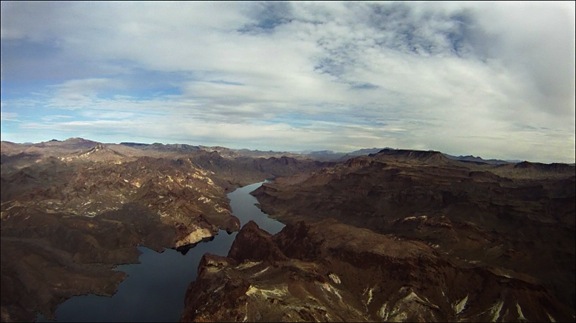
Colorado River
The Colorado River on the north end of Lake Mohave passes through a rugged gorge.

I tuned into the Lake Mead/Hoover Dam tour helicopter frequency and began monitoring communications. I knew that the area around the dam would be full of traffic and wasn’t sure what altitude pilots would be flying at. Routes and procedures are not published; my attempt to get this information from a tour operator failed miserably. (These operators apparently think they own the places they fly over and do what they can to keep everyone else out.)

I reached Willow Beach and made my first call. “Helicopter Six-Three-Zero-Mike-Lima at Willow Beach, heading for the bridge at 2500 feet.”

Some wise-ass tour pilot came on the radio and said “Which bridge? Hoover?”

What an idiotic question. There was only one bridge within 60 air miles. Which bridge did he think? What kind of morons are those tour companies hiring?

“Hoover,” I replied.

“Be advised that there will be four Maverick helicopters over the dam in about two minutes,” he replied. No indication of altitude or any other useful information.

Other pilots were more generous. Although the Papillon Pilots seemed to be crossing the river farther south at 3500 feet, the Maverick pilots were operating near the dam at 3000 feet. I planned to say at 2500 feet, which would keep me out of their way.

The bridge came into view around the same time the Maverick helicopters started appearing overhead. They were flying an odd S-shaped pattern that was obviously designed to give all their passengers a view. I did a three-quarter circle from the right to the left as my passengers leaned forward and then left to see. They got a good look — I was not prepared to loiter and they didn’t seem as if they needed me to. Then I was exiting the area along the road to Boulder City.

Hoover Dam and Bridge
The Hoover Dam and its new bridge are a popular tourist attraction for Las Vegas visitors. They’re amazing from the air.

I wasn’t finished yet, though. Another tour operator does very short tours of the dam and bridge from the Hacienda Hotel just up the road. He was preparing to launch as I flew over. He kindly said he’d wait until I’d passed by, then thanked me for talking on the radio. (Apparently, some pilots don’t — that’s a scary thought.) I thanked him for listening.

Not knowing the approach procedures for Boulder City Airport and anxious to stay out of the way of any other tour traffic, I stayed low as I crossed over the city and headed for the airport. (I was later told I’d likely get in trouble for that, but no one ever called. I guess I lucked out.) There were skydivers falling from the sky near the airport so, to stay clear, I circled around to the east and landed along one of the runways. I was still on edge from mixing with so much other traffic when I set down on one of the helicopter parking spots for the FBO.

Boulder City
Boulder City was built 90 years ago to provide a home for dam construction crews. It’s since grown to a vibrant community — the only one in Nevada that does not allow gambling.

We’d been in the air for 2.2 hours and I was ready for a break.

More about this trip in another post…
Dragon Dictate

Practice, practice, practice.

Dragon DictateWhile I realize that my review of Macworld Expo was not very complementary, I did get a first-hand look at one really good software product: Dragon Dictate. Dragon Dictate offers the possibility of being able to do something that all writers dream about: to dictate what I want to write and having the computer type it for me.

My first exposure to Dragon Dictate was with the iPad app, which is called Dragon Dictation. I blogged about it a while ago. The software has a few shortcomings. For example you can only translate short bits of text at a time. It requires an Internet connection. You really can’t use it for long dictation. It’s more of a novelty. But what it showed me is how well the Dragon line of products might be able to understand what I’m saying. I was very impressed.

The folks at Nuance Software had a booth at MacWorld Expo. I sat through one of the demos. The man doing the demo was very good. He recited some rehearsed text, but also ad-libbed, made changes to the text, and did other things that went far beyond rehearsal. It helped confirm what I thought was true: that the software was ready for prime time and might understand what I could dictate to it.

I bought the software.

Using voice-recognition software is more than simply dictating to your computer. While this software is very good at understanding what I have to say, it isn’t perfect. One of the problems with the software is that you cannot combine keyboarding with dictation. If you try to do this you get all kinds of weird errors. So if you’re serious about using it, you need to learn not only how to dictate properly to it, but how to issue the commands that you’ll need to edit the text as you dictate.

The best way to learn how to use the software is to try some dictation with the manual handy to help you edit as you dictate. The manual that comes with the software is 174 pages long. I printed it two pages per sheet of paper and then cut each sheet in half and inserted it in a binder. I can now access this information as I work with the software to help me edit the text as I dictate.

What I’m finding as I dictate this is that the software gets about 99% of what I say exactly right. I’m extremely impressed by this. The training process before I got started was actually pretty quick. I’d say that the software was ready to use within 15 minutes of installing it. This says a lot about the training process, but it also says a lot about the software’s ability to understand what people say. I should also mention here that I’m using the headset that comes with the software as I dictate to my laptop. On my desktop, I use a much better microphone. Either way, the recognition is amazing.

The 1% of dictation that is not understood or that contains errors must be corrected. Correction is tricky. The software recognizes a certain group of commands. If you use the wrong command the software will simply type what you say. This is very frustrating. If you use the correct command, the software may or may not do what you expect. It’s always great when it does what you expect. But it’s very annoying when it does what you don’t expect.

One of the things that bugs me is when I issue a command that I believe will do a certain thing and the software does something completely different. I think this is a matter of me learning the commands. The software definitely understands most of what I have to say, so the problem is probably me issuing the incorrect commands.

So it’s all a matter of practice. I dictate text and as I dictate I watch what the software types. Then I make corrections as necessary. There aren’t many corrections to do. Having the manual nearby helps me find the correct commands to make the corrections I need to do.

Another challenge is to be able to dictate exactly what I want to say. When I first began writing when I was in my teens I didn’t have a word processor. Back then, I had the ability to compose in a linear manner. In other words, my brain dictated to my hand and I was able to write in full sentences and full paragraphs exactly what I wanted to say. Little editing was needed. But word processing has changed the way I write. Nowadays, I get out the basics of what I want to say and then go back and edit. I insert words and paragraphs, I make changes to sentence structure and paragraph structure. I rearrange text. If I can’t think of how to start, I start with the middle and insert the beginning later.

For a long time now, I’ve been thinking about what a blessing and a curse word processing is. As I struggle to work with dictation software, it seems like more of a curse. Word processing has made it difficult for me to write in a linear manner. Because of this, I struggle with dictation.

I do have to say, however, it’s a real thrill to see the words that I dictate automatically typed for me. The accuracy floors me. So far, everything you’ve read in this blog post has been dictated. Not only have I dictated this text, but I’ve also corrected and edited everything that you see. I have not touched the keyboard once. Yes, I have paged through the manual—that’s the main reason for writing this post—I wanted to learn to use the software better. In a way, this blog post is an exercise. I’m hoping that it will help me to learn the software while letting me practice dictating what I want to say. Practice makes perfect.

I will continue using Dragon Dictate to dictate many of my blog posts. And with practice, I’ll be able to master the software and increase my own productivity by being able to dictate what I need to write. Although I’m a quick typist, Dragon Dictate is a lot faster.

Me and My iPhone

I am loving my new iPhone.

When the Verizon iPhone became available earlier this month, I bought one. I was due for a phone upgrade anyway, and had to choose between an iPhone and an Android phone. I needed either operating system to use my Square point of sale device.

It had been nearly four years since the original iPhone was released, but for that for years, it was only available on AT&T. AT&T does not have the coverage I need in the places I go. It also has crappy customer service handled by overseas, outsourced workers. No matter how much I wanted an iPhone, I was not willing to enter into a relationship with AT&T. Instead, during the four years, I had a Palm Treo phone followed by a BlackBerry Storm. They did the job and I was satisfied.

I was eligible for a phone upgrade on December 22. The rumors of iPhone coming to Verizon were running wild before that. I held off long enough to hear the announcement before locking for two years in on a new phone.

Early in February, when I logged into my Verizon Wireless account, Verizon offered me the phone. Again, my choices were between an iPhone and an Android phone. The main reason I went with the iPhone was because there would be no learning curve for me. I already had an iPad and my understanding was that the operating system was nearly identical on the iPhone. Unlike many people, I don’t consider my phone and toy. It’s a tool. A communication tool. Smartphone features also make it a simple computing tool. I don’t play games, I don’t make movies, and I don’t waste a lot of time with apps. My main concern was getting a smartphone that met my communication needs and enabled me to sync my data with my computer. The way I saw it, the iPhone would do this easily and transparently while an Android phone would require me to either buy special software or jump through hoops using Google apps to sync my data. And although I wasn’t very interested in apps, I knew that there were far more iPhone apps than Android apps. When I discovered that the two phones I was considering, the iPhone and the Droid 2, would cost me the same to buy, the decision became a no-brainer. I bought the iPhone.

Last BlackBerry Photo

The last photo I snapped with my BlackBerry Storm. Really.

What I never realized, was just how much I would enjoy using the iPhone. It really is easier for me to use than any other phone I’ve ever had. The interface is very intuitive. But what really blew me away was how easy it was to sync my data between my Macs and my phone. I simply entered some information about my MobileMe account into my iPhone and my iPhone did the rest. Saving time saves money — really. If I’m not wasting time with a steep learning curve, I have more time available to get work done and to enjoy my life. For me, that’s what it’s all about.

The wide availability of apps surprised me. I never realized how many apps there were for things that I need to do. In my role as a pilot, I need specialized information about the weather, sunrise and sunset times, light angles, and FAA regulations. It wasn’t long before I found apps that can meet many of my needs. For example, I found an app that gets official airport weather and displays it in a format that’s familiar to me. This makes it possible for me to use my phone to get up-to-date weather information about any airport that I might need to fly to. I can even do this during flight (although I can’t say I recommend doing so). Another app not only makes it easy to create an official FAA flight plan but it will show my aircraft position on an aeronautical chart while I am flying. Another app makes it easy for me to log my flight time after every flight. I can then sync that data to a file on my Mac book Pro and my iPad so I have up-to-date logbook information in multiple places.

I know there are a lot of games out there, but I don’t play them. I keep hearing about Angry Birds and how addictive it is and can’t understand why someone would want to play a game that sucks so much time out of their life. The only reason Game Center is on my iPhone is because I can’t get it off. There are no games. People told me that I would like my iPhone because I play with it, but that simply isn’t true –– not in the true sense of the word. I may spend more time browsing weather information and reading books and articles on the news but I don’t play games.

I’m not saying the iPhone is the perfect phone for everyone. It really depends on your needs. If you like to spend your time watching video on your phone, you probably would prefer something on a faster, 4G network. If you’re only interested in communication, you could probably save a lot of money by going with a standard phone instead of a smartphone. People who buy iPhones to look cool or keep up with their friends are idiots. The phone should meet your needs. If it exceeds your needs it should only do so to give you room to grow. After all, don’t you want your phone to last two years?

I’ll be writing a lot about my iPhone in the days and weeks to come. I want to highlight some apps that I think people may find useful. I don’t want people thinking that I’m an Apple fan boy or fan girl. Although I like most Apple products, I’m not blind to their shortcomings. (I must admit, however, that I haven’t found any shortcomings in my iPhone yet.) My goal is to point out how software tools, including mobile computing apps, make my life easier. By sharing this information with you, you might learn how to make your life easier, too.

On a side note here, I’m currently experimenting with Dragon Dictate, a software program that uses voice recognition to transcribe what I dictate. This entire blog post was written by dictation. As I look over what has been transcribed, I realize that it is not error-free, but it is amazingly accurate. I need to learn the software to help make me more productive. Many people like to spend hours in front of the computer but I don’t. I’m hoping that by using dictation software which can type almost as fast as I speak, I can save a lot of time in my writing work and be able to spend more time doing the things I love with the people I love.

A Bryce Canyon Photo Shoot

It’s all about timing.

I’m at Bryce Canyon with one of my aerial photography clients this weekend. Although we’re here to do some aerial work at Bryce and then at the Grand Canyon (and maybe Sedona), we’re grounded due to weather. Yesterday dumped at least 10 inches of snow in the area, blanketing everything with thick white snow. Last night, it started to clear out. My client and I arranged to meet before dawn and see what we could shoot in the park at sunrise.

We met at 6:30 AM. The moon, waning two days past full, was still up and, at one point, was beautifully framed by the tall, snow-covered pines along the park’s entrance road. We pulled over into a cleared area and my client spent about 20 minutes standing in the snow across the road with his tripod and camera. I took the opportunity to touch base with my husband back in Wickenburg.

The clouds were moving in again when we finally got back on the road. My client didn’t have much hope. I was uncertain. I know how quickly conditions can change up here. I also knew that the temperature/dew point spread at the airport 5 miles away was only 2°C — and that meant possible fog. I was hoping some of that fog might be in the canyon.

Inside the park, only two viewpoints were open: Sunrise Point and Sunset Point. Both look out into the “Amphitheater” area , a roughly C shaped canyon facing southeast. My client and I were glad the other road was closed; it meant our brief aerial photo work the next morning was less likely to bother park visitors.

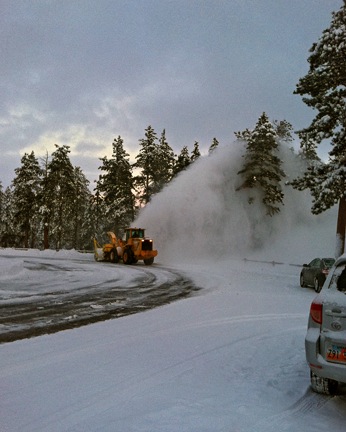
Snow ThrowerMy client steered us to Sunset Point. Two very large snow throwers were at work in the parking area where only two cars were parked. We parked behind one of them, got our gear together, and headed out to the lookout point.
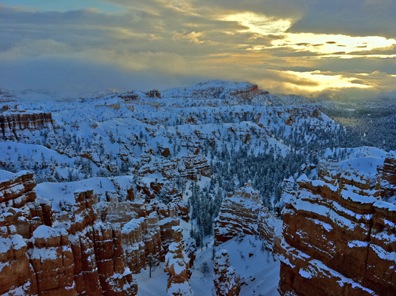
Although the path had been cleared the day before, about 2 inches of fresh powdery snow lay atop the surface. Below that was a sheet of ice. We both walked carefully. The viewpoint was deserted. The view was…well, interesting, but not perfect. The fog I wanted to see was layered in the canyon and at various other places beyond it. There was enough fog to make it interesting without really obscuring the hoodoos — red, column-like rock formations — that we’d come to see. The trouble was, the light was awful. The sun was up, but it was hidden behind thick clouds. The light was gray and lifeless.

The hiking trail down into the canyon was open — despite thick snow covering the pathway. My client, who was prepared to hike in deep snow, announced he was going down. I had the car keys. The idea was that when I got cold, I’d wait for him in the car. My iPad was in there, so I’d be able to read or check e-mail. He headed down and I walked back to the view point to see how things would change.

Another photographer showed up about five minutes later. We got to talking. He was from the Salt Lake City area and had come down the day before. He couldn’t believe all the snow he was seeing had fallen in just that day. As we chatted, we snapped photos. I had my monopod with me; he was shooting handheld. (My client was lugging a very heavy tripod down the trail with him.) A few minutes later, the man’s family joined us. He and his daughter (I assume) headed down the trail, leaving me up top with his wife and other daughter (I assume). We did a lot of chatting and photo snapping as time went on.

First LightThe first hint that things might improve came a while later when the sun started breaking through the clouds. I snapped this photo using the HDR function of my iPhone and then fixed it up a bit more in Photoshop to bring out the shadows. Not too impressive. The light faded again right after that and I started thinking about how warm the car might be. But I decided to stick it out a bit longer.
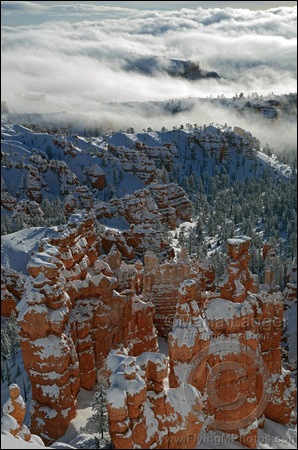
I was glad I did. A few things happened:

  • The sun rose higher. Of course, I expected that.
  • The clouds drifted on a gentle breeze to the west. The effect of that was to make it easier for the sun to poke over the top of the cloud bank.
  • The fog bank began drifting into the canyon.

The effect of all these changes, which occurred over the course of about an hour, was to make an amazing, constantly changing scene in front of me. I began doing real photography. The three photos shown below are among the best I shot.

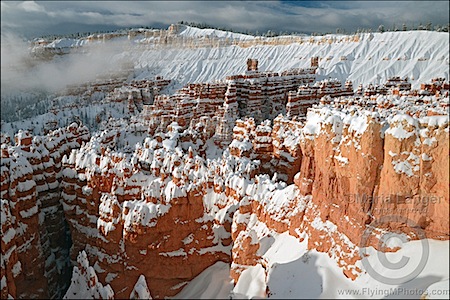
Bryce Dawn 1Snowy Bryce Dawn 1
D7000, f/10 @ 34 mm, 1/400, ISO 400, No Flash

What I like most about this first shot is the laying of the low clouds among the hoodoos in the canyon. This really helped to separate the rock formations and add an element of three-dimensionality. It was also neat to be above the clouds without having to fly there.

I had two lenses with me: a Nikkor 10-24mm and a Nikkor 16-85mm. Although I prefer the 16-85mm lens — it’s the absolute perfect all-purpose lens — I found that I was shooting most photos with the wider view. With my Nikon D7000’s 1.5x crop factor, this lens, at its widest focal length, is equivalent to a 15mm 35mm camera lens. There’s very little distortion — unlike my 10.5mm fisheye, which is fun but not practical. I liked the way it accentuated the sky in some of the earlier shots I took.

For a while, I switched back and forth — no easy feat when wearing gloves and relying on a jacket pocket for lens storage. Later, as the light continued to change, I wound up sticking with the 16-85mm lens, which also had a polarizer on it. That came in handy when the sun had risen high enough over the cloud bank to bring out some of the colors. I’m a big fan of using polarizing filters when the light is right for them. It really can accentuate the outlines of clouds and the blue of the sky, not to mention the red in the rocks.

Bryce Canyon Dawn 2Snowy Bryce Dawn 2
D7000, f/10 @ 16 mm, 1/400, ISO 400, No Flash

I’m actually a little annoyed about this photo. When I shoot, I compose in the camera with every intention of using the full frame image. In other words, I shoot photos that don’t need to be cropped. This is very easy if you use zoom lenses, which I do, and take the time to compose properly.

The problem with this image is that when I shot it, I included my monopod head, which was leaning against a fence rail, in the lower-left corner of the picture. It ruined the photo. The only way to “fix” it was to crop it. This was the best I could do. It is not as I intended. I may attempt to remove the monopod head with Photoshop in the future, but I generally don’t like doing things like that. We’ll see.

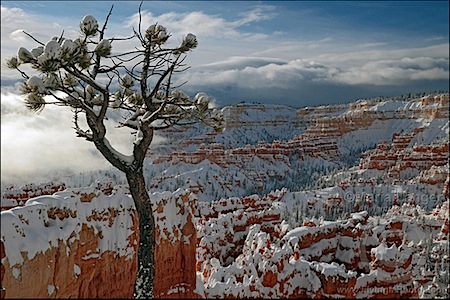
Bryce Canyon Lone PineBryce Canyon Lone Pine
D7000, f/11 @ 24 mm, 1/500, ISO 400, No Flash

I like to shoot foreground items with interesting backgrounds. This tree, with the fog, clouds, and sky behind it to separate it from the background details, made a great foreground subject. And what could be more interesting in the background than snow-covered red rock hoodoos?

In all, I shot about 50 images over the course of 90 minutes. These were the three I liked most after viewing them on my laptop. I might find other favorites when I get back to my office and have time to look at them again.

I should mention that my camera was outfitted with its Nikon GPS, which worked like a charm to encode location information into each shot. This was the first time I used it. The device is awkward and I’m not sure how often I’ll really want to use it. I might reserve it for tripod-based work.

The fog bank continued to move in and eventually blocked out the sun again. The overlook chilled back down to its pre-sun temperature. Down below, on the trail, my client and the two other people who’d gone down started back up. The dad and his daughter arrived first and the family left together. When I realized my client had stopped for more photos, I decided to head back to the car. He joined me about 20 minutes later.

It had been a nice morning shoot, despite the cold. My client says there’s too much snow on the hoodoos for the aerial shoot we need to do before heading south again. While I agree that there’s a lot, I don’t think there’s too much. The red rocks are still clearly visible and should look great from the air.

As I write this four hours after our return, the snow is falling again. Let’s hope it doesn’t add much more to the scenery here.