Some Thoughts on Drone Photography

If you can’t beat them, join them.
Phantom 4
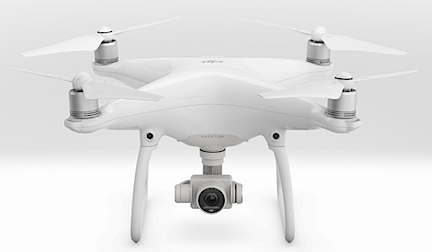
The Phantom 4 is a flying camera.

I’ve been thinking a lot about the rise of unmanned aerial systems (UAS), more commonly referred to as “drones,” these days, mostly because I’ve been able to get some good hands-on experience with the prosumer DJI Phantom 4. The Phantom 4 is marketed as a flying camera and I honestly think it’s a good categorization. Clearly it was designed for photography and it has given me a new appreciation for drones, which I don’t generally like.

Drone Threats

As a helicopter pilot, I’ve felt a rather unique threat from the rise of drones (no pun intended). I want to take a moment to explain, mostly because although my general opinion of drones has changed, my views about their threats have not.

Safety

First and foremost are my safety concerns. There are too many drone “pilots” who fly irresponsibly in places they should not be, including near airports and at altitudes that should be reserved for manned aerial flights. The FAA has attempted to reduce the risk of drone/aircraft collisions by setting a maximum altitude of 400 feet for drones. This is far from a perfect solution for two reasons:

  • Irresponsible drone pilots ignore the restrictions and fly higher than 400 feet above the ground. I have witnessed this more than once, although I’m glad to report that I wasn’t flying at the time.
  • Helicopters generally don’t have a minimum operating altitude so we can fly below 400 feet. Even my Part 135 certificate, which sets some limitations for on-demand charter flights, specifies a minimum altitude of 300 feet — this means I can legally be sharing 100 feet of airspace with UAS with charter passengers on board.

Drones are small. They can fly at speeds in excess of 50 miles per hour. I fly in speeds in excess of 100 miles per hour. That’s a closing rate, for a head-on collision, of 150 miles per hour. Does anyone really think I can “see and avoid” something the size of a 12-pack of beer coming at me at 150 miles per hour?

And if pilots are irresponsible enough to disobey FAA regulations, are they responsible enough to stay clear of aircraft?

Other drone-specific regulations regularly ignored:

  • Staying clear of temporary flight restriction (TFR) areas. There have been many reported instances of drones flying around wildfires being worked by firefighting aircraft. In some cases, these violations of airspace have caused the grounding of aircraft.
  • Staying clear of other restricted airspace. The one that worries me most is flights close to airports.
  • Keeping the drone within sight. That’s not easy to do when the drone has a range of more than 3 miles and it’s so small.
  • Not flying over people. I have witnessed this first hand many times at outdoor gatherings.
  • Obtaining FAR Part 107 certification for commercial use of drones. This certification helps ensure that drone pilots are real pilots who know and understand FAA regulations and important aviation and aeronautical concepts.

I can go on and on, but why bother? The fact is that although many drone pilots are responsible enough to learn and obey the rules for operating their drones, enough of them aren’t responsible at all. They make pilots — especially low-level pilots like those flying helicopters — worried about their safety.

Economics

The second threat I’m feeling is economic.

I’ll be blunt: over the past 15 or so years, I’ve earned a reasonable portion of my flying revenue from photography and survey flights. Drones are increasingly being used for both roles, thus cutting into my potential market.

I currently charge $545/hour for photo flights. Although I can cover a lot of territory in an hour and give two photographers a platform for aerial photos at the same time, not everyone sees the benefit. For about the same price, a photographer can buy a decent entry level photo drone and get the shots he needs. And then use the same drone another day without a further investment.

Or make a larger drone investment and get a better drone and better camera.

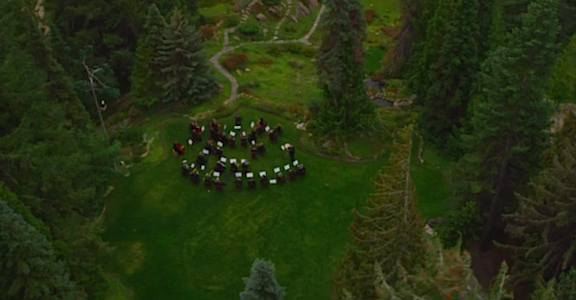
I’ll admit it: in many instances, a drone can get a better shot. A perfect example is a dawn photo shoot I did with a good client about two years ago. They’d staged the Wenatchee Symphony Orchestra at a local park, Ohme Gardens, and wanted sweeping aerial images of them playing. On our first pass, our downwash blew away their sheet music. (Oops.) We eventually got the shots they wanted, but I recall saying to my client, “You should have used a drone for this one.”
Aerial Orchestra
Here’s a still image from one of the aerial sequences we did that morning. Watch the whole video here; all the aerial shots were done from my helicopter.

But another client needed aerial video and still images all along the Columbia River from Wenatchee to Chelan, then up the Wenatchee River to Leavenworth and up Lake Chelan to Stehekin. This was well over a hundred miles to cover and some of it was inaccessible by car. We got all of the shots in less than three hours of flight time. It would have taken weeks to get that footage with a drone — and even then, some of it would have been impossible to get.

And a four-hour shoot from Seattle to Mount Rainier along often remote areas of the Green River? I can’t even imagine doing that with a drone.

But not everyone sees that. So I see drones threatening part of my livelihood.

Flying Cameras

My generally poor opinion of drones was significantly changed this past week. What changed it? Getting my hands on a Phantom 4 and seeing the quality of the photos and videos

My friend Jim — a gadget guy if there ever was one — has one of these drones. He started off by showing me some of the video he’d shot on an RV vacation in the southwest with his wife last summer. I was immediately struck by how rock-solid and clear the images were. I’ve created footage with a GoPro mounted in various places on my helicopter and have seen footage created with high-quality professional video cameras from my helicopter both with and without gyro-stabilized mounts — Jim’s footage was as good as or better than any of that.

From a flying camera that costs less than $1,000. To put things in perspective, that’s less than my Nikon DSLR, which doesn’t fly.

Then Jim and I took the drone out for a few flights. It was remarkably easy to fly, even if you choose to do so manually. The controller has two sticks that were immediately familiar to me as a helicopter pilot. The left stick handles ascent/descent (like a helicopter’s collective) and yaw (like a helicopter’s anti torque pedals) while the right stick handles direction of flight (like a helicopter’s cyclic). The drone is amazingly responsive, but what really blows me away is that releasing the controls brings the drone to a controlled hover at its current altitude. And if that isn’t enough, several program modes and tools make it possible to program a flight. The damn thing can literally fly itself.
Phantom 4
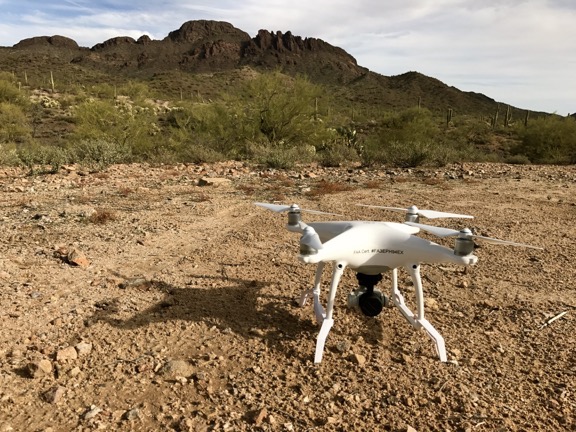
Jim’s Phantom 4, awaiting takeoff near Vulture Peak in Wickenburg, AZ. I got a chance to experiment with both manual and automatic flying modes.

I could go on and on about the Phantom 4’s feature set — which I understand is shared by many competing products these days — but I won’t. I’ll let you explore them for yourself. There’s plenty of information online.

I will say this, however: As someone who has been involved in tech for a long time — hell, I wrote books about computers for 22 years starting way back in 1990 — I’m not easily impressed. The Phantom 4 completely blew me away.

Me? A Drone Pilot?

Part 107 Explained
Want to become a commercial drone pilot? Start by learning all about the FAA’s Part 107. This book will help. Buy the ebook edition on Amazon or from Apple. Or buy the paperback edition on Amazon.

Jim, in the meantime, is looking to upgrade and offered me a sweet deal on his Phantom 4 with lots of accessories. That got me excited about owning one of these flying cameras. So excited that I watched all of the Phantom 4 tutorials on DJI’s website, worked through the FAA’s UAS pilot online training, and took (and passed) the FAA’s Part 107 pilot test. All I need is a meeting with the FAA and a sign off to become a certificated UAS pilot.

What does that mean? I’ll be legal to conduct commercial UAS flights. That means I can create (and sell) some of the photos and images I collect with a flying camera like the Phantom.

But I have other ideas for how I can make drone photography part of my professional life. Stay tuned; I’ll be sharing more on this topic in the months to come.

After all, if you can’t beat them, join them.
Mobile Devices, Passwords, and Security

A few words of wisdom from someone who has seen more than her fair share of hacking attempts.

This morning, when I fired up my laptop after a weekend away with friends, I was greeted with an on-screen notification telling me that there was a problem with my iCloud account.

iCloud, in case you don’t know, is Apple’s cloud service. I use it for some email and to synchronize data among my three computers and three mobile devices. I generally don’t use any cloud storage for any sensitive documents. I simply don’t trust it.

Today’s notification prompted me to log into my iCloud account. When I tried to do so, an error message told me that the account had been locked due to too many incorrect password entries.

I do know my password and I know I hadn’t entered it wrong too many times. That means someone else had. Another hack attempt.

This isn’t the first time someone had tried so hard to hack into my iCloud account that the account had been locked. It also happened back in October 2014. I know this date because I blogged about it back then — and oddly enough, that’s the most popular blog post so far today. (Is someone looking for clues in my blog? Good luck with that.)

Anyway, I went to Apple’s website and logged into my account again. That required Apple to send an email message to my backup account and for me to click a link in that message. I normally don’t click links in any messages I get unless I’m expecting a message with a link. I was expecting that one so I clicked the link, signed back in, and checked to make sure everything was still secure. It was.

I then changed my password, just for good measure.

A Lost Phone Story

All this comes right on the heels of a rough weekend for a friend of mine.

We went out to run some errands in the Phoenix area where she lives. Our first stop was Lowe’s. She took out her phone to take a picture of something she wanted to compare with other options in other stores. Then she decided she wanted to sketch it instead. She put the phone down and took out a pad and pencil. I wandered off to look at other things. We later met up at check out, I paid for my purchase, and we left.

About a mile down the road, she declared, while searching frantically in her purse, that she was having a senior moment. She couldn’t find her phone. When she realized it definitely wasn’t there, she began to panic. She knew she’d left it in Lowes. I turned around and we headed back. She ran in. I waited two minutes, then called her phone as she’d asked me to.

It went right to voicemail.

I knew what that meant: someone had picked up her phone and turned it off so it couldn’t be tracked. Someone smart enough to do that wasn’t going to turn it in at Lost and Found. The phone was stolen.

I went into the store and gave her the news. I had to explain what the phone going right to voicemail meant — she was in a bit of denial before panic took root. “My life is in that phone,” she told me. I asked the question I already knew an answer for: was the phone locked? Did she have to enter a password it to use it? The answer was no.

Worse yet, she had used an unsecured “memo app” to record her passwords for banks, credit cards, and all kind of other important things. If someone opened that app, they’d have complete access to her finances.

My friend is not a technically minded person. She had no idea what to do. She asked me. I’m an Apple person and I know exactly what to do for an Apple device. But I was at a lost with her Samsung Galaxy 5. I called her husband, who I knew would know. But he’s an airline pilot and his phone was switched off for a flight.

We raced to the closest Verizon store. I repeatedly dialed her number and it immediately went to voicemail each time. That means the phone was still turned off. The average phone thief would not be able to get data off the phone with it turned off.

At the Verizon store, my friend used the tech guy’s computer to log into her Google account. He pushed the right buttons to wipe the phone clean and basically brick the phone.

Disaster (probably) averted.

The odd thing about all this is that although I’ve been keeping my phone locked for the past few years, lately it’s been bugging me that I need to go through that extra unlocking step to use it. I’ve been debating with myself for the past few weeks about removing the passcode and leaving the phone unlocked for my own convenience. I even came close to doing it once or twice.

But after seeing what happened to my friend, there’s no way in hell that I’ll remove the passcode on any of my mobile devices or computers.

And if your mobile devices aren’t secured with a password, take my advice and secure them now. And then make sure that your devices can be wiped remotely if needed.

Passwords

Whoever attempted to access my iCloud account recently hit a wall when he/she couldn’t enter the correct password. Apple automatically locked the account when a certain number of incorrect attempts — three? five? — had been made. The lock required me to recover it using a secondary email account or security questions.

Passwords are the first line of defense for security. We all want to use passwords that are easy to remember and we all want to use the same password for everything. Resist the temptation! If your password is easy to remember, it might also be easy to guess. And if you use the password for everything, if someone guesses one password, they automatically have access to everything you used it for.

Your passwords should not be easy to guess. Period. They should be a combination of upper and lowercase characters and numbers with one or two symbols thrown in whenever possible. Minimum password length should be eight characters; longer is better.

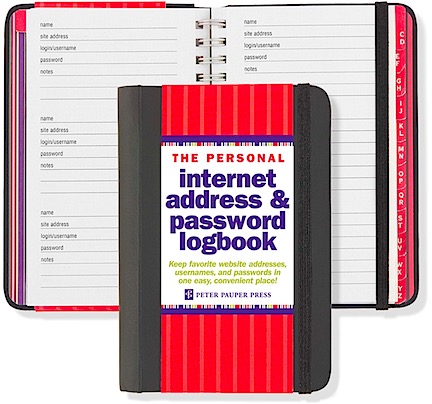
Password Notebooks are STUPID
This is the most idiotic idea I’ve ever seen. Unless you plan on keeping this book locked up in a safe all the time, you’re just making it easy for a thief to access all of your accounts.

If you have trouble keeping track of your passwords, do not write them down in a place where other people can find them. That includes post-it notes, notebooks, and unsecured apps and documents on a computer or mobile device.

My wasband used to store all of his passwords in a Microsoft Word document that was not password protected. Then, as if that wasn’t dumb enough, he routinely emailed it as an attachment from one of his email accounts to another to get the file transferred between computers when he updated his passwords. He even did this after he knew that one of his email accounts had been breeched, thus giving the “hacker” access to all of his passwords everywhere. (And yes, I do constantly ask myself how I could have loved someone as stupid as he is.) For all I know, he probably still does this.

My advice? Instead of insecurely storing this information, invest a few bucks in a password security app. I use 1Password, which works on my Macs and iOS devices, keeping all of my passwords synced between them. (There are plenty of other options out there; feel free to suggest your favorite in comments for this post.) To access my passwords, someone needs to first get into my computer or device (which is password protected) and then open the 1Password app (which is password protected with a different password).

Don’t give your passwords to anyone — even someone you trust. A long time ago, when I was a lot less security-minded, I had a simple password I used for most (but fortunately not all) things, including my Netflix account. My idiot wasband, while we were still married, gave that Netflix password to his roommate. Fortunately, he did this right in front of me so I knew about it. (Let’s not go into how pissed off I was.) I spent a good portion of that day changing my password everywhere it might be used. Needless to say, I never gave him any of my passwords again — which served me well when the divorce proceedings started and I had assets to protect.

Security Questions

Security questions are the next line of defense. They help protect your account while giving you access to it if you happen to forget the password. It’s the security questions that protected my iCloud account back in October 2014; someone had actually tried to answer them and failed.

After my recent iCloud hack attempt, I checked and changed a few of my security questions. I was very pleased to see that Apple offered questions that dug deep into my past, with answers that only I would know. Mother’s maiden name is the last question you should select and answer — it’s too widely used. So is where you and your spouse met — how many times have you told that story? (And of course, your spouse knows the answer, which can come back to bite you when divorce papers are filed.) Always pick questions that are easy for you to answer but damn near impossible for anyone else to figure out.

Of course, there is a more devious way to handle security questions and that is to use the same password as the answer to all of them. So while the question might ask “What is your father’s middle name?” — a question that anyone who knows you can research to discover — the answer might be “Jj6MbFwp,” which is obviously not your father’s middle name. That same password would then be the answer to all of your other security questions. So while your ex is trying to figure out why the system isn’t accepting “John” for the father’s middle name question when he knows damn well the name is John, you’ve fooled him by using something he’d never guess in a million years.

Which approach did I use? I won’t tell.

Take Security Seriously

Computer and Internet security — is not something to be taken lightly. The more connected you are and the more you access your personal information and finances online, the more at risk you are for loss if someone is able to access an account. It’s only by having good, difficult-to-guess passwords for your accounts — and making sure you have different passwords for each account — that you can keep them safe.

And remember, your smart phone is likely to be more valuable to a thief than your wallet. Protect it!

Snowbirding 2017 Postcards: Mormon Temple Christmas Lights

I’m spending a few days at a friend’s house in the Phoenix area and she suggested that we go see the Christmas lights around the Mormon Temple in Mesa, AZ. I’d never been to the Mormon Temple — in fact, I didn’t even know there was a Mormon Temple in Mesa. I’m always game to try something new, so we went.

My friend told me that she has good parking karma and she wasn’t kidding. The place was crowded and full of traffic, yet she managed to find a parking spot almost right in front of the temple. They were hundreds of people there, mostly families, all walking around lighted pathways and trees with the obligatory manger.

What impressed me most, however, were the reflecting pools at various places around the temple. The building itself was evenly lit with bright, white light and it reflected magnificently in the calm water. The colored lights added a sort of magic to the scene.

I didn’t take many pictures, but here are a few to give you an idea of what it was like. (I put an interactive panorama on Facebook.) If you’re ever in the area around Christmas time, I highly recommend visiting it — but not necessarily on a Saturday night.

Helicopters 101: Ground School

An excerpt from my upcoming book about my first ten years as a helicopter pilot.

Articles in the Helicopters 101 series:
Flight Planning
CG
Weight
Hover Charts
Ground School

At least five years ago, I began writing a memoir about my first ten years as a helicopter pilot. I put it aside for various reasons, picked it up, put it aside again, and have now picked it up again. At the rate I’m going, it could probably cover my first twenty years.

Since I’m trying to spend more time working on that book than writing blog posts, I figured I could excerpt some of the book’s text as blog posts. (That kind of makes sense since a lot of the book will come from existing blog posts.) This is an example from my chapter about ground school during my primary training in the late 1990s. I think it provides a good overview of what helicopter pilots learn in ground school. It also provides some very useful links for free learning resources.

A side note here…like any other blog post that will appear in my book, this one is likely to be removed from the blog once the book is published. When that time comes, the content of this post will be replaced with a link to buy the book. A girl’s gotta make a living, no?

My flight training days nearly always included up to two hours of ground school sandwiched between two blocks of flight time. Ground school is required to learn the multitude of things a pilot needs to know to be safe and legal in the eyes of the FAA⁠, such as:

  • Pilot requirements and responsibilities. What a pilot needs to legally fly in the United States and what her responsibilities are as pilot in command.
  • Helicopter aerodynamics. How helicopters fly. (Spoiler alert: they do not “beat the air into submission.”) This includes such concepts as lift, translating tendency, Coriolis effect, gyroscopic precession, translational lift, and more.
  • Helicopter components and flight controls. Helicopter rotor systems, power plant, transmission, cyclic, collective, throttle, and anti-torque pedals.
  • Basic, advanced, and emergency maneuvers and procedures. All of the procedures and skills a helicopter pilot needs to have to fly safely in normal and emergency conditions.
  • Airspace and air traffic control (ATC). The different types of airspace and a pilot’s responsibilities for operating in each of them, as well as the basics of communicating and complying with air traffic controllers.
  • Navigation. The basics of getting from Point A to Point B safely, without getting lost or wandering into restricted airspace. This includes all kinds of tools for navigation, from paper charts and plotters to radio navigation aids to GPS.
  • Weather. Any kind of weather that can affect flight—which is pretty much any kind of weather.
  • Aeronautical decision making (ADM) and pilot preparedness. Cockpit resource management and a pilot’s physical and mental condition to fly.
  • Aircraft specific information. The specific details about the aircraft the pilot will fly, such as mechanical components, performance, limitations, emergency procedures, and weight and balance.

This is only some of the information a pilot needs to know to pass written, oral, and practical tests and get a pilot certificate.

Just about all of this information can be found in four different government-published resources that are available online for free at the FAA’s website1:

  • Federal Aviation Regulations (FARs)2 are the actual laws governing flight in the United States. Written in a form of legalese, they can be frustratingly difficult to understand and often refer back and forth to each other to form a web of confusion. Occasionally, someone puts out a book purporting to translate FARs into plain English, but these don’t usually cover all topics and can contain outdated information when the FARs are updated—which can be several times a year.
  • Aeronautical Information Manual (AIM, formerly the Airman’s Information Manual) is a much easier to read and understand guide that covers most of what a pilot needs to know. Like the FARs, however, it’s geared toward airplane pilots, so there’s a lot of information a helicopter pilot doesn’t really need to know.
  • Pilot’s Handbook of Aeronautical Knowledge (FAA-H-8083-25B) is a textbook-like guide that covers all the basics of flying airplanes in an illustrated format that’s easy to read. Note that I said “airplanes” here—that’s because this book goes into a lot of detail about airplane aerodynamics, design, and controls, most of which helicopter pilots don’t need to know. But it also covers airspace, weather, airport operations, and other topics all pilots need to know.
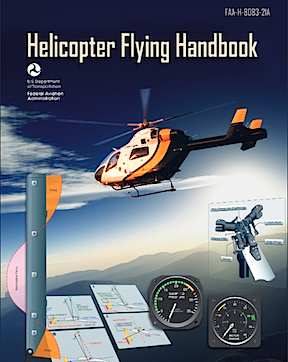
  • Helicopter Flying HandbookHelicopter Flying Handbook (FAA-H-8083-21A) is another textbook-like guide that covers all of the basics of flying helicopters. This is the book I recommend to anyone interested in helicopter flight. The illustrations and examples do an excellent job of teaching complex aerodynamic concepts specific to helicopters. This book does not, however, cover airspace, weather, or other non-helicopter specific topics that helicopter pilots still need to know.

Aircraft-specific information can be found in the pilot operating handbook (POH) that comes with and must be on board every aircraft. Those are often available online from the aircraft manufacturer.⁠3


Footnotes:
1 There’s a wealth of information for pilots at www.faa.gov. You can also buy print versions of these resources from various publishers.
2 I should mention here that what most people refer to as the FARs is actually called the “Code of Federal Regulations Title 14 Aeronautics and Space” or just “CFR Title 14.”
3 If you’re interested in seeing the pilot operating handbook for the helicopter I learned to fly in, a Robinson R22, visit http://robinsonheli.com/r22_poh.html.

Home Made Trail Mix

The best way to get a mix with everything you like — and just that.

I like trail mix as a snack food, especially on a long drive or hike. But I’m also pretty picky about what’s in my trail mix. This leads me to a never-ending search for the right blend — and often paying a premium to get it.

The solution, of course, is to make my own trail mix with just the ingredients I like. With that in mind, I went shopping at Trader Joe’s.

Trader Joe’s is a good source of dried fruits and nuts. Although they also have a bunch of different pre-formulated trail mixes, I don’t really like any of them. Instead, I bought the following and made my own:

  • Dried apples
  • Pitted dates
  • Dried tangerines
  • Dried (slightly sweetened) coconut strips
  • Honey roasted peanuts
  • Raw almonds

Trail Mix
My custom blend trail mix.

I chopped a bunch of it up — except the peanuts, which I left whole — and mixed it in a yogurt container I had a cover for. I had some chocolate chips and thought I might add them, but the mix turned out to be sweet enough without them. Also, I knew I’d be spending some time in warm weather and I didn’t want melted chocolate in my trail mix.

The result: perfection — at least as far as I’m concerned.

Best of all, I have enough ingredients to keep me in trail mix for the rest of my winter travel season.

If you like trail mix, give it a try with your favorite ingredients. I think it’s a good, budget-conscious way to get plenty of trail mix just for your taste.