Staying Focused in a Distraction-Filled World

Distractions come in all shapes and sizes.

One of the most difficult things about working these days is simply staying focused. There are far too many distractions in my workplace to stick to the task at hand. And I’m willing to bet that if you work in an office or at a desk, it’s the same for you.

Writers Need to Concentrate

As a writer, it’s vital that I be able to concentrate to organize my thoughts and then get them out in well-written sentences and paragraphs. That’s the task I’m faced with when I need to write something: think about what I need to say and write it.

I’m fortunate. If I can stay focused, I have no trouble writing. Words form sentences, sentences form paragraphs, paragraphs form blog posts, articles, and even books. If I can concentrate on the topic and what I need to say about it, I can get the words out easily. In most cases, I don’t even need to go back and edit other than to check sentence structure and fix typos.

I thought it was like this for most writers. It’s only recently that I discovered that other writers struggle with the actual process of writing. That’s not my problem at all.

My Personal Distractions

My problem is staying focused in an environment full of distractions. Here’s a list of some of the things I face in my office:

  • A cluttered desk. I find that I have a much easier time staying focused when my desk is clear and organized. Yet day after day, I find clutter piles that nag at me and make it difficult to work.
  • Too many open projects. As I summarized in a recent blog post [ADD LINK], I have too many “irons in the fire.” All the time. That’s mostly because I, as a freelancer, need to do work when it comes and keep looking for work so there’s no gap. I’ve been doing this in one form or another for 20+ years. You think I’d be able to compartmentalize better by now. But it’s hard to stay focused on one thing when you know that two (or three or five) other things need attention the same day.
  • Background noise. I have a parrot. Sometimes she makes annoying sounds that can really get under my skin when I’m trying to concentrate. (And yes, getting a parrot was likely a huge mistake. Worse yet, since she’s only 10 years old with a life expectancy of 50, I’ll have her for the rest of my life.) Unfortunately, my parrot isn’t the only source of background noise. At my Phoenix office, there are the landscapers, my neighbor with his loud girlfriend, barking dogs, and the occasional news helicopter hovering over the Apple Store a half mile away any time a line forms for a new product release. Sheesh.
  • The Internet. I could break this down into its components: a Web browser to look up anything anytime I want and an email client to pounce on incoming email as soon as it arrives. Just knowing that it’s there is enough to distract me when I hit even the slightest snag while writing.
  • Social Networking. This is so insidious that it deserves its own bullet point. Thank heaven I’m only addicted — and yes, I do say addicted — to Twitter and Facebook. I bailed out of Google+ about a month ago and am too sick of people trying to sell themselves on LinkedIn to check it more than once a month. But imagine if I’d also jumped in on FourSquare, Pinterest, and those ridiculous “newspapers” people create based on tweets?
  • The weather. In Arizona, almost every day (other than during the summer “hell season”) is perfectly beautiful. Do you know how hard it is to stay indoors when you know how nice it is outside? And then, on those rare days when there are clouds or rain — do you know how hard it is to stay inside and miss the chance to actually get rained on? You think I’m kidding? This weekend, it rained for the first time in three months. I purposely scheduled my work around the expected weather so I could be home to enjoy it.
  • The phone. This is way down on my list because I don’t get many phone calls and I don’t make many phone calls. In all honesty, I don’t like talking on the phone. But that won’t stop me if one of my extra-talkative friends calls and wants to chat. Last month, I used 110 excess primetime minutes on my cell phone — which is my only phone these days — because of long conversations with two chatty friends. (Do you know what that cost? Ouch! I’ve since upped the minutes on my plan.) The phone, of course, is also a source of business for Flying M Air, my helicopter charter service. But at least 80% of the calls I get are people fishing for a cheap flight who tell me they’ll “think about it” when they hear what it’ll cost. And don’t get me started on the ones who need time-consuming flight plan calculations to arrive at an estimate and then never call back.
  • Text messaging. Thankfully, I don’t get or send many. For a while, I had Twitter set to send me Direct Messages on my cell phone. What was I thinking?
  • Chores. Like most people who work from a home-based office, I use chores as a means of “justified procrastination.” For example, “I can’t finish this article now — there are clothes in the dryer that need to be folded!” Or, “I can’t start this outline now — I need to run to the store to buy milk for tomorrow’s breakfast!” (I just did it. I stopped doing this, went outside, toweled off my car (which was wet and clean from the rain), put my Jeep in the driveway, put my car in the garage, and pulled all the clothes out of the dryer. Seriously, I’m hopeless.)
  • Food. I snack all day long. Not huge snacks and not bad snacks. I eat fruit, hard-boiled eggs, cheese on crackers, leftovers. This is not a good thing. I don’t need to snack.

This gives you an idea of what I face. Think about what you face. I bet there’s a lot of overlap.

The Writing Environment

On top of all this is the distraction-full environment of the three applications I normally use to write: Microsoft Word for general writing, Adobe InDesign for book creation, and ecto for blogging.

It’s the formatting options that really get me with Word and InDesign. As I write, I get distracted by the task of formatting my text. With InDesign, the situation is often much worse until I’ve settled on the final styles and template for my book. I’m constantly tweaking things to make them perfect. ecto isn’t nearly as distracting, although since I write in HTML, it’s sometimes more difficult to go back and read what I’ve already written, especially after inserting links and images.

A lot of people swear by applications like Scrivener, which have a full-screen writing mode that supposedly removes all distractions. I’ve tried Scrivener and I really don’t like it for several reasons. First of all, Scrivener has to be learned to be used. That’s an investment in time that I’m not convinced will ever pay off since those skills can only be applied to Scrivener. Second, that distraction-free writing environment has to be turned on. If you don’t turn it on, you have Scrivener’s weird pseudo-outline interface or the cutesy index cards and cork board. That’s not distracting? Third, Scrivener creates Scrivener files, which are generally not readable by other applications. I’ve been bitten in the past when I adopted an application to help me be more productive or “think better” — the program was called Thought Pattern — and wound up with files I could no longer read when the application was abandoned and could no longer run on my computer’s operating system. As a result, I prefer applications that create files in standard formats: TXT, RTF, and DOC/DOCX. (InDesign is a big exception, but worth it for obvious reasons.)

(Just took a 10-minute phone call. Booked a flight for Wednesday. Added two things to my To Do list. Tweeted. )

Now before you use the comments to accuse me of “bashing” Scrivener, please re-read that paragraph. I’m not saying Scrivener is terrible. I’m just saying why I don’t like it. It doesn’t work for me. That doesn’t mean it won’t work for you.

And if all you want is a word processor that has a “distraction-free mode,” why not use Microsoft Word? It’s full-screen mode might be just what you need.

iAWriter
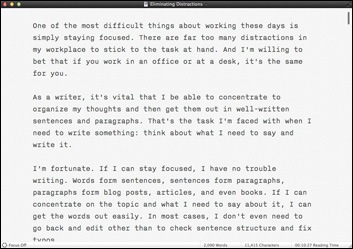
iAWriter’s normal document window is pretty simple.

Of course, I need something more hardcore. So I spent $8.99 for iA Writer, which must be the most basic, distraction-free text editor on the planet. I’m using it to write now. It forces me to concentrate on the actual text by not allowing me to build outlines or format characters or view my document in some sort of print-centric page view that no one really cares about anyway these days. And rather than taking the time to code the links you see throughout this piece, I’m just putting in [ADD LINK] notes to remind me to add the links before I publish.

iAWriter Focus Mode
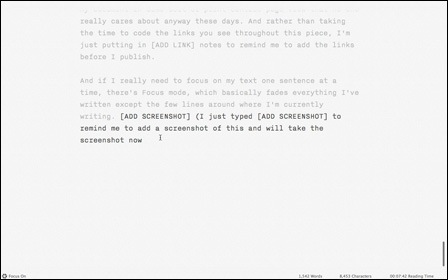
Here’s iAWriter in full screen view with Focus Mode turned on.

And if I really need to focus on my text one sentence at a time, there’s Focus mode, which basically fades everything I’ve written except the few lines around where I’m currently writing. (I just typed [ADD SCREENSHOT] to remind me to add a screenshot of this and will take the screenshot now. There.) The benefit of Focus mode is that it makes it just a little more difficult to go back and review or edit something you wrote earlier in the document. If you’re like me, you know how much productive time can be lost by tweaking text before you’re finished with the first draft.

There’s zero learning curve to this program. It’s about as close as you can get to a typewriter without losing the ability to edit.

I’m hoping to use this more often to get “back to basics.”

Other Remedies

If a super-simple, feature-free word processor is a remedy for distractions inherent in standard word processing applications, it follows that I should be able to come up with remedies for my other distractions. Here’s what I’m thinking.

ProblemPossible Remedy
A cluttered desk.Clear the damn desk. Then clear it again at the end of the work day. Every day. My sister did this at her bank job. Every time I came to visit her, her desk was completely clutter-free. It was spooky, but I think I could work better at a desk like that.
Too many open projects.Organize tasks with a To Do list that prioritizes project work. Stick to it. Also try to work on each project until finished before starting new ones.
Background Noise.Sometimes I can get Alex the Bird to shut up if I move her cage into my office. Sometimes certain foraging toys can keep her quietly busy for hours. I have to work on this. Not much I can do about the other noises. Of course, I could resolve all noise related issues by simply getting a dedicated office in a quiet place — and leaving the bird at home.
The Internet.Close all Internet apps and keep them closed. No browser, no email. Of course, this is impossible sometimes — my work often requires me to consult websites for information, etc. I think I need more willpower. Maybe a sticky note reminding me to stick to business?
Social Networks.Leave the Twitter client app closed. Stay off Facebook. I think if I schedule my social networking activities to certain times of the day, that might work.
The weather.I got nothing. I’m always going to want to get out in the rain — unless it rains for more than one day in a row. I think that if I gave myself a real day off once in a while, I could enjoy an appropriate number of nice days, too.
The phone.Because work comes by phone, I have to answer the phone. Fortunately, I don’t have to restrict myself about making calls because I seldom call anyone else.
Text messaging.Not enough of a problem to warrant a remedy.
Chores.This is an easy one: save chores for break time. Real break time. Scheduled break time. Of course, that means I have to schedule some break time.
Food.See above. Also, keep food out of the house. That might sound weird, but I’m one of those people who shops for groceries almost every day anyway. It’s one of my chores.

What about you? What distractions do you face? What remedies do you use to stay focused and get things done? Share some of your tips in the comments for this post.

When Computers Reduce Your Productivity

How many times has something like this happened to you?

By now, most of us who participate in social networking — Twitter, Facebook, Foursquare, etc. — know firsthand how social networking can absolutely destroy productivity. The rest of us with Internet connections can see how having an email client or Web browser open at our desks can seriously reduce productivity. But have you ever stopped to consider how the computer applications we actually use to get our work done hurt our productivity?

For an example of this, I can draw upon something that happened to me last week.

WordPress LogoI manage a number of WordPress-based Web sites, including one for N&W Associates, which sells helicopter ground handling solutions. N&W is owned and operated by Walter, who is an older gentleman who builds wheels and tow bars from scratch in his workshop. He’s a very nice man but not exactly computer literate, so I manage every aspect of the site for him. Every once in a while, he sends me some new material for the site and I put it online.

About a month ago, I completed my move of all sites I manage from GoDaddy hosting (good riddance!) to Bluehost. N&W was one of the last sites I moved. After moving it, I tested it and it worked fine.

Last week, Walter sent me an email message asking if I’d add mention of R66 helicopters, since their skid configuration is the same as R44 helicopters, thus making his equipment compatible. No problem, I said. It was an easy fix. His site only has about 6 pages so adding references to the R66 should take about 10 minutes tops. I told him I’d do it right away.

And I did. Or at least I tried to.

Trouble is, when I went to log into WordPress on his site, I couldn’t log in. No error message — instead, the login screen kept reappearing, as if I hadn’t even tried to log in.

For about 10 minutes, I tried multiple password combinations. No luck.

For about 5 minutes, I used FTP software to examine the settings files for a password and tried that password. No luck.

For about 20 minutes, I researched the password problem on WordPress’s Support site.

For another 20 minutes, I tried three different techniques to reset the password. No luck.

For about 20 minutes, I researched the login problem on forums on WordPress’s Support site.

For another 15 minutes, I tried both of the solutions people in the forums claimed would work for them. No luck.

For 10 minutes, I went back to the WordPress support forums using a variety of different search phrases. In one forum post, someone mentioned, in passing, the .htaccess file. A lightbulb went off in my head.

For 5 minutes, I used a text editor to open the .htaccess file I’d created for N&W. There was some code I’d included that would automatically rewrite the site’s URL to www.helicopterwheels.com (in the address bar and site logs) no matter how the domain was reached. I pulled out those four lines of code, saved the file, and tried logging in.

It worked.

For those of you who care about the problem, here are the details. The N&W site can be reached through two domain names: helicopterwheels.com and r22bigwheels.com. When I moved the site, to ensure continuity during the move, I moved it using the r22bigwheels.com domain. That’s the domain that was set up in WordPress’s General settings for the moved site. I used DNS on Bluehost to point both domains to the same folder containing the site files and it worked fine. Trouble is, when I tried to log in as an administrator, WordPress wanted to give me administrative access on R22bigwheels.com but the .htaccess file kept directing it to helicopterwheels.com. I’d created a loop. Once I logged in, I changed General settings to www.helicopterwheels.com, saved them, and restored the lines of code I’d temporarily removed from .htaccess. It worked the way it was supposed to do.

That little fix took another 5 minutes.

So if you add up all the time I spent on this “10-minute” edit, you’ll see that I lost an hour and 40 minutes of my day.

I can’t blame the computer, of course. And I can’t blame WordPress. It was my configuration error that had caused the problem. But placing blame isn’t the point of this post. The point is, we rely on computers to make us more productive and get tasks done quickly and efficiently. But all too often, it’s computer problems that slow us down.

The problem could be something technical like this. Or it could be a computer malfunction, such as a bad hard disk or software bug. Or it could be the simple fact that we don’t know exactly how to perform a task and have to learn how to do it before we can get it done.

I’m not suggesting here that we work without computers. But I am suggesting that we keep in mind that the more we rely on computers, the more we’re setting ourselves up for the possibility of getting less work done.

And I’m also suggesting that we try hard to keep things simple. If I didn’t put that fancy code in N&W’s .htaccess file, I wouldn’t have lost an hour and 40 minutes of my day to troubleshooting.

Got examples of how your computer cost you time? Share them in the comments!

A Look at OmniFocus

A quick overview.

I tried OmniFocus for a few weeks to set up and maintain a Get Things Done (GTD) routine. I’m always interested in easy-to-use productivity tools that I can integrate into my workflow.

What OmniFocus Does

OmniFocusOmniFocus enables you to set up any number of projects, each of which can contain specific actions. For example, I might have a project for Flying M Air to send out a marketing letter to travel agents. Within that project might be the individual actions to get the job done: get a mailing list of travel agents, write the marketing letter, print out the materials, stuff envelopes, mail. You can set up a project so its actions must be completed in order (sequentially) or so that they can be completed in any order or concurrently (parallel). Unfortunately, there didn’t seem to be any way to set up some actions within a project to be sequential while others in the same event were parallel without creating groups of actions.

Each action can also be related to a context. A context is “where the work happens.” This is a lot less intuitive but, I suppose, it can be useful once you get an idea of how to use it. For example, you might set up contexts for telephone follow-up or errands. Personally, I had a problem distinguishing between context and projects and couldn’t maintain a consistent approach.

OmniFocus offers a number of commands and options that help you “focus” on specific projects or tasks. You can flag things, set priorities, enter start or end dates, and choose from a bunch of different status options. You can then create “perspectives,” which are views of tasks matching criteria. But setting these things up can be time consuming and isn’t very intuitive.

On Intuitiveness

I did not find OmniFocus to be very intuitive. For example, each time I entered a new action, I pressed Return. Return is usually the command programs use to end or accept an entry. In OmniFocus, it starts a new one. That’s likely because of the Omni Group’s experience with OmniOutliner, which this is apparently spun off from. But when I create a list of things to do, I don’t think of an outline. I think of a list of individual items. iCal doesn’t create a new item when you press Return after completing the entry of a new one. It doesn’t make sense to me that OmniFocus does.

The perspectives view looks and works just like the main OmniFocus window. Great. Except that a perspectives view contains a subset of all items and, if the View bar isn’t showing, it’s not clear that you’re looking at a subset. You wonder what happened to an event you’re looking for and maybe, like me, you think it’s been eaten by a quirk in the software. So you re-enter it and wind up with a duplicate when you finally realize you’re just looking at a subset of all actions.

Some items don’t appear at all, depending on how options are set and how the item is coded. That makes you think twice about whether you want to set sequential items as sequential — they might not appear in some views.

And I’m still not sure how OmniFocus applies color coding to tasks. I understand the red, but blue, gray, and purple? What does it mean? Without documentation during the beta process, I couldn’t be sure. (Now I don’t really care.)

Syncing…Sometimes

One of the features that attracted me to OmniFocus was its ability to sync with iCal. I had a heck of a time doing this with the beta versions, until tech support suggested that I turn off the Birthday’s Calendar in iCal. Evidently, there’s a bug in iCal and that was messing things up. When I disabled it, syncing worked okay.

But OmniFocus syncs based on context, not project. So I needed to not only use the context feature, but set up corresponding calendars in iCal to properly sort out the tasks. Then, when I manually synced with iCal — automatic syncing is not an option — each task’s project was appended to the task name in brackets. This made the task names in iCal unnecessarily long.

OmniFocus syncs only iCal tasks, not calendar events. I also had some trouble when I marked off tasks as done in one program, it would not consistently sync to the other. So tasks didn’t “go away” when they were done.

I should mention that I need iCal syncing because I sync between iCal and my Treo to have a complete list of events and tasks when I’m on the road. My memory is bad (and steadily getting worse) and I rely on my Treo to remind me of things I need to do when I’m away from my office.

What OmniFocus Doesn’t Do

OmniFocus is supposed to make it easy to “capture” tasks from other applications. This is extremely limited. For example, although I can capture a task from a mail message, there’s no way within OmniFocus to easily link to that message — even though each message in Leopard has a unique URL. Instead, I found myself copying and pasting message text into OmniFocus.

OmniFocus falls short as an outliner in that it only gives you three levels of outlining: projects, actions, and “sub-actions” (created when you group actions within a project). Four levels, if you also create folders to organize your projects. But I suppose that if you want an outliner, you’d use OmniOutliner.

There’s no easy way to relate one action to other actions because contexts are not like keywords and you can only assign one per action.

Printing is also extremely limited, so if you want to print off a list of actions to take to a meeting or on the road, you’re stuck with standard formatting with large fonts.

When Productivity Software Reduces Productivity

My main gripe with most of these GTD software “solutions” is that they make you do so much work to set them up and implement them.

OmniFocus is a prime example of this. I wasted an entire morning trying to get my iCal events into OmniFocus , sorting them into projects, and applying contexts. And then, when I synced them back to iCal, I wound up with a bunch of duplicate items in both programs that I had to weed out. While this might be due to buggy beta software, I can’t be sure. I could be a problem I’d be dealing with every time I completed a sync.

It’s far easier for me to simply open iCal and look at my task list, which is already sorted by my existing project-related calendars, to see what needs to be done.

I was hoping that OmniFocus would introduce features that were not in iCal. It did, but none of them were features I needed or even wanted. The ones I did want — primarily calendar and task list printing flexibility — were missing.

At the introductory price of $39.95, OmniFocus was a program to consider. I might have sprung for it and made it work. But when the folks at The Omni Group upped the price to its regular price of $79.95, they made the decision for me. I’ve already paid enough money for software I don’t use regularly.

OmniFocus simply isn’t the solution I’m looking for. It isn’t intuitive enough to be a good productivity tool for me.

I only wish I could get back the two to three days I spent trying to make it help me get things done.

Is Social Networking Sucking Your Life Away?

An honest cost-benefit analysis can help you decide.

I participate in Twitter. I also participate on LinkedIn and RedBubble. And I have accounts on My Space, Facebook, Technorati, Del.icio.us, StumbleUpon, Pownce, Flicker and a number of others I can’t remember. (I occasionally sign up for a “new” account, only to find that I already have one. Oops!)

Note here that I make a distinction between participate in and have accounts on. The social networking sites I participate in are the ones I use regularly. The ones I have accounts on are ones I’ve tried but don’t actively use. And then there are the ones I’ve tried and deleted accounts from. (My recent experience with Spock comes to mind.) I’ve actually deleted more social networking accounts than I actively participate in.

But I know many, many people who actively participate in multiple social networking sites. And I have just two questions for these people:

  • How?
  • Why?

How Do they Do It?

I don’t know about you, but in my universe, a day has 24 hours. Of those 24, I throw away 6 to 8 by sleeping. I spend another 4 to 6 doing “life maintenance” tasks like eating, bathing, socializing with my household’s members (husband, parrot, dog, and horses) and friends, and keeping my house clean. Then figure another 4 to 12 hours doing the work that pays the bills.

What’s left? Not much.

So how are people finding the time to participate in all these social networks?

My participation in Twitter is well-integrated into my lifestyle. Twitterific is open on my computers’ desktops. (And no, that’s not a typo. It’s open on all of my computers’ desktops.) Throughout the day, I receive tweets from the 30 or so Twitter members I follow and send my own tweets out into the ether. Occasionally, a conversation will start up between me and another member, but it usually consists of no more than two or three tweets on either side. And it isn’t as if the conversation is live. Sometimes a fellow twitterer will ask me a question and I won’t see it for an hour or two, when I’ll finally answer it. It’s not like I sit there watching Twitterific. I don’t. And when I’m away from my desk or computer, I’ll occasionally tweet from the field using the SMS capabilities of my Treo. I do this most often when I’m on the road, but I occasionally do it when I’m in the middle of something and have a few spare minutes. I hate doing nothing and these tweets often give me something to do.

My participation in LinkedIn is less active. I basically check in once a week or so, just to see if any of my contacts have added contacts that I know. If so, I attempt to add them. Once in a while, I’ll update my profile or write up a recommendation for one of my contacts. Or ask for a recommendation.

RedBubble sees me even less frequently. Although I started out visiting every morning for one to two hours, I soon realized that I was wasting my time there. RedBubble, in case you’re not familiar with it, is a social networking site for artists, photographers, and (supposedly) writers. Members post their work. Artwork can often be purchased. But I soon learned that the kind of artistic people who actively participate in online social networking do so only so they get positive feedback on the work they’ve posted. There’s not much “social” about it. So I stopped wasting my time and now use RedBubble solely to get extremely high quality cards and prints of my own photographs. (Seriously, RedBubble is the best. I challenge anyone to find a better source for printing photography in a variety of formats.)

Note that I used the phrase “stopped wasting my time.” I stopped wasting my time with most of the other social networking sites, too. I simply wasn’t getting enough benefit from these sites to make it worth the time I was spending there.

Yet so many people make the time. Where do they get it from? Do they simply neglect the other parts of their lives? Which ones? Sleeping? Life maintenance? Real socializing with friends and family members?

How do they do it?

Why Do They Do It?

But perhaps the real question is why they do it. What benefit do people get from online social networking?

As you may have guessed, I haven’t seen much benefit to the sites I don’t actively participate in. I have my own Web site (you’re on it, unless you’re reading this in a feed reader or yet another splog has stolen my content), so I have my own forum for sharing thoughts, photos, etc. That means I don’t need MySpace or Facebook. I simply don’t have time to surf the Web for interesting content, so I don’t need Technorati, Del.icio.us, or StumbleUpon. My photos are on my site or on RedBubble, where they can be purchased as high-quality products, so I don’t need Flicker. Pownce is simply a prettier version of Twitter with a few extra bells and whistles, but I like Twitter and since I use the Twitterific interface for following tweets, I don’t care how unattractive Twitter’s interface is.

As for the social networking sites I do participate in, I see definite benefits to my participation and those benefits outweigh the cost in my [very valuable, at least to me] time.

Take, for example, Twitter. Being a writer is a lonely occupation, since it doesn’t involve working directly with people throughout the writing process. In fact, it’s better when there isn’t anyone around. So imagine me at my desk working 12-hour days to finish a book on time. I have some music on and my parrot is chattering away in the next room. I’m creating screenshots and laying out pages, and editing the last edition’s text so it applies to this version of the software. I need a break, I feel like being part of the world, at least for a few minutes. So I switch to the Twitterific window and see what my Twitter friends have been up to. Suddenly, I’m not alone. I’m part of an active, current world. I see news tweets from CNN when something major has occurred (although I really don’t give shit about O.J. and can’t understand why CNN is determined to keep it in the news). I see tweets about lunch and meetings and work activities and family interaction. I’m alone in my office, yet I’m part of a bigger picture and that picture is live.

I’ve also made friends on Twitter. Not people I’ve met in person — at least not yet. But people I can turn to if I have a question or even chat with. Yesterday, I called Francine Hardaway, one of my Twitter friends, on the phone to get her impressions on social networking. She’s extremely involved in online social networking — she tweets about it all the time — and I thought she might reveal something about it that I could be missing. What I discovered is that she uses Twitter for pretty much the same reason I do. And she’s involved with many of the other social networking sites to stay in tune with what younger, technology-saavy people are doing and thinking. This helps her with her work as an entrepreneurial consultant.

What’s neat about Twitter is that it attracts people from all over the world. I think I have more Twitter friends in the U.K., Australia, and New Zealand than in the U.S. It’s interesting to observe how they come and go throughout the day. Andy, who is in the U.K., is just finishing up his work day as I start mine. Miraz, in New Zealand, is getting to work as I break for lunch. Twitter is a big picture of the world and I find it fascinating and well worth the time I put into it.

I wish I could say the same about LinkedIn. Although the concept is a good idea, its feature set is somewhat limited by the site developers’ desire to monetize it. So the really useful features are reserved for paying members. And frankly, I don’t think they’re worth paying for. What’s left is a true networking site where you have to already have a relationship or link to a member before you can be directly linked. That keeps spammers and “friend collectors” (as you might find on Twitter, Facebook, etc.) in check.

While you think that a professional networking site like this — after all, it’s based on working relationships — might result in work leads and jobs, it doesn’t. Not for me, not for any of my LinkedIn connections. Yet people spend hours and hours on LinkedIn, answering questions posted by other members, searching for jobs, requesting recommendations, fine-tuning their connection lists. For what? I don’t know. Although I haven’t entirely written it off, it certainly isn’t worth more time than I already put into it: perhaps 2 to 4 hours a month.

N630ML at Norquist'sRedBubble, as I already mentioned, has just one benefit for me: the ability to get very high quality prints of my own photos. I’ve used it recently to create a package of photo cards to give as a gift to passengers on Flying M Air‘s Southwest Circle Helicopter Adventure. The quality is something I can be proud to hand out as a gift. In fact, I recently had cards made as a gift for a friend who allowed me to land my helicopter in her yard so photographer Jon Davison could get photos of the helicopter and a really neat looking house. So my time spent on RedBubble these days is solely to upload photos and place orders.

I should mention here that I also use Del.icio.us. The emphasis is on the word use. I have a Del.icio.us bookmark in my browser that creates a Del.icio.us bookmark for pages I like. I never view the resulting list. Instead, Del.icio.us automatically generates a page full of my new links each day and posts them to my site.

But what about the other online social networking sites out there? Why are people using them? What benefit are they receiving? Is it worth the time they’re putting into it?

Don’t Let It Suck Your Life Away

I’ve been saying the same thing for years now, but I need to keep saying it.

Computers are a great tool and the Internet gives us easy and often exciting new ways to interact with other people. But there’s far more to life than what you see on a computer screen. The hours you spend in front of a computer are the hours you’re not participating in real life, building the relationships and memories and skills you’ll cherish for a lifetime.

So here’s what I’d like you (yes, you) to do. The next time you sit down for a session on Facebook or Flicker or [fill-in-the-blank], note the time you got started. Then, when you’re finished, note the time you stopped. Then think about that time and how you might have spent it better with your spouse or kids or best friend in the park or at a ball game or sitting around the kitchen table in conversation. Or doing something else that you enjoy or that can make you or your relationship with other people better. Then think about all the hours you spent at that social networking activity and imagine all those hours spent doing something better.

Don’t you think that might make your life better?

People often ask me how I do so much. My stock answer is that I don’t watch television. But the other answer is that I try not to waste time online.

And with that said, it’s time to get to work for the day.

What Do You Think?

I know you participate in online social networking. Why not answer my two questions — how and why? — in the Comments for this post? Perhaps you’ll be the one to explain what I’m missing. Use the Comments link or form for this post to get started.

On Notebooks and Scratchpads

Some organization/productivity tips.

When I’m working in my office, I’m sitting in front of a computer all day. Although I have three different tools for taking notes on my computer while I’m working, I always turn to pen and paper when I need to make a note. And I recently realized that that isn’t a bad thing after all.

Sure, you can use software to jot down notes as you need to, but there’s really no substitute for a notebook or scratchpad. I have both, although I prefer the notebook.

It’s usually a spiral bound notebook, the kind with page perforations so you can cleanly rip off a sheet. I keep it open on my desk to the “current” page, which is the page I last used for jotting down a note. I try hard to start a new page each time I have a series of related notes to jot down, but I don’t always succeed. Sometimes, I simply forget.

Recently, I used up all the pages in my notebook and haven’t replaced it. So I’m using a scratchpad. I make the scratch pads out of the galley pages for my Quicken books. Really. Here’s how it works. I write my Quicken book and submit it electronically as Word files. I get back edited Word files, accept or reject changes, and send them back. Then the book goes to layout. The publisher prints the galley pages and sends them to me. I mark up the pages that have problems and send them back to the publisher. Since there’s no reason to send back pages without problems — after all, why pay to ship more than you have to? — I save them. I bring them to Kwikprint here in Wickenburg and they cut them into 1/4 or 1/2 size sheets and pad them up with about 200 pages per pad with the blank side facing up. Throughout the year, I use the scratch pads in my office and house to jot down notes.

What kinds of things do I jot down? Well, one look at the notebook will reveal all. Here’s my current scratchpad (1/4 page size) by page:

  1. The phone number for the local museum (highly recommended), along with the user ID, password, and domain address for a recently created MySQL file.
  2. A list of the template files I plan to create for my series of articles about creating a WordPress Theme from scratch. (The same list appears in the first article of the series.)
  3. My ScratchpadMeasurements of content, sidebar, and page sizes, in pixels, for the WordPress theme I’m designing from scratch and writing about in the article series (see image).
  4. Another page of the same thing but with a different layout and different measurements.
  5. A list of hexadecimal codes corresponding to the colors I plan to use in the WordPress theme I’m creating.
  6. Dates for the beta and Gold Master releases of a software program I’m not allowed to talk about.
  7. Domain names for a few adventure travel sites I checked out for possible advertising of Flying M Air excursions. (They all suck.) Also the phrases Whirly Girls, instrument rating, and Part 136 jotted down during a conversation with a fellow pilot this afternoon.

What’s not listed here are the pages I don’t need anymore, the ones I’ve torn out and discarded. (Don’t worry; I have a recycle box under my desk.) That’s the beauty of notebooks and scratchpads. You can write down the information you need when you get it and discard the pages when you’re done with them. Or file the pages if you think you’ll need them in the future.

Getting Things DoneI’ve been trying hard lately to get and stay organized. I have been reading Getting Things Done by David Allen and it’s been helping. Although I think he goes to far — no, I do not need a label maker to properly file or label things — he has a lot of good ideas. And although he recommends blank, unlined paper — like the kind in your copy machine — I prefer lined notebook paper for notes I want to keep. What I like best about the notebooks is that the pages stay bound together until I’m ready to discard or file them. No loose paper scattered all over my desk, waiting for me to do something with it.

So although I still rely on iCal to keep track of appointments and schedule items, I don’t use any computer-based tool for jotting down notes. All notes are in my notebook or scratchpad (or both), where I can note things wherever I am, without having to open a program or document and use a keyboard.

After all, it only takes one hand to write with a pen.