How YouTube Ad Revenue Works for Monetized Channels

A behind-the scenes look at how YouTube creators can make money on advertising.

A while back, I blogged about an unexpected windfall from my YouTube videos and how that had motivated me to create new content and keep my channel growing as a real source of income. Since then, I’ve learned a few things.

The most important thing I learned was how YouTube advertising revenue works, and I thought I’d share it with the folks who think that they can become rich quick as YouTube content creators. As you’ll see, it isn’t that easy.

Yes, once your channel is monetized — a step that requires the channel to have at least 10,000 subscribers, which is a challenge in itself — you can get a small part of the revenue that YouTube collects on the ads that appear before, on, after, and sometimes during your video.

As a creator, you get some control over what kind of ads appear and when they appear. You can do this on a video-by-video basis or set default options that apply to all new videos you publish. Here’s what the Video Monetization screen looks like for one of my longer videos:

Video Monetization Options
Here’s the Video Monetization settings for one of my upcoming videos.

Of course, all this is moot for a video if you turn monetization off. That doesn’t turn ads off — it just turns off your ability to collect ad revenue on the video. Why would you do that? Well, perhaps the video has a paid promotion in it; if so, YouTube requires you to turn off monetization. Failure to do so is a violation of the terms of service which is a serious no-no in YouTubeland.

If Monetization is turned on, you can select what kind of ads you’ll allow on the video and when they will appear. YouTube recommends that you turn all of them on and it’s pretty obvious that a lot of creators do. But because I hate seeing ads in the middle of a video, I keep the During Video option (at the bottom) turned off. (I wish everyone did.) Other than that, I keep them set as you see here, with most turned on. Skippable ads run for about 5 seconds before you can click to skip them and I think that’s a small price to pay for free content. (To my knowledge, skipping an ad does not reduce my revenue.) Non-skippable ads are a little more frustrating but they’re always short. Overlay ads and sponsored cards both appear over content and I have one turned on and the other turned off; I think my logic was that one is more obtrusive than the other.

Now you might think that turning these on results in ads appearing on every single view. That’s simply not the case. Surely you’ve seen YouTube videos without ads?

There’s actually a sitewide estimate of how often ads appear on YouTube content: 40% of the time. So if one of my videos is viewed 10,000 times, only 4,000 of those views were likely to include ads. This becomes an important number, as we’ll see in a moment.

I should mention here that you can actually calculate your current ad percentage manually by consulting two different analytics screens. The Channel Analytics Overview screen tells you the number of views for a specific period — 28 days by default. The Channel Analytics Revenue screen tells you the number of monetized playbacks. Divide monetized playbacks by total views to get the percentage:

For example, as of today, for the past 28 days my numbers are as follows:
Monetized Playbacks: 62.7 ÷ Total Views: 124.3K = Percent of Videos Monetized: 50.4%

So right now I’m having a higher percentage of monetized playbacks than average. That could be because one of my recent videos has become very popular and may be more attractive for advertisers so I’m getting more ad buys.
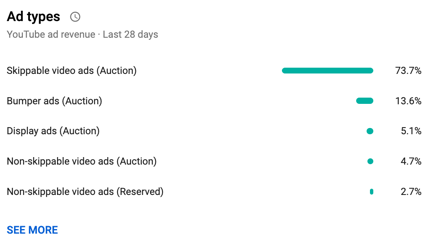
Ad Types
Here are the kinds of ads sold on my channel in the past 28 days.

Of course, I don’t see all the details of every single ad sale. All I see is a breakdown of the kinds of ads sold for videos on my channel and the all-important CPM. The breakdown is on the Channel Analytics Revenue screen and clicking a SEE MORE link brings up a full screen of detail.

The CPM, which also appears on that Revenue screen, is an average of what I’ll be paid per 1,000 monetized views. This number changes regularly — it’s $6.79 this morning, but was down to $4+ the other day. (Again, I suspect a popular video has made space on my channel more valuable.) I’ve seen it as high as $11+. I would not be surprised if I checked in this evening and it was different. (In a way, it’s kind of like a stock market per share valuation for my channel or a specific video. It rises and falls depending on the market for ads on my channel or specific video.) They say that $4 is an average CPM for YouTube creators, so I’ll stick to that for illustrative purposes.

But no, this doesn’t mean you get $4 per view or even $4 per monetized view. It means you get $4 per 1,000 monetized views.

So going back to my previous example, if a video got 10,000 views and 40% of them were monetized and you were getting $4 per monetized view, that’s

10,000 x 40% /1000 X 4 = $16.00

My channel is doing pretty well this month, mostly because of my 737 MAX video‘s popularity. I published it 8 days ago and it has almost 50,000 views as I type this. I can get analytics for just this video and the numbers are very nice: almost 50% monetized playbacks and an $8.38 CPM. That video has earned me $104.54 in ad revenue in just 8 days. Sounds great, right?

Well, let’s look at the video that came out right before it, the Autumn Cockpit POV flight. Although it has a higher percentage of monetized playbacks, it’s only been viewed 2,800 times in two weeks. Its CPM is just $5.91. In two weeks, it’s earned me a whopping $11.99. (That’s not per day, by the way. It’s for the entire two weeks. That’s less than $1 per day.)

And please do remember that a video will not earn the same amount per day/week/month/etc. throughout its whole life. Sometimes they start like duds and pick up steam, like the 737 MAX video — it wasn’t doing well at all for the first two days. And then sometimes they’re going like gangbusters and interest suddenly disappears. You never know what to expect and can only hope for a pleasant surprise.
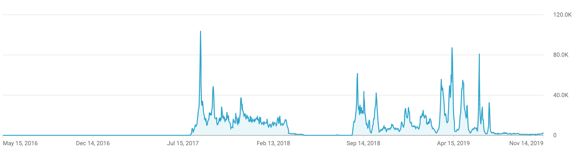
Views
Here are the view analytics for my most popular video ever. It had hardly any views for the first year it was published and then took off like a rocket, with periodic surges. The current live analytic for the past 48 hours shows 4,466 views — three years after it was released! This is a YouTube content creator’s dream; I wish I had a dozen like this.

When I started writing this, I didn’t mean to get into the complex details of revenue calculations for specific videos. I just wanted to explain how ad revenue works for monetized channels on YouTube. To take some of the mystery out of it.

The takeaway on all this is that in order to make YouTube a full-time business — as some creators have — you need a strategy that combines ad revenue from wildly popular videos and other sources. This is why so many content creators on YouTube also sell merchandise and offer memberships or Patreon patron benefits.

I’ll be frank here: creating content for my YouTube channel is crazy expensive. Not only do I have to fly an aircraft that costs hundreds of dollars an hour to fly, but I have to have the cameras, camera mounts, and video editing equipment to record and edit the resulting footage. And the time I spend doing all this is time I’m not spending doing something that could earn money elsewhere so there’s a definite value to my time. I could easily drop $300 to $600 to make a video that will never earn more than what it cost to make.

I’m not complaining here — I’m just telling it like it is. I love flying and having an excuse to fly. I enjoy making the videos. I like most of the very positive feedback I get. But a girl has to make a living so I hope folks don’t mind me pushing Flying M Air hats and T-shirts or asking for Patreon patrons. If my video creation efforts wind up costing me more than I take in over the long term, I simply won’t be able to continue making them.

And every once in a while, I publish one that actually makes the ad revenue work for me. My Home to Airport by Helicopter video, which has over 9.5 million views, is one of them.

Now if only I could come up with about a dozen more like that.
Why I Shop on Amazon

Where else can I get exactly what I want when what I want is something weird?

If you’ve been following this blog, especially lately, you know that I’ve been doing a lot of video work. A bunch of it requires two cameras that create a pair of videos that must be synchronized. As I explain in my video about the setup, I was creating a sort of key frame for synchronization by clapping my hands between the two cameras, which face each other.

That’s not the way professionals do it. They use what’s called a clapboard. It’s the iconic black and white (usually) device that’s snapped together right after the director calls “Action!” Typically, it’s got spaces on it that are filled in with information about the scene being shot, including the date, take, and scene identifying data.

The real benefit of a clapboard is that when you snap it shut hard, it makes a sharp clapping sound. If your video clips have an audio track, this clap appears as a spike in that audio track. That makes it super easy to align the clips so both spikes appear one after the other. Perfect alignment, right up to the frame.

I decided I wanted one of these things.

Now, I live in a rural area. While Wenatchee is a nice little city nearby, it doesn’t have any shops that cater to video producers. This isn’t Los Angeles. Although we have a few video production companies in town — I’ve done some flying work for two of them — the demand for video equipment will never be enough for someone to open a shop that carries the equipment they need.

Besides, I had very specific needs. I wanted one that was small so it would fit in my video kit but not a toy or novelty item. I wanted it to work with dry-erase markers instead of chalk. I wanted it to be sturdy with a good snap.

So I did what most people in the U.S. do these days: I went to Amazon.com and searched for movie clapboard. And Amazon immediately showed me hundreds of search results.

To be fair, some of them were really off-base. A coffee mug with a movie clapboard on it. A novelty director’s party kit that included a fake Oscar, megaphone, and clapboard. A picture frame designed to look like a clapboard. Clapboard keychains. Pillow covers with a movie theme that included a clapboard.

But the vast majority of the hundreds of items listed were actual, usable movie clapboards.

I went through them. It took some time — but not nearly as much time as it would to find a brick and mortar shop that sold clapboards, get to it, make my selection (if they had what I wanted), and get home. I eventually found the one I wanted: Action Cut Board, Andoer Acrylic Clapboard Dry Erase Compact Size TV Film Movie Director Cut Action Scene Clapper Board Slate (whew!). It was $10.99 with free shipping.

I read the reviews with a grain of salt. Amazon reviews are notoriously untrustworthy. You have to read a bunch from “verified purchasers” to get a real idea of the pros and cons of the item you’re considering. Disregard the 5 star reviews that seem a bit too glowing and short on details. Disregard the 1 star reviews that seem too critical and short on details. You know the kind. The rest of the reviews were good enough. One mentioned the solid clapping sound. I think a few complained about the small size — which is actually a feature I wanted.

So I ordered it. It arrived in two days.

The clapboard really is exactly what I wanted, but I admit it did not arrive in perfect condition. Two of the nuts/bolts holding the clapboard on were a tiny bit loose; I tightened them. And the acrylic board that had been glued into a slot on the clapper part wasn’t exactly aligned. Fortunately, it also wasn’t glued in very well, which made it loose in the slot. I pulled it out and glued it back in with more glue and better alignment. What do I expect for $11, right?

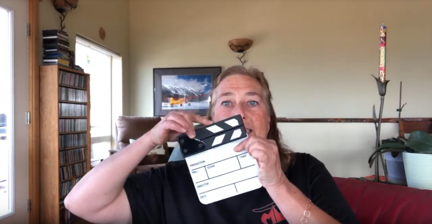
Clapboard
Here I am, showing off my new little clapboard during a livestream event on YouTube.

I showed it off to my YouTube channel viewers at the beginning the AMA Livechat I did last night. I snapped it for them.

This is the kind of thing that’s impossible to find in brick and mortar shops unless you’re in a large enough city with a large enough market for a niche item like this. And that’s why I turned to Amazon. Although it’s often a pain in the butt to wade through the search results and quality is becoming a bigger issue every day as they allow more and more junk to be listed, I will almost always find exactly what I’m looking for, usually at a price that I’m willing to pay.

About the BOGO iPhone 8+

How I got conned into getting a second phone and why I don’t mind.

Back in September, when I was on vacation in Washington, DC, I upgraded my old iPhone 7 to an iPhone Xs. It was just under 2 years since my last upgrade, but the iPhone 7 had a tiny scratch on the camera lens. I was facing either $80 to repair a two-year-old phone or $1000+ to buy a new phone with a much better camera. I went with the upgrade.

While I was there at the Verizon store in Union Station, the salesperson excitedly told me that because I was 55 or older, I qualified for a buy one get one free offer on a second phone. “I don’t need a second phone,” I told her. “I’m one person.”

“But it’s free,” she said.

“What kind of phone?” I asked, figuring I could get it and sell it on Craig’s List. “An old flip phone?”

“Any phone we sell that lists for under $1,000,” was the surprising answer.

“And what about using it?” I asked. “Do I have to pay more every month to have it?”

“No, she told me. “Your monthly service cost will be the same. You just have to keep it for two years.”

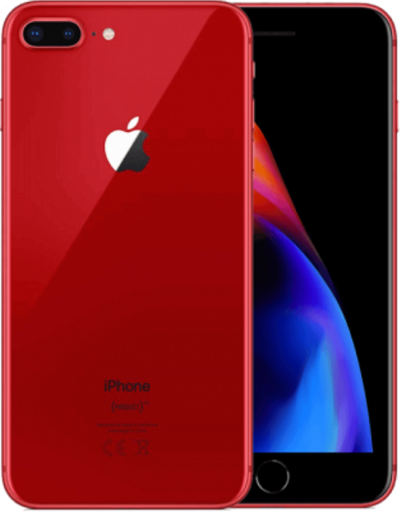
Red iPhone 8+
It’s pretty and I am partial to red.

This sounded too good to be true, even though I couldn’t sell it right away. The way I saw it, it would be an insurance policy; if I broke my other phone, I could use this one. I was hooked. I picked out a red iPhone 8+, which is known for having a good camera. That’s the big screen iPhone. Too big for everyday use, in my opinion, but what the hell. It was free.

Except it wasn’t. I had to pay sales tax on it. That was nearly $80.

She activated my iPhone Xs and I tossed the boxes for both phones in a shopping bag. I finished my vacation 2 weeks later, packed them in my luggage, and brought them home. I put the boxes on a shelf in my office, never even bothering to take out the red phone.

Fast forward to the other day. After getting a phone call while I was recording a video, I decided it might be nice to use a different camera for all these YouTube videos I’ve been making. I thought immediately of the red phone still in its box. The big screen would make it easier for my 55+ eyes to see what I was shooting. I retrieved it, plugged it in to charge its dead battery, and called Verizon to make sure I could activate it and use it without paying additional fees.

I was on the phone for over an hour with the customer service person. Turns out that the Union Station salesperson wasn’t exactly truthful. Although my bill was about what I expected every month — higher than the old bill but just enough to cover the cost of the $1200 iPhone Xs I was paying off over 2 years — I was paying extra for that new phone. I didn’t know it because I never bothered looking at my bill. Service was $40 each per phone and I’d been paying $40/month since September for a phone in a box just draining its battery.

Imagine how pissed off I was. Maybe you can’t. I can get pretty pissed off. I could feel my blood pressure rise.

She did more research and we discovered that my old plan had been $85/month for my one phone. That included unlimited talk, text, and data. The new plan with the BOGO phone was $60/month for one phone or $40/month per phone for more than one phone. So, in reality, I was paying slightly less for my plan every month with two phones than I had been paying for one phone.

But I would be paying $20/month less if I had just one phone. Still, $20/month wasn’t going to break me. Hell, I hadn’t even noticed the difference.

I thought about the situation I’d found myself in. In my mind, I was basically getting two phones for the price of one. At the end of my two year period, I could sell both phones and come out fine. (I keep my phones in pristine condition with cases and screen covers.) In the meantime, I could use this new phone for video stuff; it had exactly the same plan as the one I was using every day.

To sweeten the deal, the Verizon customer service rep put a $100 credit on my account, basically covering 5 months of what I’d paid ($80/month paid – $60/month what I would have paid with one phone = $20/month).

Of course, I wound up keeping the phone. It was a hell of a lot easier than fighting with Verizon about taking it back. And I really do like the phone for the video work I’m doing. The big screen rocks and the camera quality is better than I need.

But I did learn a valuable lesson: The next time I upgrade my phone, I’m taking my bill along with me and will compare the current bill with the new bill. I’m not going to pay for equipment I’m not using again.

Bluehost Domain Deactivated Scam

Another day, another phishing attempt.

This morning, I got an email like this for three of the domains I host at Bluehost.

Bluehost Scam
I found one of these in my email inbox for three of my domain names this morning. I added the red underline; I explain why below.

Here’s the text, in case you can’t read it:

MARIA LANGER

Your web hosting account for flyingmair.com has been deactivated (reason: site causing performance problems).
Although your web site has been disabled, your data may still be available for
up to 15 days, after which it will be deleted.

If you feel this deactivation is in error, please contact customer support via:
http://my.bluehost.com.[redacted].piknini.org/account/8236/reactivation.html

Thank you,
BlueHost.Com Support
http://www.bluehost.com
For support go to http://helpdesk.bluehost.com/
Toll-Free: (888) 401-4678

I have to say that it looked very real. Simple, to the point. From “admin@bluehost.com”. All the links I pointed to actually went to where they said they were.

What really made me almost believe they were real was the fact that I’d made some changes to my domain setup a few weeks ago to lower my hosting costs with a slight hit to performance (which I hoped to be able to minimize with a new cache plugin). So the fact that performance might be causing issues just happened to make sense in my world.

Except, not for the domains it reported: flyingmair.com, flyingmproductions.com, and gilesrd.com. You see, none of those sites get any significant traffic. The only one of my sites that does get significant traffic is the one you’re reading this on right now, and I didn’t get an email message for it.

And then I took a closer look at the link I was supposed to click to resolve the issue. It started off fine: http://my.bluehost.com. But instead of a slash (/) after the domain, there was a dot and an alphanumeric string followed by the real domain I’d be going to if I clicked.

I switched to my browser and manually typed in www.flyingmair.com. The site came right up. It sure didn’t look deactivated to me.

I went up to my loft-based office where I could look at the email on a real computer (rather than an iOS device). I didn’t learn anything new, but by this time I was convinced it was another scam.

It bothered me that I’d almost been fooled. I called Bluehost and was told that they were already aware of the problem. Jeez. You think they’d send out an email warning us about it.

In any case, what I’ve always said about these things still applies: never click a link in an email message you were not expecting. If you think there’s any truth to a reported problem like this, manually type in the domain name of the site you can use to check — in this case, bluehost.com — and log in the usual way to follow up. Or just use the tech support number you should already have on hand to get more information.

Don’t get scammed.

And, for the record, I’d much rather blog about the things going on in my life that aren’t related to someone trying to rip me off than crap like this.

Apple ID Scam

Yet another scam for people dumb enough to click before they check.

Got this email today from “App Service”:

App Service Scam Email
Point to the link to see where it goes BEFORE you click it. In this case, the link does not go to Apple’s website or anything related to Apple.

Pointing to the link makes it pretty obvious that this is a scam. The bubble that pops up does not show a URL shown in the link, or to any other destination on Apple’s website. Clicking this link will likely install malware on your computer or direct you to a site that looks like Apple but is designed to gather your Apple login information, thus gaining access to your credit card, email, and other data you want to keep private.

Don’t click links in email messages unless you are expecting to receive a link.

Check out the text of the message when it’s copied and pasted! You can see a mix of alphanumeric codes and what looks like Chinese charaters embedded in the text.

Dear REDACTED@mac.com,

The following changes to your A96p17p23l98e11 28I98D86 were made on November 6, 2018

B40i40l55l54i52n87g56 Information

If you did not make these changes, or if you believe an unauthorized person has accessed your account, you should change your password as soon as possible from your Apple ID account page at manage.iforgot.service.com
Your Apple ID will be temporarely disabled until you verify your identitiy.
We will wait 24 hours for the verification, if we not receive any verification your Apple ID will be permanently disabled !
吃生薑
Sincerely,

Apple Support

What do you do if you think a message like this might be real? Close the message, go to your browser, and manually type in the URL to go to the site in question. Log in from that screen.