A behind-the scenes look at how YouTube creators can make money on advertising.
A while back, I blogged about an unexpected windfall from my YouTube videos and how that had motivated me to create new content and keep my channel growing as a real source of income. Since then, I’ve learned a few things.
The most important thing I learned was how YouTube advertising revenue works, and I thought I’d share it with the folks who think that they can become rich quick as YouTube content creators. As you’ll see, it isn’t that easy.
Yes, once your channel is monetized — a step that requires the channel to have at least 10,000 subscribers, which is a challenge in itself — you can get a small part of the revenue that YouTube collects on the ads that appear before, on, after, and sometimes during your video.
As a creator, you get some control over what kind of ads appear and when they appear. You can do this on a video-by-video basis or set default options that apply to all new videos you publish. Here’s what the Video Monetization screen looks like for one of my longer videos:

Here’s the Video Monetization settings for one of my upcoming videos.
Of course, all this is moot for a video if you turn monetization off. That doesn’t turn ads off — it just turns off your ability to collect ad revenue on the video. Why would you do that? Well, perhaps the video has a paid promotion in it; if so, YouTube requires you to turn off monetization. Failure to do so is a violation of the terms of service which is a serious no-no in YouTubeland.
If Monetization is turned on, you can select what kind of ads you’ll allow on the video and when they will appear. YouTube recommends that you turn all of them on and it’s pretty obvious that a lot of creators do. But because I hate seeing ads in the middle of a video, I keep the During Video option (at the bottom) turned off. (I wish everyone did.) Other than that, I keep them set as you see here, with most turned on. Skippable ads run for about 5 seconds before you can click to skip them and I think that’s a small price to pay for free content. (To my knowledge, skipping an ad does not reduce my revenue.) Non-skippable ads are a little more frustrating but they’re always short. Overlay ads and sponsored cards both appear over content and I have one turned on and the other turned off; I think my logic was that one is more obtrusive than the other.
Now you might think that turning these on results in ads appearing on every single view. That’s simply not the case. Surely you’ve seen YouTube videos without ads?
There’s actually a sitewide estimate of how often ads appear on YouTube content: 40% of the time. So if one of my videos is viewed 10,000 times, only 4,000 of those views were likely to include ads. This becomes an important number, as we’ll see in a moment.
I should mention here that you can actually calculate your current ad percentage manually by consulting two different analytics screens. The Channel Analytics Overview screen tells you the number of views for a specific period — 28 days by default. The Channel Analytics Revenue screen tells you the number of monetized playbacks. Divide monetized playbacks by total views to get the percentage:
For example, as of today, for the past 28 days my numbers are as follows:
Monetized Playbacks: 62.7 ÷ Total Views: 124.3K = Percent of Videos Monetized: 50.4%
So right now I’m having a higher percentage of monetized playbacks than average. That could be because one of my recent videos has become very popular and may be more attractive for advertisers so I’m getting more ad buys.
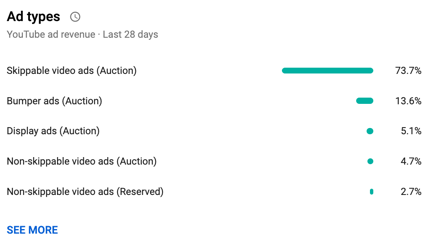
Here are the kinds of ads sold on my channel in the past 28 days.
Of course, I don’t see all the details of every single ad sale. All I see is a breakdown of the kinds of ads sold for videos on my channel and the all-important CPM. The breakdown is on the Channel Analytics Revenue screen and clicking a SEE MORE link brings up a full screen of detail.
The CPM, which also appears on that Revenue screen, is an average of what I’ll be paid per 1,000 monetized views. This number changes regularly — it’s $6.79 this morning, but was down to $4+ the other day. (Again, I suspect a popular video has made space on my channel more valuable.) I’ve seen it as high as $11+. I would not be surprised if I checked in this evening and it was different. (In a way, it’s kind of like a stock market per share valuation for my channel or a specific video. It rises and falls depending on the market for ads on my channel or specific video.) They say that $4 is an average CPM for YouTube creators, so I’ll stick to that for illustrative purposes.
But no, this doesn’t mean you get $4 per view or even $4 per monetized view. It means you get $4 per 1,000 monetized views.
So going back to my previous example, if a video got 10,000 views and 40% of them were monetized and you were getting $4 per monetized view, that’s
10,000 x 40% /1000 X 4 = $16.00
My channel is doing pretty well this month, mostly because of my 737 MAX video‘s popularity. I published it 8 days ago and it has almost 50,000 views as I type this. I can get analytics for just this video and the numbers are very nice: almost 50% monetized playbacks and an $8.38 CPM. That video has earned me $104.54 in ad revenue in just 8 days. Sounds great, right?
Well, let’s look at the video that came out right before it, the Autumn Cockpit POV flight. Although it has a higher percentage of monetized playbacks, it’s only been viewed 2,800 times in two weeks. Its CPM is just $5.91. In two weeks, it’s earned me a whopping $11.99. (That’s not per day, by the way. It’s for the entire two weeks. That’s less than $1 per day.)
And please do remember that a video will not earn the same amount per day/week/month/etc. throughout its whole life. Sometimes they start like duds and pick up steam, like the 737 MAX video — it wasn’t doing well at all for the first two days. And then sometimes they’re going like gangbusters and interest suddenly disappears. You never know what to expect and can only hope for a pleasant surprise.
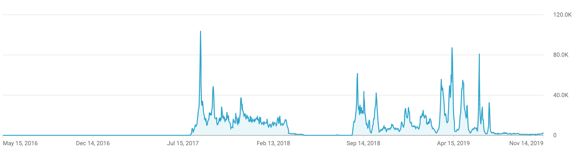
Here are the view analytics for my most popular video ever. It had hardly any views for the first year it was published and then took off like a rocket, with periodic surges. The current live analytic for the past 48 hours shows 4,466 views — three years after it was released! This is a YouTube content creator’s dream; I wish I had a dozen like this.
When I started writing this, I didn’t mean to get into the complex details of revenue calculations for specific videos. I just wanted to explain how ad revenue works for monetized channels on YouTube. To take some of the mystery out of it.
The takeaway on all this is that in order to make YouTube a full-time business — as some creators have — you need a strategy that combines ad revenue from wildly popular videos and other sources. This is why so many content creators on YouTube also sell merchandise and offer memberships or Patreon patron benefits.
I’ll be frank here: creating content for my YouTube channel is crazy expensive. Not only do I have to fly an aircraft that costs hundreds of dollars an hour to fly, but I have to have the cameras, camera mounts, and video editing equipment to record and edit the resulting footage. And the time I spend doing all this is time I’m not spending doing something that could earn money elsewhere so there’s a definite value to my time. I could easily drop $300 to $600 to make a video that will never earn more than what it cost to make.
I’m not complaining here — I’m just telling it like it is. I love flying and having an excuse to fly. I enjoy making the videos. I like most of the very positive feedback I get. But a girl has to make a living so I hope folks don’t mind me pushing Flying M Air hats and T-shirts or asking for Patreon patrons. If my video creation efforts wind up costing me more than I take in over the long term, I simply won’t be able to continue making them.
And every once in a while, I publish one that actually makes the ad revenue work for me. My Home to Airport by Helicopter video, which has over 9.5 million views, is one of them.
Now if only I could come up with about a dozen more like that.