I’ll get the hang of it — one of these days.
I’ve now had my new POV.1 video camera for just over a week. And I’m not too pleased with my ability to operate it yet.
Tests Runs Okay
 I made a few test runs with the camera.
The first consisted of me walking around the downstairs of my house, holding the camera in my hand and narrating what I saw. This was mainly a test of the controls and sound capabilities. It produced some predictably boring yet perfectly fine quality video. So far, so good.
Next, I attached the camera to a hat and had it running when I went down to feed the horses one evening. More narration, but I was limited to where the camera pointed because it was attached to my hat and the monitor was in my pocket. I couldn’t see what the camera was really pointing at. It turned out, it wasn’t pointing at what it should have been for about 90% of the video. So while the sound test worked fine — you could certainly hear my heavy breathing as I walked back up the hill — the video was not a keeper.
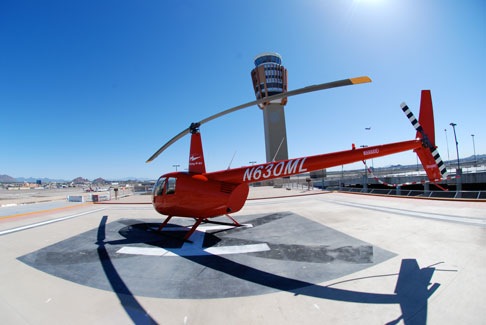
Next, I decided to test the setup in the helicopter. Because running the helicopter is not what a budget-conscious individual would do unnecessarily, I wanted my test to test all systems: the camera mount, video quality, and sound. Sound was the tricky part. I couldn’t just let the mic pick up cockpit sound because that was mostly helicopter engine and rotor noise. Instead, I had to figure out a way to get just the sound I wanted — intercom and radio sounds — directly into the POV.1’s recorder.
 The solution was to use a tiny powered lapel mic (similar to the one shown here) that I happened to have for a cassette recorder. The mic’s pickup was small enough to fit inside my headset ear cup, dangling right over my ear. I secured it in there with a clip. Any sound that got to my ear would get to the recorder. And the Bose Generation X headset’s active noise cancellation would filter out much of the sound of the helicopter running.
[A side note here: a more permanent solution would be to get an avionics guy to install an audio out jack. I already have an audio in jack, which is standard on Robinson helicopters, and allows me to listen to my iPod while I fly. An audio out would make it possible for me (or a passenger) to connect a video camera to the helicopter’s intercom system.]
I mounted the camera on the bar between the two front seats, using a mount I’d bought a year or two ago for a regular digital video camera. (That experiment had not gone well; the camera couldn’t compensate for the helicopter’s vibrations.) Then I went flying with Ed, my mechanic. We took a 14-minute flight around Vulture Peak, down to Vulture Mine, and back to the airport. Ed held the recorder unit while I flew. I used Viddler to post an edited-down version of the video. It wasn’t bad at all.
In fact, I thought I was ready for “prime time.”
Real Life Trials
My next for-hire flight was the next day. I was taking a dad, his birthday-boy son, and his son’s friend on a 50-minute flight to see the ghost towns and mines in the Wickenburg area. I figured I’d video the flight, then put the video on a DVD for the dad and his son.
[Another note here: That day, as I waited for my passengers, I met a pilot from Oregon who typically flies with three cameras on his plane. He had his laptop with him and showed me some of the video, which he’d set to music. It wasn’t very exciting stuff — not for a fellow pilot, anyway — but he said that his non-pilot friends love it. That wouldn’t surprise me at all.]
I was all set up as I had been the day before. As the helicopter warmed up, I started the recorder and placed it back on the space between the two back seats so it would be out of the way. I then did the flight. When we returned and shut down, I was surprised to see that the recorder was turned off. I figured it had run out of space on the SD card. But when I brought it inside, I was embarrassed to see that it had only recorded 41 seconds of video. The power button must have been hit after I put it down.
Dang! No video for my clients.
Anxious to get some real video to send them, Mike and I went out again with Mike’s mom. This time, I turned the camera on and locked its controls to prevent an accidentally pushed button from shutting it off.
I managed to capture 80+ minutes of video and sound. The only problem was, Mike’s mom’s profile or hands or shoulders are in every shot. In attempting to capture what was out the window in front of her, I managed to capture a bit too much of her. And 80+ minutes of partially blocked views, much of which are of boring open desert, really isn’t very interesting to anyone. Here’s a tiny bit I extracted and set to music.
On Wednesday, I took another client “heli shopping” down in Scottsdale. She’s a much smaller woman and I adjusted the camera a bit to take in more of the panel and less of her. But I also made the fatal error of using the camera’s “loop” mode to avoid capturing lots of boring stuff. Unfortunately, I didn’t understand how loop mode really worked, so when I thought I was turning it on and tagging the video, I was really turning it off. I didn’t capture any video at all.
Sheesh. Am I a loser or what?
Today’s Plan
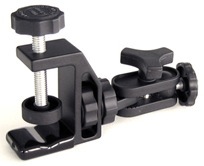
 For today’s flight to Sky Harbor, I made some changes to the mounting setup. I’d ordered a special mounting clamp from the V.I.O. people and it arrived on Wednesday afternoon. It would give me more flexibility in where I could mount the camera.
There are two places I had in mind. The first was inside the cockpit bubble, at the front passenger’s feet. There’s a ridge there at the very bottom of the bubble and I’m pretty sure I can use the clamp and the 12-in. flexible mount I also bought to mount the camera inside, pointing out. The drawback of that location, of course, is glare. An additional drawback is the position of the recorder box and the difficulties I’d have attaching audio to it. (I can’t have any wires hanging loose around the critical areas near my flight controls.)
 The second place I had in mind was where I actually attached it: on the vent opening for the pilot’s door. This mount, which is shown here in the photos I took with my Treo yesterday, has the camera head outside, pointing slightly to the right and slightly down. The rest of the unit is inside, fastened to the helicopter’s airframe. I have all wires securely attached to various things that’ll keep them away from my controls. And I wrapped the camera and mount with red electrical tape, which is somewhat elastic and easier to remove than duct tape. I showed the setup to Ed and he agreed that the camera was not likely to come loose during flight.
Today will be an important test. If I can get the camera to work well from this position and not screw up using the controls, I’ll have some really interesting video. And if the mount and tape hold properly, it might be a good location for future installations.
To Las Vegas on Sunday
We’ll be flying to Las Vegas on Sunday. My planned route will take us over some very boring desert to Lake Havasu City. From there, we’ll fly up the Colorado River, past Topock, Bullhead City and Laughlin, Lake Mohave, Black Canyon, the Boulder Dam, and Lake Mead before turning west and flying right down Tropicana Boulevard to McCarran Airport. It’s one of my favorite flights and I’m eager to get the “good parts” on video.
So cross your fingers for me. I need to get some good shots soon.

 I made a few test runs with the camera.
 The solution was to use a tiny powered lapel mic (similar to the one shown here) that I happened to have for a cassette recorder. The mic’s pickup was small enough to fit inside my headset ear cup, dangling right over my ear. I secured it in there with a clip. Any sound that got to my ear would get to the recorder. And the Bose Generation X headset’s active noise cancellation would filter out much of the sound of the helicopter running.
 For today’s flight to Sky Harbor, I made some changes to the mounting setup. I’d ordered a special mounting clamp from the V.I.O. people and it arrived on Wednesday afternoon. It would give me more flexibility in where I could mount the camera.
 The second place I had in mind was where I actually attached it: on the vent opening for the pilot’s door. This mount, which is shown here in the photos I took with my Treo yesterday, has the camera head outside, pointing slightly to the right and slightly down. The rest of the unit is inside, fastened to the helicopter’s airframe. I have all wires securely attached to various things that’ll keep them away from my controls. And I wrapped the camera and mount with red electrical tape, which is somewhat elastic and easier to remove than duct tape. I showed the setup to Ed and he agreed that the camera was not likely to come loose during flight.