Getting a Part 135 Certificate

Don’t expect free help from me.

Last night, I received yet another e-mail from a helicopter operator with questions about getting a Part 135 certificate. I thought that it was about time for me to explain why people who e-mail me for free help about this won’t get it.

But first, a bit of an explanation of what a Part 135 Certificate is.

What Is a Part 135 Certificate?

A Part 135 certificate is literally a piece of paper issued by the FAA that permits a commercial aircraft operator to perform air-taxi operations. The phrase air-taxi refers to the mission of picking up a passenger at Point A and transport him to Point B. A Part 135 Certificate also permits an operator to conduct aerial tours beyond the 25 statute mile limitation set by Part 91 or the relatively new Part 136. Part 135 gets its name from the Federal Aviation Regulations (FARs) Part 135, but a Part 135 operator must also comply with all other applicable FARs, including Parts 61, 91, and 119.

Zero Mike Lima at Monument Valley

Zero-Mike-Lima at Monument Valley during one of my multi-day excursions.

A Part 135 certificate is worth more than its weight in gold for an operator that has one and can use it properly. For example, if I didn’t have one, I’d be limiting my operations to short tours within 25 miles of my starting point and aerial photo/survey flights. With a Part 135, however, I can also take my tours as far as I like, transport passengers between two points, and even offer day trips and multi-day excursions. In the highly competitive area I live in — Arizona is just swarming with helicopter operators — a Part 135 Certificate gives me the competitive edge I need to stay in business. (With less local competition, I might even become profitable. Wouldn’t that be special?)

There are three types of Part 135 certificates: Single Pilot, Single Pilot in Command, and Basic. I have a single Pilot Part 135 certificate. That means that under my company’s certificate, only one pilot is allowed to fly the aircraft under Part 135: me. (Hint to jobseekers: that’s one reason why I don’t ever hire other pilots.) A Single Pilot in Command certificate is similar, but is used mostly in organizations with aircraft that require more than one pilot; just one of those pilots is allowed to fly as pilot in command, but any other pilot can be second in command. The Basic Part 135 certificate — and I may have its name wrong — allows multiple pilots to act as pilot in command on multiple aircraft. The Grand Canyon tour operator I worked for had a Basic Part 135.

At a recent meeting at my local Flight Standards District Office (FSDO; pronounced fizz-doe), I learned that there are only 4,800 Part 135 certificates in the entire country. If you take a moment to consider what percentage of those could possibly be helicopter operators, you’ll realize that I’m part of a very small club.

The penalty for conducting a Part 135 operation without a Part 135 certificate? Well, I know of at least one pilot who had his license permanently suspended. Ouch. When you consider the amount of time and money a commercial pilot — especially a helicopter pilot — might have invested in a career, that’s a very costly penalty.

Airline operations, by the way, are Part 121, which has tighter regulations.

How to Get a Part 135 Certificate

You work with your local FSDO to get a Part 135 Certificate. It requires multiple meetings at the FSDO to work your way through a flow chart of activities. Although I’ve heard of people getting their Single Pilot Part 135 as quickly as three months — it took me four months — it takes other people years. In fact, more than a few operators have gone out of business while working through the process.

Want Help Writing a Statement of Compliance?

When I wrote this blog post back in 2010, I was firmly against helping operators create their Statement of Compliance. At time time, I was based in Arizona with a lot of competition making it damn near impossible to turn a profit. Things are different now. It’s 2017 and I’m comfortably settled in Washington State with a small market but little competition for Part 135 work. In addition, I have found more lucrative sources of flying revenue that don’t require a Part 135 certificate at all. Add to that the FAA’s recent requirement for all Part 135 helicopter operators to have a radio altimeter and the cost to obtain that and I’m a bit softer about helping others — for a fee. Let’s just say that the FAA has motivated me to sell my experience and possibly increase its workload.

So here’s the deal. If you’re interested in getting help writing a Statement of Compliance for a Part 135 certificate, use the form on the Contact page of this site to get in touch with me. Tell me a little about your business and the aircraft you fly, the kind of Part 135 certificate you’re seeking, and where you are in the process with your FSDO. If I think I can help you, I’ll let you know what kind of compensation I need to write a Statement of Compliance for you.

Keep in mind that although this will make the process easier, it’s still time-consuming and you’ll still have a lot of work to do on your own.

There’s a lot of paperwork. The biggest challenge to most people is the creation of a Statement of Compliance. That’s where you list all the applicable FARs and state exactly how you will comply. My Statement of Compliance, written in 2005, was 54 pages long. It wasn’t difficult for me to create because, after all, I am a writer. But I’d say that 90% of the people who try to get their Part 135 certificate stumble on this component, which occurs about halfway through that flow chart.

You’ll also need to get on a drug testing program, create a training manual for carrying (or not carrying) HazMat, and obtain a secure location for basing your aircraft. You’ll need to create forms for pilots to log time flown, aircraft flight time, and squawks. You’ll need to have perfect maintenance records. If you’re going for a Basic Part 135, you’ll need all kinds of other manuals and documents, as well as staff in predetermined positions, such as Director of Operations, Director of Maintenance, etc.

The FAA did not make the process easy. If it were easy, everyone would have a Part 135. Instead, they made it a challenge.

I am extremely fortunate to be working with an excellent FSDO full of people who are reasonable and helpful. Yes, I’m required to jump through the same hoops as everyone else, but my contacts at the local FSDO help me make those jumps. In turn, I comply with their requests promptly, without question. After all, their mission is to keep me safe. Why wouldn’t I want to be safe?

Why I’d Rather Not Help You Get Your Part 135 Certificate

I’ve already given you several hints on why I’d rather not help you get your Part 135 Certificate. Did you read between the lines to get the answer? If not, I’ll spell it out for you.

  • Rise to the challenge. I personally believe that the FAA makes it challenging to get a Part 135 Certificate as a test to see if applicants are worthy. Let’s face it: the FSDO folks spell out what you need to do — using a flowchart, for Pete’s sake! If you come into the application process with the right attitude, they’ll help you achieve your goal. But they won’t just give you a certificate for showing up. You have to earn it. By jumping through all the hoops and smiling the whole time, you’ll prove that you have the right stuff to be a safe and cooperative aircraft operator. If I — or anyone else — help you get your certificate, you won’t prove anything other than that you can’t do it alone.
  • Membership has its privileges. That old American Express slogan can easily be applied to the 4,800-member club of Part 135 certificate holders. We can do things that Part 91 operators can’t. This gives us far more flexibility in our operations. I can’t tell you what a joy it was to finally be able to say yes to a client request for an air-taxi flight. Saying yes means more business, more revenue.

I get e-mails and calls at least twice a month from helicopter operators hoping I’ll help them get their Part 135 certificate or make their business grow. Apparently, it isn’t enough for me to write about my own experiences here so they can use them as learning tools. Instead, they want me to take them by the hand and walk them through the process.

Why should I? What’s in it for me?

I did the hard work I needed to do to get my certificate and build my business. Isn’t it in my best interest to have other operators jump through the same hoops I did and prove they’re worthy of getting a Part 135 certificate? Wouldn’t I rather be sharing the skies with pilots who passed muster with the FAA? Wouldn’t I rather refer overflow business to an operator I know has the ability to do his own homework?

You want a Part 135 certificate? Take my advice: Call your local FSDO and set up a meeting to get started. Then put a smile on your face, roll up your sleeves, and get to work.

Helicopters 101: Flight Planning

The basics of cross-country flight planning for helicopters.

Articles in the Helicopters 101 series:
Flight Planning
CG
Weight
Hover Charts
Ground School

Recently a reader of this blog wrote to suggest that I cover cross-country planning as a blog topic. I searched my archives and found that I already had. My post, “Flight Planning,” goes into a great deal of detail about the process I use to prepare for Part 135 charter flights, which require a complete flight plan. But that’s probably not what this reader was talking about. I think he was more interested in the nuts and bolts of creating a flight plan.

This weekend, I have to make three relatively long cross-country flights:

  • Wickenburg, AZ (E25) to Page, AZ (PGA) – 189 nm direct
  • Page, AZ (PGA) to Salt Lake City, UT (SLC) – 232 nm direct
  • Salt Lake City, UT (SLC) to Seattle, WA (BFI) – 601 nm direct

I’ve flown the route from Wickenburg to Page and back numerous times. I’ve done Salt Lake CIty to Page once and Seattle to Salt Lake City once. I figured I’d use the PGA to SLC flight, which I’ll be doing alone, as an example of how I plan a flight.

Weather

A few days before the scheduled flight, I start checking the weather along my route. I use the National Weather Service’s NOAA Web site for weather information. After all, the NWS is the source of all the weather data for the United States. That’s where the Weather channel and Duats and the FAA get raw weather data. Although each weather reporting organization may interpret it slightly differently, it’s all based on the same stuff. And the NWS site doesn’t bombard me with obnoxious advertising.

A lot of folks use the Aviation Weather link to get aviation weather information. I don’t — at least not a few days out. Remember, I’m flying a helicopter. I’m 500 – 1000 feet off the ground. I don’t care much about upper level disturbances, the jet stream,or icing in clouds. I’m not getting anywhere near that stuff.

Page Weather

The graphic weather forecast for Page on the morning this post was written.

What I’m interested in is forecasted conditions for the departure and arrival airports, as well as any cities in between. So, in this case, I would check out the weather forecast for Page, Salt Lake City, and possibly Richfield, which is roughly halfway between the two. I’ll pay close attention to the forecast for my day of travel, as well as the day before and after.

What I see today is relatively poor forecasted conditions for Saturday, the day of my flight, with chance of rain or snow at each location. Not what I want to see, but remember, it’s a forecast. It will probably change. I have to hope it gets better.

Route

Next, I plan out my route. Although I listed straight-line distances at the beginning of this piece, I seldom fly in a straight line. Instead, I try to find a route that’s a compromise between a straight line — which, out in the desert, usually means doing a lot of flying in the middle of nowhere — and following roads — which is where people will be if I need help.

Now I need to make it clear that unless there’s a road going the way I need to go, I’m not going to follow roads to get from Point A to Point B. I don’t want to go out of my way — at least not too far. Helicopters are expensive to fly and I’m not made of money. The time budget for this trip is 2 hours — that’s what the client paid for — and I’ll need all of it and then some. So what I want is a compromise that puts me near roads for part of my trip.

I plan my route with charts. World Aeronautical Charts (WACs) are very handy for long cross-country flight planning. But sectionals offer more detail.

Of course, I cheat. I use SkyVector.com. It puts the charts onscreen and enables me to do some very basic flight planning — mostly distances and directions. As the site warns — probably with the advice of lawyers — it’s not for navigation or preflight use. But I use it for preliminary planning. It really helps me get a good idea of where I need to go.

Options

The pink line at the bottom is the direct route from Page to Brice; the red and blue lines are my two options for continuing northbound without overflying 10,000 foot mountains.

In this case, I’m seeing that a direct flight from Page (PGA) to Bryce Canyon (BCE) would take me 57 nm mostly over remote, high desert terrain, climbing from about 4300 feet to over 7000 feet. No major mountain ranges to cross along the way — and that’s good.

From there, I can follow the East Fork of the Sever River and the road beside it northbound between a pair of mountain ranges topping out at over 10,000 and 11,000 feet, then follow a pass that’ll hook me up with Highway 89. This map shows it as the red route. That’s the way I flew last time and the only drawback I recall was the rough air in that pass.

The other option is to continue on almost the same heading to Panguitch (U55), which will hook me up with Highway 89. I can then follow that northbound between two mountain ranges topping out at 11000 feet, staying slightly lower in overall altitude and sticking with a well-traveled road. This map shows it as the blue route.

Completed Route

My planned route, roughed out on SkyVector.

I continue this process for the entire trip. This one’s pretty easy; I’ll be following Route 89 most of the way. When I get to the outskirts of Salt Lake City, I’ll be following I-15. This turns my 232 nm trip into a 259 nm trip and adds at least 15 minutes of flight time. But I’ve minimized my flying time over the middle of nowhere without detouring too much out of my way. The WAC charts I pasted together here from SkyVector screenshots give you an idea of what the entire route looks like. I can also see that my flight without wind could be as long as 2-1/2 hours. My helicopter’s endurance is just 3 hours, so I need to consider the possibility of needing a fuel stop if I hit headwinds. Fortunately, there are plenty of airports with fuel along the last 50 miles of my route.

By the way, the main benefit to following a road when you enter busy airspace and don’t know the local reporting points is that you can state your position to ATC in relation to the road. For example, “Helicopter Zero-Mike-Lima is ten miles south over I-15” is a very definite location.

Once I get a rough outline of the course, I go into detail with sectional charts. I buy them as needed for my cross-country flights. I’ll check to be sure there’s no special airspace or weird activity (think gliders and ultralights) along the way. I’ll also look for charted power lines — not that I’ll remember them when the flight time comes. I’ll make a cheat sheet of airport names, designators, elevations, and frequencies so they’re easy to enter into my GPS for added navigation assistance during flight.

Although I don’t usually mark up my local charts (Phoenix sectional and terminal area chart), I don’t mind taking a highlighter to the Las Vegas and Salt Lake City Sectionals I’ll use for this trip. I’ll also have a Salt Lake City terminal area chart on hand. Before I start my flight, I’ll fold them all neatly to expose the route. With just one hand to fiddle with charts, it’s much easier to prepare before lift off.

Destination Information

On this particular trip, I’ll be landing at Salt Lake City Airport, a Class Bravo airport I’ve never landed at before. I’ll need to know where on the airport I’ll be landing so I don’t sound like a complete idiot when I talk to the tower.

Airport Diagram

The airport diagram for SLC. General aviation is handled in the southeast corner, not far from the I-15 freeway.

I could pull out my Airport/Facilities Directory and look up the airport, but that green book is already stowed in the helicopter for the trip. So instead, I’ll hop online to the FAA’s AeroNav Services (formerly NACO) web site. Once there, I’ll click the link for Free Digital Products and then click d -TPP and Airport Diagrams on the page that appears. (Note that you can get a PDF of the page(s) for a specific airport from this site, too.) I’ll use links and search to get the Airport Diagram for SLC, which will be downloaded as a PDF. I can print it out for future reference and put it with my charts.

I’ll also go to AOPA Airports and get information for SLC. I’m interested mainly in FBOs. I was told to go to Million Air, so I want its location, frequency, and phone numbers. AOPA Aiports also shows a zoomed in satellite image of the FBO’s location, making it easy to mark on the airport diagram.

While I’m at the AOPA Airports site, I’ll also jot down the phone numbers for the AWOS or ASOS systems along my route. I’ll program these into my cell phone. This way, if I need up-to-date weather information for a specific airport, I can get it by simply calling. This has come in handy in the past in marginal weather conditions. I have quite a few airports stored in my computer and phone.

Note that I always get airport frequency information from FAA sources: up-to-date charts or the Airport/Facilities Directory. No online database that isn’t maintained by the FAA is guaranteed to be accurate. There’s nothing worse than trying to land at a towered airport and having the wrong frequency for it. I’ll also update my Garmin 420‘s database before this flight. I have an annual subscription, but I often skip updates because they’re such a pain in the butt to install.

Final Planning

I’ll keep watching the weather all week. If it starts to look like its getting worse, I’ll start thinking about rescheduling my trip. In all honesty, the only thing that would stop me from doing the flight would be winds in excess of 40 miles an hour (possible, but not likely), low clouds (definitely possible), or freezing rain (possible). Although I mostly fly in great weather here in the desert, I’ve flown in ugly weather, too. A fair weather pilot should not be flying for hire.

The day before the flight, I’ll call Million Air and tell them to expect me. I don’t have to do that, but it’s better than just dropping in. They’ll also give me some insight about where to land/park. I’ll note it on my airport diagram.

The day of the flight, I’ll check the weather again. This time, I’ll use Duats.com. I’ll punch in my flight plan airports and let Duats tell me the official aviation weather and notams and give me a more precise (official) flight plan that factors in the wind.

Could I do it by hand? Yes, if I had to. But I don’t so I don’t.

I’ll also make my fly/no fly decision.

I’ll file a flight plan via Duats. I might forget to open it when I take off, though. I often do when I fly by myself. But I have a Spot Messenger that broadcasts my location to a Web site that my husband monitors. I think that’s better flight following than I could get from the FAA without climbing to 12,000 feet. (Keep in mind that I don’t have oxygen and the R44 vibrates like a coin op motel bed at altitudes above 9500 feet.)

That’s About It

That’s all there is to it. The longer the flight, the more variables to consider. This is a pretty short one. The flight from Salt Lake City to Seattle is another story. Lots of variables there. My co-pilot on that trip will plan and fly the entire route. I’ve already looked at the route he suggested and it seems fine to me. I’ll just follow along on the chart.

The main thing that makes this different from planning for an airplane flight is the altitude issue. Airplanes climb several thousand feet over terrain. Mountains don’t get in their way; they’re above the mountains. Helicopters generally don’t fly that high, so we often look for routes that take us around obstacles like 11,000 foot mountain ranges. We also have the luxury of being able to land almost anywhere if we have a problem

John McCain’s Miracle Fence

McCain uses his vast ignorance to mislead the public.

Lately, the radio here in Arizona has been full of commercials for John McCain. You know. That Senator from Arizona who gave Sarah Palin her ticket to wealth and fame? The man with the creepy smile who lost to Barack Obama in the 2008 Presidential Election? The man who’s trying hard to stay in the public eye by speaking out against everything our President is in favor of, even when the President’s plan would benefit his constituents?

John McCain: Angry Old ManYeah. That guy.

Although I usually switch channels when a McCain commercial comes on, I actually listened to one yesterday. It was old Johnny, talking about his immigration plan. And what pissed me off was his promises to “build a fence” along the Arizona – Mexico border.

I’ve flown the Arizona border in a helicopter 300 feet off the ground from Yuma to Nogales — a distance of 230 statute miles. (There’s another 100 miles of border beyond that before you get to New Mexico.) Although the first bunch of miles are flat and already have some sort of fence, there are long stretches of mountainous terrain where the erection of a fence would be downright impossible. The landscape is rocky and rugged with towering cliffs and tall peaks. Other than white markers positioned more than a mile apart, the border is impossible to see. (I actually slipped over to the Mexican side during the flight because I couldn’t see the next marker.) It’s Sonoran desert, home to cactus, rattlesnakes, and coyotes. There are few roads on the U.S. side. It would take a miracle to build a fence there — and if one were constructed, it would be a crime against nature.

Arizona-Mexico Border

Yet John McCain continuously promises to build this miracle fence, leading people who haven’t seen the border first hand — 99+% of the population, including, no doubt, John McCain himself — to believe that such a task is not only possible, but it’s reasonable.

It’s neither.

In fact, even attempting such a feat would be a blatant misuse of public funds. Arizona’s own “Bridge to Nowhere.”

I believe that the Arizona-Mexico border is impossible to fully secure. Even if fences were built, they’d be cut, tunneled under, or torn down — as they already are. Illegals will get into the country from Mexico. That’s a fact of life in Arizona. Don’t get the idea that it’s easy to get it; it’s not. But it is possible and it will always be so — just as it’s possible to get across the Canadian border. Building a fence will not deter those who are serious about crossing the border.

What’s the answer? I don’t know.

But I do know that I’m sick of listening to John McCain mislead the American public into thinking that the solution is as easy as putting up a fence.

iPad: First Impressions

First thoughts on Apple’s “magical” device.

iPadLast week, while I was away in Ventura, CA, recording a revision to my Twitter course for Lynda.com, I took the plunge and bought an iPad. I bought the 32 GB WiFi version. I already pay for Internet in three places and am not willing to add a fourth monthly Internet bill.

Because I had a lot of work to do all day in the recording booth and a lot of work to do in the evening to prepare for the next day in the recording booth, I didn’t open my new toy for over 24 hours. This was particularly difficult on the last day of recording when I could see the bag containing my new iPad right outside my booth, just beyond where my producer sat.

@Miraz commented on Twitter that I have iron willpower. She may be right, at least as far as this goes.

So later that day, when the course was in the can (dig my movie lingo), I finally got a chance to break my iPad out of its box and play with it.

Very First Impressions

My immediate impression on power up: disappointment.

The trouble is, if you don’t have an Internet connection when you first power up, there’s not much of interest to play with. So the “right out of the box” experience isn’t too thrilling. Perhaps Apple should have included some sort of video tour? Or sample content? Something to give you a gee whiz, this is fun feeling?

I didn’t have Internet when I first fired it up. I was staying in a hotel that had WiFi but it was kind of flakey. I’d connect with my MacBook Pro and maybe be able to access a page or two and then it would throw up a page forcing me to log in for free. It did this at least once a day. When my iPad reported that too many people were connected (?), I thought it was this weird hotel Internet.

Similarly, I had trouble connecting my iPad to my MacBook Pro with the provided cable. I kept getting weird error messages on the iPad. I kept doing what I thought — intuitively, mind you — would fix the problem. Eventually, it did. I made the connection to my MacBook Pro and, moments later, the weird hotel login screen appeared in Safari on my iPad. I connected to the world.

Suddenly, the iPad wasn’t so disappointing anymore.

The Good

I’ll tackle the list of what’s good about my first experience first.

  • Included Apps. The iPad comes with a number of applications and most of them are good, well designed, and useful. I’m constantly surprised by how well thought out some of them are. I’m especially impressed with the implementation of Address Book and the way Mail makes it very easy to add a sender as a contact. (More on apps — specifically, interface — in “The Bad” section below.)
  • iPad CaseApple Case. Frankly, I can’t understand why so many third party vendors are creating and selling cases for this device. The plain black case Apple offers (at a whopping $49) is excellent. It provides the protection you need for your iPad investment without making a slim, portable device unnecessarily bulky. And since the cover can be used to prop up the iPad at an angle in landscape view, it does double duty. Now that I’ve slipped my iPad into it, I can’t imagine the need for anything else.

Just two good things? Yes. For now. After all, these are my first impressions.

The Bad

Here’s what I didn’t like about the iPad. Remember these are first impressions. I’ve organized these by how nit-picky they are. The first ones are minor whines; the last ones are what I consider serious drawbacks.

  • Packaging. There’s too much. The box is beautiful, as most Apple product boxes are, but it’s about twice as big as it needs to be. As a result, I had to leave it behind in my hotel garbage pail. Couldn’t fit it in my luggage. And let’s be real here: Aren’t big boxes a bit wasteful?
  • Documentation. There is none. Well, there is a small card with a picture of the iPad and callouts to what its few buttons do. Beyond than that and a few brief instructions on the back of the card, you’re pretty much on your own until you can get on the Internet. That’s where you can download a 154-page iPad User Guide available as a PDF. As @JeffCarlson pointed out, there’s a link to this manual in Safari’s bookmarks. Sadly, I replaced Safari’s bookmarks before seeing that link. I had to stumble upon the documentation on Apple’s Web site. You can find it on the Manuals page.
  • Interface. While I’m sure the iPad’s interface is completely intuitive to someone who has been using an iPhone or an iPod Touch for years, it was very unintuitive to me. (I’ve never owned an iPhone or iPod Touch.) I didn’t immediately (or intuitively) know how to go back to a previous screen or perform some functions. I kept looking for Mac OS type interface elements that I needed to get a job done and coming up empty. Instead, there was some other element II’d never seen before that did the job. Yeah, I know I’m not a genius, but I make my living figuring out how things like this work and I still struggled a bit with it. I think that putting this in the hands of someone who has always used the same kind of computer and operating system his/her entire life will stoke up a lot of frustration. It’s very interesting to me how individuals who have no computer experience — very young children, older folks, and cats — seem to be able to use the iPad without much problem. I think it’s because they don’t have to “relearn” anything to do so.
  • Keyboard. In general, the keyboard is pretty good and very easy to use. But it’s definitely not one a writer would depend on to write a long piece. I started this blog post on my iPad (in the WordPress app, no less) and wound up sending it to my iMac to finish. (I got as far as the second bullet point in this list and added the images later.) I would go nuts if I had to write more than a few paragraphs with that keyboard. My main gripe? The apostrophe key. It’s in a weird place. I do need to mention, however, that since I learned how to use the dictionary assistant feature that’s part of text entry — I had to look it up in the User’s Guide, for Pete’s sake! — typing is a lot better, although not much faster. Using a wireless keyboard helps tremendously. The Keyboard Dock that Apple offers, by the way, is obviously not designed for travel. The Dock part doesn’t detach, making it extremely bulky. I’m surprised at Apple. They can do better design that that.
  • KindleKindle vs. iBooks. I think Apple missed the boat on this one. The Kindle app (see screenshot) has iBooks beat. Why? Because the Kindle app is available for iPad, iPhone, BlackBerry, Mac OS, Windows, etc. iBooks is available on iPad. So I go to Amazon.com and I buy a book. That book is automatically available on all of my registered devices. My bookmarks and last page read are automatically synchronized among them. So I can read a book in bed on my iPad and then, the next day, when I’m stuck waiting in line at the Motor Vehicle office, I can whip out my BlackBerry and continue reading where I left off. Theoretically, I can also register my husband’s Windows laptop so he can read my books, too. The only thing that would make this better is the ability to loan books to other Amazon.com account holders like Barnes and Noble’s Nook. (By the way, I named my iPad “Not Nook” because I cancelled my Nook order in January, expecting to buy an iPad instead. B&N dropped the ball when they couldn’t fulfill orders in a timely manner. Not having a problem doing that anymore, I bet.)

  • iTunes. The iTunes app is really the iTunes store. It’s embarrassing to admit that it took several frustrating sessions with my iPad to figure out that I had to use the iPod app to access my iTunes music. Hello, Apple? You had to include two store applications? You couldn’t just make one? This really illustrates what some blogger — wish I could remember who! — said about the iPad: it’s just a vehicle for selling content.
  • No FlashFlash. Okay, so the iPad doesn’t support Flash. I don’t care very much because I hate Flash. I hate the way it’s overused on the Web, I hate the way it takes so damn long to load on the shitty slow Internet connection in my Wickenburg office, I hate the way when it finally loads that it wastes time and bandwidth with idiotic content. Take, for example, the crappy design of Stingray Sushi’s Web site. Like I need to see dancing Sumo wrestlers? Hear loud music? I couldn’t see or hear it on my iPad, but even when my husband connected with his laptop, he still couldn’t figure out how to view a menu. Web designers lean too hard on Flash to make Web sites they think will impress clients. They don’t consider the user experience. If not having Flash on my iPad means I’ll miss experiencing crap like Stingray’s site (see iPad screenshot), I consider that a positive feature of the iPad. Right now, it’s just a drawback because I occasionally can’t see something I might need to see.

  • Tethering for Internet Access. I knew this would be an issue when I bought it, but it still bugs me: I cannot use Bluetooth to tether my iPad to my BlackBerry Storm for Internet access. I can do so with my MacBook Pros, my iMac, my old PowerBook, and even my Dell laptop when I need to. But this capability is unsupported on iPad and is likely to remain so. I resent this. The only reason Apple has locked up the tethering feature is so force encourage people to buy a more expensive device and sign up for Internet access with Apple-approved providers. And even a long-time Apple user like me — it’s been 21 years since I bought my first Mac — should be able to look at the situation objectively enough to realize that it sucks.

Overall, I Like it

After reading all this, it may sound like I hate my iPad. I don’t. I rather like it.

The challenge is to understand what the device is and isn’t — and how it can be part of my life. I already see a bright future for it as a take-everywhere device. I even bought a new purse that it will fit comfortably inside. (I was long overdue for a new purse anyway.)

Testing has shown that it handles my multiple IMAP e-mail accounts extremely well. Browsing is quite acceptable. The e-book reader (Kindle is my choice) is magnificent. Syncing through MobileMe puts my calendar, address book, and Safari bookmarks at my fingertips. (Literally.) Twitterrific’s iPad app is an excellent choice for accessing Twitter and Instapaper gives me the ability to read Web content I’ve saved for later reading, even when I’m offline. The Netflix app gives me access to movies available for immediate playing through my Netflix account. I’ve even tested the iPad with my merchant account and found that have no trouble processing credit card transactions.

Of course, these aren’t first impressions. These are the things I’ve learned since Wednesday evening at about 8 PM. Less than four days.

As I learn more, I’ll likely start churning out how-to pieces and tips on Maria’s Guides. I’ll be sharing more overall impressions — good and bad — here.

But don’t worry. I do have a life beyond my iPad.

My Morning Cup of Joe

It has to be just right.

I start each morning with a cup of coffee. That’s not unusual in the United States. Coffee is a pretty standard breakfast beverage. It’s why we drink coffee and the kind of coffee we drink that varies from person to person.

And my morning cup is special.

First of all, I don’t drink coffee because I rely on that jolt of caffeine to jump start my day. If all I wanted was caffeine, I’d get it from a double espresso at the local Starbucks or allow myself to become addicted to one of those idiotic “energy drinks” that young guys like to get hopped up on.

Instead, I drink coffee because I actually like coffee. I like the flavor. I like the aroma. I like the way it feels going down my throat when it’s just the right temperature: good and hot.

The trouble is, I don’t like just any old coffee. I like a certain kind of coffee the way I like it made.

And that’s the rub.

The Ingredients

Coffee ingredients are very basic, right? Well, to many folks, they are. But to someone as picky as me about coffee, they’re special.

  • Coffee. This is the main ingredient in a cup of coffee and, for me, it needs to meet several requirements:
    • Freshness. I buy coffee beans so I can grind them myself at home. The beans never come out of a hopper in a supermarket, where they may have been sitting for who knows how long. They always come in a vacuum-sealed package.
    • Bean type. This is where I differ from many self-proclaimed coffee connoisseurs. I don’t like Columbian coffee. To be fair, it may be the way it’s normally roasted: dark. I prefer Arabica beans with a light to medium roast. I also like Kona from Hawaii. These are smooth, mellow beans, roasted in a way where the roasting process doesn’t impart a bitter or burnt taste.
    • Roast. As mentioned, light to medium roast is my preference. Dark roast coffee tastes bitter or burnt to me. This is my big gripe against Starbucks and other “high end” coffee shops.
    • Eight O'Clock CoffeeBrand. The brand of coffee isn’t nearly as important to me as the other criteria. These days, my coffee of choice is Eight O’Clock coffee. I tend to buy it in bulk — 4 to 6 12-oz bags at a time — when it’s on sale at the local Supermarket. I store the unopened (very important) bags in the freezer. (They say that freezing coffee doesn’t do anything to maintain its freshness, but I do it anyway, just in case.) I’ll also buy any brand of light to medium roast pure Kona (not a “blend” — whatever the hell that means) and, in a pinch, Starbucks Breakfast Blend. I should mention here that a recent “coffee snob” house guest turned her nose up at my coffee choice and would make a special trip to Starbucks every morning for her cup. I guess if you’re not spending at least $1/ounce for coffee, you just can’t make some people happy.
    • Caffeine content. I drink caffeinated coffee. While I’m not in it just to get the caffeine, I don’t see any reason to drink coffee that has been tampered with in a lab to remove a naturally occurring ingredient. The resulting buzz I get if I drink two cups of coffee is what keeps me from drinking a third.
  • Water. I’m fortunate enough to live in a home with excellent and tasty well water. When I’m at our Phoenix place, however, I will use the tap water, which tastes like chlorine to me. The way I brew my coffee, the taste of the water is usually not a factor.
  • Milk. Yes, I put a small amount — about 1-1/2 tablespoons, if you were to measure — of milk in my coffee. Not cream, not half and half, and certainly not some powered crap with ingredients I can’t pronounce. I prefer 2% milk but can use 1% or whole milk. Skim milk is pushing things a bit.
  • Sugar. I also put about 1/2 teaspoon of sugar in my coffee. I like plain granulated sugar or evaporated cane juice sugar (often touted as “organic”). I don’t like Sugar in the Raw, a popular product that has a distinct molasses flavor. Ick. I also won’t use artificial sweeteners. There are 16 calories in a teaspoon of sugar and I’m using only half of that. Surely I can put another 8 calories into my body each day?

The Daily Grind

Before I got a decent grinder, I’d buy one or two bags of coffee at a time and grind them using the supermarket’s grinder. It was important to shake out any trace of the hopper coffee that the previous user might have left in the machine. I once ruined a package of coffee by letting it mingle with what some flavored crap.

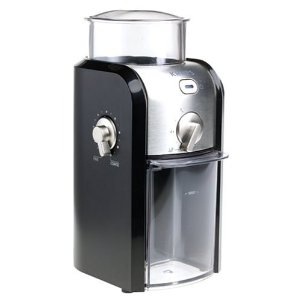
Krups Burr GrinderBut now I have a nice Krups Burr grinder which I like. It got mixed reviews on Amazon.com and I do agree with some of the points brought up by negative reviewers — for example, it can be a bit messy — but, in general it’s perfectly suited to my needs.

Almost perfectly. The least coffee it’ll grind is for two cups — even though the setting says it’s for one cup. But that’s okay. I usually do drink two cups of coffee a day. If I don’t drink the second cup, I don’t mind using coffee ground the day before. I’m not that picky.

I grind my coffee more finely than what’s recommended for drip coffee makers. Not quite an espresso grind, but certainly more fine than a basket or cone drip. That could be why the darn grinder gets messy.

The Coffee Preparation Device

A year or three ago, the big chatter on Twitter was about an $11,000 coffee maker. It brewed one cup at a time. At least they got that part right.

Brew and GoMy coffee maker of choice is a Black & Decker Brew ‘N Go. Designed for people who want to grab their cup of coffee as they head out the door on their morning commute, it comes with an insulated thermal plastic travel mug. I don’t use the mug unless I’m heading out to the car, too. I use a large ceramic coffee mug. It probably holds about 14 ounces.

I don’t use the reusable “gold” filter that came with the coffee pot. Because I prefer my coffee ground finely, the coffee grinds make their way though those gold filters and get in my cup. So I use #2 cone filters in the filter basket of the machine. I’m not picky about brand or paper bleaching. (Sheesh.) Because I go through so many of these things, I like to buy them cheap. I’ve actually found them very cheap in the coffee maker area of WalMart. So on the rare occasion that I’m in there, I stock up. And yes, when I’m at home, I compost the filters and coffee after brewing.

The Brewing Process

To brew a cup of coffee, I go through this routine.

  1. Fill a coffee cup with cold water and pour it into the coffee maker’s well.
  2. Refill the coffee cup with hot water to prewarm the cup. If I can’t get hot water from the tap right away, 2 minutes in the microwave warms whatever water I can get.
  3. Put a clean coffee filter in the filter holder.
  4. If necessary, grind enough coffee for a cup.
  5. Using a measuring spoon, measure out enough coffee for that size cup.
  6. Tamp the coffee down into the filter paper and close the lid.
  7. Dump the hot water out of the cup and put it on the coffee machine’s cup shelf.
  8. Push the button.

What comes out about 2 minutes later is a steaming hot, fresh cup of very strong coffee. This is what I like.

The Coffee I Don’t Like

I don’t like bad coffee and won’t drink it. What’s bad coffee? This:

  • Weak coffee. If I can see my spoon while I’m stirring, it’s too weak for me.
  • Coffee brewed from inferior ingredients. Yeah, I know the 3-pound plastic tub of Savarin was on sale at Costco last month. But don’t think I’m going to drink it.
  • Coffee that has sat in a pot on a warmer for more than 10 minutes. Yes, just 10 minutes. I have experimented with this at home using our bigger coffee maker. I’ll use that to make enough coffee for a group of people and the first cup is usually fine for me. But the second cup from the same pot ten minutes later? Keep it.
  • Columbian or dark roasted (or both) coffee. If it’s brewed right and fresh, I can drink it. But it’s normally not brewed strong enough or not fresh enough for me.
  • Most restaurant coffee. It usually falls into one or more of the above categories. Occasionally, you’ll get a good cup of coffee at a good restaurant, but I won’t even consider ordering coffee at a diner or cheap restaurant.
  • Flavored coffee. Are you serious?
  • Instant coffee. I stopped drinking instant coffee about 20 years ago and have seen no real reason to go back. And no, the new Starbucks instant coffee does not impress me. At all.

I prefer to drink no coffee than any of the above. In fact, I have. If I’m traveling and need a hot beverage and can’t track down a place to get a latte — freshly brewed, with enough milk to cut the bitterness of the dark roast — I’ll order tea. Or iced tea. Or juice.

Picky, yes. Snobbish? I don’t think so. If I were snobbish about my coffee, I’d buy expensive coffee, brew it in some fancy gadget, and turn my nose up at everything else. Instead, I buy relatively cheap coffee and brew it in a cheap machine the way I like it: hot, strong, and fresh.

What’s in your cup?